Wp-calypso: Domains: Improve error messaging for phone numbers
Steps to reproduce
- Starting from: https://wordpress.com/plugins/upload/ for any site that doesn't have a custom domain set. (Note: the messaging displayed here is really confusing too.)
- Click through to purchase a domain.
- Select a domain + no email.
- Enter your information.
- At the phone field, enter a digit or two and pause.
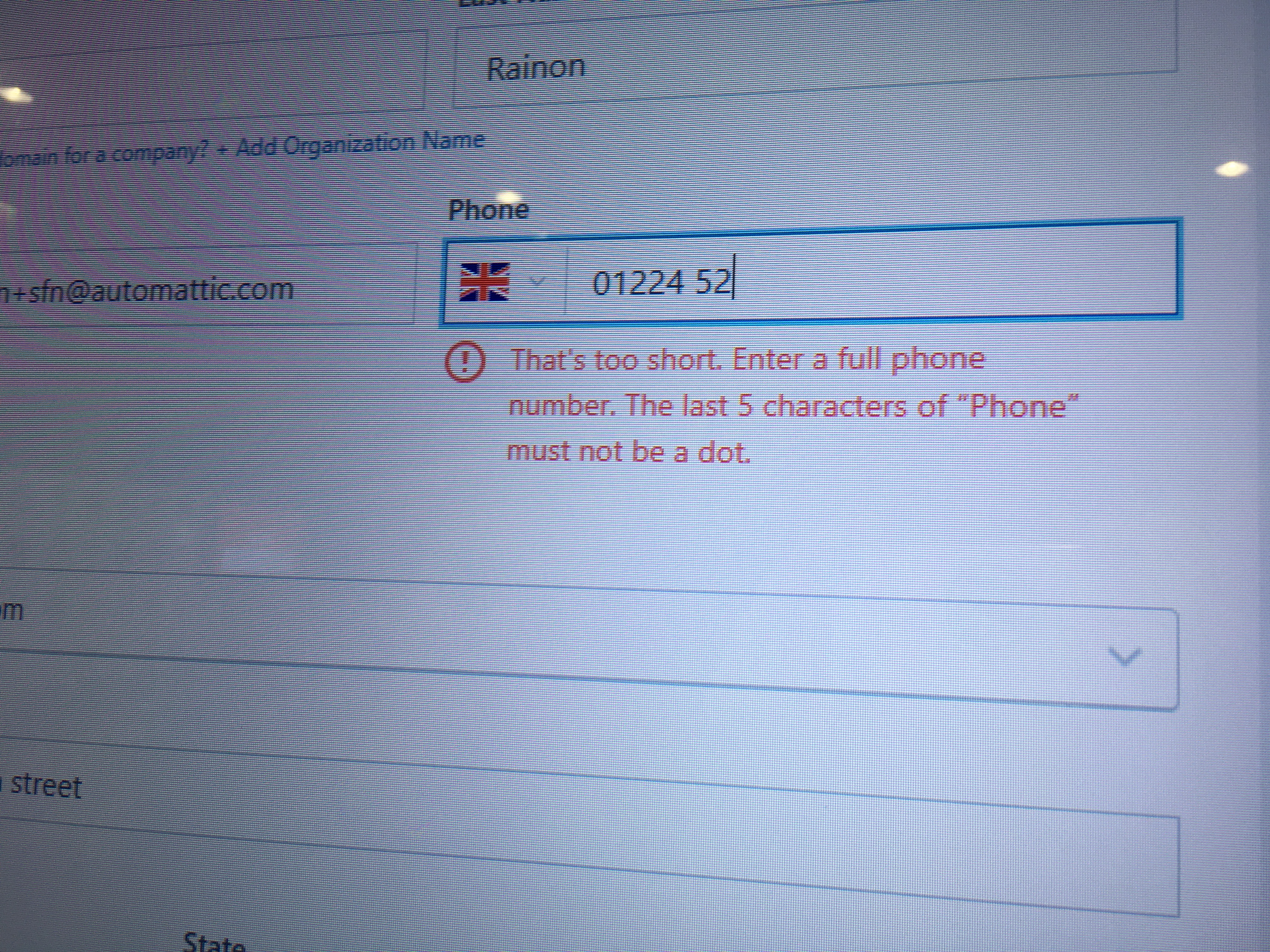
- See a really awkward and confusing error message!
What I expected
A human-parseable error message, or at least one that's only applicable to the errors I'd made.
I didn't enter a dot anywhere, so it shouldn't complain at me for doing so. Even if I had, can't we just programmatically strip out the dot? That sounds like one line of code. Can I add dots elsewhere in the phone number? Why is "Phone" capitalised? I'm so confused.
What happened instead
I got a message that said: That's too short. Enter a full phone number. [all okay] The last five characters of "Phone" must not be a dot. [wtf?]
Browser / OS version
Everything.
Screenshot / Video
Context / Source
Happened in tandem with #18854. It's been a frustrating morning. #dogfooding
 sarahmonster
All 2 comments
Wow, you must really hate this form by now 😅(and I share the feeling, believe me)
You're absolutely right - if the phone number is too short, it doesn't make sense to check the other rules.
I've fixed that in r163894-wpcom - thank you for pointing this out 🙇
 klimeryk
on 15 Oct 2017
klimeryk
on 15 Oct 2017
So much better—thank you @klimeryk!
sarahmonster
on 20 Oct 2017
Related issues
 roccotripaldi
·
3Comments
roccotripaldi
·
3Comments
 spen
·
3Comments
spen
·
3Comments
 jjchrisdiehl
·
3Comments
jjchrisdiehl
·
3Comments
 kellychoffman
·
3Comments
kellychoffman
·
3Comments
 BrookeDot
·
3Comments
BrookeDot
·
3Comments
Most helpful comment
Wow, you must really hate this form by now 😅(and I share the feeling, believe me)
You're absolutely right - if the phone number is too short, it doesn't make sense to check the other rules.
I've fixed that in r163894-wpcom - thank you for pointing this out 🙇