Wp-calypso: Image Editor: add editing animations
As a follow up to https://github.com/Automattic/wp-calypso/pull/5403#issuecomment-220710178 let's add some additional polish to the image editor:
As @drw158 said:
- After cropping, Google Photos moves the image, not the crop box when you click and drag inside of the crop box. The crop box stays centered.
- As seen in the gif, while resizing the crop box to be larger than the available area, the image decreases in size.

 gwwar
gwwar
All 14 comments
Adding low priority because I don't think this is a blocker.
 rralian
on 8 Sep 2016
rralian
on 8 Sep 2016
I played a bit with this and tried to add the animations with CSS3 transition prop but it won't be that easy. If we really want the same level of animations as on Google Photos, I think it will require substantial work and/or a bit of rework of the image editor.
 lamosty
on 9 Sep 2016
lamosty
on 9 Sep 2016
After cropping, Google Photos moves the image, not the crop box when you click and drag inside of the crop box. The crop box stays centered.
I'm going to tackle this part of the task first, and informally label it _'low-hanging fruit'_.
The highlighted bounding box representing the crop area, is a <Draggable /> component, however, we no longer want to drag the crop area, but keep it centred as per @gwwar 's and @drw158 's comments.
Instead we need something like a <DraggableTouchPad />, for want of a better ComponentName, that resizes in relation to the four, draggle anchors, but more importantly, captures the {x, y} coords of mouse/touch drag event. It will then pass the coords via a props.someMethod to <ImageEditorCanvas />, which will translate the canvas (so long as it overflows the crop area).
We can achieve this by<Draggable controlled={ true } />, and delegating the translate work via a prop.func.
This will be the first step. Additional ideas most welcome.
A positive consequence is that it appears to prevent triggering a re-render onClick, which is somehow causing the Y and maxHeight dimensions of the canvas to shrink by approx -0.14%.
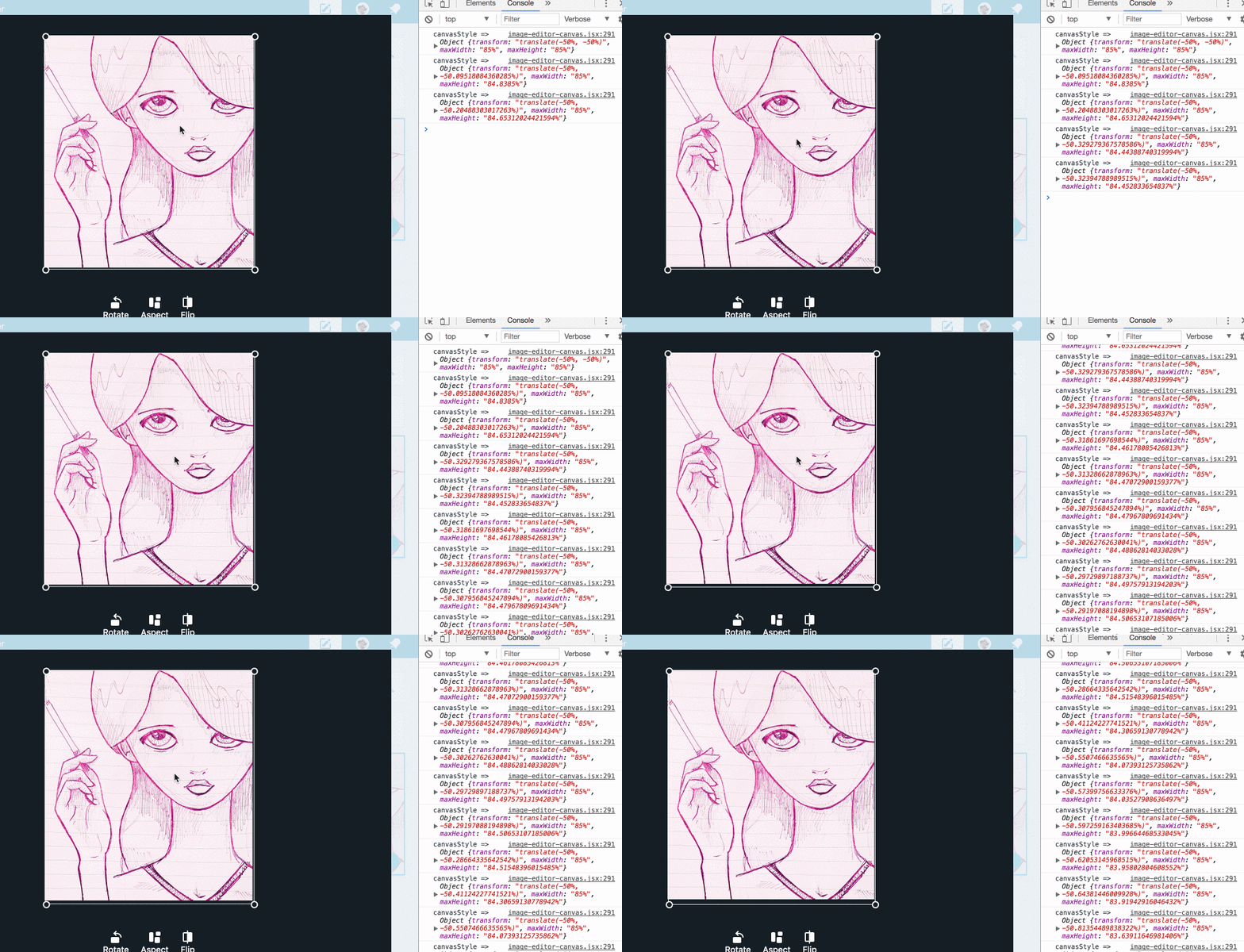
We could possibly wrap a feature toggle around the new component and its side-effects, but I haven't yet got a handle on how many conditional statements it'll require. TBD. If this ticket doesn't bloat out, then we might get away with a long-lived-and-loved branch (?).
A further, small enhancement will be to reduce the opacity value of the div.image-editor__crop-background block elements onDrag, as per Google Photos, to provide some feedback to the user that the image is active.
Analysis of the resize animation task to come...
 ramonjd
on 1 Jul 2017
ramonjd
on 1 Jul 2017
A positive consequence is that it appears to prevent triggering a re-render onClick, which is somehow causing the Y and maxHeight dimensions of the canvas to shrink by approx -0.14%.
:) possibly more rounding bugs. I squashed a few before but I wouldn't be surprised to see more.
It may be helpful to 👀 a previous attempt in https://github.com/Automattic/wp-calypso/pull/8672 and see if you like any of the ideas there.
gwwar
on 1 Jul 2017
possibly more rounding bugs. I squashed a few before but I wouldn't be surprised to see more.
Along the way, I think I've found a better solution: <Draggable /> shouldn't really be communicating 'dragEnded' when no valid drag has taken place, for example, when we're just click happy.
The quick fix appears to be to simply check if the mousemove/touchmove events trigger a mousePosition update.
I'll create a separate branch with corresponding pull request.
ramonjd
on 2 Jul 2017
The more I dig into this, the more complex the task appears.
Translating the canvas alone won't cut it to replicate the animation effect. Animation/manipulation probably needs to be done to an image, at least to simulate the UI candy, with simultaneous updates to context.drawImage happening in the background.
Looking at #8672 , it seems like @marcinbot was implementing this. A backwards refactor based on this work seems possible, but it will take a lot longer.
ramonjd
on 2 Jul 2017
I pushed a branch with some more work here: https://github.com/Automattic/wp-calypso/tree/add/image-editor-animations
It's pretty out of date. I'll keep an eye on this PR and I can jump on Slack to help at any time :)
As for dragging the image instead of the border, it was a low hanging fruit indeed:
- I added
dxanddycalculation toDraggableand then passed them to the callback: https://github.com/Automattic/wp-calypso/compare/add/image-editor-animations?expand=1#diff-80da3e7d567825b0010fddbed40a07f8R168 - I added a handler to the border drag that takes
dxanddyand instead of moving the border, it moves the image in the opposite direction: https://github.com/Automattic/wp-calypso/compare/add/image-editor-animations?expand=1#diff-aaa84f2d061c121e779c17a8f4b355c7R355
2a. Same handler could be added to the background image itself to completely simulate the image dragging: https://github.com/Automattic/wp-calypso/compare/add/image-editor-animations?expand=1#diff-aaa84f2d061c121e779c17a8f4b355c7R551
I did, however, run into other problems, mostly performance related (and the big issue of keeping the code readable and maintainable). The approach suggested by some Automatticians I discussed it with was to ditch React completely, implement the editor in lower-level JS (jQuery?) and then wrap it in a React container. Any input about this from more experienced Calypsoers (@gwwar) welcome
 marcinbot
on 2 Jul 2017
marcinbot
on 2 Jul 2017
Thanks a lot @marcinbot !!
I'll take a look at the branch you posted, and spend some time trying to go through it. Do you think it's worth porting it back into Calypso?
Now that you mention it, it sounds like very reasonable advice to extricate the core functionality away from React, and create a stand-alone module for portability and performance management.
Were the performance issues related to the constant updating of both image/canvas properties, or just the animations themselves?
Cheers.
ramonjd
on 2 Jul 2017
The approach suggested by some Automatticians I discussed it with was to ditch React completely, implement the editor in lower-level JS (jQuery?) and then wrap it in a React container.
I think it'd be fine to use Vanilla JS if we need more control over our canvases/scene graph. Let's try to avoid bringing in other dependencies like jQuery (haha don't make @mtias cry) or other things like d3 for the moment since I think we can do this without any helper libs.
gwwar
on 3 Jul 2017
Ha. I wouldn't want to cause a jQuery-induced allergic reaction! :)
I kicked-off a mini-vanilla-project. I had to get my head around the technical requirements, and the full scope if we were to build a platform-independent, reusable module out of it.
I still think it’s a good idea, and I’m starting to see a few ways it can be done. @marcinbot started down this path already, but I think what’s missing in the current version is the separation of the animation/image layer and the canvas work layer.
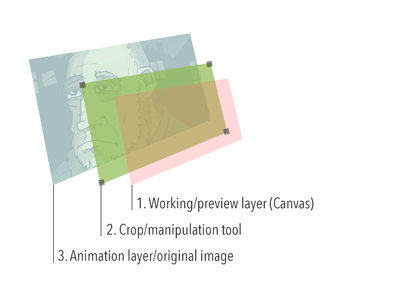
Transforming (scaling, rotating, translating) is done on the image layer, from which we derive the source data/coords (via lot's of ratio calc) and then draw it to the work layer.
Opening this door might reveal an easier path towards a more responsive and maintainable tool.
ramonjd
on 7 Jul 2017
Sounds like a good direction, add in a event/render loop too and those should be pretty strong tools for any future enhancements.
gwwar
on 7 Jul 2017
So, as an experiment, I was having a play with the mouse deltas (locally branched off master), and managed to get the canvas dragging, even with the percentage translate values.
Each time we have to calculate the drag delta, covert it to a percentage and add it to the current translate values. For example:
        const canvasX = -50 * widthRatio - 100 * leftRatio;
        const canvasY = -50 * heightRatio - 100 * topRatio;
    this.canvasX = canvasX + ( ( dx / canvas.width ) * 100 );
    this.canvasY = canvasY + ( ( dy / canvas.height ) * 100 );
    canvas.style.transform = `translate(${ this.canvasX }%, ${ this.canvasY }%)`;
But I'm coming unstuck calculating offset positions, drag limits and background shadows.
Mixing pixel translations and percentages isn't probably the way go, and I don't think it's productive use of time to try to retro fit it. It would be easier if we translated everything via pixels.
ramonjd
on 16 Jul 2017
bug-scrub #pre-gutenburg-bug-purge
Tested and confirmed that I can move the crop box, not the image itself, when editing an image via Calypso.
Video: 16s
Tested with Firefox 58.0.1 on macOS 10.13.3.
@gwwar should this issue remain open even though the Image Editor milestone is not currently active?
 designsimply
on 13 Feb 2018
designsimply
on 13 Feb 2018
No harm in having it @designsimply, the enhancement can be picked up later, and the history here is helpful.
gwwar
on 13 Feb 2018
Related issues
 roccotripaldi
·
3Comments
roccotripaldi
·
3Comments
 jeherve
·
3Comments
jeherve
·
3Comments
 kellychoffman
·
3Comments
kellychoffman
·
3Comments
 samouri
·
3Comments
samouri
·
3Comments
 ghost
·
3Comments
ghost
·
3Comments
Most helpful comment
I think it'd be fine to use Vanilla JS if we need more control over our canvases/scene graph. Let's try to avoid bringing in other dependencies like jQuery (haha don't make @mtias cry) or other things like d3 for the moment since I think we can do this without any helper libs.