Wowchemy-hugo-modules: Issues with preview for projects
I followed the thread #633, but since the last update, it seems that we have to have the same image for the featured image and the preview image ? I personally do not use a featured image but I had a preview image and I cannot make it work.
 PierreMarchand20
All 18 comments
Same for me. The idea of having fixed image size for homepage is great, but forcing the image preview and banner to be the same is not that great : the "banner" does not always fit very well as an image preview (and vice versa). At least, for me, they totally do not fit...
(question apart: why mixing .md files and .jpg ? Wasn't it good to keep these files separated?)
 Bertbk
on 12 Oct 2018
Bertbk
on 12 Oct 2018
The new featured image system (#708) follows in the footsteps of many of the leading CMS/blog systems and simplifies the image system by automatically resizing one featured image to fit in the various different layouts/pages where the image can be displayed on the site. The automated output can be affected some what by modifying the input (e.g. using a high resolution, banner ratio, subject vertically centered, etc.)
@PierreMarchand20 You can override Academic and force no header images by creating an empty file named header_image.html in YOUR_SITE/layouts/partials/ (you may need to create those folders). We may add a page option like show_featured_image in the future if there's demand for it...
@Bertbk it's mostly a matter of personal preference and convenience whether you use the image library static/img/ or an image in a page's own folder. Hugo's new image processing features only work well with the latter though, hence the change.
 gcushen
on 12 Oct 2018
gcushen
on 12 Oct 2018
Having an option like show_featured_image could be really useful @gcushen
 MrinalJain17
on 13 Oct 2018
MrinalJain17
on 13 Oct 2018
Based on your feedback,
- a focal point option has been added to help ensure that the automatic resizing centers around the intended focal point
- on large monitors, the featured image transforms from a banner into a split view consisting of page title on one side and featured image on the other side (prevents showing extremely wide images on large monitors)
The following options have been added to the front matter for this:
# To use, add an image named `featured.jpg/png` to your page's folder.
[image]
  # Caption (optional)
  caption = ""
  # Focal point (optional)
  # Options: Smart, Center, TopLeft, Top, TopRight, Left, Right, BottomLeft, Bottom, BottomRight
  focal_point = ""
Currently, if no featured image is defined, a [header] image can still be shown. Going forward, [header] image is intended primarily for archive node pages (e.g. /post/).
Note that this update will cause the earlier header_image.html hack to no longer work for hiding a featured image. We'll consider adding a param like show_featured_image instead.
gcushen
on 13 Oct 2018
Ok, I would really like the option show_featured_image then ahah anyway, why is it zoomed in for the featured image ? It should have its normal size in the project page and be zoomed in for the preview no ? (if I understood it right) you can have an example on https://pierremarchand.netlify.com/project/cemracs/ with this picture

PierreMarchand20
on 15 Oct 2018
Thanks a lot @gcushen for both your precision and your hard work.
I'm sorry to insist. I understand that using a single featured.jpg for both the "banner" and the "preview" could be usefull (even if I do not totally agree (see below) :-)). My current issue is that the banner seems to always be cropped, whatever the size of the screen, which is different from previous version.
I took your example in example_folder, and it give the following screenshots:
Medium/small screen:

XL screen:

I understand that, if the image is just an illustration, it can be ok to cropp the image in multiple ways. But, in my humble opinion and for scientific project, it would be preferable to get the full image rather than a cropped one.
Or maybe I'm using it wrongly? The image size was not good ? I also tried with a 1600x400 image...
- For a project, I used the
image_previewto display the logo and the "header image" to display features. Wouldn't it be useful to be able to separatedfeatured.jpgand the image preview ? For example, if athumbnail.jpgfile exists, then use it as preview, otherwise usefeatured.jpg?
Again: thanks a lot for this amazing theme!
Bertbk
on 15 Oct 2018
I fully agree with @PierreMarchand20 and @Bertbk on the importance of having different thumbnails and featured images, or at least a show_featured_image option.
I'm also having weirdly cropped feature images no matter the image size. The thumbnail version is awesome though, thanks again for that!
 nfaivre
on 16 Oct 2018
nfaivre
on 16 Oct 2018
Hi,
I'm having trouble with cropping too.
Here below is what I get with Academic v2.4.0:
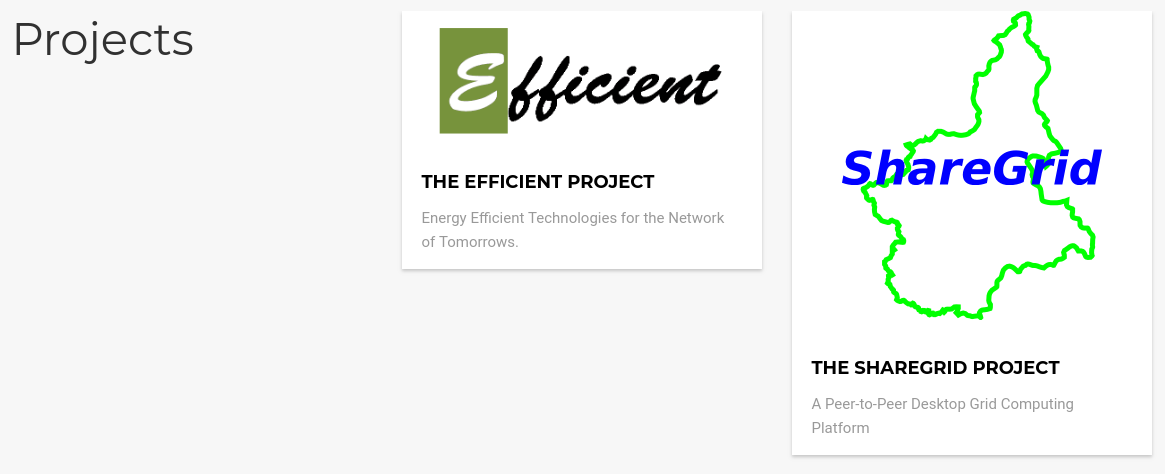
While here is the result with Academic v3.0.0:
Project overview:

Project detail:

I like the way v2.4.0 shows the image.
So, I'm wondering if it is possible to tell Academic v3 resize the image to fit the container size instead of cropping it.
Thank you for your help.
 sguazt
on 26 Oct 2018
sguazt
on 26 Oct 2018
I would also prefer the previous behaviour when:
- A different summary image could be selected to be displayed in the home page.
- Images were not cropped arbitrarily (even though I can control focal point, I don't like certain images, like logos, to be cropped at all)
 ccamara
on 31 Oct 2018
ccamara
on 31 Oct 2018
For project widget card view, we will likely be reverting back to the Pinterest style of resized rather than cropped images.
Also, project widget will be getting a new showcase layout that is dedicated to showcasing project images.
gcushen
on 1 Nov 2018
Thanks a lot for your work!
I might have missed something but this issue should not be closed: on a project page, the image is still cropped on XL screen.
The preview_only option is great but why not going further and allow the user to have different image for the preview and the content? Something like: if preview.jpg exists then use it as preview, otherwise use featured.jpg (+ focal spot), otherwise use nothing?
Bertbk
on 4 Nov 2018
@Bertbk if you are using v3.2.0 without overriding any of the theme files, then the following code within a page's front matter will prevent the featured image showing on the page itself.
[image]
  preview_only = true
  ...
The goal of Academic has always been to make a CMS that is intuitive and minimal yet flexible. The featured image system is consistent with other popular CMS/blog sites which only support one featured image file per page. Since Academic's codebase is already large and there are not many other regular contributors/maintainers, the time/effort can be better spent on other features and maintenance. For example, much of the documentation has not fully caught up with the last few releases yet.
If you really want to use multiple featured images in a page, it's still possible to achieve similar effect by using something like preview_only = true to generate a thumbnail with one file and then use another file for either header image or begin the page content with an image/figure shortcode.
gcushen
on 4 Nov 2018
Thanks for adding the preview_only option !
Meanwhile, I tried the option to have a featured image in project page and it is true it is pretty interesting. But for some reasons, it is always cropped and zoomed in (see the example I gave a few posts ago, I updated it with the new release) which makes it hard to use.
But anyway, we can always remove it using the preview_only option.
PS: I am planning on updating the doc for the widgets, as we talked about in another issue, where can we talk about it ? can I make an issue about it in the repo of doc ?
PierreMarchand20
on 5 Nov 2018
Thanks for your detailed answer @gcushen ! I fully understand that you are the only maintainer of this great theme and you have to make choices. With the new and great showcase feature for project, it becomes even more difficult to keep and easy-to-use theme, especially for an image which is displayed with different ratio: card, banner, ...
@PierreMarchand20, I guess that the cropped image on XL display is due to the different image ratio on XL screen (680x500) and on other screens (1600x400). Apart from removing the XL responsive mode, there is nothing to do against it?
I guess I'm already "old" because I'm nostalgic of the previous system with a separated preview image and banner image. I have to use the images differently than I first though of :) (I think I will stop to display the featured image as a banner)
If you really want to use multiple featured images in a page, it's still possible to achieve similar effect by using something like preview_only = true to generate a thumbnail with one file and then use another file for either header image [...]
Thanks for the tip ! It however does not work due to (page_header line 18):
{{ if and .Params.header.image (not $featured) }}
which should then be something like
{{ if and .Params.header.image (not (and $featured (not $.Params.image.preview_only))) }}
A last btw: I recently do a presentation of your theme to my collegues (math) to help them build a beautiful website, some of them just switch to it, so thanks again :)
Bertbk
on 6 Nov 2018
@Bertbk thanks for the suggestion, preview_only in combination with [header] image is now supported. Enables use of featured image for thumbnails only with a full-width header image [header] shown on the page itself.
Thanks for raising awareness of Academic with your colleagues, let me know if they have any suggestions/feedback :D
gcushen
on 10 Nov 2018
@gcushen Thanks for adding the possibility to combine [header] and preview_only: works like a charm!
Most of my colleagues are both researchers and teachers at University. They are all highly interested in a "Teaching widget", even though they (and I !) are already happy with either the custom or the project widget. They were also interested in using it to
publish they lecture online (instead of a pdf). I'm trying it this year: no regret :).
Btw, for the lecture I give, I developped a small css + shortcode to render Theorem/Lemma/Definition/... kind of like LaTeX. See an example. I don't know if you believe this could be of interest for your theme. If so, I can send a PR. The code is quite simple, composed by:
- A shortcode
thm - i18n for theorem/lemma/...
- CSS code
{{% thm definition/theorem/proof... [Name]}}
My theorem...
{{% /thm %}}
Currently, a thm cannot be cross-referenced, but it's obviously possible.
As this is only usefull for mathematician, I would understand that you do not want to add it to Academic! :)
Bertbk
on 12 Nov 2018
Does anyone have any recommendations for just generally zooming out a bit on the webpage? I am finding it's just a bit too close up, is there a feature for this I've overlooked? Any help much appreciated.
 ehhope
on 28 Dec 2018
ehhope
on 28 Dec 2018
Sensational! Thanks!
 arthurpessa
on 17 Jul 2020
arthurpessa
on 17 Jul 2020
Related issues
 anirbanbasu
·
3Comments
gcushen
·
3Comments
anirbanbasu
·
3Comments
gcushen
·
3Comments
 eduardohenriquearnold
·
4Comments
eduardohenriquearnold
·
4Comments
 chris-prener
·
3Comments
chris-prener
·
3Comments
 somnathrakshit
·
3Comments
somnathrakshit
·
3Comments
Most helpful comment
For project widget card view, we will likely be reverting back to the Pinterest style of resized rather than cropped images.
Also, project widget will be getting a new showcase layout that is dedicated to showcasing project images.