Workbox: Service Worker immediately becomes redundant on refresh
Library Affected:
*workbox-sw
Browser & Platform:
*Chrome 71 for mac os x.
Issue or Feature Request Description:
My service worker works as expected while there are two tabs open, but when I have only one tab open a refresh of that tab doesn't serve anything from the service worker, the previous service worker becomes redundant immediately on refresh and a new one is registered. The result is that in a real world use case I cannot "browse offline". I am using precacheAndRoute as well as some runtimeCaching that all works with two tabs open.
I am including my service worker here for assistance:
self.__precacheManifest = [
  {...} // trimmed purposefully, i can paste these if they are needed.
];

importScripts("https://storage.googleapis.com/workbox-cdn/releases/3.6.3/workbox-sw.js");

workbox.skipWaiting();
workbox.clientsClaim();
self.__precacheManifest = [].concat(self.__precacheManifest || []);
workbox.precaching.suppressWarnings();
workbox.precaching.precacheAndRoute(self.__precacheManifest, {});

workbox.routing.registerRoute(
  /.*\.(?:png|jpg|webp|webm|jpeg|svg|gif)/,
  workbox.strategies.cacheFirst({
    cacheName: 'media',
    plugins: [new workbox.cacheableResponse.Plugin({ statuses: [0, 200] })],
  }),
  'GET',
);
workbox.routing.registerRoute(
  /.*/,
  workbox.strategies.staleWhileRevalidate(),
  'GET',
);
 brad-decker
All 24 comments
Do you have "Update on reload" checked in Chrome's DevTools, as described at https://developers.google.com/web/fundamentals/primers/service-workers/lifecycle#update_on_reload?
 jeffposnick
on 9 Jan 2019
jeffposnick
on 9 Jan 2019
No, it is unchecked. I am not having much luck in debugging the issue as I don't know what is going wrong or where to even log out things.
brad-decker
on 10 Jan 2019
I was leaving this on in production because while it wasn't working it wasn't harming anything but found out that when a user visits the site for the first time on Firefox (latest version), the initial prefetch causes links not to load the associated bundles. Disabling the service worker fixed this problem. I have to believe that the two issues are related and that Firefox is just doing something more drastic in response to the bug. I know this is fully on my end because I have seen implementations of this library with my exact stack work correctly but do these details help at all in giving me a nudge in the right direction for debugging? 😬
brad-decker
on 17 Jan 2019
Apologies that this is still causing problems.
There are a couple of things you can do to enable additional debugging in Workbox: https://developers.google.com/web/tools/workbox/guides/troubleshoot-and-debug#debugging_workbox
Here's one more thing to check in the meantime: are there any build warnings output from webpack due to assets being larger than the maximum default size (which is 2mb)? By default, Workbox will exclude those assets from the precache manifest, and some of what you're describing (URLs for associated bundles not loading while offline) sounds like it _could_ be caused by that.
jeffposnick
on 22 Jan 2019
@jeffposnick i have confirmed that this isn't the cause. Debugging info you provided yields no additional results for me, the only thing that is even a warning is that i'm not using a revision flag in my precache manifest because my file names are revisioned.
brad-decker
on 25 Jan 2019
So, to confirm I removed all but one file from the precache manifest that is under 10kb. Its so peculiar though. This is what I see 90% of the time immediately after the alert that lets me know urls are cached:

the '- deleted' part is what I notice and then when I refresh my page this one becomes redundant and a new one is created and the whole init cycle happens again followed by the - deleted flag reappearing.
I can sometimes modify my service worker file and cause this to stop happening. The worker persists and all is good until I trigger lightbox which I have been using to validate that my solution will persist because lightbox seems more effective at clearing cached results. in all cases running lightbox causes the worker to go back into that deleted permanent cycle described above again without any changes to my service worker file.
Still no errors on the service worker or in the console.
brad-decker
on 25 Jan 2019
adding one more detail i just discovered. I can "Trick" the service worker into a good state by adding an error into my service worker file and reloading. Once the error is thrown the worker isn't deleted, but instead is redundant. I then remove the error (just throwing an error with a string) and then refresh and on the next load the SW is running fine and will persist. If i click "unregister" to the right of the worker in dev tools i go back into a bad state.
brad-decker
on 25 Jan 2019
Hello @brad-decker—apologies, but I'm at a loss as to what might be going on.
Do you have an instance of your web app deployed at a public URL that I could visit to reproduce the issue?
Can you reproduce the problem when visiting your web app in an Incognito window with multiple tabs?
jeffposnick
on 1 Feb 2019
Also, if this is still an issue, could you consider upgrading to the latest v4 release candidate? If you're using, e.g., the webpack plugin, you can do so via npm install --save-dev workbox-webpack-plugin@beta, or just manually swap in the updated CDN URL for the workbox-sw loader library: https://storage.googleapis.com/workbox-cdn/releases/4.0.0-rc.3/workbox-sw.js
jeffposnick
on 20 Feb 2019
@jeffposnick sorry for the delay/lack of response here from our side. I will give the release candidate a whirl in the next few days and report back. Also just want to praise you for how helpful you've been for something that is so very clearly an implementation issue on our end. Really appreciate the extra mile you've gone.
brad-decker
on 20 Feb 2019
I am facing the same issue. Have you come across any solution?
 thebedroomprogrammer
on 22 Mar 2019
thebedroomprogrammer
on 22 Mar 2019
@thebedroomprogrammer I have discovered an issue in my bundle related to how I was manually splitting out some dependencies using a regex. I am still diving into this because we still haven’t enabled our worker but have at least found that there is a silent error or two that is impacting our users without the worker. I want to fix these up before I re-enable worker because my theory is the silent error is preventing the worker from persisting
brad-decker
on 22 Mar 2019
Ok I came across this issue when we migrated our project from https://games.gamezop.com to https://www.gamezop.com we did not do any change in the script and started getting very less service worker activation. Thanks for them help though. I will update on this thread if I get any concrete solution.
thebedroomprogrammer
on 22 Mar 2019
@jeffposnick sorry for the long delay, finally got around to testing with version 4. I will say the version 4 experience is much better but I'm having the same result in my next.js app. I will provide the details I have gathered here to see if it sparks anything.
Notes
- [x] webpack set to maximum pre-gzip chunk size of < 2 mb
- [x] upgraded to latest workbox
This is my service worker file:
self.__precacheManifest = [
  {
    "url": "/_next/static/O_OckWoVTaY0N5wsWRLFw/pages/contact.js"
  },
];

importScripts("https://storage.googleapis.com/workbox-cdn/releases/4.1.1/workbox-sw.js");


workbox.precaching.precacheAndRoute(self.__precacheManifest, {});
I've actually trimmed this way down just to see if i could get it working with as minimal as required setup. This is the file that registers the worker in the client:
export const registerWorker = async () => {
  if ('serviceWorker' in navigator) {
    const { Workbox } = await import('workbox-window');

    const wb = new Workbox('/service-worker.js');
    wb.addEventListener('activated', event => {
      // `event.isUpdate` will be true if another version of the service
      // worker was controlling the page when this version was registered.
      if (!event.isUpdate) {
        console.log('Service worker activated for the first time!');

        // If your service worker is configured to precache assets, those
        // assets should all be available now.
      }
    });

    wb.addEventListener('waiting', () => {
      console.log(
        `A new service worker has installed, but it can't activate` +
          `until all tabs running the current version have fully unloaded.`,
      );
    });

    wb.addEventListener('message', event => {
      if (event.data.type === 'CACHE_UPDATE') {
        const { updatedURL } = event.data.payload;

        console.log(`A newer version of ${updatedURL} is available!`);
      }
    });

    wb.addEventListener('installed', event => {
      if (!event.isUpdate) {
        console.log('First install');
      } else {
        console.log('updated install');
      }
    });

    wb.addEventListener('controlling', event => {
      if (!event.isUpdate) {
        console.log('First control');
      } else {
        console.log('updated control');
      }
    });

    wb.addEventListener('externalinstalled', event => {
      if (!event.isUpdate) {
        console.log('external first install');
      } else {
        console.log('external update install');
      }
    });

    wb.addEventListener('externalwaiting', event => {
      if (!event.isUpdate) {
        console.log('external first waiting');
      } else {
        console.log('external update waiting');
      }
    });

    wb.addEventListener('externalactivated', event => {
      if (!event.isUpdate) {
        console.log('external first acvtive');
      } else {
        console.log('external update acvtive');
      }
    });

    wb.addEventListener('redundant', event => {
      // `event.isUpdate` will be true if another version of the service
      // worker was controlling the page when this version was registered.
      if (!event.isUpdate) {
        console.log('Service worker redundant for the first time!');

        // If your service worker is configured to precache assets, those
        // assets should all be available now.
      }
      console.log(event);
    });

    wb.register();
  }
};
I've just tried to log everything out that I could to see what happens.
results:
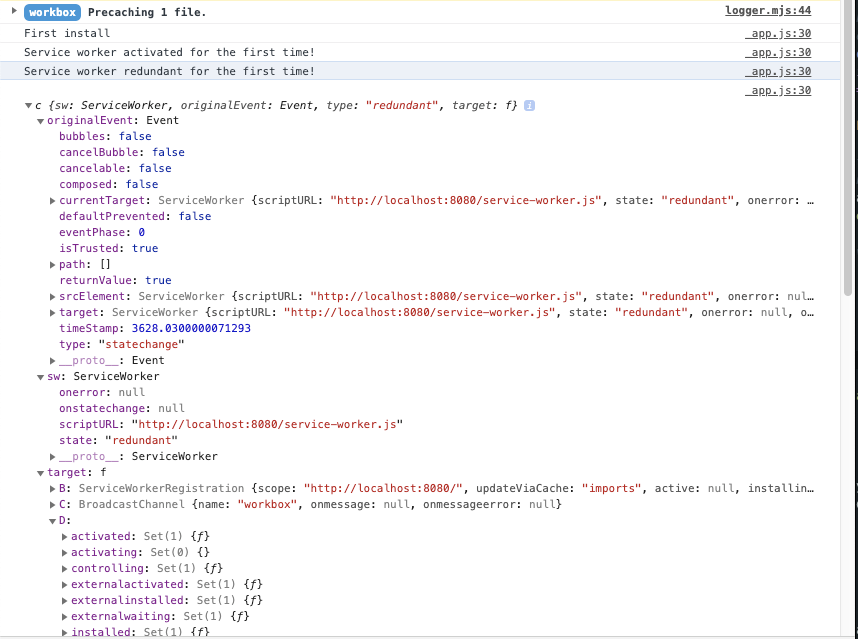
Side note, if I use skipWaiting/clientsClaim, no redundant message ever occurs:
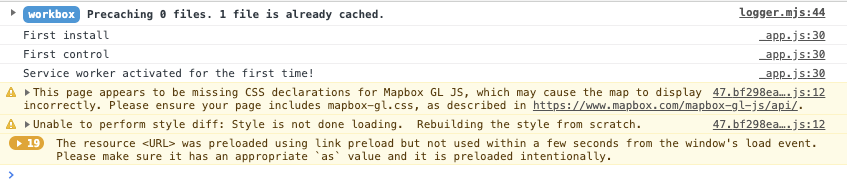
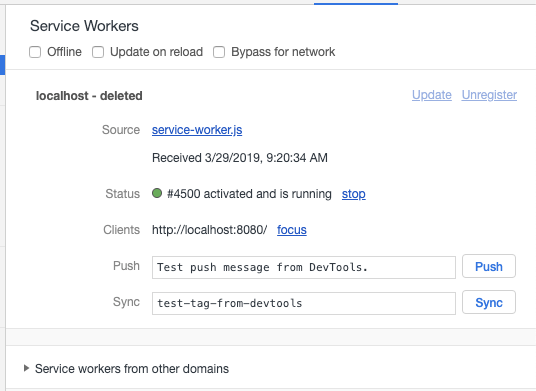
but that - deleted flag is there and on the next refresh i'll get the exact same console messages.
brad-decker
on 29 Mar 2019
The problem that I faced was with the precache manifest. So basically the error occurred and service worker became redundant because the links that I had in my precache manifest file was posing cors error when fetched via service workers. I resolved the CORS issue and I was able to get my service worker up and running.
thebedroomprogrammer
on 29 Mar 2019
How did you diagnose the issue and confirm the CORS issue? @thebedroomprogrammer thanks for sharing!
brad-decker
on 29 Mar 2019
@thebedroomprogrammer I will work on confirming that I have actually fixed the issue but your feedback made me look at my script/link tags more closely and I discovered that some of the resources we are attempting to cache had an improper 'crossOrigin' attribute. It seems to be working but I'm going to put it through its paces and report back once I am confident it's not like the other flukes I've had :D.
brad-decker
on 29 Mar 2019
@thebedroomprogrammer @jeffposnick i have confirmed that the issue is one of our third party scripts we are loading (?) When i fixed our head script tags up I added proper crossOrigin attributes in a few places they were missing and one of those scripts started not responding to our request (throwing a real error in the console about cross origin). So essentially that script was never loaded, but the service worker persisted and worked as expected. Once reverting that change and allowing the script to load the old behavior returns of the service worker immediately marking itself as deleted.
VERY OCCASIONALLY i get a Uncaught DOMException in promise with no stack trace error and always after refresh its gone. Maybe related? The script in question is under 200kb and there is no message about quota exceeded.
brad-decker
on 1 Apr 2019
Also we do not have a caching strategy for that third party script/route so the service worker shouldn't be requesting it, right?
brad-decker
on 1 Apr 2019
Sorry for replying so late. I resolved my issue by mainly trial and error. On precaching files I was getting an error in my service worker like this Uncaught (in promise) TypeError: Failed to fetch . On examining the issue I came to know that there were some files in my precache that I was getting from AWS bucket. As both my sites and bucket URLs were different I was getting the CORS error hence the fetch request was failing. I allowed the CORS on my bucket and the error was gone. My service worker was registering and running from then on without any issue.
thebedroomprogrammer
on 1 Apr 2019
@brad-decker if there's an error while attempting to precaching files, Workbox should be logging that to the console. https://github.com/GoogleChrome/workbox/blob/v4.1.1/packages/workbox-precaching/PrecacheController.mjs#L191-L198
So if you're not seeing any error logged, then most likely precaching is not the issue. Do you have a demo of this hosted publicly somewhere?
 philipwalton
on 2 Apr 2019
philipwalton
on 2 Apr 2019
@philipwalton @thebedroomprogrammer @jeffposnick - Back from paternity leave sorry for resurrecting this again. So the third party we use has enabled cors options for this script that is killing the sw. Still the same problem. The thing is we aren't even attempting to cache it or respond to it with our service worker. Removing the script makes the service worker work as expected. I don't have a public demo that I can share at this point. We are pre-launch still.
brad-decker
on 25 Apr 2019
@jeffposnick @philipwalton @thebedroomprogrammer -- in this case it happens to be that the third party script was manually unregistering service workers as a workaround for a problem they were having with their own implementation. We've asked that they remove it. Thanks for all the support during this crucible of mine!
brad-decker
on 25 Apr 2019
Glad you got it figured out!
philipwalton
on 25 Apr 2019
Related issues
 josephliccini
·
4Comments
josephliccini
·
4Comments
 niveditaece
·
3Comments
jeffposnick
·
3Comments
niveditaece
·
3Comments
jeffposnick
·
3Comments
 thangman22
·
4Comments
jeffposnick
·
3Comments
thangman22
·
4Comments
jeffposnick
·
3Comments
Most helpful comment
@jeffposnick @philipwalton @thebedroomprogrammer -- in this case it happens to be that the third party script was manually unregistering service workers as a workaround for a problem they were having with their own implementation. We've asked that they remove it. Thanks for all the support during this crucible of mine!