Workbox: [workbox-webpack-plugin] Missing debug mode / logging
Library Affected:
workbox-webpack-plugin 2.1.2
Browser & Platform:
Google Chromium 61.0.3163.100 - Linux Mint 18.2 Cinnamon 3.4.3 64-bit
Issue or Feature Request Description:
We're using Webpack 3.8.1 to build our app using workbox-webpack-plugin with the following configuration:
plugins: [
...
    new WorkboxPlugin({
        globDirectory: config.build,
        globPatterns: ['**/*.{js,json,css,html}', 'static/fonts/icons.*', 'static/img/**/*'],
        swDest: path.join(config.build, 'js/sw.js'),
        navigateFallback: '/index.html', // SPA fallback
        modifyUrlPrefix: {
            // CSS and JSON URLs somehow don't get prefixed with /static/
            css: '/static/css',
            json: '/static/json'
        },
        clientsClaim: true,
        skipWaiting: true
    })
]
... Then in our app, we then register the Service Worker as the guide recommends.
Now, when running the build through a simple express server (we couldn't get it to work at all on webpack-dev-server), the app loads up and we get the console log that ServiceWorker has registered. A manifest (sw.js) is generated and seems to have all the correct filepaths. Going to the Application - Service Workers -tab in Chromium reveals the following:
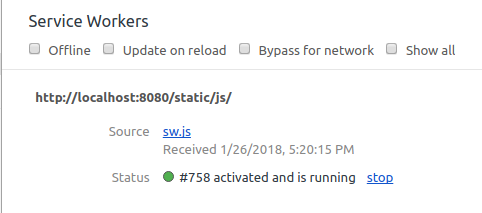
However, when reloading the page no assets appear to be served by ServiceWorker. Trying offline mode reveals that the Service Worker ... Is not active/working at all? It would be super helpful to have the debug switch available for the Webpack Plugin, because right now I don't really have a clue as to what's going wrong.
 neutraali
All 10 comments
The issue is that you're serving your service worker from http://localhost:8080/static/js/sw.js, and that means that the maximum scope of the service worker is http://localhost:8080/static/js/. It will only control pages that are hosted under that scope, and presumably your HTML is served from elsewhere.
To fix this, you need to serve you service worker from a location "higher up" in your server's hierarchy, like http://localhost:8080/sw.js.
https://github.com/GoogleChrome/workbox/issues/1211 is already open to track the addition of guidance regarding scoping and the location of your service worker, so I'm going to close this in favor of that issue.
(The upcoming v3 workbox-webpack-plugin will generate a service worker that has debugging enabled by default on localhost. Though in this particular case, you wouldn't see anything beyond the initial Welcome message, since there won't be any requests made controlled by the service worker.)
 jeffposnick
on 26 Jan 2018
jeffposnick
on 26 Jan 2018
Thanks for the speedy reply Jeff! Scoping is clearly something that has escaped my notice so far.
Apparently ServiceWorker requires some exceptions to our current directory structure.
neutraali
on 26 Jan 2018
Is there any way to instead disable debug in development with workbox-webpack-plugin?
 jiayihu
on 1 Sep 2018
jiayihu
on 1 Sep 2018
Any updates? I need to disable debug in development with workbox-webpack-plugin. This is really annoying.
 ImanMh
on 10 Mar 2019
ImanMh
on 10 Mar 2019
Would be nice to be able to configure this explicitely.
 thasmo
on 29 May 2019
thasmo
on 29 May 2019
after looking too much sad messages, i don't want to say how to disable debug. this is really annoying but guys please let me know if anyone got the answer. 🤦♂
 w3debugger
on 16 Jul 2019
w3debugger
on 16 Jul 2019
I do it with this:
{
      // InjectManifest 模式下 swSrc 是必填的。
      clientsClaim: true,
      skipWaiting: true,
      navigateFallback: '/index.html', // SPA fallback
      importScripts: ['./workbox-inject.js'],
 }
I do it like this in workbox-inject.js:
workbox.setConfig({debug: false});
It looks so troublesome. oo
 xuxihai123
on 12 Sep 2019
xuxihai123
on 12 Sep 2019
Please open this issue and implement this issue..
 sayjeyhi
on 5 Nov 2019
sayjeyhi
on 5 Nov 2019
+1 for making this a configurable option, I would like it for debugging on live apps
 a-axton
on 20 Nov 2019
a-axton
on 20 Nov 2019
Please see https://github.com/GoogleChrome/workbox/issues/1619#issuecomment-557105799 for the latest plan.
jeffposnick
on 21 Nov 2019
Related issues
 pratikraj-mob-incedo
·
4Comments
pratikraj-mob-incedo
·
4Comments
 davidka
·
3Comments
davidka
·
3Comments
 niveditaece
·
3Comments
niveditaece
·
3Comments
 truescotian
·
4Comments
truescotian
·
4Comments
 piehei
·
4Comments
piehei
·
4Comments
Most helpful comment
Is there any way to instead disable
debugin development with workbox-webpack-plugin?