wordpress:php7.4-fpm-alpine - MySQL Connection Error: (2002) Connection
Hi I am creating docker-compose file which will be using nginx reverse proxy via php-fpm, the problem that I get is that whenever wordpress-php7.4-fpm-alipe starts it throws:
wordpress_1  | WordPress not found in /var/www/html - copying now...
wordpress_1  | WARNING: /var/www/html is not empty! (copying anyhow)
wordpress_1  | Complete! WordPress has been successfully copied to /var/www/html
wordpress_1  | [03-Jan-2020 15:28:12 UTC] PHP Warning:  mysqli::__construct(): (HY000/2002): Connection refused in Standard input code on line 22
wordpress_1  |
wordpress_1  | MySQL Connection Error: (2002) Connection refused
wordpress_1  |
wordpress_1  | MySQL Connection Error: (2002) Connection refused
wordpress_1  |
wordpress_1  | MySQL Connection Error: (2002) Connection refused
wordpress_1  |
wordpress_1  | MySQL Connection Error: (2002) Connection refused
wordpress_1  |
wordpress_1  | MySQL Connection Error: (2002) Connection refused
wordpress_1  |
wordpress_1  | MySQL Connection Error: (2002) Connection refused
wordpress_1  |
wordpress_1  | MySQL Connection Error: (2002) Connection refused
wordpress_1  |
wordpress_1  | MySQL Connection Error: (2002) Connection refused
wordpress_1  |
wordpress_1  | MySQL Connection Error: (2002) Connection refused
wordpress_1  |
wordpress_1  | MySQL Connection Error: (2002) Connection refused
wordpress_1  |
wordpress_1  | WARNING: unable to establish a database connection to 'mariadb'
wordpress_1  |   continuing anyways (which might have unexpected results)
wordpress_1  |
wordpress_1  | [03-Jan-2020 15:28:39] NOTICE: fpm is running, pid 1
wordpress_1  | [03-Jan-2020 15:28:39] NOTICE: ready to handle connections
Here is my docker compose yml:
version: "3.2"
services:
  mariadb:
    image: mariadb
    restart: always
    environment:
      MYSQL_ROOT_PASSWORD: secret
      MYSQL_DATABASE: default_wp
      MYSQL_USER: default_wp
      MYSQL_PASSWORD: secret
    volumes:
     - db:/var/lib/mysql
  wordpress:
    image: wordpress:php7.4-fpm-alpine
    depends_on:
      - mariadb
    restart: always
    environment:
      WORDPRESS_DB_HOST: mariadb
      WORDPRESS_DB_NAME: default_wp
      WORDPRESS_DB_USER: default_wp
      WORDPRESS_DB_PASSWORD: secret
    volumes:
      - wp:/var/www/html
      - wp-uploads:/var/www/html/wp-content/uploads
      - wp-theme:/var/www/html/wp-content/themes/theme
      - vendor:/var/www/html/wp-content/themes/theme/vendor

volumes:
  db:
  wp:
  vendor:
  node_modules:
  wp-uploads:
    external: true
  wp-theme:
    external: true
Is there any particular reason behind that?
 asolopovas
All 8 comments
If I use docker-compose.yml from https://hub.docker.com/_/wordpress
version: '3.1'

services:

  wordpress:
    image: wordpress
    restart: always
    ports:
      - 8080:80
    environment:
      WORDPRESS_DB_HOST: db
      WORDPRESS_DB_USER: exampleuser
      WORDPRESS_DB_PASSWORD: examplepass
      WORDPRESS_DB_NAME: exampledb
    volumes:
      - wordpress:/var/www/html

  db:
    image: mysql:5.7
    restart: always
    environment:
      MYSQL_DATABASE: exampledb
      MYSQL_USER: exampleuser
      MYSQL_PASSWORD: examplepass
      MYSQL_RANDOM_ROOT_PASSWORD: '1'
    volumes:
      - db:/var/lib/mysql

volumes:
  wordpress:
  db:
I get the following errors on initial start:
Creating volume "wordpresstest_wordpress" with default driver
Creating volume "wordpresstest_db" with default driver
Creating wordpresstest_wordpress_1 ... done
Attaching to wordpresstest_wordpress_1
wordpress_1  | WordPress not found in /var/www/html - copying now...
wordpress_1  | Complete! WordPress has been successfully copied to /var/www/html
wordpress_1  | [03-Jan-2020 16:00:21 UTC] PHP Warning:  mysqli::__construct(): php_network_getaddresses: getaddrinfo failed: Name or service not known in Standard input code on line 22
wordpress_1  | [03-Jan-2020 16:00:21 UTC] PHP Warning:  mysqli::__construct(): (HY000/2002): php_network_getaddresses: getaddrinfo failed: Name or service not known in Standard input code on line 22
wordpress_1  |
wordpress_1  | MySQL Connection Error: (2002) php_network_getaddresses: getaddrinfo failed: Name or service not known
wordpress_1  | [03-Jan-2020 16:00:24 UTC] PHP Warning:  mysqli::__construct(): php_network_getaddresses: getaddrinfo failed: Name or service not known in Standard input code on line 22
wordpress_1  | [03-Jan-2020 16:00:24 UTC] PHP Warning:  mysqli::__construct(): (HY000/2002): php_network_getaddresses: getaddrinfo failed: Name or service not known in Standard input code on line 22
wordpress_1  |
wordpress_1  | MySQL Connection Error: (2002) php_network_getaddresses: getaddrinfo failed: Name or service not known
wordpress_1  | [03-Jan-2020 16:00:27 UTC] PHP Warning:  mysqli::__construct(): php_network_getaddresses: getaddrinfo failed: Name or service not known in Standard input code on line 22
wordpress_1  | [03-Jan-2020 16:00:27 UTC] PHP Warning:  mysqli::__construct(): (HY000/2002): php_network_getaddresses: getaddrinfo failed: Name or service not known in Standard input code on line 22
wordpress_1  |
wordpress_1  | MySQL Connection Error: (2002) php_network_getaddresses: getaddrinfo failed: Name or service not known
wordpress_1  | [03-Jan-2020 16:00:30 UTC] PHP Warning:  mysqli::__construct(): php_network_getaddresses: getaddrinfo failed: Name or service not known in Standard input code on line 22
wordpress_1  | [03-Jan-2020 16:00:30 UTC] PHP Warning:  mysqli::__construct(): (HY000/2002): php_network_getaddresses: getaddrinfo failed: Name or service not known in Standard input code on line 22
wordpress_1  |
wordpress_1  | MySQL Connection Error: (2002) php_network_getaddresses: getaddrinfo failed: Name or service not known
wordpress_1  | [03-Jan-2020 16:00:34 UTC] PHP Warning:  mysqli::__construct(): php_network_getaddresses: getaddrinfo failed: Name or service not known in Standard input code on line 22
wordpress_1  | [03-Jan-2020 16:00:34 UTC] PHP Warning:  mysqli::__construct(): (HY000/2002): php_network_getaddresses: getaddrinfo failed: Name or service not known in Standard input code on line 22
wordpress_1  |
wordpress_1  | MySQL Connection Error: (2002) php_network_getaddresses: getaddrinfo failed: Name or service not known
wordpress_1  | [03-Jan-2020 16:00:37 UTC] PHP Warning:  mysqli::__construct(): php_network_getaddresses: getaddrinfo failed: Name or service not known in Standard input code on line 22
wordpress_1  | [03-Jan-2020 16:00:37 UTC] PHP Warning:  mysqli::__construct(): (HY000/2002): php_network_getaddresses: getaddrinfo failed: Name or service not known in Standard input code on line 22
wordpress_1  |
wordpress_1  | MySQL Connection Error: (2002) php_network_getaddresses: getaddrinfo failed: Name or service not known
wordpress_1  | [03-Jan-2020 16:00:40 UTC] PHP Warning:  mysqli::__construct(): php_network_getaddresses: getaddrinfo failed: Name or service not known in Standard input code on line 22
wordpress_1  | [03-Jan-2020 16:00:40 UTC] PHP Warning:  mysqli::__construct(): (HY000/2002): php_network_getaddresses: getaddrinfo failed: Name or service not known in Standard input code on line 22
wordpress_1  |
wordpress_1  | MySQL Connection Error: (2002) php_network_getaddresses: getaddrinfo failed: Name or service not known
wordpress_1  | [03-Jan-2020 16:00:43 UTC] PHP Warning:  mysqli::__construct(): php_network_getaddresses: getaddrinfo failed: Name or service not known in Standard input code on line 22
wordpress_1  | [03-Jan-2020 16:00:43 UTC] PHP Warning:  mysqli::__construct(): (HY000/2002): php_network_getaddresses: getaddrinfo failed: Name or service not known in Standard input code on line 22
wordpress_1  |
wordpress_1  | MySQL Connection Error: (2002) php_network_getaddresses: getaddrinfo failed: Name or service not known
wordpress_1  | [03-Jan-2020 16:00:46 UTC] PHP Warning:  mysqli::__construct(): php_network_getaddresses: getaddrinfo failed: Name or service not known in Standard input code on line 22
wordpress_1  | [03-Jan-2020 16:00:46 UTC] PHP Warning:  mysqli::__construct(): (HY000/2002): php_network_getaddresses: getaddrinfo failed: Name or service not known in Standard input code on line 22
wordpress_1  |
wordpress_1  | MySQL Connection Error: (2002) php_network_getaddresses: getaddrinfo failed: Name or service not known
wordpress_1  | [03-Jan-2020 16:00:49 UTC] PHP Warning:  mysqli::__construct(): php_network_getaddresses: getaddrinfo failed: Name or service not known in Standard input code on line 22
wordpress_1  | [03-Jan-2020 16:00:49 UTC] PHP Warning:  mysqli::__construct(): (HY000/2002): php_network_getaddresses: getaddrinfo failed: Name or service not known in Standard input code on line 22
wordpress_1  |
wordpress_1  | MySQL Connection Error: (2002) php_network_getaddresses: getaddrinfo failed: Name or service not known
wordpress_1  |
wordpress_1  | WARNING: unable to establish a database connection to 'db'
wordpress_1  |   continuing anyways (which might have unexpected results)
wordpress_1  |
wordpress_1  | AH00558: apache2: Could not reliably determine the server's fully qualified domain name, using 172.18.0.2. Set the 'ServerName' directive globally to suppress this message
wordpress_1  | AH00558: apache2: Could not reliably determine the server's fully qualified domain name, using 172.18.0.2. Set the 'ServerName' directive globally to suppress this message
wordpress_1  | [Fri Jan 03 16:00:49.397119 2020] [mpm_prefork:notice] [pid 1] AH00163: Apache/2.4.38 (Debian) PHP/7.3.13 configured -- resuming normal operations
wordpress_1  | [Fri Jan 03 16:00:49.397145 2020] [core:notice] [pid 1] AH00094: Command line: 'apache2 -D FOREGROUND'
mysql is just taking a few minutes to initialize
WordPress gives the error WARNING: unable to establish a database connection to 'db' while mysql becomes available
$ docker-compose up -d
Creating network "wordpress_default" with the default driver
Creating volume "wordpress_wordpress" with default driver
Creating volume "wordpress_db" with default driver
Creating wordpress_db_1        ... done
Creating wordpress_wordpress_1 ... done

$ docker-compose logs -f
Attaching to wordpress_wordpress_1, wordpress_db_1
wordpress_1  | WordPress not found in /var/www/html - copying now...
wordpress_1  | Complete! WordPress has been successfully copied to /var/www/html
wordpress_1  | [03-Jan-2020 17:31:29 UTC] PHP Warning:  mysqli::__construct(): (HY000/2002): Connection refused in Standard input code on line 22
wordpress_1  |
wordpress_1  | MySQL Connection Error: (2002) Connection refused
wordpress_1  |
wordpress_1  | MySQL Connection Error: (2002) Connection refused
wordpress_1  |
wordpress_1  | MySQL Connection Error: (2002) Connection refused
wordpress_1  |
wordpress_1  | MySQL Connection Error: (2002) Connection refused
wordpress_1  |
wordpress_1  | MySQL Connection Error: (2002) Connection refused
wordpress_1  |
wordpress_1  | MySQL Connection Error: (2002) Connection refused
wordpress_1  |
wordpress_1  | MySQL Connection Error: (2002) Connection refused
wordpress_1  |
wordpress_1  | MySQL Connection Error: (2002) Connection refused
db_1         | 2020-01-03 17:31:25+00:00 [Note] [Entrypoint]: Entrypoint script for MySQL Server 5.7.28-1debian9 started.
db_1         | 2020-01-03 17:31:25+00:00 [Note] [Entrypoint]: Switching to dedicated user 'mysql'
db_1         | 2020-01-03 17:31:25+00:00 [Note] [Entrypoint]: Entrypoint script for MySQL Server 5.7.28-1debian9 started.
db_1         | 2020-01-03 17:31:26+00:00 [Note] [Entrypoint]: Initializing database files
db_1         | 2020-01-03T17:31:26.039101Z 0 [Warning] TIMESTAMP with implicit DEFAULT value is deprecated. Please use --explicit_defaults_for_timestamp server option (see documentation for more details).
db_1         | 2020-01-03T17:31:32.113008Z 0 [Warning] InnoDB: New log files created, LSN=45790
db_1         | 2020-01-03T17:31:35.578597Z 0 [Warning] InnoDB: Creating foreign key constraint system tables.
db_1         | 2020-01-03T17:31:38.254014Z 0 [Warning] No existing UUID has been found, so we assume that this is the first time that this server has been started. Generating a new UUID: e598ba22-2e4e-11ea-a42c-0242c0a8b002.
db_1         | 2020-01-03T17:31:39.046824Z 0 [Warning] Gtid table is not ready to be used. Table 'mysql.gtid_executed' cannot be opened.
db_1         | 2020-01-03T17:31:39.336666Z 0 [Warning] CA certificate ca.pem is self signed.
db_1         | 2020-01-03T17:31:39.365746Z 1 [Warning] root@localhost is created with an empty password ! Please consider switching off the --initialize-insecure option.
wordpress_1  |
wordpress_1  | MySQL Connection Error: (2002) Connection refused
wordpress_1  |
wordpress_1  | MySQL Connection Error: (2002) Connection refused
wordpress_1  |
wordpress_1  | WARNING: unable to establish a database connection to 'db'
wordpress_1  |   continuing anyways (which might have unexpected results)
wordpress_1  |
wordpress_1  | AH00558: apache2: Could not reliably determine the server's fully qualified domain name, using 192.168.176.3. Set the 'ServerName' directive globally to suppress this message
wordpress_1  | AH00558: apache2: Could not reliably determine the server's fully qualified domain name, using 192.168.176.3. Set the 'ServerName' directive globally to suppress this message
wordpress_1  | [Fri Jan 03 17:31:56.734819 2020] [mpm_prefork:notice] [pid 1] AH00163: Apache/2.4.38 (Debian) PHP/7.3.13 configured -- resuming normal operations
wordpress_1  | [Fri Jan 03 17:31:56.734856 2020] [core:notice] [pid 1] AH00094: Command line: 'apache2 -D FOREGROUND'
Checking the mysql logs
Note the 3 minute pause between 17:31:39 - 17:34:06, while WordPress was ready at 17:31:56 above
$ docker logs -f wordpress_db_1
2020-01-03 17:31:25+00:00 [Note] [Entrypoint]: Entrypoint script for MySQL Server 5.7.28-1debian9 started.
2020-01-03 17:31:25+00:00 [Note] [Entrypoint]: Switching to dedicated user 'mysql'
2020-01-03 17:31:25+00:00 [Note] [Entrypoint]: Entrypoint script for MySQL Server 5.7.28-1debian9 started.
2020-01-03 17:31:26+00:00 [Note] [Entrypoint]: Initializing database files
2020-01-03T17:31:26.039101Z 0 [Warning] TIMESTAMP with implicit DEFAULT value is deprecated. Please use --explicit_defaults_for_timestamp server option (see documentation for more details).
2020-01-03T17:31:32.113008Z 0 [Warning] InnoDB: New log files created, LSN=45790
2020-01-03T17:31:35.578597Z 0 [Warning] InnoDB: Creating foreign key constraint system tables.
2020-01-03T17:31:38.254014Z 0 [Warning] No existing UUID has been found, so we assume that this is the first time that this server has been started. Generating a new UUID: e598ba22-2e4e-11ea-a42c-0242c0a8b002.
2020-01-03T17:31:39.046824Z 0 [Warning] Gtid table is not ready to be used. Table 'mysql.gtid_executed' cannot be opened.
2020-01-03T17:31:39.336666Z 0 [Warning] CA certificate ca.pem is self signed.
2020-01-03T17:31:39.365746Z 1 [Warning] root@localhost is created with an empty password ! Please consider switching off the --initialize-insecure option.
2020-01-03 17:34:06+00:00 [Note] [Entrypoint]: Database files initialized
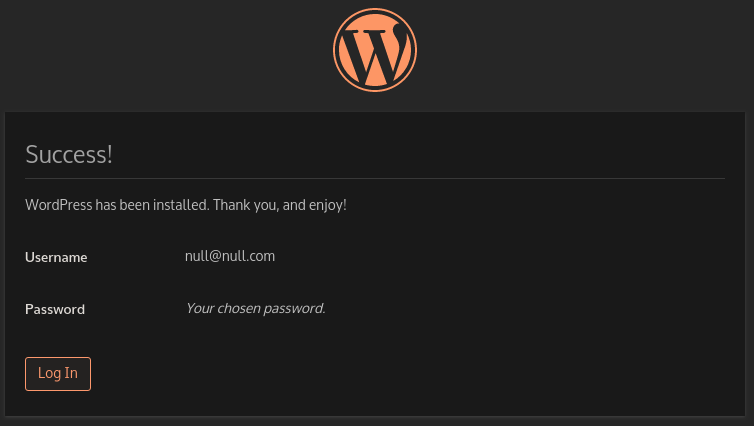
. . .
Then after mysql is initialized WordPress can be setup
 wglambert
on 3 Jan 2020
wglambert
on 3 Jan 2020
Is there a way to make WordPress container for DB to initialize. depends_on property does not seem to help it.
asolopovas
on 4 Jan 2020
docker compose will not be enough; depends_on only ensures that one is started before the other (and nothing about readiness). This would need to be something else that ensures the database is ready before starting wordpress. On the other hand, if the database goes down (or is restarted), you are in the same state as if it hasn't finished starting. But this is beyond the scope of this repository (the image works fine and this is more about orchestration).
Two possible workarounds: use a different version of MariaDB (see https://github.com/docker-library/mariadb/issues/262 for the ones that are problematic) or to not use MariaDB and instead use MySQL.
(The MySQL image should be a drop-in replacement, but may require deleting your database and other volumes to start over).
 yosifkit
on 7 Jan 2020
yosifkit
on 7 Jan 2020
Closing since this seems resooved
wglambert
on 9 Jan 2020
In my case the solution was to change OS/ARCH of the wordpress image from docker hub.
 bukowa
on 9 Jan 2020
bukowa
on 9 Jan 2020
Is there a way to make WordPress container for DB to initialize.
depends_onproperty does not seem to help it.
Could you share how to resolve the problem? I got the same problem in a CentOS environment!
Many thanks!
 atubo2012
on 3 Mar 2021
atubo2012
on 3 Mar 2021
Is there a way to make WordPress container for DB to initialize.
depends_onproperty does not seem to help it.Could you share how to resolve the problem? I got the same problem in a CentOS environment!
Many thanks!
Hi the problem is that db service does not get initialized quickly enough, container starts but mysql takes a bit longer to boot if you wait a little it should start working, the was a library that would wait I can't remember the name, I ended up just waiting. You can try googling for it or see if this article would help, https://www.datanovia.com/en/lessons/docker-compose-wait-for-container-using-wait-tool/docker-compose-wait-for-mysql-container-to-be-ready/
asolopovas
on 3 Mar 2021
Related issues
 adriatic
·
5Comments
adriatic
·
5Comments
 andheiberg
·
5Comments
andheiberg
·
5Comments
 shankie-codes
·
5Comments
shankie-codes
·
5Comments
 danyork
·
4Comments
danyork
·
4Comments
 ptrdlbrg
·
5Comments
ptrdlbrg
·
5Comments