Wordpress-seo: The WordPress dashboard is terribly slow after upgrading to Yoast SEO 14.2
- [x] I've read and understood the contribution guidelines.
- [x] I've searched for any related issues and avoided creating a duplicate issue.
Please give us a description of what happened.
More info: https://wordpress.org/support/topic/latest-update-causes-server-overload/
My WordPress dashboard is very slow after update to Yoast SEO 14.2.
In the Query Monitor plugin, I see that this query takes about 80 seconds:
SELECT COUNT(term_id)
FROM wp_term_taxonomy
WHERE term_id NOT IN (SELECT object_id
FROM wp_yoast_indexable
WHERE object_type = 'term')
AND taxonomy IN ('category', 'post_tag', 'post_format')
called by Yoast\W\S\A\I\Indexable_Term_Indexation_Action->get_total_unindexed()
It fires up every time I enter the WordPress dashboard.

Please describe what you expected to happen and why.
The WordPress dashboard should load quickly.
How can we reproduce this behavior?
- Litespeed server
- Have thousands of posts and tags in the database
- Index everything in Yoast SEO
- Go to the dashboard homepage
Technical info
- WordPress version: 5.4.1
- Yoast SEO version: 14.2
- Tested with theme: Twenty Nineteen
 rafaucau
All 45 comments
We got the same issue.
 Uranbold
on 31 May 2020
Uranbold
on 31 May 2020
I am also seeing the same issue, confirmed with Query Monitor
 dcx15
on 1 Jun 2020
dcx15
on 1 Jun 2020
Please inform the customer of conversation # 616253 when this conversation has been closed.
 monbauza
on 1 Jun 2020
monbauza
on 1 Jun 2020
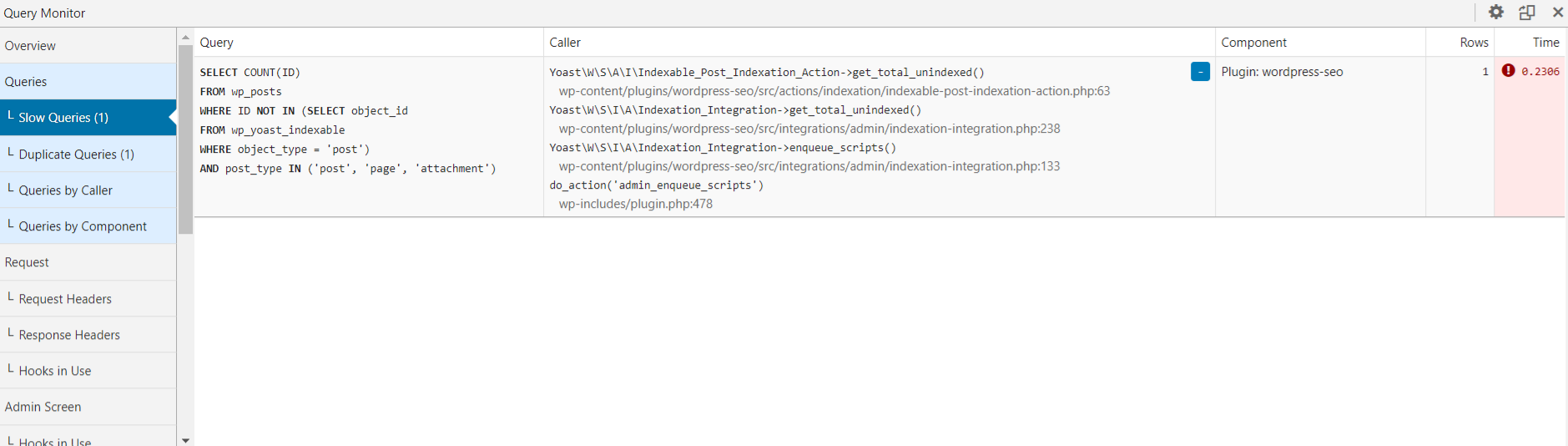
The above user is getting a slow query in Query Monitor when all non-Yoast plugins are disabled and the theme is on Twenty Twenty.
- The user's website has 21,840 posts, 12 pages and 35,953 attachments
- It happens with Yoast SEO Free and Yoast SEO Premium
- The slow query shows up in admin pages like /wp-admin/index.php and /wp-admin/plugins.php
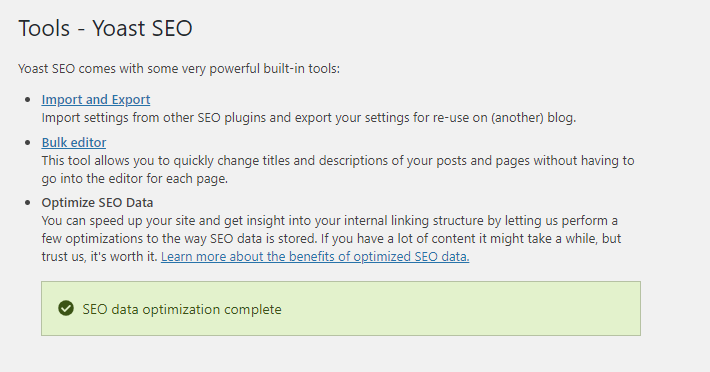
- Data indexation appears as complete under SEO > Tools
- The slow query doesn't seem to be specific to v14.2. The above user has been experiencing this issue since v14.0
monbauza
on 1 Jun 2020
Please inform the customer of conversation # 614708 when this conversation has been closed.
 amboutwe
on 2 Jun 2020
amboutwe
on 2 Jun 2020
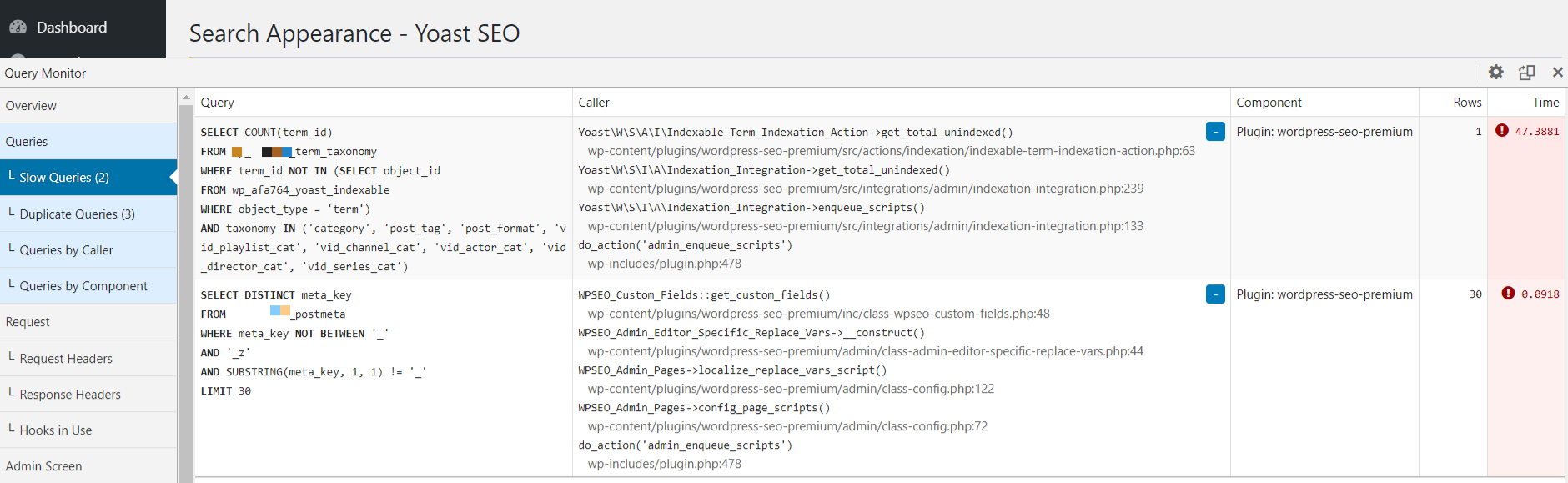
The above user is experiencing a slow query in the backend that takes more than 45 secs to complete (see screenshot below).
- The slow query occurs on several admin pages: /wp-admin/plugins.php, /wp-admin/index.php and admin.php?page=wpseo_titles for example.
- The user is running Yoast SEO Premium v14.2.
- The website has 2,095 posts, 51 pages, 6,828 attachments, 68 categories and 4,198 tags (and a small number of other custom post types and taxonomies).
monbauza
on 2 Jun 2020
I am having the same issue
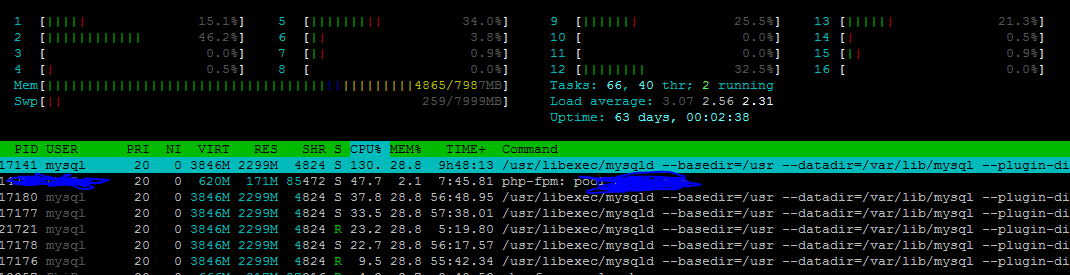
I noted that upon deactivating Yoast, reduced in mysql queries and cpu load goes down from 2.3 to around 1. Tried 2 times activating and deactivating Yoast and I saw increase in CPU usage after activating yoast and decrease after deactivating yoast.
My website installed with woocommerce with 15727 products & 2 blog post

 shally87
on 3 Jun 2020
shally87
on 3 Jun 2020
having the same issue, updated to the latest version of Yoast SEO (14.2) from 13.5, and it overloaded my site, needed to deactivate, delete Yoast SEO and restart my VPS to fix the problem
Wordpress: 5.4.1
Posts: 1,471
Pages: 41
Current fix, rolled back to 13.5 for the time being
 ianchen79
on 3 Jun 2020
ianchen79
on 3 Jun 2020
Is rollback to 13.5 safe for SEO? Will it not break something in the database?
It's getting worse. Now I get server timeouts and as I can see Yoast is not in a hurry to fix such a serious problem. That's why I will have to go back to the older version.

rafaucau
on 13 Jun 2020
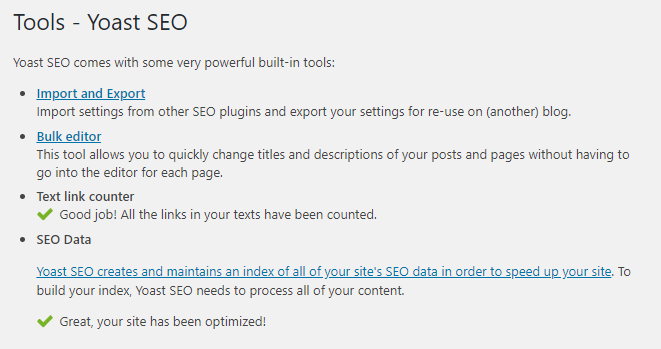
Same issue although mine does not seem as severe. Regardless of the severity it is the slowest query in my admin panel so it is quite serious.

I have indexation marked as complete.
 nickbencino
on 16 Jun 2020
nickbencino
on 16 Jun 2020
I truncated the wp_yoast_indexable table in the PHPMyAdmin and now my WordPress dashboard is working normally
rafaucau
on 17 Jun 2020
It has been almost 3 weeks since this issue was first posted. Is there any news on a fix/update?
As was previously asked, is it safe to rollback to version 13.5 or will this break the meta data?
dcx15
on 17 Jun 2020
Is there any news on a fix/update?
A PR was created in draft stage, but it's unclear if / when this will be released
As was previously asked, is it safe to rollback to version 13.5 or will this break the meta data?
Yes, it is safe, but keep in mind that we don't support older versions of the plugin
This issue isn't widespread, and requires another unkown site-specific element to get to the slow state that is described in this thread. As it has not been suggested in this thread yet, you can try resetting the indexables. As this comment seems to indicate, the issue may lie in there. In the early 14.x versions, there was an issue that could create duplicate entries in the indexables table, and this may be a factor in this count query slowing down significantly.
To reset the indexables there are 2 (non-manual) ways:
- Install the Yoast Test Helper plugin and go to
Tools -> Yoast Test -> Reset indexables & migrations. After that, either dismiss the notification about indexing and start lazy-loading, or run the indexation process. - Use WP-CLI; run
wp yoast index --reindex
 Djennez
on 17 Jun 2020
Djennez
on 17 Jun 2020
@Djennez Thank you for the update. I have just tried resetting the indexables via CLI as suggested and that seemed to fix it!
dcx15
on 17 Jun 2020
Interesting, if anyone with the same issue can check something for us (before and after resetting the indexables): how many posts / pages / taxonomies / terms does your site have, and how many rows are there in the <prefix>_yoast_indexables table?
Djennez
on 17 Jun 2020
Hello, @Djennez
My wordpress admin are very slower after upgrade to Yoast 14, we are using the updated version 14.5 and monitoring with "query monitor plugin" and other tools.
The update of indexables is taking a long time to execute. We tried to reset the indexables with CLI command, but in 6h of execution only 9% of posts where proccessed.
Is possible to limit the indexable object types to ignore generation for attachments for example? It will reduce 30% of our posts to process.
My wordpress database has:
643.414 posts
104 categories
936 tags
241 authors
276.268 attachments
 diego-grupo-nd
on 13 Jul 2020
diego-grupo-nd
on 13 Jul 2020
I am also experiencing this issue (https://wordpress.org/support/topic/15-1-slow-query-in-wordpress-admin/#post-13538882).
I have 6050 posts on my website.
This is the slow query:
SELECT COUNT(ID)
FROM wp_posts
WHERE ID NOT IN (
SELECT object_id
FROM wp_yoast_indexable
WHERE object_type = 'post'
AND permalink_hash IS NOT NULL )
AND post_type IN ('post', 'page', 'attachment')
Yoast\W\S\A\I\Indexable_Post_Indexation_Action->get_total_unindexed()
Plugin: wordpress-seo   1   0.2561
I did some testing today and this is what I found out:
- Reset indexables & migrations with the Yoast Test Helper plugin fixes the issue
- Running the CLI command wp yoast index --reindex brings back the slow query
If you have any questions, feel free to ask, I am willing to help if you need it.
Thanks.
 janvitos
on 15 Oct 2020
janvitos
on 15 Oct 2020
Guys is this fixed?
Today I tried to update Yoast from 13.4.1 to 15.1.1 and it completely overloaded the server...
The site has around 21 000 posts. / ~13 pages / ~ 24 000 Taxonomies ( if you mean all of the tags + categories etc.. )
Looking for a way to update Yoast without kicking the server in the n*ts for a long time :)
Thanks!
 rneveri
on 17 Oct 2020
rneveri
on 17 Oct 2020
+1 for https://wordpress.org/support/topic/site-constantly-offline-seo-optimization-error-message/
_The web hosting company says: Below, the queries that we continue to see, even after WP-CLI has been indexing._
+-----+----------------+-----------+----------------+---------+------+------------------------------+------------------------------------------------------------------------------------------------------------------------------------------------------------------------------------------------------------------------------------------+----------+
| Id | User | Host | db | Command | Time | State | Info | Progress |
+-----+----------------+-----------+----------------+---------+------+------------------------------+------------------------------------------------------------------------------------------------------------------------------------------------------------------------------------------------------------------------------------------+----------+
| 554 | mysite | localhost | mysite | Query | 128 | Sending data | SELECT COUNT(term_id)
FROM wp_term_taxonomy
WHERE term_id NOT IN (
SELECT object_id FROM wp_yoast_indexable WHERE link_count IS NOT NULL AND object_type = 'term'
) AND taxonomy IN ('category', 'post_tag', 'post_format') | 0.000 |
| 597 | mysite | localhost | mysite | Query | 93 | Sending data | SELECT COUNT(term_id)
FROM wp_term_taxonomy
WHERE term_id NOT IN (
SELECT object_id FROM wp_yoast_indexable WHERE link_count IS NOT NULL AND object_type = 'term'
) AND taxonomy IN ('category', 'post_tag', 'post_format') | 0.000 |
| 666 | mysite | localhost | mysite | Query | 49 | Waiting for table level lock | UPDATE wp_yoast_indexable SET permalink = 'https://www.mysite.com/tag/bucket/', permalink_hash = '46:c0a4ffa1bec561f0bcabfbc8a4addf53', updated_at = '2020-10-22 09:59:49' WHERE id = '5303' | 0.000 |
| 670 | mysite | localhost | mysite | Query | 46 | Waiting for table level lock | SELECT * FROM wp_yoast_indexable WHERE object_id = '28047' AND object_type = 'post' LIMIT 1 | 0.000 |
| 673 | mysite | localhost | mysite | Query | 40 | Waiting for table level lock | SELECT * FROM wp_yoast_indexable WHERE object_id = '25624' AND object_type = 'post' LIMIT 1 | 0.000 |
| 674 | mysite | localhost | mysite | Query | 40 | Waiting for table level lock | SELECT * FROM wp_yoast_indexable WHERE object_id = '9542' AND object_type = 'post' LIMIT 1 | 0.000 |
| 676 | mysite | localhost | mysite | Query | 34 | Waiting for table level lock | SELECT * FROM wp_yoast_indexable WHERE object_id = '1476' AND object_type = 'term' LIMIT 1 | 0.000 |
| 677 | mysite | localhost | mysite | Query | 28 | Waiting for table level lock | SELECT * FROM wp_yoast_indexable WHERE object_id = '25543' AND object_type = 'post' LIMIT 1 | 0.000 |
| 678 | mysite | localhost | mysite | Query | 19 | Waiting for table level lock | SELECT * FROM wp_yoast_indexable WHERE object_id = '3936' AND object_type = 'post' LIMIT 1 | 0.000 |
| 680 | mysite | localhost | mysite | Query | 16 | Waiting for table level lock | SELECT * FROM wp_yoast_indexable WHERE object_id = '29306' AND object_type = 'post' LIMIT 1 | 0.000 |
| 681 | mysite | localhost | mysite | Query | 16 | Waiting for table level lock | SELECT * FROM wp_yoast_indexable WHERE object_id = '5270' AND object_type = 'term' LIMIT 1 | 0.000 |
| 682 | mysite | localhost | mysite | Query | 15 | Waiting for table level lock | SELECT * FROM wp_yoast_indexable WHERE object_id = '16582' AND object_type = 'post' LIMIT 1 | 0.000 |
| 684 | mysite | localhost | mysite | Query | 8 | Waiting for table level lock | SELECT * FROM wp_yoast_indexable WHERE object_id = '1148' AND object_type = 'term' LIMIT 1 | 0.000 |
| 685 | mysite | localhost | mysite | Query | 5 | Waiting for table level lock | SELECT * FROM wp_yoast_indexable WHERE object_id = '16172' AND object_type = 'post' LIMIT 1 | 0.000 |
| 687 | mysite | localhost | mysite | Query | 4 | Waiting for table level lock | SELECT * FROM wp_yoast_indexable WHERE object_id = '25849' AND object_type = 'post' LIMIT 1 | 0.000 |
| 688 | mysite | localhost | mysite | Query | 3 | Waiting for table level lock | SELECT * FROM wp_yoast_indexable WHERE object_id = '16172' AND object_type = 'post' LIMIT 1 | 0.000 |
| 689 | root | localhost | NULL | Query | 0 | NULL | show full processlist | 0.000 |
 iamazik
on 22 Oct 2020
iamazik
on 22 Oct 2020
 Pcosta88
on 26 Oct 2020
Pcosta88
on 26 Oct 2020
I'm seeing a similar problem. With Yoast installed, saving a post takes 15-25s. With Yoast disabled, saving the post takes < 1s.
Sample save:
curl 'https://staging.climateinteractive.org/wp-json/wp/v2/pages/24500?_locale=user' \
  -H 'x-http-method-override: PUT' \
...snip...
From Query Monitor:
x-qm-overview-memory: 46,115 kB
x-qm-overview-memory_usage: 35.2% of 131,072 kB limit
x-qm-overview-time_taken: 25.0220
x-qm-overview-time_usage: 83.4% of 30s limit
Rebuilding the index (/wp-admin/admin.php?page=wpseo_tools&start-indexation=true) did _not_ solve the problem.
Should I open a separate issue, or is the the catchall for "Yoast is slow AF"?
 paulschreiber
on 29 Oct 2020
paulschreiber
on 29 Oct 2020
I was just troubleshooting a site where browser was giving a warning "A script on this page is slowing down your browser". It was taking 45+ seconds for the page to completely load.
Deactivation of this plugin corrected the issue.
This is not a large site, only a few pages. It does use ACF and these pages are extremely complex with hundreds of custom fields. I deactivated all plugins on the site except ACF, Classic Editor and this plugin. Problem persisted. As soon as this plugin was deactivated the issue resolved. I also deactivated ACF. The issue persisted. Reverted this plugin to version 13.5, issue resolved.
Sorry, I don't have more for you as I did not find this until after I reverted to 13.5.
 Hube2
on 29 Oct 2020
Hube2
on 29 Oct 2020
Also my website is affected my this issue we have 128.623 articles. I have also noticed than around noon, all databases goes to 100% and the website goes down. To fix this I had to change expiration of the following transients:
- wpseo_total_unindexed_posts
- wpseo_total_unindexed_post_type_archives
- wpseo_total_unindexed_terms
- wpseo_unindexed_term_link_count
- wpseo_unindexed_post_link_count
 frattallone
on 11 Nov 2020
frattallone
on 11 Nov 2020
@frattallone Thanks for sharing the workaround. How exactly did you change the expiration of the relevant transients?
iamazik
on 11 Nov 2020
with "wp cli" or Transients Manager plugin. Look for wpseo transients then change their expiration.
Expiration is a php date expressed in seconds:
php > print(strtotime("12 November 2020 03:00"));
1605150000
php >
is tomorrow at 3 am
frattallone
on 11 Nov 2020
I have the same issue, page loads of over 1.3 mins with the plugin enabled, any version over 14.8.1.
I make heavy use of ACF and have very large pages ( post_meta ) but until the version of yoast, 14.9, its worked without any issues.
I have everything on the latest version of all my plugins, wordpress and am on premium hosting.
I have tried the following versions with their respective page loads, the only difference is the yoast plugin itself:
Disabled : 31.04s
14.4 : 31.87s
14.5 : 31.88s
14.6 : 32.99s
14.7 : 48.73
14.8 : 35.83
14.9 : 1.1min
15.0 : 1.3min
15.1 : 1.1min
15.2 : 1.2min
As you can see, from v1.4.9 there is a massive jump in pageload speeds, with most of the other versions prior to that having a negligibly increase in page load from not being enabled.
Im happy to assist in any way to get the the root cause of this, and await your response.
PS: Please don’t ask me to disable all other plugins & theme, as thats clearly not the issue here…
 dominicpedro
on 16 Nov 2020
dominicpedro
on 16 Nov 2020
I'll add a bit more information here on behalf of @dominicpedro based on his finding:
class-metabox.php, line 987, private function get_custom_replace_vars.
return [
’custom_fields’ => $this->get_custom_fields_replace_vars($post),
’custom_taxonomies’ => $this->get_custom_taxonomies_replace_vars($post),
‘custom_fields’ => [],
‘custom_taxonomies’ => [],
];
This function iterates through every custom field and every taxonomy, so if you have a complex site with many taxonomies and are using ACF, which has a lot of custom fields, then this iteration adds a ton of overhead and load time.
Baseline page load without any modifications on my local env is: 1.4min
With these lines, the modified page load is: 41s
iamazik
on 19 Nov 2020
Yoast developers (@Djennez and others), here's one suggestion that shaves off some time because the Yoast query currently isn't using an index and does a full table scan (for us), but after a small tweak, it starts using the index.
Here's the query:
SELECT object_id FROM wp_yoast_indexable WHERE object_type = 'post' AND permalink_hash IS NOT NULL
If I run EXPLAIN on it as is:
1 SIMPLE wp_yoast_indexable ALL object_type_and_sub_type,permalink_hash_and_object_type 1120720 Using where
With a simple tweak of adding object_id to wp_yoast_indexable's permalink_hash_and_object_type index as the 3rd term:
1 SIMPLE wp_yoast_indexable range object_type_and_sub_type,permalink_hash_and_object_type permalink_hash_and_object_type 163 560367 Using where; Using index
The query now runs faster, though it's still quite expensive (1.6s vs 2.5s). I recommend you tweak permalink_hash_and_object_type for better performance.
To clarify, this query shows up here:
SELECT COUNT(ID)
FROM wp_posts
WHERE ID NOT IN (
SELECT object_id
FROM wp_yoast_indexable
WHERE object_type = 'post'
AND permalink_hash IS NOT NULL )
AND post_type IN ('post', 'page', 'attachment')
 archon810
on 20 Nov 2020
archon810
on 20 Nov 2020
@archon810 thanks for the details! @herregroen is this something we can work with to improve our performance?
Djennez
on 23 Nov 2020
Please inform the customer of conversation # 668906 when this conversation has been closed.
amboutwe
on 27 Nov 2020
@Djennez I haven't actually put that index tweak live on prod yet and loaded the Dashboard today. This query according to Query Monitor took 25s. For some reason, even if I run it with SQL_NO_CACHE, follow-up executions are a lot faster (2-2.5s), but nonetheless - whether it's 2.5 or 25s, it's a crazy number to add to the Dashboard.
Why is this query running on the Dashboard at all? Can you remove it and only make it run on the appropriate page, which I presume is wp-admin/admin.php?page=wpseo_tools? It's the query that figures out if there's more stuff to index or if it's done, right?
Please don't infect the rest of WP admin with such expensive queries that don't need to run so frequently.
archon810
on 4 Dec 2020
This is a critical issue that is affecting performance on production sites and slowing them down to a crawl. Please escalate the severity and urgency.
I just checked the plugins page (wp-admin/plugins.php) with Query Monitor on, and at least 4 variations of the query that pulls from yoast_indexable are present on this page in the slow query log, some running for 3-4s+ and sometimes much longer, depending on db performance. There's absolutely no need for these queries to be running on all these backend pages, slowing down unrelated tasks.
I've run some more tests, and adding object_id into the index doesn't really result in real performance improvements due to how much data the query still has to return when all posts are already indexed (pretty much all of them), so the only solution I am seeing is removing the query from being run on all these pages.
archon810
on 10 Dec 2020
Same problem here, any updates about a real fix for that? So far nothing..
 dinizgb
on 16 Dec 2020
dinizgb
on 16 Dec 2020
The very first query in this topic is about the get_total_unindexed(), called by Yoast\W\S\A\I\Indexable_Term_Indexation_Action->get_total_unindexed(). This function has since been altered (since version 14.5) to first check a transient that gets stored for 24 hours, before calling this query. However, even with 30.000 tags and categories, I was still unable to get this query to take longer than 0,03 seconds. Yes, that's slow, but it's only called once every 24 hours on a normal installation.
There are 3 more of these queries; to check unindexed post types (Yoast\W\S\A\I\Indexable_Post_Indexation_Action->get_total_unindexed()), unindexed link counts from posts (Yoast\W\S\A\I\Abstract_Link_Indexing_Action->get_total_unindexed()) and from taxonomies (Yoast\W\S\A\I\Abstract_Link_Indexing_Action->get_total_unindexed()). As far as I can see, they all only run once every 24 hours.
So I am wondering why a limited number of sites is experiencing issues with one or more of these checks. I think it's good to distinguish 2 questions:
If the queries get called on every admin pageload, are you using the latest version (version 14.5 introduced the transients) of the plugin and are you allowing transients? Because this should only happen every 24 hours.
If the queries themself take a long time to load, how does that happen? If I can't get my query to go above 0,03 seconds with 30.000 terms and categories (which, to me, is a ridiculous amount, even for larger sites), then is there maybe something else that is interfering here?
Djennez
on 17 Dec 2020
@Djennez (1) you need to be more specific than "the latest version" — you need to say version "xyz or newer." Folks reading this ticket (now or in the future) won't know what the latest version was on December 17, 2020.
(2) Even if you store this in a transient and cache it, you shouldn't be running this code on pages where it's not needed.
paulschreiber
on 17 Dec 2020
Edited the post to include the version that the transient was introduced. Since we don't support older versions, you'd still need to be on the latest version anyway.
Djennez
on 17 Dec 2020
Does 14.5 address the problem of loading your code on all dashboard pages instead of just the appropriate pages?
paulschreiber
on 17 Dec 2020
What @paulschreiber said ^ the code shouldn't be running all over the place.
In addition, transients could sometimes be cleared more frequently than expected. For example, see this bug we recently filed with W3 Total Cache: https://github.com/W3EDGE/w3-total-cache/issues/303.
archon810
on 17 Dec 2020
Changing where this query is loaded does not fix this issue (slow / frequent updates), and in order for the indexables to function optimally, it's important that they stay up to date. With that in mind, the pages where they get checked are not the first place I want to look for a "fix" for a problem that does not seem to impact everyone. So I am more interested in the last 2 questions of my previous post.
Having said that, loading this query on different admin pages does seem to be a possible report in and of itself, though being one of lower priority. I can imagine there are more efficient ways to keep the indexables up to date, unfortunately I am not up to date with what options where considered for this.
Djennez
on 18 Dec 2020
@Djennez WP has built-in scheduling, which is a preferable way to keep indexes up-to-date.
Regarding component loading, it would make sense to only load the parts (functions, files, modules) of Yoast needed for a specific page. i.e. some pages may need more components than others.
paulschreiber
on 19 Dec 2020
If the queries themself take a long time to load, how does that happen? If I can't get my query to go above 0,03 seconds with 30.000 terms and categories (which, to me, is a ridiculous amount, even for larger sites), then is there maybe something else that is interfering here?
I posted my results and the relevant queries above. Are you using SQL_NO_CACHE in your query tests? Ideally you'd also restart the MySQL/MariaDB server as there are OS caches that are still used even with SQL_NO_CACHE present that make subsequent queries an order of magnitude faster.
If the queries get called on every admin pageload, are you using the latest version (version 14.5 introduced the transients) of the plugin and are you allowing transients? Because this should only happen every 24 hours.
Besides what was said about transients already, I'm in 100% agreement with @paulschreiber about shifting such refreshing to cron jobs. Even if your transients work as expected and expire once a day, it will still affect a page load for me once a day. The correct first step is to make sure unneeded code, especially with expensive processing, is only loaded when absolutely needed. When 15 plugins sprinkle their code all over wp-admin (or even worse - the frontend), it slows down page loads for everyone and really adds up.
archon810
on 19 Dec 2020
Please inform the customer of conversation # 681595 when this conversation has been closed.
User has 12k tag pages, and said:
we've had to go the nuclear option and disable saves to the database on line 165 of wp-content/plugins/wordpress-seo-premium/src/models/indexable.php return parent::save();
which fixed the issue temporarily.
User also said that disabling: Text Link Counter, Insights, and Link Suggestion features and re-enabling that line of code caused an immediate 503.
Pcosta88
on 30 Dec 2020
Please inform the customer of conversation # 685025 when this conversation has been closed.
User is using ACF
Pcosta88
on 5 Jan 2021
Please inform the customer of conversation # 681694 when this conversation has been closed.
User is using ACF
Pcosta88
on 6 Jan 2021
Once a day my website stops working for several minutes, so the current solution is not very good.
A wp-cron job that starts somewhere at night would be nice.
rafaucau
on 10 Jan 2021
Related issues
 cristopherrosenberg
·
3Comments
cristopherrosenberg
·
3Comments
 PENTAGON4
·
6Comments
Pcosta88
·
6Comments
PENTAGON4
·
6Comments
Pcosta88
·
6Comments
 tholu
·
3Comments
tholu
·
3Comments
 shanejones
·
5Comments
shanejones
·
5Comments
Most helpful comment
@Djennez WP has built-in scheduling, which is a preferable way to keep indexes up-to-date.
Regarding component loading, it would make sense to only load the parts (functions, files, modules) of Yoast needed for a specific page. i.e. some pages may need more components than others.