Wordpress-seo: Yoast SEO 12.8 doesn't show the metabox for custom post types by default
- [x] I've read and understood the contribution guidelines.
- [x] I've searched for any related issues and avoided creating a duplicate issue.
Please give us a description of what happened.
With Yoast SEO 12.7 a custom post type like the _Products_ post type from WooCommerce has the metabox enabled by default, after upgrading to Yoast 12.8 this defaults is disabled.
Please describe what you expected to happen and why.
Yoast SEO 12.8 should maintain the previous behavior, this is a regression.
How can we reproduce this behavior?
- Install Yoast SEO 12.7;
- Install WooCommerce;
- Open SEO → Search Appearance → Content Types tab, the Products section has _Yoast SEO Meta Box_ set to _show_, also inside the _Add new product_ page the metabox appears correctly;
- Update Yoast SEO to version 12.8;
- The Yoast SEO metabox isn't shown, and the relevant setting is set to _Hide_.
Technical info
This is a regression caused by the options cache introduced in 12.8. The relevant pull request is https://github.com/Yoast/wordpress-seo/pull/13055
* If relevant, which editor is affected (or editors):
- [x] Classic Editor
- [x] Gutenberg
- [ ] Classic Editor plugin
* Which browser is affected (or browsers):
- [x] Chrome
- [x] Firefox
- [x] Safari
- [ ] Other
Used versions
- WordPress version: 5.3.2
- Yoast SEO version: 12.8
- Relevant plugins in case of a bug: any plugin which adds a custom post type
- Tested with theme: not relevant
 CarloCannas
All 18 comments
@CarloCannas thanks for your report! I was able to reproduce the issue and we're currently investigating the cause. Will report back once we find something.
 Djennez
on 10 Jan 2020
Djennez
on 10 Jan 2020
From what we could find:
12.8 introduced caching in the options of our plugin and it looks like this caching is handling non-existing options in the database different than previous versions of Yoast. We found that if you haven't saved the options of the plugin at some point, and you try to retrieve the option that determines if the metabox should be shown, it defaults to false if that option is not in the database. This only goes for custom posttypes and taxonomies.
The workaround is to go to SEO -> Search Appearance and set all metabox toggles on Content Types and Taxonomies to "Show". A problem we found here is that, because all defaults are now "Hide", when you save the options, all these defaults will get saved to the database. So: make sure you go through all tabs and set all options to the values you want.
Meanwhile we're going to look into the priority to get this fixed.
Djennez
on 10 Jan 2020
Possible solution: call fill_cache on register taxonomy and register posttype.
 IreneStr
on 10 Jan 2020
IreneStr
on 10 Jan 2020
Possible solution: call
fill_cacheon register taxonomy and register posttype.
That's what we did to workaround for our users that were encountering the problem, and it's somewhat working even when called externally.
The main concern is that this approach basically counteracts the effects of having the caching system at all, since you'll be filling the interity of the cache, losing the performance benefits that the caching system was meant to bring.
 alexmaurizio
on 10 Jan 2020
alexmaurizio
on 10 Jan 2020
Possible solution: call
fill_cacheon register taxonomy and register posttype.
Probably better to just clear $option_values instead of calling fill_cache. WPSEO_Options::get automatically fills the cache if $option_values is null so this ensures we're rebuilding our cache as little as possible.
Custom post types and taxonomies are generally registered all at the same time so we'd only be refilling our cache once instead of once per taxonomy and once per custom post type.
If we also remove the fill_cache call in WPSEO_Options::__construct it's even possible no options will be called before taxonomies and custom post types are registered and we'll fill the options cache only once when the first WPSEO_Options::get is called.
 herregroen
on 10 Jan 2020
herregroen
on 10 Jan 2020
Hi @alexmaurizio , can you specify the "somewhat working" comment in your reply? Any information that we can use would be welcome here :)
Djennez
on 10 Jan 2020
@Djennez of course!
Our system includes custom post types that were broken after the 12.8 Yoast update while visiting the edit post page. We had to include an urgent fix for our users, and we managed to achieve what was proposed earlier by using the fill_cache on registered post type and taxonomy hooks.
Here's the relevant code we included - we had to also call get_instance for compatibility with other plugins, but that should not be required if fixed by your part and not by ourselves.
/*
 * Yoast SEO 12.8 introduced a new setting cache system which seems to
 * not honour default settings specified in
 * https://github.com/Yoast/wordpress-seo/blob/12.8/inc/options/class-wpseo-option-titles.php#L270
 * This should flush the cache and take the correct defaults
 */
private static function fix_yoast_seo_12_8() {
    $fix = function() {
        if ( ! is_callable( array( 'WPSEO_Options', 'fill_cache' ) ) ) {
            return;
        }
        /*
         * A plugin may register a post_type or a taxonomy
         * before Yoast is fully loaded, in these cases a
         * fatal is thrown because WPSEO_Options wasn't
         * initialized
         * Call to a member function remove_hooks() on null
         * https://github.com/Yoast/wordpress-seo/blob/12.8/inc/options/class-wpseo-options.php#L280
         * get_instance() should avoid this problem without
         * other side-effects.
         */
        WPSEO_Options::get_instance();
        WPSEO_Options::fill_cache();
    };
    add_action( 'registered_post_type', $fix );
    add_action( 'registered_taxonomy', $fix );
}
We're looking forward for a fix from your part so we can remove this snippet ASAP, but we need to keep it in until 12.8 has the issue.
I guess the solution @herregroen proposed is better suited than calling fill_cache!
alexmaurizio
on 10 Jan 2020
@alexmaurizio thanks a bunch for your response! Our developers will start working on the fix and we're planning a patch release next tuesday.
Djennez
on 10 Jan 2020
I know this isn't a helpful comment so forgive me ahead of time, but I'm curious for myself.
How does a problem this large pass and get released?
 ekmoreau
on 10 Jan 2020
ekmoreau
on 10 Jan 2020
Hey @ekmoreau it's a valid question :-)
It doesn't happen for people who have already saved their settings, ever... Only for "new" custom post types.
 jdevalk
on 10 Jan 2020
jdevalk
on 10 Jan 2020
So, per @herregroen and @alexmaurizio's suggestions and other stuff seen here, we should:
- [x] create a new public
clear_cachethat resets the cache tonull - [x] deprecate
fill_cacheand make it use the newclear_cachefunction - [x] create a new, private,
prime_cachethat does whatfill_cacheused to do and use that inWPSEO_Options::get - [x] Remove
self::fill_cache();from theWPSEO_Optionsconstruct - [x] clear the cache when a post type or taxonomy is registered
- [x] Hook:
registered_taxonomy - [x] Hook:
registered_post_type
- [x] Hook:
This way we only prime the cache when we need it.
- [ ] Write tests:
- [ ] whether the action is on the above filters
- [ ] test
clear_cacheto see ifWPSEO_Options::option_values(which is public) ===null
jdevalk
on 11 Jan 2020
@jdevalk FYI: I've edited some things in your comment: cache_clear --> clear_cache, cache_fill --> fill_cache + I added write tests
IreneStr
on 13 Jan 2020
Anyone else also have it remove other items? For me 12.8 removed:
- the default Titles of both the individual custom post types and the custom post type archive pages in the Yoast settings page (they got blanked)
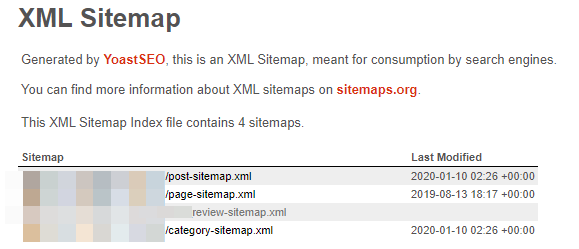
- the last modified dates from custom post type sitemaps?
 JeremyL
on 15 Jan 2020
JeremyL
on 15 Jan 2020
Hi @JeremyL and thanks for your contribution. Yes, the custom titles suffer the same problem as well, and since they're not toggle-able you can only get them back by re-inserting and saving them.
I found that 12.8.1 does fix this issue. But if you've saved your settings in the meantime without updating these titles, they are now saved as blanks I'm afraid. This also goes for the metabox settings but since that's a toggle, that's a lot easier to fix.
To fix the titles:
This is the default post SEO Title: %%title%% %%page%% %%sep%% %%sitename%%
This is the default archive SEO Title: %%pt_plural%% Archive %%page%% %%sep%% %%sitename%%
Do this for all your custom post types and save them.
Djennez
on 15 Jan 2020
@Djennez yeah that fixed the title issue. Thanks.
Any idea is 12.8.1 fixes the sitmap last modified date too? I don't have it avalible for download so I can't test it out.
JeremyL
on 15 Jan 2020
I was unable to replicate any issues with the sitemap modified dates unfortunately. Can you go into a bit more detail on what is happening and what you expect to happen?
12.8.1 isn't released yet, should be coming later today.
Djennez
on 15 Jan 2020
@Djennez see screenshot with missing date (also missing on individual custom posts). But after restoring an older archive to staging looks like that date on custom post types has been missing awhile. So seems related to something else. I'll dig into it and submit another report if I can't figure it out. Thanks.
JeremyL
on 15 Jan 2020
If you open that sitemap, are there any posts in there? The date only shows if it contains items as far as I know.
Djennez
on 15 Jan 2020
Related issues
 JoshuaPotter
·
4Comments
JoshuaPotter
·
4Comments
 danieltj27
·
6Comments
danieltj27
·
6Comments
 stayallive
·
4Comments
stayallive
·
4Comments
 tholu
·
3Comments
tholu
·
3Comments
 andizer
·
3Comments
andizer
·
3Comments
Most helpful comment
From what we could find:
12.8 introduced caching in the options of our plugin and it looks like this caching is handling non-existing options in the database different than previous versions of Yoast. We found that if you haven't saved the options of the plugin at some point, and you try to retrieve the option that determines if the metabox should be shown, it defaults to false if that option is not in the database. This only goes for custom posttypes and taxonomies.
The workaround is to go to SEO -> Search Appearance and set all metabox toggles on
Content TypesandTaxonomiesto "Show". A problem we found here is that, because all defaults are now "Hide", when you save the options, all these defaults will get saved to the database. So: make sure you go through all tabs and set all options to the values you want.Meanwhile we're going to look into the priority to get this fixed.