Wordpress-seo: WooCommerce Product Schema appears under Yoast SEO Breadcrumbs in Google Structured Data Tool
- [ ] I've read and understood the contribution guidelines.
- [ ] I've searched for any related issues and avoided creating a duplicate issue.
Please give us a description of what happened.
WooCommerce Product Schema appears under Yoast SEO Breadcrumbs.
Please describe what you expected to happen and why.
Only one Breadcrumb data would appear and WooCommerce Product Schema would appear on own line in Google Structured Data tool NOT combined with the Yoast SEO Breadcrumb schema.
How can we reproduce this behavior?
1.Add Yoast SEO Breadcrumbs to your site
2.Enable them in the SEO-Search Appearance-Breadcrumbs section. See that they appear

3.Create a WooCommerce Product
4.Run it through the structured data tool
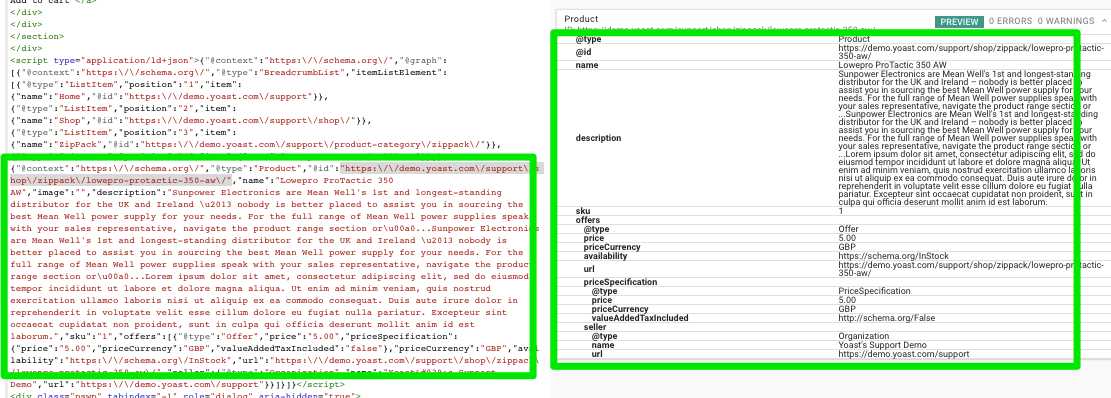
5. See two Breadcrumb schema are identified.

6. The top set of Breadcrumb schema is from Yoast. The Yoast SEO Breadcrumb schema is highlighted in the source code
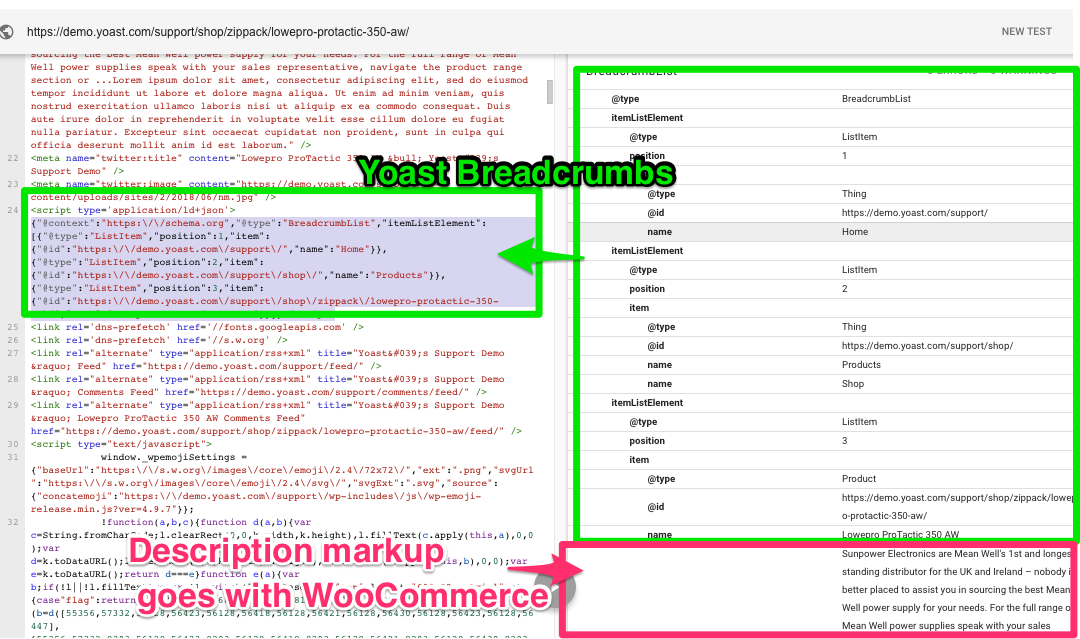
7. The bottom Breadcrumb schema is from WooCommerce. The WooCommerce breadcrumb schema is highlighted in the source code

8.See that the WooCommerce Product Schema is _not_ highlighted under the WooCommerce Breadcrumbs
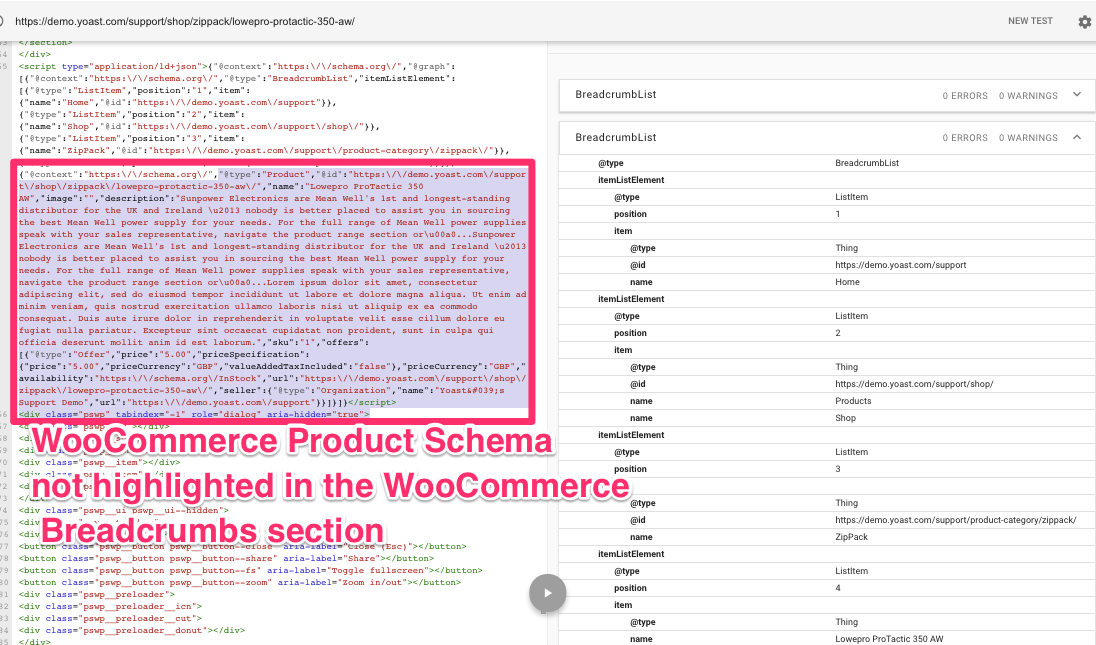
9.However, see that the WooCommerce Product Schema IS highlighted under the Yoast SEO Breadcrumbs
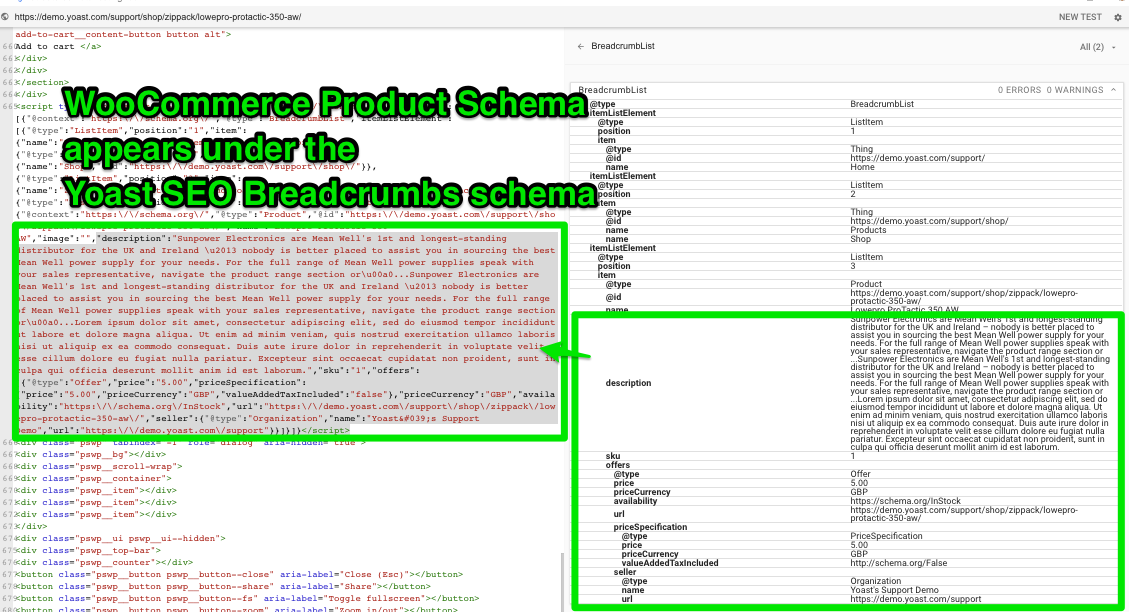
10.Disable Yoast SEO Premium
11.See WooCommerce Breadcrumbs and WooCommerce Product appear on their own individual lines
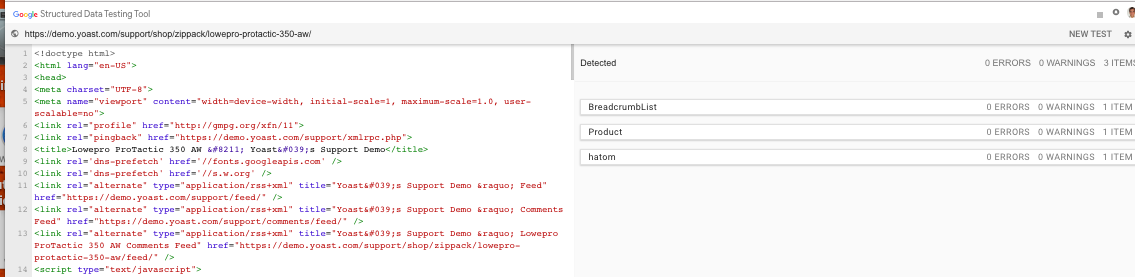
12.See WooCommerce Breadcrumbs highlight breadcrumb schema

13.See WooCommerce Product Highlight product schema
Screenshots
If applicable, add screenshots to help explain your problem.
Additional context
Add any other context about the problem here.
Technical info
- WordPress version: 4.9.7
- Yoast SEO version: 7.8
- Relevant plugins in case of a bug: 3.4.3
- Tested with theme: StoreFront (with Yoast SEO Breadcrumbs included in it)
NOTE:
Does not matter if WooCommerce SEO is enabled and the Yoast SEO WooCommerce breacrumbs are enabled. Two Breadcrumb schemas are outputted in the tool
_i. Yoast SEO WooCommerce breacrumbs are enabled_
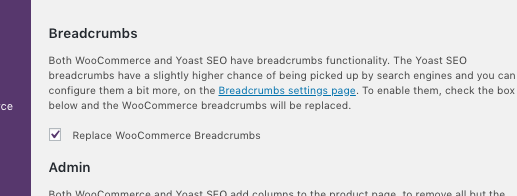
_ii.Two Breadcrumbs_

 Pcosta88
All 21 comments
Please inform the customer of conversation # 402420 when this conversation has been closed.
Pcosta88
on 10 Jul 2018
Possibly related:https://github.com/Yoast/wordpress-seo/issues/10342
 rmarcano
on 11 Jul 2018
rmarcano
on 11 Jul 2018
Downgrading to v6.3.1 appears to resolve the issue.

Pcosta88
on 13 Jul 2018
Why are there no Yoast employees addressing this? This is a extremely serious issue for eCommerce Sites. I can’t believe this is being ignored.
 jsmusiker
on 3 Oct 2018
jsmusiker
on 3 Oct 2018
Please inform the customer of conversation # 430026 when this conversation has been closed.
rmarcano
on 5 Oct 2018
Please, inform the customer of conversation #435316 when this conversation has been closed.
 laurasacco
on 18 Oct 2018
laurasacco
on 18 Oct 2018
Please inform the customer of conversation # 435239 when this conversation has been closed.
rmarcano
on 18 Oct 2018
This issue is causing users to lose their product snippets on search results.
 benvaassen
on 19 Oct 2018
benvaassen
on 19 Oct 2018
Please inform the customer of conversation # 435756 when this conversation has been closed.
 mariusghitulescu
on 19 Oct 2018
mariusghitulescu
on 19 Oct 2018
I'm aware of this issue, and working on a solution. I'm specifying a large update to the way we output schema, which should resolve this. Watch this space.
 jono-alderson
on 23 Oct 2018
jono-alderson
on 23 Oct 2018
Please inform the customer of conversation # 442217 when this conversation has been closed.
Pcosta88
on 8 Nov 2018
In the short-term, we should append the #product to the end of the product @id parameter.
jono-alderson
on 13 Nov 2018
I have the same issue with schema generated by Site Reviews plugin which appears inside the BreadcrumbList instead of Product
 JeremieBALDY
on 13 Nov 2018
JeremieBALDY
on 13 Nov 2018
I have the same issue with schema generated by Site Reviews plugin which appears inside the BreadcrumbList instead of Product
Please see: https://wordpress.org/support/topic/schema-appears-under-breadcrumblist-in-google-structured-data-tool-2/#post-10880708
 pryley
on 14 Nov 2018
pryley
on 14 Nov 2018
any idea when it will be fixed, or some workaround at least?
 hagsonz
on 21 Dec 2018
hagsonz
on 21 Dec 2018
Workaround
I'am using a workaround since the problem stil exists for months now, I wrote it a few years ago. It is not the nicest piece of code but is working for me.
Download:
json-ld-woocommerce.txt
You have to change the organization name, it is hard coded. Change it to your own organization name and for the brand the same thing or make comments of it (Lines 126 and 131).
Rename the file to json-ld-woocommerce.php .
Copy the file to your theme or better child theme folder.
Call the code in your header.php of your theme by including it as shown here:
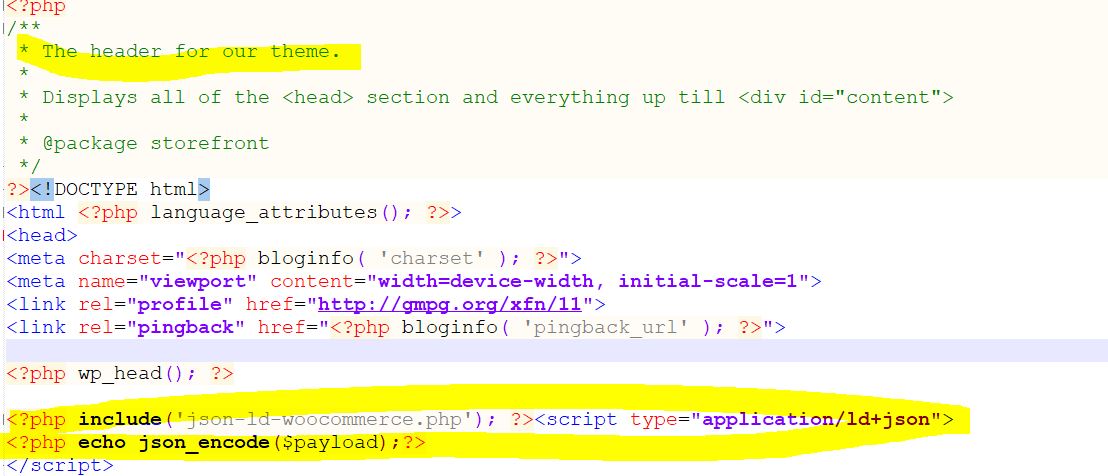
To make it easy download this file and copy paste this in your header as shown above.
Check in Google:
https://search.google.com/structured-data/testing-tool#
Put in a link to your product page and you will see the product microdata.
I'm not giving support, use it at your own risk.
Merry Christmas and happy new year 2019
 MAJA1970
on 25 Dec 2018
MAJA1970
on 25 Dec 2018
I am a Premium YOAST user since years and I'm shocked how long this bug is present and does harm Google search results for so many of us. PLEASE YOAST.....
 GTO-1
on 6 Jan 2019
GTO-1
on 6 Jan 2019
Lots of moving parts here, so consolidating for simplicity.
- In JSON-LD markup, any entity can have an
IDproperty (an arbitrary string). That ID uniquely identifies that entity, in the context of the page it's on. - If multiple entities on a page share an ID, then search engines / etc may confuse and conflate those entities. In this case, the
productand thebreadcrumbsshare the same ID, and Google is awkwardly trying to merge them. - There's a special case with
breadcrumbs, however, where the IDs _must_ be the URL of the page. So, no other entity on a page should ever use the URL as its ID. - So, the
Productneeds a different, unique ID. - We should make in WooCommerce's code.
- For the sake of neatness, we recommend that an ID be structured as an 'extension' of the page the entity is on. E.g., in this case, the ID of the product could/should be
https://www.example.com/page/#product, where the URL is the page in question.
Making this change will remove the ID collision, and resolve the conflicts. Nothing else should change/break.
A slight nuance
- If WooCommerce is referencing the _current_ ID anywhere (e.g., an
Organizationnode may have a 'makesOffer' property which references the product ID), then the referenced IDs will also need to be updated to the new format. - I don't _think_ that this is currently the case anywhere, but we should check.
jono-alderson
on 14 Jan 2019
Opened over at WooCommerce: https://github.com/woocommerce/woocommerce/issues/22440
jono-alderson
on 14 Jan 2019
The main problem in this issue has been resolved by the fix in Yoast SEO: WooCommerce (https://github.com/Yoast/wpseo-woocommerce/pull/294)
This will disable the WooCommerce breadcrumbs when the option is selected in the plugin.
To be able to provide the most optimal schema.org implementation for Products, the WooCommerce JSON+LD output needs to change, to make sure the identifier for a product is not the URL it is on.
This is being discussed in the above-mentioned issue.
If you do not own Yoast SEO: WooCommerce, we recommend to disable the Breadcrumbs in WooCommerce and use the ones output by Yoast SEO.
Closing this in favor of: https://github.com/Yoast/wordpress-seo/issues/12053
Support: Please determine if the problem for the customers that have been added to this issue has been fixed or if they need to be notified when closing #12053
 moorscode
on 17 Jan 2019
moorscode
on 17 Jan 2019
The above-mentioned fix in WooCommerce has been applied and released in 3.5.5 - see https://github.com/woocommerce/woocommerce/pull/22554
moorscode
on 27 Feb 2019
Related issues
 isaumya
·
4Comments
isaumya
·
4Comments
 theRealRizeo
·
5Comments
theRealRizeo
·
5Comments
 shanejones
·
5Comments
shanejones
·
5Comments
 JoshuaPotter
·
4Comments
JoshuaPotter
·
4Comments
 haroldangenent
·
4Comments
haroldangenent
·
4Comments
Most helpful comment
Why are there no Yoast employees addressing this? This is a extremely serious issue for eCommerce Sites. I can’t believe this is being ignored.