Wordpress-seo: wp_options rows with tons of wpseo_sitemap_*_cache_validator
What did you expect to happen?
Is this normal to have so many of these? All autoload == yes. didn't expect to have all those rows autoloading in the wp_options table.
What happened instead?
full of rows, currently 733 right now.
How can we reproduce this behavior?
look at wp_options table and filter by wpseo_sitemap_
Can you provide a link to a page which shows this issue?
nope. here's an image.
ALSO: Any way to clean that out other than removing all those rows via sequel-pro or something similar?

Technical info
- WordPress version: 4.5.2
- Yoast SEO version: 3.2.5
 chuckreynolds
All 47 comments
The rows with numerical keys are invalid and should no longer be created in current version of the plugin. Might be leftovers from earlier, do you observe them still being generated?
See #4389
 Rarst
on 9 Jun 2016
Rarst
on 9 Jun 2016
right then. what's the worst that can happen... I'd nuke all of wp_options rows that include those and i'd have to rebuild the sitemap cache from the plugin settings? it's crappy but i can handle that.
chuckreynolds
on 10 Jun 2016
and to answer your "do you observe them still being generated?"... no. after removing all occurances and reloading /sitemap_index.xml and the subs, I only see the appropriate ones being generated in the DB... would have been nice to have a cleaner function when that version that patched that issue came out. I had upwards of over 1600 of them in production.
chuckreynolds
on 10 Jun 2016
Autoload for cache options is now properly disabled too btw (not sure if it shipped yet, but it's implemented).
Rarst
on 10 Jun 2016
so I can manually delete it, right?
 pawawat
on 22 Jul 2016
pawawat
on 22 Jul 2016
@pawawat yeah, cache entries are safe to delete.
Rarst
on 22 Jul 2016
We found the same issue on one old WP install. We updated the plugin and cleaned the old entries with
mysql> delete FROM get_options WHERE option_name rlike 'wpseo_sitemap_[0-9]*_cache_validator';
Query OK, 13964 rows affected (0.35 sec)'
before doing that we had some performance issue with the whole WP site.
 dgolja
on 8 Oct 2016
dgolja
on 8 Oct 2016
I had a similar issue over a month ago. Then I deleted over 10000 rows. Although it wasn't suppose to happen with this new version today I deleted another 1663 rows.
Is there a bug which creates all these rows?
 GreenLondon
on 27 Mar 2017
GreenLondon
on 27 Mar 2017
@Rarst please have a look on this issue as it's not solved and the problem still persists.
GreenLondon
on 4 Apr 2017
We found a site with 600.000 of these option entries! I can confirm that @dgolja's query got rid of them.
In my opinion it would be good if that query was run automatically on plugin upgrade to clean up old cruft. There are likely many more sites still getting bogged down by a filled-up options table. The performance problems are compounded by the fact that WP does not have an index on the autoload column in this table, so MySQL performs a sequential scan over these records on every page view.
(Current version wordpress-seo-premium 3.9, no new entries seem to be created.)
 lifeforms
on 22 Apr 2017
lifeforms
on 22 Apr 2017
The plugin needs to delete these options value rows. I also have tons of them right now! I had 329 entries.
 inetbiz
on 21 Jul 2017
inetbiz
on 21 Jul 2017
Watching. I am seeing 30K+ rows in my one site.
 moazam1
on 4 Aug 2017
moazam1
on 4 Aug 2017
I have over 400k of these entries!
 davidshq
on 25 Aug 2017
davidshq
on 25 Aug 2017
mysql> delete FROM get_options WHERE option_name rlike 'wpseo_sitemap_[0-9]*_cache_validator';
Query OK, 13964 rows affected (0.35 sec)'
thanks for this. i cleaned up my database.
 tosunkaya
on 17 Sep 2017
tosunkaya
on 17 Sep 2017
But how can i block these
tosunkaya
on 17 Sep 2017
Seeing this in latest version with 900+ entries.
 rickalee
on 7 Nov 2017
rickalee
on 7 Nov 2017
@rickalee delete method on 2 above of your message.
tosunkaya
on 8 Nov 2017
Besides adding a manual SQL query to a cron job, how do we prevent this database bloat?
rickalee
on 8 Nov 2017
im looking for a real soultion too. i have lots of websites. but one of these has 100k woocommerce products and getting 9999999 yoast rows. we should fix this.
tosunkaya
on 8 Nov 2017
I have the same problem. Everyday i have to clean up my datbase.
 JohnBijl
on 18 Nov 2017
JohnBijl
on 18 Nov 2017
I'm seeing the same problem and I've only recently installed the plug-in (so not from old versions left lying around). Surprised as my site is really small!
 smycroft
on 1 Dec 2017
smycroft
on 1 Dec 2017
is this issue is fixed? today I get it again :(
 magneto664
on 9 Jan 2018
magneto664
on 9 Jan 2018
Same issue here on the latest versions of Yoast and WP core, hoping to see this resolved in the near future. Thanks.
 bozzmedia
on 10 Jan 2018
bozzmedia
on 10 Jan 2018
 monbauza
on 10 Jan 2018
monbauza
on 10 Jan 2018
Sorry, you send me to other topic, and I don't see on it any idea how to fix it, can you help me? tnx.
magneto664
on 10 Jan 2018
I just deleted 63,183 rows, which were all cache_validator rows... that's insane...
 mattpramschufer
on 22 Jan 2018
mattpramschufer
on 22 Jan 2018
yep i just found a crap lad of these atleast a few thousand ugh.....
 rpandassociates
on 16 Feb 2018
rpandassociates
on 16 Feb 2018
epic fail........ i think yoast needs to come clean these out for me hahahaha NOT funny
rpandassociates
on 16 Feb 2018
@rpandassociates just use this to clean it out... it will take seconds...
mysql> delete FROM get_options WHERE option_name rlike 'wpseo_sitemap_[0-9]*_cache_validator';
 vincepettit
on 16 Feb 2018
vincepettit
on 16 Feb 2018
27205 entries wow...... but in my case it is wp_options versus get_options I guess i need to harden my sql prefix :)
rpandassociates
on 16 Feb 2018
index autoload column may help
pawawat
on 17 Feb 2018
I noticed my site getting really slow for no apparent reason. Had a look at the wp_options table and found 153,590 * _cache_validator rows. I also found over 150,000 rows from WooCommerce with _wc_product_loop in the option name.
So I wrote a small cron task that deletes the offending rows every 24 hours. It took my wp_options table from over 300,000 rows down to about 1,300. My site is much faster and the Query Monitor plugin isn't complaining about all of the slow queries (which were all related to the wp_options table).
Here's the code you can add to a custom plugin or your functions.php file.
DISCLAIMERS
- USE WITH CAUTION.
- THIS WILL DELETE DATA FROM YOUR SITE!
- BACKUP REGULARLY AND OFTEN!
- SERIOUSLY, DON'T USE THIS UNLESS YOU UNDERSTAND WHAT IT DOES.
- CONSULT YOUR DOCTOR IF YOU FEEL DIZZY OR NAUSEOUS.
/**
 * Loop through option strings that might exist in the "option_name" column
 * and delete the row if there is a match.
 */
function mycode_cleanup_options_table() {

    global $wpdb;

    $options = [
        '%_wc_product_loop%', // Plugin: WooCommerce
        '%_cache_validator', // Plugin: Yoast SEO
    ];

    foreach ( $options as $option ) {
        $query = "DELETE FROM $wpdb->options WHERE option_name LIKE %s";
        $wpdb->query( $wpdb->prepare( $query, $option ) );
    }
}

add_action( 'mycode_cleanup_options_table', 'mycode_cleanup_options_table' );

/**
 * Schedule options table cleanup daily.
 */
function mycode_schedule_options_table_cleanup() {
    if ( ! wp_next_scheduled( 'mycode_cleanup_options_table' ) ) {
        wp_schedule_event( time(), 'daily', 'mycode_cleanup_options_table' );
    }
}

add_action( 'wp', 'mycode_schedule_options_table_cleanup' );
 EricBusch
on 21 Feb 2018
EricBusch
on 21 Feb 2018
I just wrote a plugin: https://github.com/moazam1/yoast-seo-cleaner for those who don't want to write code. I have published plugin on WP site and will add link here as soon as it's published.
moazam1
on 22 Feb 2018
What? This was never fixed?
 MediaMaquina
on 3 Mar 2018
MediaMaquina
on 3 Mar 2018
What? This was never fixed?
Mine seems to be accumulating ever more of these records so I guess it wasn't. Been reported often enough by many different people yet no fixes. I'm not pondering whether to wait for the fix plug-in (above) to be published or to switch to a different SEO plug-in. Seems a bit daft for others to have to create plug-ins to fix long established problems in other plug-ins!
smycroft
on 3 Mar 2018
My plugin is live: https://wordpress.org/plugins/clean-yoast-seo-cache/ I hope Yoast will fix this asap. It's shame to install addons to fix issues like this.
moazam1
on 4 Mar 2018
Over 122k entries on one of our sites and over 5k on the other. As per https://github.com/Yoast/wordpress-seo/issues/5507#issuecomment-284704443, setting max entries per sitemap to something else doesn't remove these rows.
Currently running version 6.1.1, will upgrade soon, but it's not clear whether this bug was ever resolved, or if it's a bug at all.
SELECT count(*) FROM wp_options WHERE option_name like 'wpseo_%cache_validator';
+----------+
| count(*) |
+----------+
|   122476 |
+----------+
SELECT count(*) FROM wp_options WHERE option_name like 'wpseo_%cache_validator';
+----------+
| count(*) |
+----------+
|     5153 |
+----------+
 archon810
on 20 Mar 2018
archon810
on 20 Mar 2018
@jdevalk Can you chime in here and #5507? Look at how many confused comments have been posted.
archon810
on 20 Mar 2018
We've created a beta that will partly address this issue.
It clears all existing cache validator entries from the database. This is a small step towards removing the cache from the database entirely. To read more, please see:
https://github.com/Yoast/wordpress-seo/pull/9504
The beta has been added. Please note that we always advise you to test the beta on a testing environment and create a backup of your website.
If you test this, please let us know what your findings are and if this helps solve part of your problem.
 CarolineGeven
on 20 Apr 2018
CarolineGeven
on 20 Apr 2018
What is the status of this issue that is more than 2 years old?
I see these rows in wp_options after doing an import into a clean fully updated wordpress site with version 8.1.2 of your plugin.
Is there any actual fix planned for this issue?
If there is a work around via installation of a cache plugin like redis integration, is there any documentation that details how that helps or the steps one needs to take?
Is there any formal documentation from your team on how to and the impact of removing these rows manually or should I use the community provided SQL?
 jstromergalley
on 6 Sep 2018
jstromergalley
on 6 Sep 2018
Why would this data be stored in the wp_options table anyway? Why isn't Yoast storing their data in an optimized plugin-specific table?
 mwendell
on 19 Sep 2018
mwendell
on 19 Sep 2018
After THAT time frame i see this issue is still not fixed?
magneto664
on 9 Oct 2018
Updated to latest version 9.2.1 of plugin and all rows are removed automatically and cleaned database. Great Work
 jimi008
on 23 Nov 2018
jimi008
on 23 Nov 2018
Same here, went from 39k entries in wp_options to under 300. On the flip side, XML sitemaps are now uncached and take forever to load. There should be a caching solution for these IMO, just one that doesn't spam wp_options.
archon810
on 23 Nov 2018
Caching plugins (WP Super Cache, W3 Total Cache, ...) work for sitemaps (if they aren't excluded from in caching settings).
WP Super Cache recognizes correctly _Content-type_ (there were issues 1-2 years ago) and sitemaps are stored as wp-cache files (same as "feed" - Content-type: text/xml). Each change of posts will flush sitemap cache (because it flushes feeds). I've created couple PRs for WPSC and I confirm that it works correctly.
I think that you don't need more to exclude sitemaps from caching plugins. You could try and create new issue related to caching plugins if it doesn't work as should.
 stodorovic
on 23 Nov 2018
stodorovic
on 23 Nov 2018
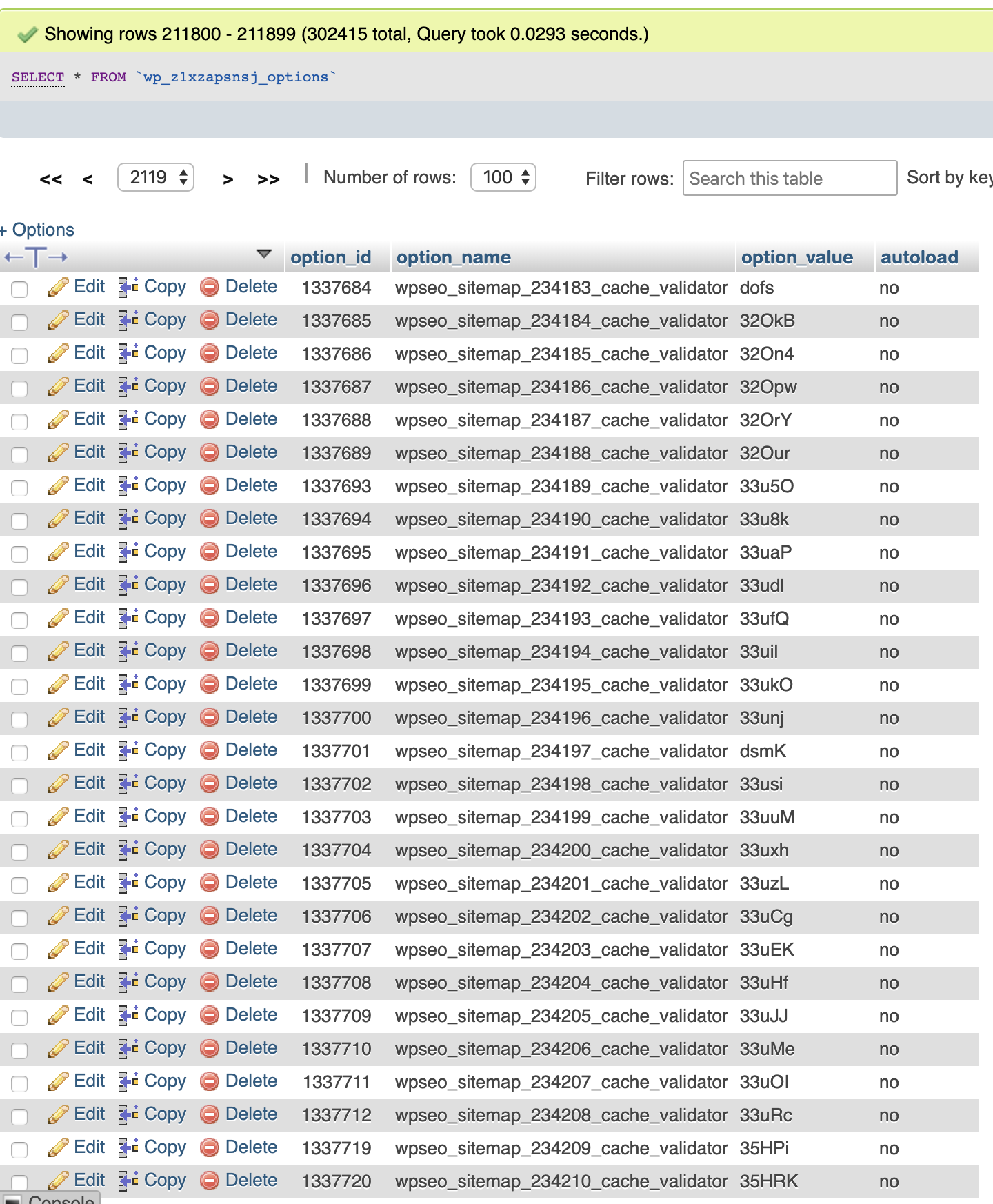
Why is this still an issue? Can Yoast please fix this mess already:
 nickth0
on 4 Nov 2019
nickth0
on 4 Nov 2019
@nickth0 Do you have installed Divi or Divi builder?
There is line in their code (_includes/builder/plugin-compat/wordpress-seo.php_) which forces caching into transients (which is disabled by default since Yoast SEO 7.4):
add_filter( 'wpseo_enable_xml_sitemap_transient_caching', '__return_true' );
Maybe there are similar cases in other themes/plugins. You could override this value by adding filter with higher priority.
stodorovic
on 6 Nov 2019
Related issues
 cristopherrosenberg
·
3Comments
cristopherrosenberg
·
3Comments
 shanejones
·
5Comments
shanejones
·
5Comments
 stayallive
·
4Comments
stayallive
·
4Comments
 tholu
·
3Comments
tholu
·
3Comments
 theRealRizeo
·
5Comments
theRealRizeo
·
5Comments
Most helpful comment
We found the same issue on one old WP install. We updated the plugin and cleaned the old entries with
before doing that we had some performance issue with the whole WP site.