Wordpress-ios: Magic login link brings iPad users to browser
Expected behavior
When trying to log into a WordPress.com account or create a new one, the magic login link should open in the WordPress iOS app and log the user in.
Actual behavior
The magic login or account creation links are opening in a browser, or prompt the user to open any browser on the device, but not the WP app. In the browser it shows an error that states:
"Looks like you clicked a magic sign-in link on your desktop instead of on the phone or tablet where you use the app.
To sign in to the app, check your email on your mobile device and tap the link there."
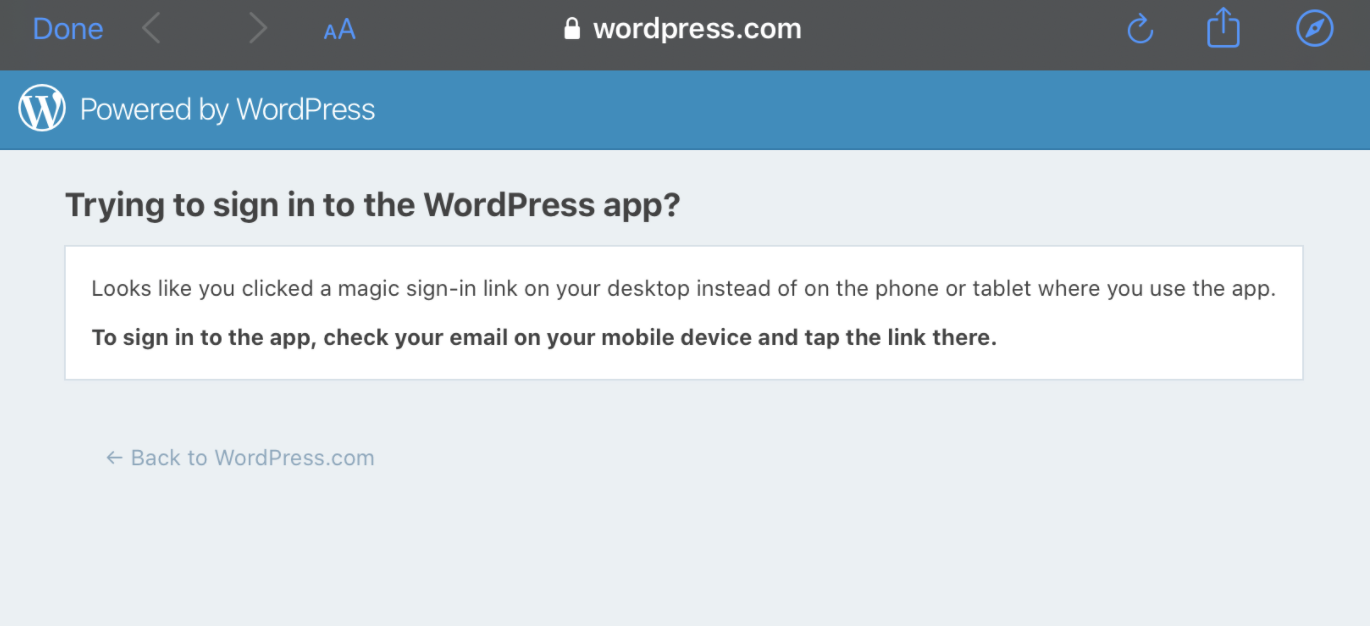
Steps to reproduce the behavior
- On an iPad, open the WordPress app while logged out (or log out)
- Tap to create a new WPcom account (or to log into an existing one)
- Click the link in email
- You should be redirected to the browser, and the same wording shows up for site creation or login
Tested on iPad 7th gen, iOS 13.6, WPiOS 15.3
reported on:
- iPad 5th Gen, iOS 13.5.1, WPiOS 15.2
- iPad 6th Gen, iOS 13.5.1, WPiOS 15.3
 msilbers
All 13 comments
I did a quick test of sign in and sign up with magic links using an iPad Mini 4 iPadOS 13.6 in landscape mode and was unable to replicate. (1m33s, 1m14s)
Tested with WPiOS 15.4.0.0 TestFlight beta on iPhone 11 iOS 13.6.
I can try testing again tomorrow with older app versions and/or with a simulator if needed.
Heya @msilbers, was this issue reported by a user or did you observe the bug first-hand on your iPad or both?
 designsimply
on 4 Aug 2020
designsimply
on 4 Aug 2020
@designsimply This was reported by 2 users (the last 2 listed), and replicated by @sarahfg on iOS 13.6
msilbers
on 4 Aug 2020
@designsimply I'm not sure if it makes a difference here but I was tapping the link from inside the gmail app for iPad. When tapping on the magic login link emailed to me my iPad gave me several choices on what to open the link in. All choices were web browsers on my iPad, not the WordPress app.
 sarahfg
on 4 Aug 2020
sarahfg
on 4 Aug 2020
"As of iOS 13, mobile Safari can be configured to always request a desktop version of a web page. This option can be found under Settings > Safari > Request Desktop Website." /hat tip @mindgraffiti
Users may try testing with the Settings > Safari > Request Desktop Website setting turned off, but also note that there may be another factor which is how we are doing the redirects back to the app based on user agent in another way as well. Which leads me to:
"It looks like if you request the desktop site the user agent no longer includes what type of device is requesting it which would cause the ‘desktop link’ message to be displayed." /hat tip @emilylaguna
(internal reference: D41714-code, pbMoDN-QJ-p2#comment-1655)
From what I understand after a bit more research (and some conversations in Slack), the reason this is happening is that Apple changed the way websites are typically requested making it hard to determine the user agent in some cases (i.e. settings based) and we are relying on knowing the user agent to do the redirect which should happen right after entering a 2fa code in a magic link + two-factor enabled login. We can change that quickly but the tradeoff is that if users click on the app-generated login magic link from a desktop Safari browser then it will result in a blank page instead of the warning message from your screenshot. I think the change is worth it in the short-term because the current potential is that some people are blocked from being able to do passwordless sign in with 2fa from the WPiOS app.
designsimply
on 7 Aug 2020
Another user report for this in 3202634-zen.
 rezzap
on 8 Aug 2020
rezzap
on 8 Aug 2020
This came up in beta tester feedback:
Lors de l’inscription, lors du clique sur le bouton d’inscription dans la messagerie, me proposer d’ouvrir dans l’app mais celle bug et saute sur l’écran d’accueil
Anonymous Crash Feedback (Aug 6, 2020 at 3:59 AM) - WPiOS 15.4.0.2 iPhone 8 iOS 14.0
Translated with Google:
During registration, when clicking on the registration button in the messaging, offer to open in the app but the app bug and jump to the home screen
designsimply
on 13 Aug 2020
Should be fixed in D47822-code. Props @aerych @emilylaguna. 🎉
I followed up with ticket 3202634-zen as it was the only user ticket listed on this issue.
designsimply
on 13 Aug 2020
There was another report on 3185969-zen.
Since it's fixed, I replied to the user and asked them to try again.
 erricgunawan
on 13 Aug 2020
erricgunawan
on 13 Aug 2020
Any new reports on this one?
 aerych
on 17 Aug 2020
aerych
on 17 Aug 2020
reported without many details yet in 3351551-zen
[Update from Sheri: adding some details about this one below!]
I am trying to sign up. I downloaded your app. It sent an email with a link for sign up. When I click on it, it only lets me open with browsers, not your app (I am using an iPad). When I select a browser, the sign up doesn’t work because it is not the app. Please help
WPiOS 15.7 - iPad 7 (WiFi) (iPad7,11) - iOS 13.7
msilbers
on 26 Sep 2020
Removing the blocking label because there has been only one user report in the last 50 days.
designsimply
on 2 Oct 2020
I took a closer look at the latest report. Testing on my iPad 11 Pro
When I select a browser, the sign up doesn’t work because it is not the app.
Selecting a browser is interesting. As of iOS 14 the default web browser can be changed, but our user is still on iOS 13.7. I'm guessing they are not using the default mail app, and are instead using Gmail (or another similar app) which can be configured to ask which browser to use when opening a link.
Testing Gmail app
I installed the Gmail mail app, along with Chrome and Firefox and then tested creating a new account and logging in to an existing account via a log in link. Firefox never appeared as an available browser option from within the Gmail app but I could choose between Chrome and Safari (and had an option to download the Google app). I was able to successfully login or sign up via either Chrome and Safari chosen from within the Gmail app.
Testing iOS 14 default browser
For due diligence I also tested on iOS 14 and setting the default browser to Chrome and Firefox and was still able to successfully log in with both browsers.
Take away
Everything just worked so we're missing some key step or condition that's affecting our user. It seems like the majority of our users shouldn't be encountering any trouble but it would be nice to see if we could get more insight into what this particular user is experiencing.
It would be good to reach back out and ask if them to confirm which app they are using for their email (is it actually Gmail) and which browser they are choosing to open the link.
aerych
on 5 Oct 2020
No response on 3351551-zen and no further login activity for that user since September 26. As we've had no new reports I suggest we close this one.
 mindgraffiti
on 17 Nov 2020
mindgraffiti
on 17 Nov 2020
Related issues
designsimply
·
3Comments
mindgraffiti
·
3Comments
 iamthomasbishop
·
3Comments
iamthomasbishop
·
3Comments
 hypest
·
3Comments
designsimply
·
3Comments
hypest
·
3Comments
designsimply
·
3Comments
Most helpful comment
Should be fixed in D47822-code. Props @aerych @emilylaguna. 🎉
I followed up with ticket 3202634-zen as it was the only user ticket listed on this issue.