Wordpress-ios: Notifications: 2FA login push notification sometimes does not trigger in-app confirmation prompt
Expected behavior
I expect that if I am logged in to my account with 2FA in the app, and I try to log in to that account on the web, I'll be prompted with a 2FA push notification about the login attempt. When I tap the push notification, I'll be taken to a confirmation prompt in the app where I can ignore or approve the login.
Actual behavior
Sometimes, tapping the push notification opens the app but does not display the confirmation prompt so I can't ignore or approve the web login.
This was reported by an a8c tester with WP Internal and I reproduced it with WP Internal. I haven't confirmed if it happens with the app store version. I noticed that the logs for both reports (mine and the other tester) show Received push notification twice for the push_auth notification.
Steps to reproduce the behavior
We don't have exact steps to reproduce, but these are the steps used when it happened:
- Start logged in to the app with a WordPress.com account with 2FA. Ensure you have push notifications enabled on your device.
- On the web, log in to the same account. At the 2FA step, you should see a message that a push notification was sent to your device for 2FA.
- When the push notification arrives, tap it.
Result: Sometimes the app opens with the confirmation prompt, but sometimes the app opens and no confirmation prompt appears.
Reported at p4a5px-2v0-p2 on iPhone X, iOS 13.3, WP Internal beta
Reproduced on [iPhone XS], iOS [13.3], WPiOS [14.20.20200210]
 rachelmcr
All 16 comments
I have had this experience as well - either receiving the push notification but no in-app confirmation, or not receiving the push notification at all. Will keep an eye out for more cases.
 thehenrybyrd
on 18 May 2020
thehenrybyrd
on 18 May 2020
There is another report here https://woothemes.zendesk.com/agent/tickets/2946401 from Android WP app v14.7.1. #2946401-zen
[UPDATE from Sheri: the support request in 2946401 was a different bug where the "Approve" option appeared but tapping on it did not work (now fixed on the server side via https://github.com/Automattic/wp-calypso/pull/42504 which Eli noted earlier in another comment). 👍 This bug is different, it's a case where the "Approve" button never appeared.]
 sarahfg
on 18 May 2020
sarahfg
on 18 May 2020
This has been fixed here: https://github.com/Automattic/wp-calypso/pull/42504. @thehenrybyrd since you could replicate, can you verify and close the issue if it's no longer a problem? Thanks.
 elibud
on 20 May 2020
elibud
on 20 May 2020
@elibud and @thehenrybyrd - Another report in 2992136-zd
 scosgro
on 21 May 2020
scosgro
on 21 May 2020
@scosgro that user reported the issue before we deployed the fix, can you ask them to try again now please?
elibud
on 21 May 2020
@scosgro that user reported the issue before we deployed the fix, can you ask them to try again now please?
Reached out again in 2992136-zd. Will post a link to this thread in the notes for when they get back with us.
[UPDATE from Sheri: the support request in 2992136 was a different bug where the "Approve" option appeared but tapping on it did not work (now fixed on the server side via https://github.com/Automattic/wp-calypso/pull/42504 which Eli noted earlier in another comment). 👍 This bug is different, it's a case where the "Approve" button never appeared.]
scosgro
on 21 May 2020
With the help of a few additional internal reports ❤️ I've figured out some reliable steps to reproduce this issue.
To prepare:
- On the device, go to Settings > WordPress > Notifications and turn "Allow Notifications" on.
- If you haven't already, set up two-factor authentication (2FA) for your WP.com account. (ref)
To test:
- Log in to the WPiOS app using a 2FA-enabled account.
- Lock the device.
- On the web, go to https://wordpress.com/log-in.
- Enter username and password and click the "Log In" button.
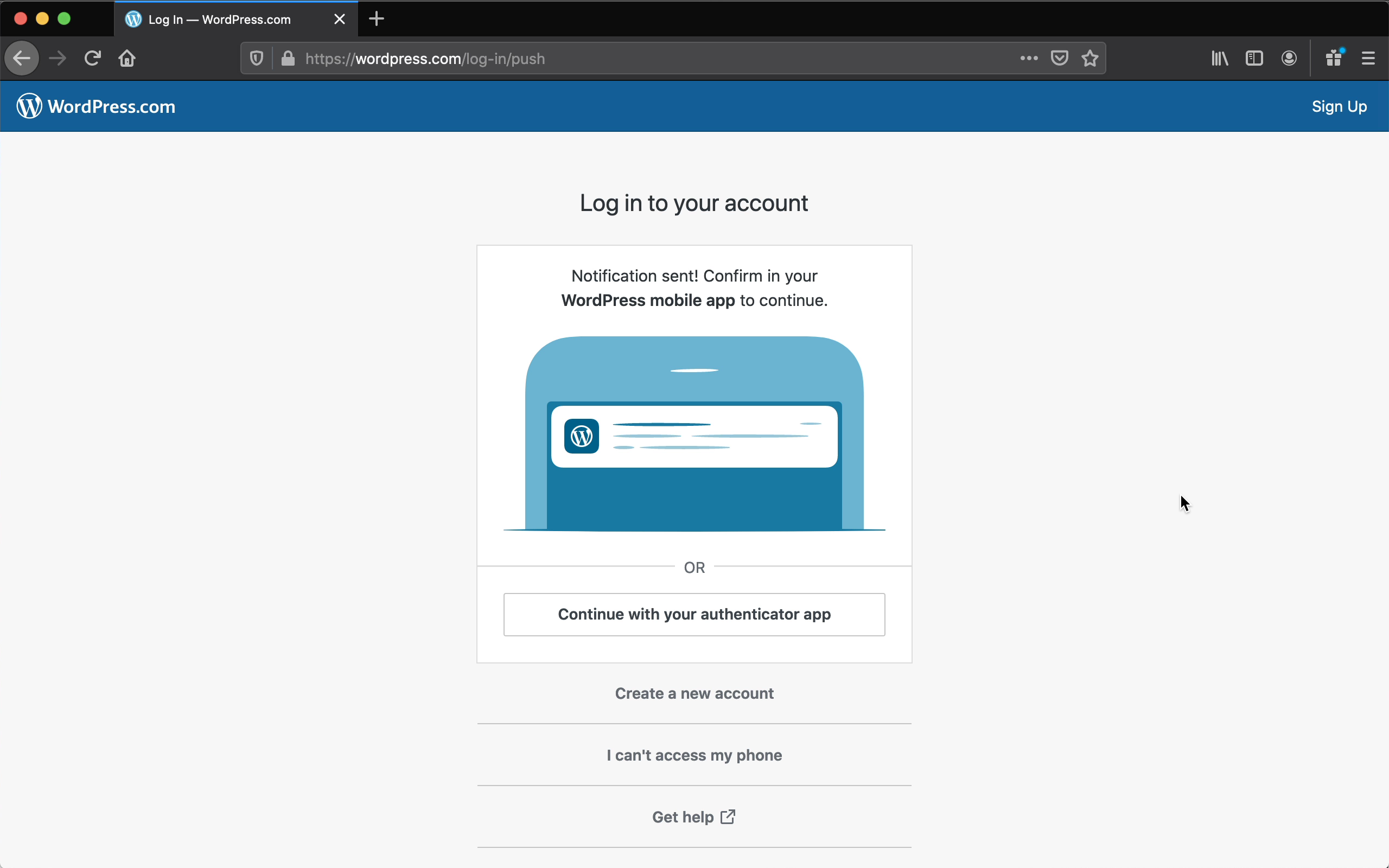
- Expect to see a "Notification sent!" message.
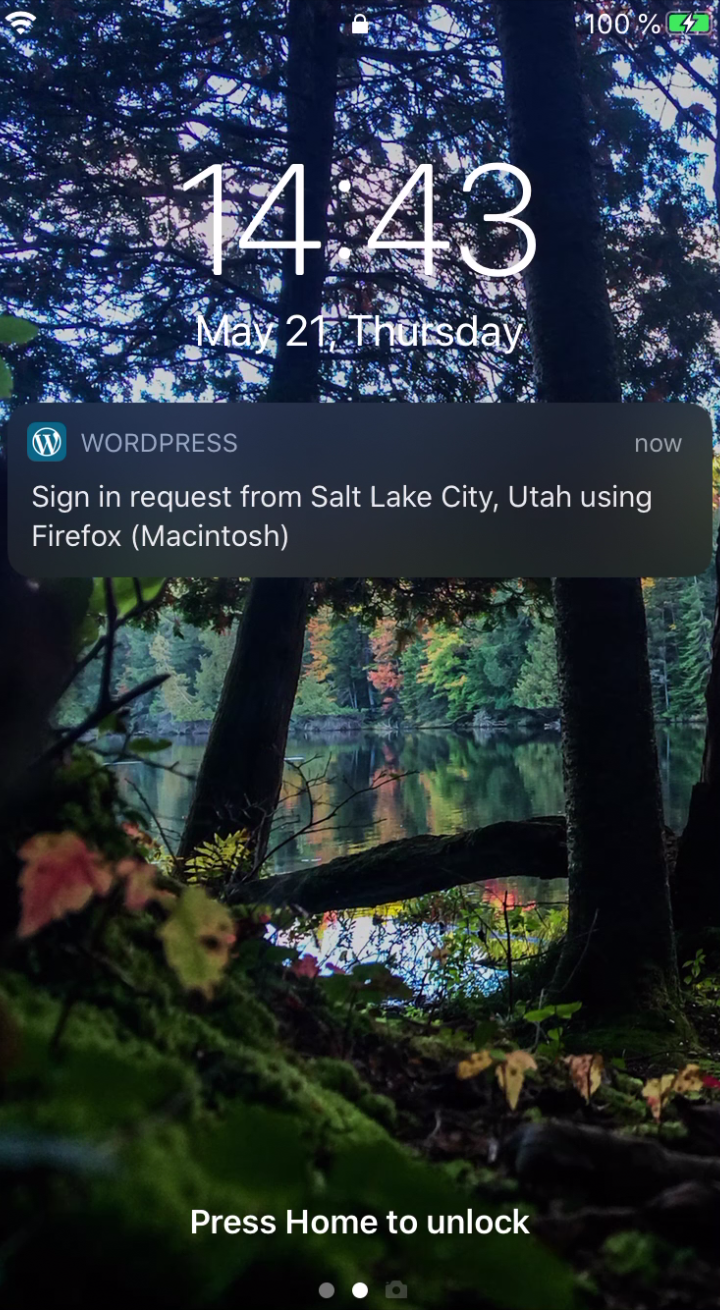
- Expect to see a corresponding push notification on the lock screen of the app.
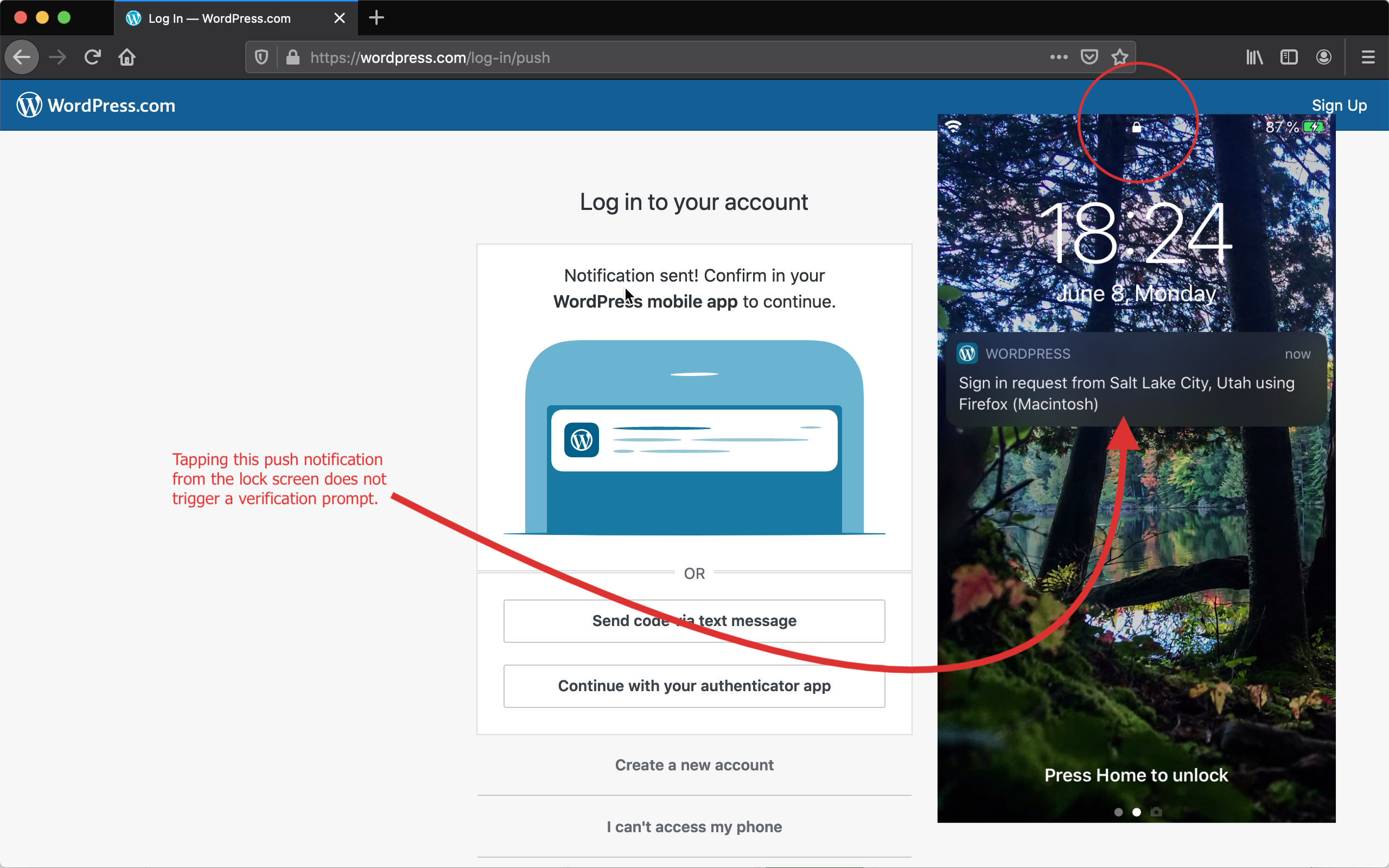
- Tap the notification on the lock screen.
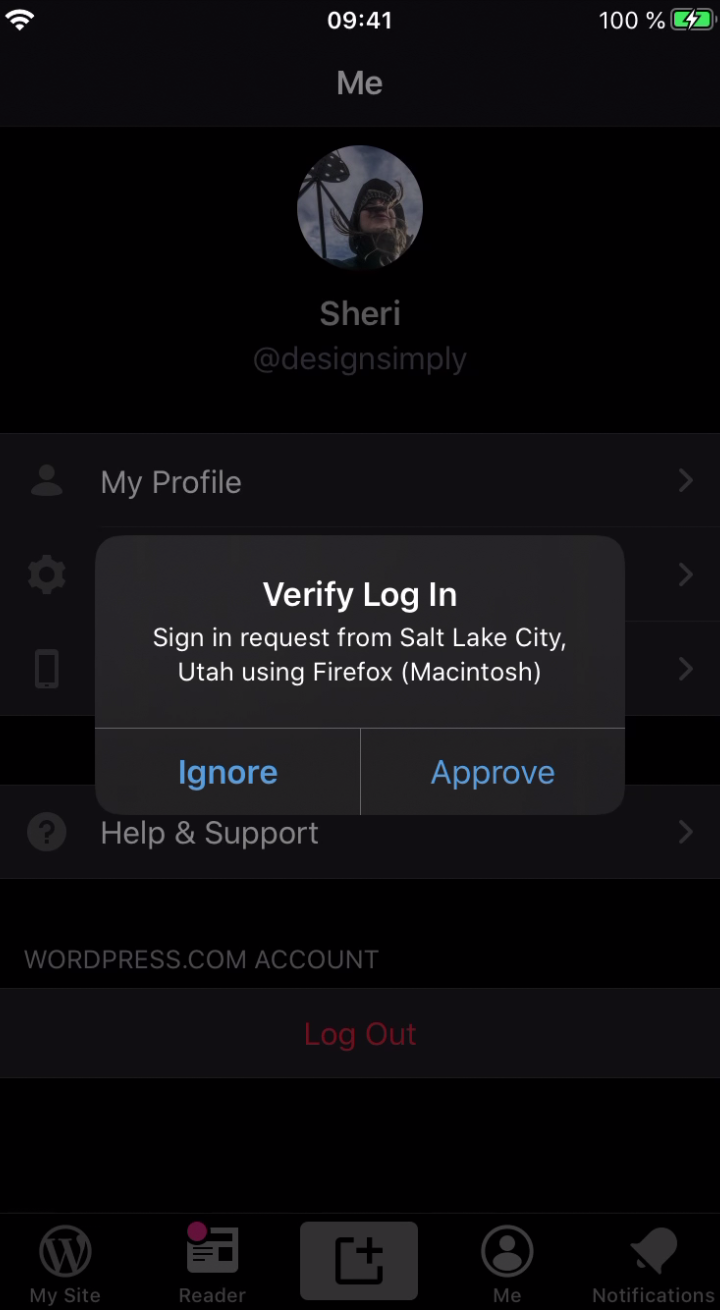
- Notice the in-app confirmation does not appear.
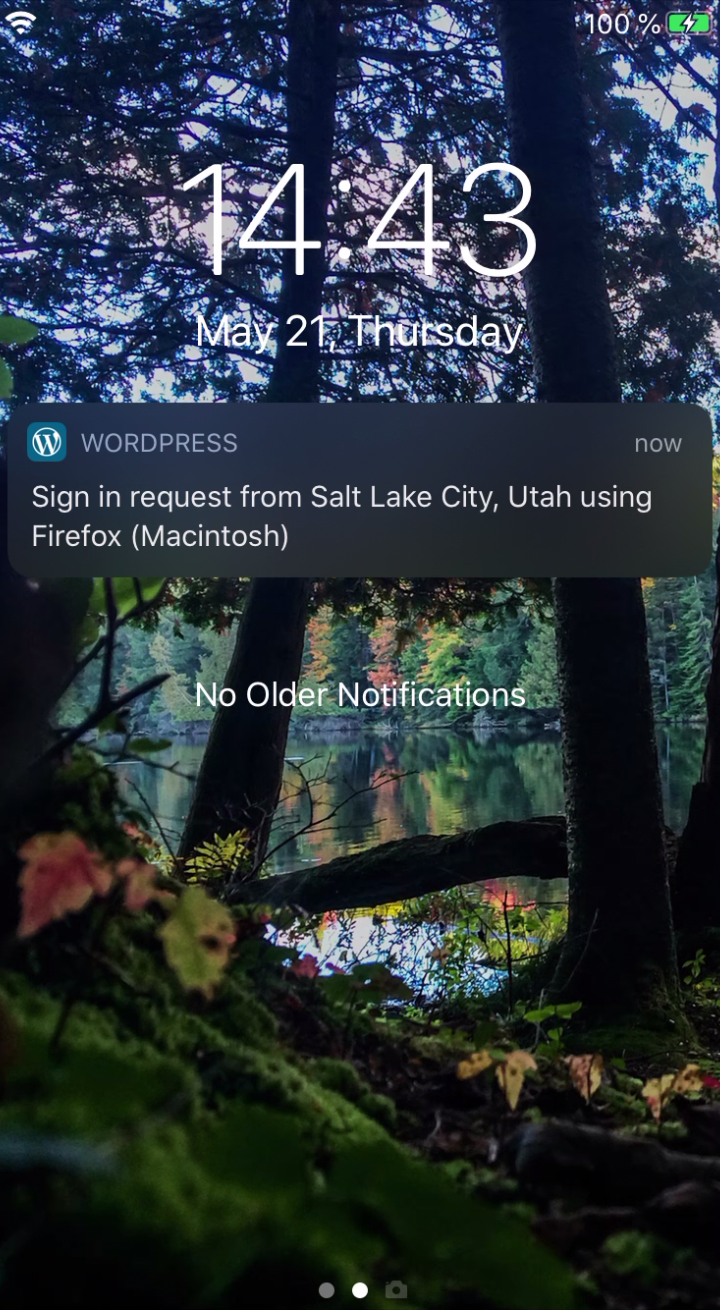
- Try the steps again except unlock the device _before_ tapping the push notification.
Results: the in-app "Verify Log In" prompt with Ignore/Approve buttons never appears if you tap a login push notification from the lock screen. If you unlock the phone first and _then_ tap on the push notification in the notification center (while the device is unlocked) then the in-app confirmation prompt appears. (2m8s)
WP.com push login|Push Notification on Lock Screen|Push Notification in Notification Center (Unlocked)|In-app confirmation prompt (missing if pn is tapped from lock screen)
---|---|---|---
 |
| |
| |
|
Tested with Firefox 76.0.1 on macOS 10.15.4 and WPiOS 14.8.2 App Store version on iPhone 6S iOS 13.3.1.
 designsimply
on 21 May 2020
designsimply
on 21 May 2020
Report from an internal user running 14.7.1:
Today I got a request for verification:
- A push notification was sent to my phone, and a notification was shown in my phone while locked…
- I tapped on it.
- I could see the WordPress app attempting to launch and immediately crashing.
This has happened for long because I immediately blamed myself for not doing what I usually do knowing that this problem usually arises. I would have normally unlocked the phone and just head to the app to approve the request there.
@jleandroperez since you were just looking at this code, any initial ideas on what this could be?
/cc @frosty @yaelirub
[Quick update from Sheri to note the internal reference: p4a5px-2z7-p2.]
 bummytime
on 22 May 2020
bummytime
on 22 May 2020
@bummytime thank you for the reference sir!
There's no glaring reason why the push notification handling would crash the app, I'm afraid.
Since I couldn't spot the exact trace on Sentry, I've poked Oscar requesting further details (same P2: p4a5px-2z7-p2).
In the affected time window, there are crashlogs ranging from [Reader, Notifications, Core Data, ...] (May 21, ~13.00 UTC), perhaps we can try narrow it down.
As per the silent failure (no Alert onscreen!), I'll spend some time next week. Will keep you posted!
 jleandroperez
on 23 May 2020
jleandroperez
on 23 May 2020
Following up (Oscar is awesome), incoming console logs. It would appear that the NotificatioNServiceExtension is blowing up:
<NSXPCConnection: 0x1031fca40> connection to service on pid 19680 created from an endpoint: Warning: Exception caught during invocation of selector didReceiveNotificationRequest:withCompletionHandler:, dropping incoming message and invalidating the connection.
Exception: Invalid type in JSON write (UNNotificationContent)
Invalid type in JSON write (UNNotificationContent)
(
    0   CoreFoundation                      0x00000001a2361604 409609CD-8410-38E1-BA5D-BDED609D2018 + 1222148
    1   libobjc.A.dylib                     0x00000001a2083bcc objc_exception_throw + 56
    2   Foundation                          0x00000001a27cb72c 1A46239D-F2FC-34B6-95BC-9F38869F0C85 + 1795884
    3   Foundation                          0x00000001a27ce050 1A46239D-F2FC-34B6-95BC-9F38869F0C85 + 1806416
    4   libswiftCore.dylib                  0x00000001afa61618 DCBC2D49-9C31-3DBE-BCF3-B0F5205F87FE + 2659864
    5   libswiftCore.dylib                  0x00000001af858a44 DCBC2D49-9C31-3DBE-BCF3-B0F5205F87FE + 526916
    6   Foundation                          0x00000001a27cd580 1A46239D-F2FC-34B6-95BC-9F38869F0C85 + 1803648
    7   Foundation                          0x00000001a27ce358 1A46239D-F2FC-34B6-95BC-9F38869F0C85 + 1807192
    8   CoreFoundation                      0x00000001a2334c7c 409609CD-8410-38E1-BA5D-BDED609D2018 + 1039484
    9   CoreFoundation                      0x00000001a23352a8 409609CD-8410-38E1-BA5D-BDED609D2018 + 1041064
    10  Foundation                          0x00000001a27cda2c 1A46239D-F2FC-34B6-95BC-9F38869F0C85 + 1804844
    11  Foundation                          0x00000001a27ce050 1A46239D-F2FC-34B6-95BC-9F38869F0C85 + 1806416
    12  libswiftCore.dylib                  0x00000001afa61618 DCBC2D49-9C31-3DBE-BCF3-B0F5205F87FE + 2659864
    13  libswiftCore.dylib                  0x00000001af858a44 DCBC2D49-9C31-3DBE-BCF3-B0F5205F87FE + 526916
    14  Foundation                          0x00000001a27cd580 1A46239D-F2FC-34B6-95BC-9F38869F0C85 + 1803648
    15  Foundation                          0x00000001a2682bbc 1A46239D-F2FC-34B6-95BC-9F38869F0C85 + 449468
    16  Foundation                          0x00000001a2682840 1A46239D-F2FC-34B6-95BC-9F38869F0C85 + 448576
    17  WordPressNotificationServiceExtensi 0x0000000102cd9da8 WordPressNotificationServiceExtensi + 89512
    18  WordPressNotificationServiceExtensi 0x0000000102cd4c4c WordPressNotificationServiceExtensi + 68684
    19  WordPressNotificationServiceExtensi 0x0000000102cd5ddc WordPressNotificationServiceExtensi + 73180
    20  UserNotifications                   0x00000001a96c1e40 44B07041-E972-3AF2-A644-6A04BC8588A7 + 20032
    21  Foundation                          0x00000001a284bf28 1A46239D-F2FC-34B6-95BC-9F38869F0C85 + 2322216
    22  Foundation                          0x00000001a2668e68 1A46239D-F2FC-34B6-95BC-9F38869F0C85 + 343656
    23  Foundation                          0x00000001a284c040 1A46239D-F2FC-34B6-95BC-9F38869F0C85 + 2322496
    24  libxpc.dylib                        0x00000001a1f299d8 9E9D069D-E3B1-36FA-8575-5E1D9E6B6B54 + 51672
    25  libxpc.dylib                        0x00000001a1f29d48 9E9D069D-E3B1-36FA-8575-5E1D9E6B6B54 + 52552
    26  libdispatch.dylib                   0x00000001a20275e4 5A83D0CF-8FB9-3727-8A32-012D20A47EC8 + 374244
    27  libdispatch.dylib                   0x00000001a1fe3fb8 5A83D0CF-8FB9-3727-8A32-012D20A47EC8 + 98232
    28  libdispatch.dylib                   0x00000001a1fd3770 5A83D0CF-8FB9-3727-8A32-012D20A47EC8 + 30576
    29  libdispatch.dylib                   0x00000001a1fe4bb4 5A83D0CF-8FB9-3727-8A32-012D20A47EC8 + 101300
    30  libdispatch.dylib                   0x00000001a1fd3770 5A83D0CF-8FB9-3727-8A32-012D20A47EC8 + 30576
    31  libdispatch.dylib                   0x00000001a1fd42c4 5A83D0CF-8FB9-3727-8A32-012D20A47EC8 + 33476
    32  libdispatch.dylib                   0x00000001a1fdd78c 5A83D0CF-8FB9-3727-8A32-012D20A47EC8 + 71564
    33  libsystem_pthread.dylib             0x00000001a2078b74 _pthread_wqthread + 272
    34  libsystem_pthread.dylib             0x00000001a207b740 start_wqthread + 8
)
(internal reference: p1590510515273800-slack-wpmobile re: which release to target)
designsimply
on 26 May 2020
I tested with WPiOS 14.9 (App Store version) and found that I was not able to crash the app but that the problem remains where tapping a login push notification from the lock screen does not work.
Video: 1m30s
Tested with WPiOS 14.9 App Store version on iPhone 6S iOS 13.3.1.
designsimply
on 9 Jun 2020
For the record, I've managed to reproduce this issue. Steps were:
- Leave WPiOS in the foreground. Reader or My Sites work
- Lock your phone
- Receive a Push Auth Notification (DM me to force this on develop builds please!)
- Wait ~4 seconds
- Press over the Push Auth notification: Make sure you stay away from the FaceID sensors
- Wait for the "FaceID to Unlock" label
- Perform FaceID to unlock!
As a result, WPiOS will be onscreen but no Alert will show up.
Hotfix shipping soon in 15.1 via #14349 😄
jleandroperez
on 18 Jun 2020
Woohooo thanks @jleandroperez!
elibud
on 18 Jun 2020
Anytime Eli!! hope there's no third chained bug, buuut pretty sure this is it 😄
jleandroperez
on 18 Jun 2020
Looks like this was addressed in #14349 — closing.
bummytime
on 6 Jul 2020
Related issues
designsimply
·
3Comments
 kurzee
·
3Comments
jleandroperez
·
3Comments
kurzee
·
3Comments
jleandroperez
·
3Comments
 mindgraffiti
·
3Comments
mindgraffiti
·
3Comments
 SiobhyB
·
3Comments
SiobhyB
·
3Comments
Most helpful comment
With the help of a few additional internal reports ❤️ I've figured out some reliable steps to reproduce this issue.
To prepare:
To test:
Results: the in-app "Verify Log In" prompt with Ignore/Approve buttons never appears if you tap a login push notification from the lock screen. If you unlock the phone first and _then_ tap on the push notification in the notification center (while the device is unlocked) then the in-app confirmation prompt appears. (2m8s)
WP.com push login|Push Notification on Lock Screen|Push Notification in Notification Center (Unlocked)|In-app confirmation prompt (missing if pn is tapped from lock screen)
 |
| |
| |
|
---|---|---|---
Tested with Firefox 76.0.1 on macOS 10.15.4 and WPiOS 14.8.2 App Store version on iPhone 6S iOS 13.3.1.