Wordpress-ios: Quick Start: Confusing transition from Themes tour to Customize tour
Expected behavior
I expect to be clearly guided from Quick Start tour to the next, with any required steps to complete the first tour done before the next tour starts.
Actual behavior
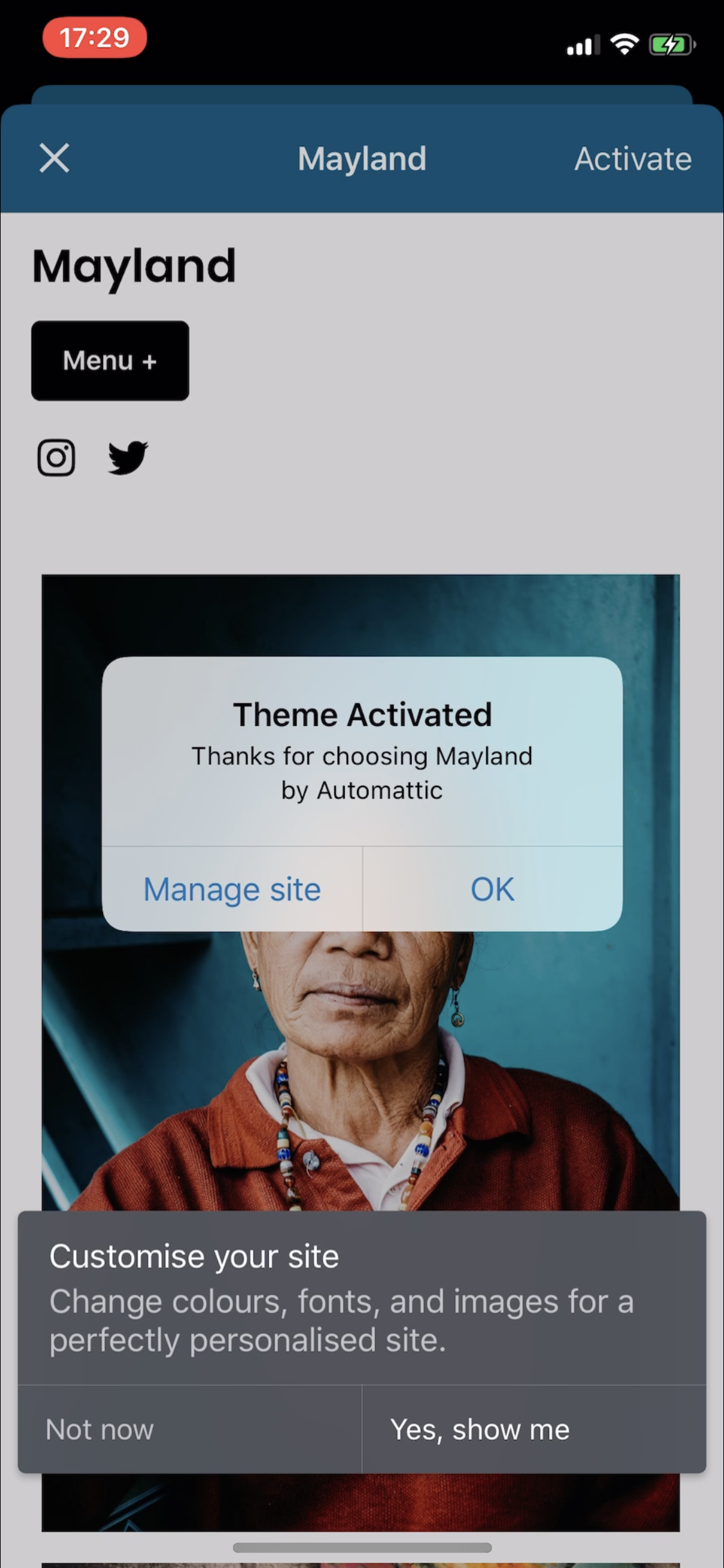
After doing the Themes tour and activating a new theme, the Customize tour begins while the new theme's demo page and confirmation dialog are still on screen. This page and dialog prevent you from continuing the tour until you close them, and the tour doesn't guide you as to how to do that.
There's also simply a lot on screen at once and it's hard to know what should take priority.
Steps to reproduce the behavior
- Create a new site in the app.
- When prompted, accept more help getting started to get the Quick Start tours.
- Select the "Choose a theme" tour.
- Open the Themes section.
- Select and activate a new theme.
- Notice that immediately after activating a new theme, a "Theme Activated" dialog appears along with the "Customize your site" tour prompt.
Tested on [iPhone XS], iOS [13.2.3], WPiOS [13.8.0.20191202]
 rachelmcr
All 4 comments
Hey @rachelmcr ! Thanks for finding this out! Should the flow just show the next step once the user has returned to "My Site" (as it happens in the "customize" step)? Or something else? Maybe @osullivanchris can provide some advice here too.
Thanks!
 Gio2018
on 9 Jul 2020
Gio2018
on 9 Jul 2020
Should the flow just show the next step once the user has returned to "My Site" (as it happens in the "customize" step)?
Yeah @Gio2018 I think so! I'm not sure if there's a general logic we can apply (or that already exists) or if it is particular to this use case. But definitely agree with the original bug and I would expect it to appear once I close the theme preview to go back to My Site.
 osullivanchris
on 10 Jul 2020
osullivanchris
on 10 Jul 2020
The only caveat I'd mention is that the "Customize" option is also under My Site > Themes. So I think it's meant to appear right away when you get back to the Themes screen (without having to go all the way back to My Site). That said, if the most straightforward fix is to wait until the user has returned to My Site, that seems like a reasonable solution.
rachelmcr
on 13 Jul 2020
The only caveat I'd mention is that the "Customize" option is also under My Site > Themes. So I think it's meant to appear right away when you get back to the Themes screen (without having to go all the way back to My Site). That said, if the most straightforward fix is to wait until the user has returned to My Site, that seems like a reasonable solution.
Hey @rachelmcr , thanks for pointing this out!
In the current UI, as soon as users tap on 'Activate', the 'Themes Browser' is dismissed "behind the scenes" (the navigation controllers pops to root before the theme preview is dismissed), so as soon as they close the theme preview, they will see the 'My site' page. For this reason, and since it's an acceptable solution, I am going to show the next step when they go back to 'My Site'.
Gio2018
on 14 Jul 2020
Related issues
 kurzee
·
3Comments
kurzee
·
3Comments
 hypest
·
3Comments
hypest
·
3Comments
 mindgraffiti
·
3Comments
mindgraffiti
·
3Comments
 wptester9845
·
3Comments
wptester9845
·
3Comments
 SiobhyB
·
3Comments
SiobhyB
·
3Comments
Most helpful comment
Hey @rachelmcr , thanks for pointing this out!
In the current UI, as soon as users tap on 'Activate', the 'Themes Browser' is dismissed "behind the scenes" (the navigation controllers pops to root before the theme preview is dismissed), so as soon as they close the theme preview, they will see the 'My site' page. For this reason, and since it's an acceptable solution, I am going to show the next step when they go back to 'My Site'.