Wordpress-ios: [Insights Management] Update views for Dark Mode
Update views related to Insights Management for Dark Mode where necessary. Specifically:
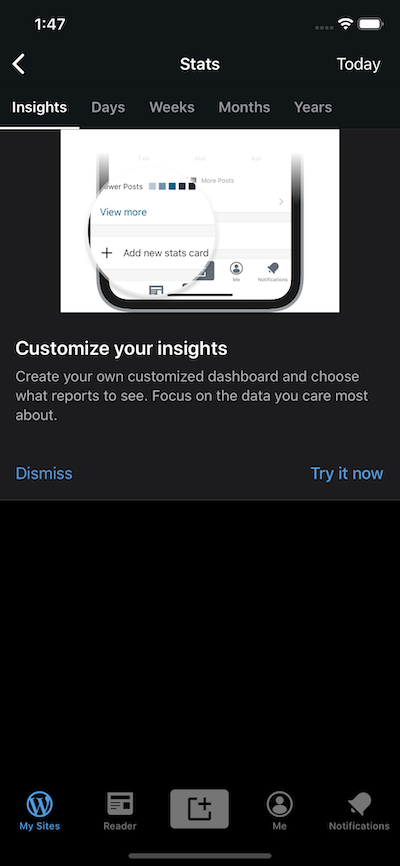
- 'Customize your insights' card.
- 'Add new stats card' card.
- 'Manage Insight' ellipsis button in card headers.
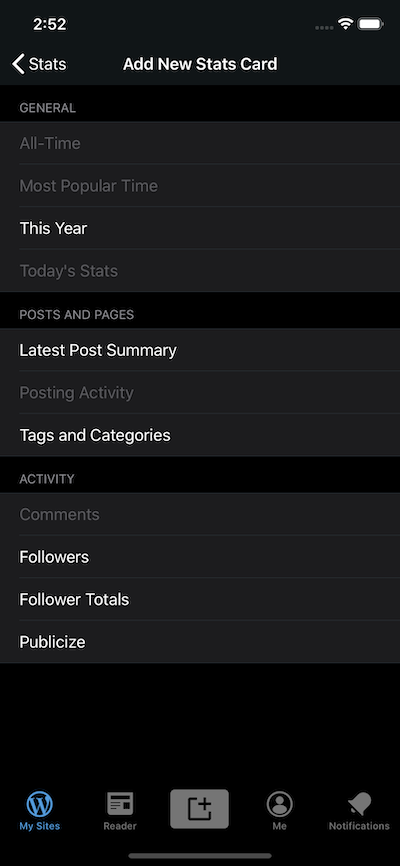
- 'Add New Stats Card' view.
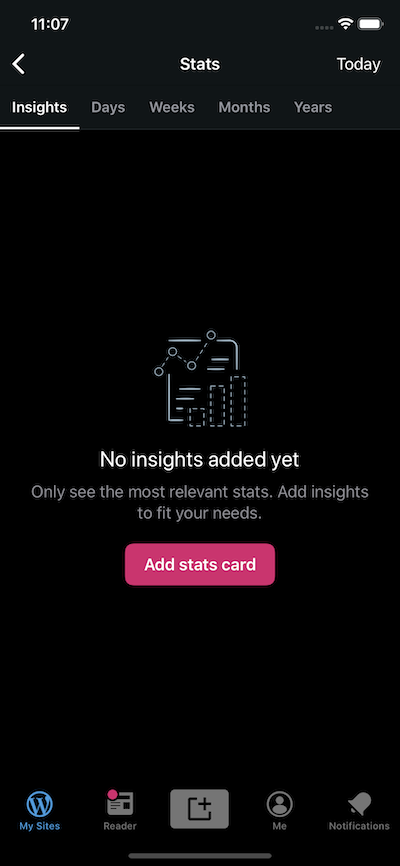
- Empty view.
This is how they look now.
'Customize your insights' card:
'Add new stats card' card:

'Manage Insight' ellipsis button:

'Add New Stats Card' view:
Empty view:
 ScoutHarris
All 10 comments
@osullivanchris @SylvesterWilmott - can you please review these and let me know what, if any, changes need to be made? Thank you!!
ScoutHarris
on 9 Oct 2019
Hey @ScoutHarris I've had a look through all of this, numbering my responses below.
1 Customise Insights Card
this looks as I would expect, except for the image. I will provide a dark mode version of the image today or in the morning Thursday and we can slot that in.
2 'Add New Stats Card' card
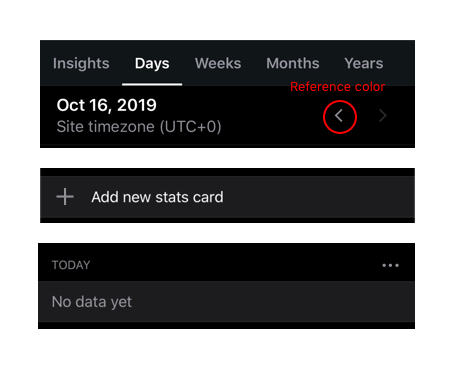
Here the plus icon should be a brighter color. I suggest using the same color as the active chevron in the day/week switcher component (shown in red). I am not 100% sure how we have defined the colours but per pauD4L-o1-p2 it looks like grey 30. Lets match whatever we are doing in the chevron.
3 Manage insight ellipsis button
Similarly this looks good but should be the same icon color mentioned above (there's another ellipsis with the same color on 'My Site' > 'Blog Posts' > on the 'more' icon bottom right of the card
4 'Add new stats card' view
This looks fine to me
5 Empty view
The text and button styles seem like what I would expect. The empty illustration could be tweaked for dark mode, but I don't know if we have access to those and I wouldn't consider this a blocker.
Cc @mattmiklic who has been doing most of the dark mode work. Two questions
- Can I get a +1 from you here that the text styles etc look ok, the only changes I'm proposing are brightening up the icons
- The "no insights" illustration. I think we have several of these illustrations so its not specific to this one issue - do we have access to the original files for those illustrations and are we creating dark mode versions for those? I'm already on top of the one for the insights card, just talking about the empty state here.
 osullivanchris
on 16 Oct 2019
osullivanchris
on 16 Oct 2019
Thanks @osullivanchris !
ScoutHarris
on 16 Oct 2019
Hey @osullivanchris .
All the icons you mentioned are using the same color, that is simply .gray. Meaning all of these are already the same color:
- plus icon
- ellipsis icon
- active chevron icon
- 'My Site' > 'Blog Posts' > on the 'more' icon
So, I'm not sure what change (if any) to make to the plus and ellipsis icons.
ScoutHarris
on 16 Oct 2019
@ScoutHarris hey thanks for letting me know! That's strange because the plus icon and elipsis in the screenshots you provided looks dimmer, and I checked with some rough color picking before replying. Is there any other values applied to it that might be causing it to look different in the screenshot, e.g. opacity?
osullivanchris
on 16 Oct 2019
It looks like the initial screenshots @ScoutHarris posted might have been taken right after switching from light to dark mode; Stats is one of a few places where some colors aren't automatically updating until the screen is refreshed. @osullivanchris's feedback on the colors in the screenshots was correct, but @ScoutHarris is also correct that the colors are right in code. 🙂 I took a look in the Simulator and these are both using the correct color, which is listIcon.


 mattmiklic
on 17 Oct 2019
mattmiklic
on 17 Oct 2019
might have been taken right after switching from light to dark mode; Stats is one of a few places where some colors aren't automatically updating until the screen is refreshed.
Uh... woops. 😄 Sorry about that @osullivanchris . Thanks @mattmiklic for verifying and saving me from unnecessary hairpulling.
ScoutHarris
on 17 Oct 2019
No problem @ScoutHarris! Hopefully we can get that fixed soon so we don't have those places where the colors aren't updating automatically.
@osullivanchris:
The "no insights" illustration. I think we have several of these illustrations so its not specific to this one issue - do we have access to the original files for those illustrations and are we creating dark mode versions for those? I'm already on top of the one for the insights card, just talking about the empty state here.
We do have access to the originals, and I'm working on a plan for getting them converted to dark mode. There's a set of standard illustrations that I'll try to update all at once as soon as I can.
mattmiklic
on 17 Oct 2019
Great stuff! Sounds like we are good to go here. Thanks for clearing up our pickle @mattmiklic
@ScoutHarris I'm happy to ship with the current empty state illustration, I wouldn't consider that a blocker. I'm just making up the images for the 'customise your insights card' for this PR and #12659 and then you should have everything you need from me. I'll attach to this PR and to zeplin shortly
osullivanchris
on 17 Oct 2019
Thanks @osullivanchris . Since the Customize image isn't Dark Mode specific, I'm closing this issue and I'll update that image separately.
ScoutHarris
on 17 Oct 2019
Related issues
 kurzee
·
3Comments
kurzee
·
3Comments
 iamthomasbishop
·
3Comments
iamthomasbishop
·
3Comments
 marekhrabe
·
3Comments
marekhrabe
·
3Comments
 SiobhyB
·
3Comments
SiobhyB
·
3Comments
 jkmassel
·
3Comments
jkmassel
·
3Comments