Wordpress-ios: Site Creation: "Upload a site icon" tutorial step not clear.
Description:
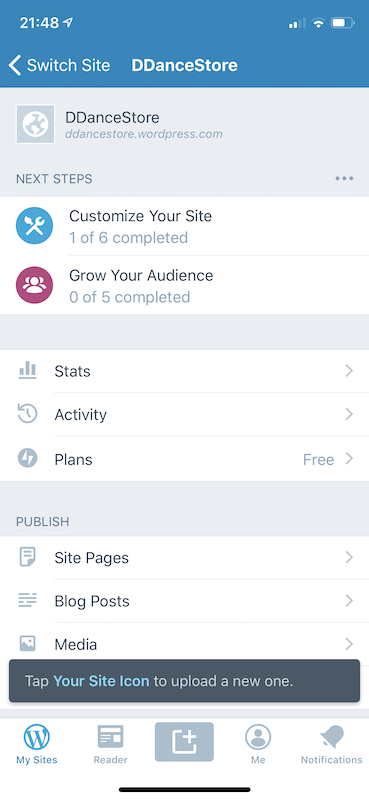
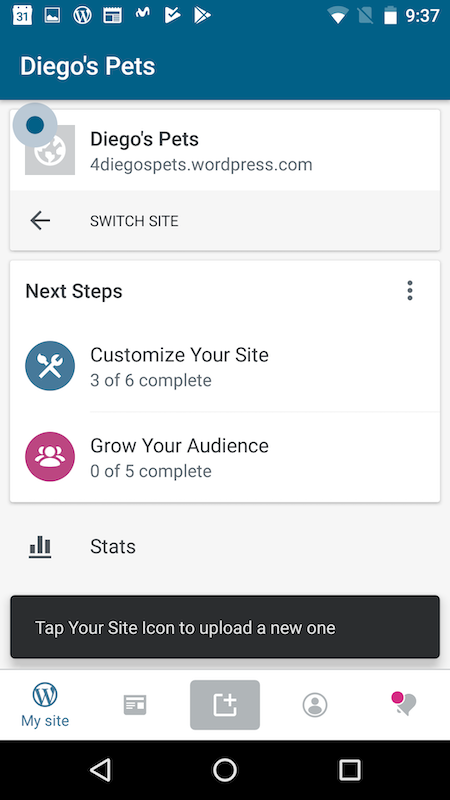
The step that explains to the user how to "Upload a site icon" is not explaining clearly to the user what needs to be tapped.
Images:
This is how it looks in iOS:
This is how it looks in Android (notice the blue dot showing where to tap):
 diegoreymendez
All 5 comments
We've recently changed the text to look white, which clarifies that it's not the blue text that you should tap.
@osullivanchris can I ask you for your input on this? I feel like closing this issue, because there's no available definition of what it'd take to make this better, and the color change we did may be enough for now.
@SylvesterWilmott was previously taking care of these I believe, so it may make sense to validate with him
diegoreymendez
on 26 Jun 2019
Is the blue dot invisible on iOS every time? This is a bug for sure since it was added.
On Android, the words: "Your Site Icon" should be in a heavier text weight
 SylvesterWilmott
on 2 Jul 2019
SylvesterWilmott
on 2 Jul 2019
Is the blue dot invisible on iOS every time?
Thanks... that's missing. I'll look into it.
diegoreymendez
on 2 Jul 2019
fwiw, the code that's supposed to add that dot (called a spotlight in code fwiw) is here: https://github.com/wordpress-mobile/WordPress-iOS/blob/develop/WordPress/Classes/ViewRelated/Blog/BlogDetailHeaderView.m#L102
I'm not sure at what point it stopped working.
@diegoreymendez I'm available to help with this, give me a ping anytime.
 nheagy
on 2 Jul 2019
nheagy
on 2 Jul 2019
Thanks @nheagy, that helps a lot!
I'll give it a brief look to see if it's an easy fix and if it gets tricky I'll ping you.
diegoreymendez
on 2 Jul 2019
Related issues
 wptester9845
·
3Comments
wptester9845
·
3Comments
 marekhrabe
·
3Comments
wptester9845
·
3Comments
marekhrabe
·
3Comments
wptester9845
·
3Comments
 jleandroperez
·
3Comments
jleandroperez
·
3Comments
 rclations
·
3Comments
rclations
·
3Comments