Wordpress-ios: iOS: “Maximum allowed is Zero KB” errors
We’ve had some reports from iOS users, on version 9.8 of the mobile app, who are seeing an “Media filesize (XX KB) is too large to upload. Maximum allowed is Zero KB” error when they attempt to upload media to their site. Here’s a screenshot of what that looks like:
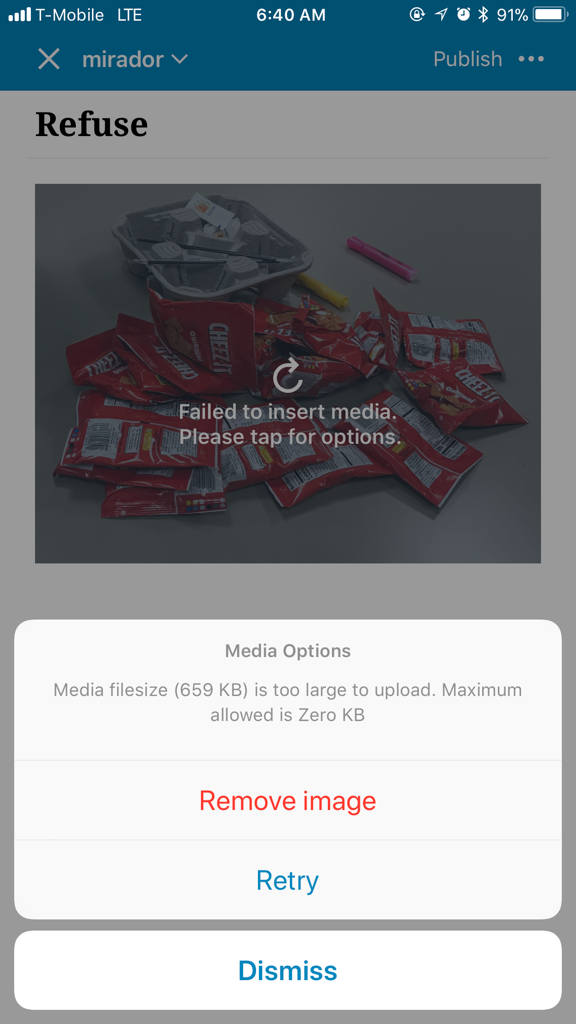
This error seems to pop up no matter the size of an image and seems to only be affecting some Jetpack and Atomic users
Tested on iPhone X, iOS 11, WPiOS 9.8
 SergioEstevao
All 13 comments
Reported here as well: 278672-h
Edit:
WPiOS: 9.8
iPhone 7
iOS: 11.3
No further details provided.
 nellofn
on 2 May 2018
nellofn
on 2 May 2018
Same here, the upload works on the web UI but only occurs at IOS client.
 lijingyu85
on 5 May 2018
lijingyu85
on 5 May 2018
Same issue here.
When I DISABLE Jetpack plugin, works fine 🤔
 tdkn
on 6 May 2018
tdkn
on 6 May 2018
Removed milestone since this didn't make the 9.9 cut.
 diegoreymendez
on 7 May 2018
diegoreymendez
on 7 May 2018
Diego if you see the PR above this was solved and merged on 9.9
Sent from my iPhone
On 7 May 2018, at 19:02, Diego Rey Mendez notifications@github.com wrote:
Removed milestone since this didn't make the 9.9 cut.
—
You are receiving this because you were assigned.
Reply to this email directly, view it on GitHub, or mute the thread.
SergioEstevao
on 7 May 2018
The release manager can't assume the PR solves an open issue, because it may just be a partial fix. Keep in mind that on top of dealing with inconsistencies such as these ones, we have to go through all of the issues in each release to write the release notes.
Please make sure to keep issues and PRs up to date.
diegoreymendez
on 7 May 2018
This came up again in 278836-h and seems to be affecting a fair amount of users.
 SiobhyB
on 8 May 2018
SiobhyB
on 8 May 2018
Another one came in here 279753-h
Edit:
WPiOS: 9.8
iPhone 8 (CDMA)
iOS: 11.3
Media being uploaded was 4mb large.
nellofn
on 8 May 2018
@SiobhyB, @nellofn - If possible when reporting occurrences of issues, I think we should add some details here (such as the version of the app used, device, and any important highlights).
Mostly to encourage openness (since it's an open source project) but also to make the interaction easier for us.
diegoreymendez
on 8 May 2018
Here's another one 279897-h.
WPiOS: 9.8
iPhone 7
iOS: 11.3.1
No further details provided other than the same occurrence of the error.
nellofn
on 8 May 2018
@nellofn it looks like a fix was released on 9.9, can you ask the user to update the app and try again?
@SergioEstevao did you write the same fix for Android?
 elibud
on 8 May 2018
elibud
on 8 May 2018
@elibud Sure, I will contact the users, ask to update and report back to confirm.
nellofn
on 8 May 2018
Thanks, @nellofn!
diegoreymendez
on 8 May 2018
Related issues
 designsimply
·
3Comments
designsimply
·
3Comments
 marekhrabe
·
3Comments
marekhrabe
·
3Comments
 wptester9845
·
3Comments
wptester9845
·
3Comments
 frosty
·
3Comments
frosty
·
3Comments
 mindgraffiti
·
3Comments
mindgraffiti
·
3Comments