Wordpress-ios: Share Extension: Inaccurate error when logged in to username-only account or self-hosted site
Expected behavior
If I'm not logged in to a WordPress.com account with a WordPress.com or Jetpack site in the app, I expect to get a contextually accurate error explaining that I can't share to the app.
Actual behavior
There are several reasons why I might not be able to use the share extension:
- I'm not logged in at all.
- I'm logged in to a WordPress.com account with no sites.
- I'm logged in to a self-hosted site that doesn't use Jetpack.
No matter which of these situations I'm in, I always see an error message telling me to log in to the app:
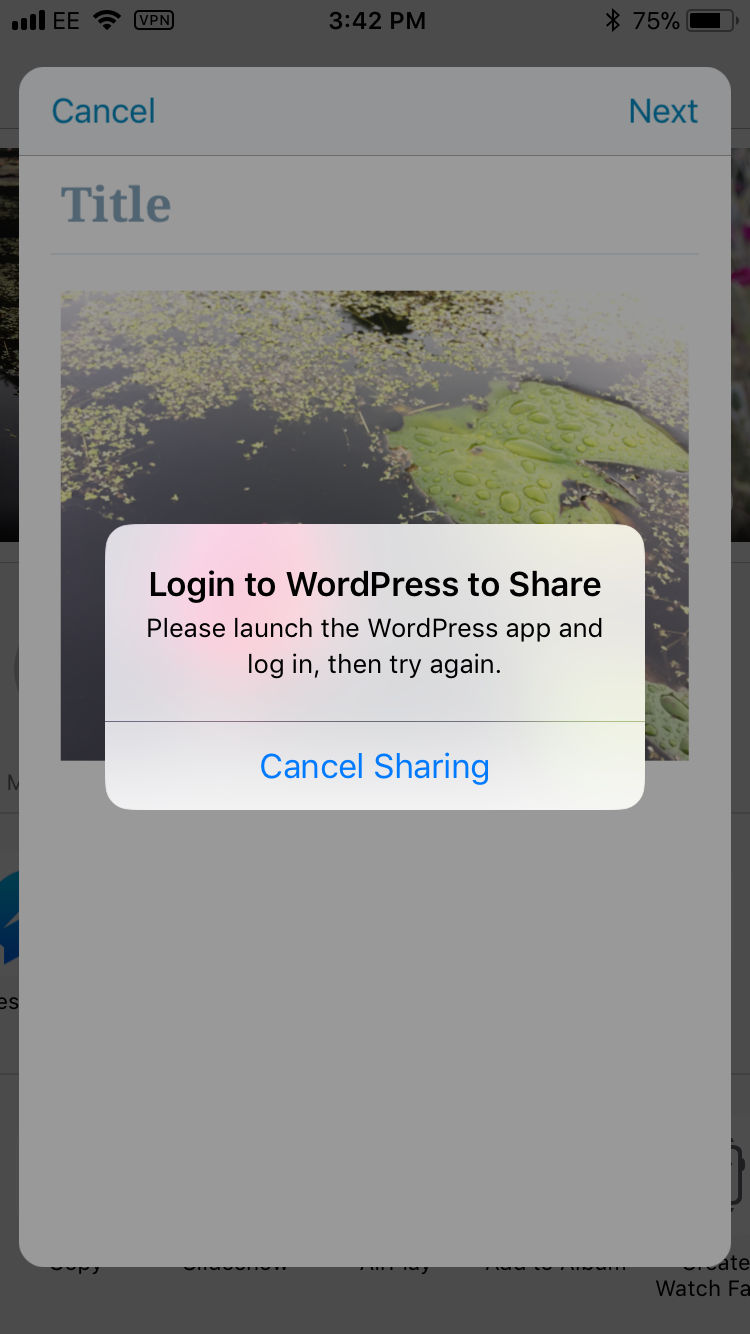
This is confusing because in scenarios 2 and 3 I'm logged in, just not to a site that I can share to.
Tested on iPhone 6, iOS 11.2.5, WPiOS 9.3.0.20180129
 rachelmcr
All 6 comments
@rachelmcr Excellent catch. I agree this is confusing as well.
@folletto To determine if the user is logged in, we are just looking for a shared oath token that the main WPiOS app puts into a shared store for the extension to access. For now, could we perhaps just change the text in that dialog to something more descriptive?
 bummytime
on 31 Jan 2018
bummytime
on 31 Jan 2018
To determine if the user is logged in, we are just looking for a shared oath token that the main WPiOS app puts into a shared store for the extension to access. For now, could we perhaps just change the text in that dialog to something more descriptive?
Just to be sure: what do we know about it at this stage then? It still has to be one message for all the instances described above?
 folletto
on 31 Jan 2018
folletto
on 31 Jan 2018
@folletto When the share extension launches, all we really know is the username and if the oath bearer token is set by WPiOS. If that token is not set for whatever reason (.org-only, not logged in, etc) we currently display the dialog above. Very binary, I realize.
It still has to be one message for all the instances described above?
Without making a huge change, yes.
bummytime
on 31 Jan 2018
Ok so the criteria:
I'm not logged in at all.
I'm logged in to a WordPress.com account with no sites.
I'm logged in to a self-hosted site that doesn't use Jetpack.
Could be satisfied with a generic tweak like:
Sharing error
Please launch the WordPress app, log in to WordPress.com and make sure you have at least one site, then try again.
[ Cancel sharing ]
However, for a later PR: shouldn't we able to detect at least the situation of "logged in" and "no sites" for a more precise message? And even Jetpack sites? Aren't they returned in the next step?
Aside: can we pre-load the list of sites when the user is on this screen?
folletto
on 31 Jan 2018
Could be satisfied with a generic tweak like:
I will make that change for 9.3. Thank you @folletto!!
However, for a later PR: shouldn't we able to detect at least the situation of "logged in" and "no sites" for a more precise message? And even Jetpack sites? Aren't they returned in the next step?
Yep we can do that. I will make another issue that describes that ☝️
Aside: can we pre-load the list of sites when the user is on this screen?
Yes we can and should. I'll track that in another issue.
bummytime
on 31 Jan 2018
I am going to leave this issue open to address the identified scenarios:
I'm not logged in at all.
I'm logged in to a WordPress.com account with no sites.
I'm logged in to a self-hosted site that doesn't use Jetpack.
more smartly.
In short, we are going to have to make some changes to what is stashed in ShareExtensionService to help give the share extension a hint about what the customer's situation is (assuming the oath token is missing).
In addition, if the oauth token IS present, pre-fetching the site data & parsing it while in the editor can also help us determine other issues and guide the user appropriately.
bummytime
on 31 Jan 2018
Related issues
 wptester9845
·
3Comments
wptester9845
·
3Comments
 designsimply
·
3Comments
wptester9845
·
3Comments
designsimply
·
3Comments
wptester9845
·
3Comments
 mindgraffiti
·
3Comments
mindgraffiti
·
3Comments
 jleandroperez
·
3Comments
jleandroperez
·
3Comments