Wordpress-ios: Year row is not visible in scheduled post date picker.
We got a question from a users about how to change the year of a scheduled post. Currently, if you scroll the date row long enough the year will change, but this is a bit confusing - I originally thought that you can't do it at all. Not sure how date picker works in iOS (you can chose year in Calypso and Android app), but maybe this is something we could improve at some point.
 khaykov
All 5 comments
Tested and confirmed that it's not easy to schedule a post in the distant future or tell which year you are currently in using the build in datepicker. The following screenshot shows a post scheduled for 2029:
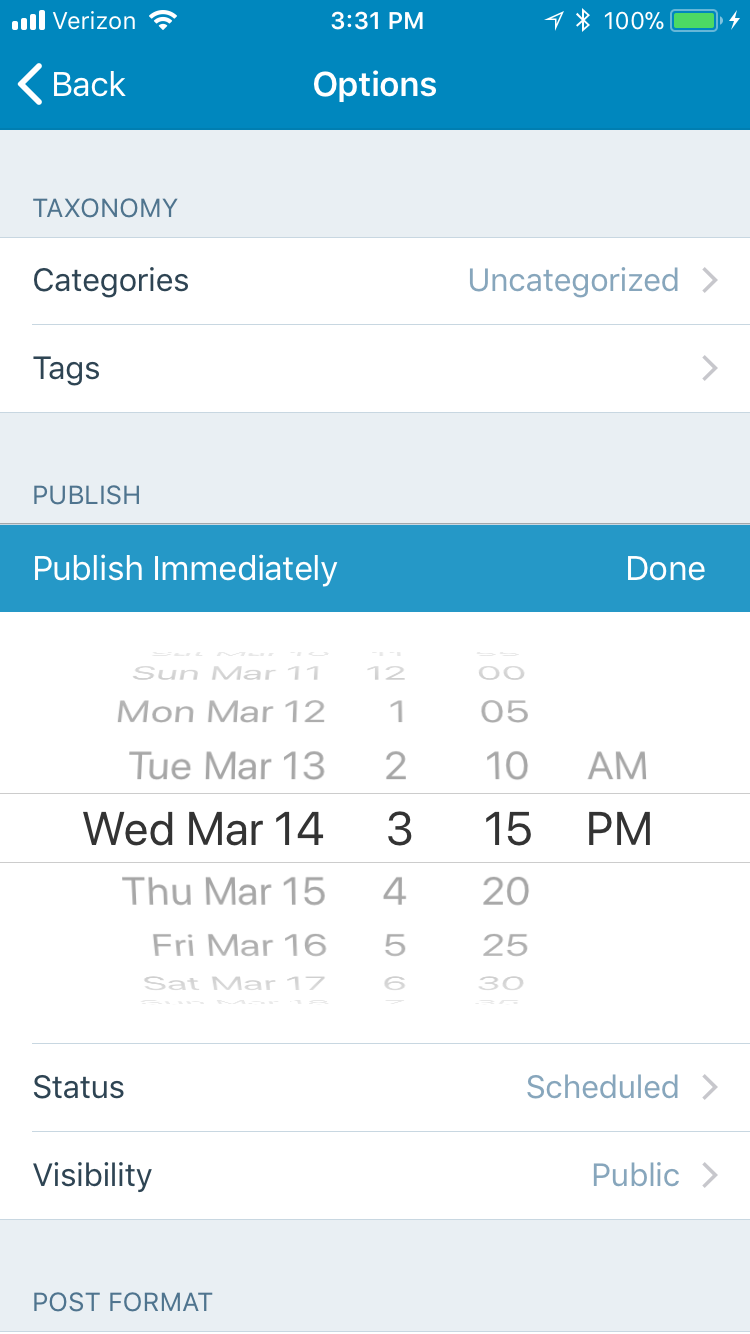
Tested with iPhone 6S, iOS 11.2.6, WPiOS 9.6.0.20180312.
 designsimply
on 13 Mar 2018
designsimply
on 13 Mar 2018
This issue has been marked as stale because:
- It has been inactive for the past year.
- It isn't in a project or a milestone.
- It hasn’t been labeled
[Pri] Blocker,[Pri] High, orgood first issue.
Please comment with an update if you believe this issue is still valid or if it can be closed. This issue will also be reviewed for validity and priority (cc @designsimply).
![stale[bot] picture](https://avatars3.githubusercontent.com/in/1724?v=4&s=40) stale[bot]
on 13 Mar 2019
stale[bot]
on 13 Mar 2019
@annacmc would it be possible for you to get an idea of how often this comes up in support for us? If it's common and you can find a few examples to include for reference, that'd be nice to have for this case.
designsimply
on 14 Mar 2019
Sure @designsimply I've had a hunt through Zendesk as well as asked around and have not been able to find any cases of this coming up in support for us.
 annacmc
on 21 Mar 2019
annacmc
on 21 Mar 2019
With the new Post Scheduling Enhancement (https://github.com/wordpress-mobile/WordPress-iOS/issues/12686) calendar UI this issue should be resolved.
 bjtitus
on 19 Dec 2019
bjtitus
on 19 Dec 2019
Related issues
 marekhrabe
·
3Comments
marekhrabe
·
3Comments
 wptester9845
·
3Comments
wptester9845
·
3Comments
 kurzee
·
3Comments
kurzee
·
3Comments
 hypest
·
3Comments
designsimply
·
3Comments
hypest
·
3Comments
designsimply
·
3Comments