Wordpress-android: Jetpack Backup: If you do no stay on the screen with the progress bar you will not be able to download the backup file
To prepare:
- Create a Jetpack site.
- Add a Jetpack Security Daily plan.
- Wait for a backup to appear.
To test:
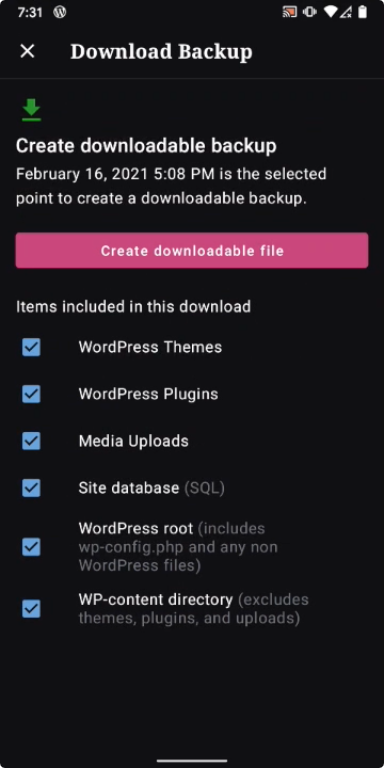
- Go to My Site > Jetpack > Backup > overflow menu > Download backup.
- Tap the "Create downloadable file" button.
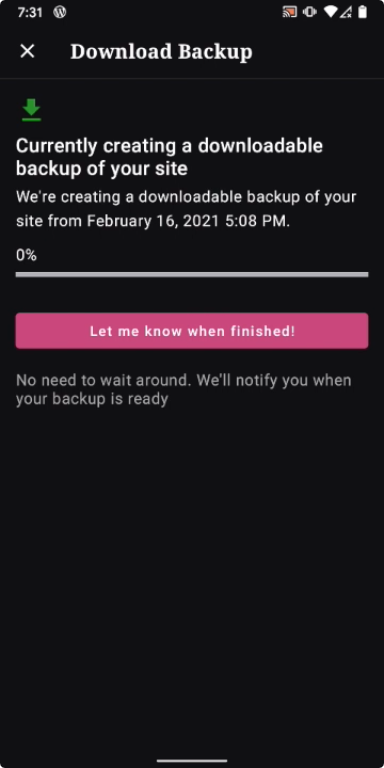
- Observe this sentence: "No need to wait around. We'll notify you when your backup is ready."
- Tap the "Let me know when finished!" button or exit that screen.
- Observe the "Download Backup" notification.
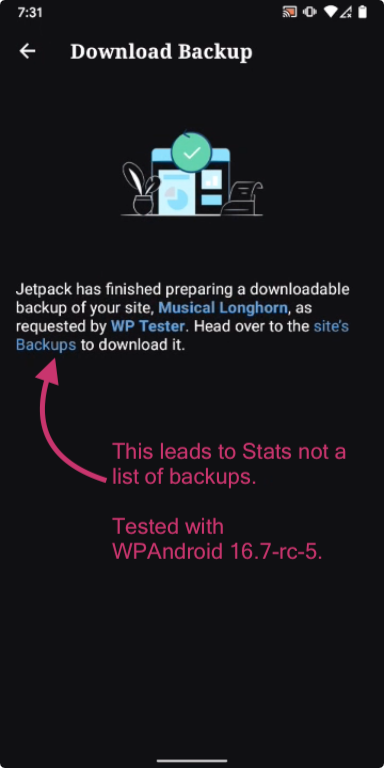
- Tap the "site's Backups" link in the notification.
- Land on the Stats screen.
Result: if you do not stay on the screen with the progress bar generating a downloadable backup file then you can never find the downloadable file after that using the app. Note that this is specific to 16.7 beta. (4m33s)
Generate backup|Leave this screen|Try to download the backup
---|---|---
 |
| |
|
Tested with WPAndroid 16.7-rc-5 on Pixel 3 Android 11.
Recommendations specific to the 16.7 release:
- Instead of telling people there's no need to wait around on the screen with the progress bar, encourage people to stay on that screen if you do not yet have a way to point them to the downloadable backup file in the app later.
- The "site's Backups" link in the "Download Backup" notification should not point to stats. It should either point out to a browser to the correct location where someone can download the generated backup or the link should be removed and you should explain how to find the backup. Ideally, and I'm sure you already know this!, the "site's Backups" link would point to a list of the site's backups but if you can't do that then I don't think you should link to somewhere else.
It took me an unreasonably long time over several tests to figure out how to download a backup! 😂😭😂
 designsimply
All 3 comments
@designsimply #14030 will fix this issue. :)
 leandroalonso
on 18 Feb 2021
leandroalonso
on 18 Feb 2021
@designsimply #14075 adds a workaround for the notification issue (eventually the API has to be fixed). It will be in release 16.8, as we decided to rely on the email (with the download link) for the MVP. We removed the "Notify Me" buttons for release 16.8 too. Full transparency, there is quite a bit of work to address #14030 and it won't make the official cut off for release 16.8, but I'm sure I could have it ready next week and we can get it in the next beta.
 zwarm
on 18 Feb 2021
zwarm
on 18 Feb 2021
Okay! Thanks everyone for the updates!
designsimply
on 18 Feb 2021
Related issues
 guarani
·
3Comments
guarani
·
3Comments
 nbradbury
·
3Comments
nbradbury
·
3Comments
 mzorz
·
3Comments
mzorz
·
3Comments
 roundhill
·
3Comments
roundhill
·
3Comments
 wptester9845
·
3Comments
wptester9845
·
3Comments