Wordpress-android: InflateException: Binary XML file line #48: Binary XML file line #48: Error inflating class ImageView
Sentry Url: https://sentry.io/share/issue/b00c51c09d0944fc82de76dd5bec2e0c/
User Count: 1
Count: 256
First Release: org.wordpress.[email protected]+947
First Seen: 2020-11-05T19:55:55.514000Z
Last Seen: 2020-12-20T19:22:11Z
24 Hours: 44
30 Days: 222
InflateException: Binary XML file line #48: Binary XML file line #48: Error inflating class ImageView
     at org.wordpress.android.ui.accounts.login.LoginProloguePageFragment$onViewCreated$2.run(LoginProloguePageFragment.kt:66)
...
(20 additional frame(s) were not displayed)
 loremattei
All 10 comments
User Count is 1 because this happens before login.
The occurrences count is not very high, but it looks like there's been a spike in the last 24 hours. Since 16.4-rc-1 was actually published by Play Store just yesterday, I think it's worth it to monitor this.
loremattei
on 21 Dec 2020
👋 @khaykov
CTOW here, this crash is happening at this line. Could you please take a look at it?
 ashiagr
on 21 Dec 2020
ashiagr
on 21 Dec 2020
Looked a bit into this one; running out of time but thought to share a piece of information in case it can ring any bell into someone else.
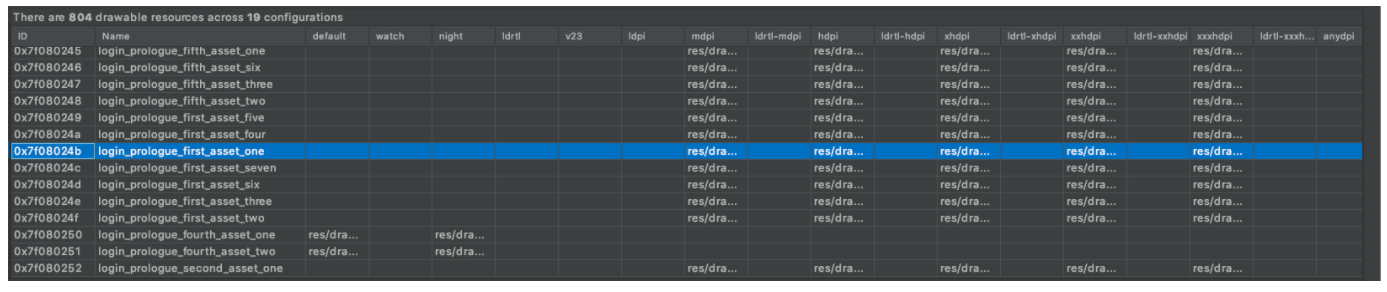
Was not able to replicate, anyway inspecting the vanilla debug APK from 16.2 and 16.4-rc-1 you can see the following:
| 16.2 -> Unable to find resource ID #0x7f080244 |
|---|
|  |
|
| 16.4-rc-1 -> Unable to find resource ID #0x7f08024b |
|---|
|  |
|
So the resource id that is recorded with the issue seems to point to login_prologue_first_asset_one that in here is used as src in the ImageView at line 48.
What I was wondering is if there can be some device/android configuration that could cause the framework to default to one of the non explicitly set qualifier (like ldpi); not sure it's the right path to go with but as said I run out of time so could not dig further. Hope this helps in some way 🙇 . cc @ashiagr
 develric
on 23 Dec 2020
develric
on 23 Dec 2020
👋 @loremattei @khaykov @ashiagr
After investigating this issue a bit today, I don't seem to be able to reproduce it or even getting close to the root cause.
However, I am speculating that this might be related to Android App Bundle and the fact that users might share the app, either via P2P sharing programs, or uploading the APK to the web then other users downloading and installing from the web. I found this interesting Stack Overflow Question where Nick Fortescue (Software Engineer working for Google Play) responded as such. I suggest reading it before going deeper into this issue.
As per Nick's suggestion, and if that is indeed the case, on way to deal with is to detect this situation and explicitly act on it. Maybe the first step could be to add tracking to the whole flow and find out whether this is indeed what happens.
Your thoughts?
 ParaskP7
on 4 Jan 2021
ParaskP7
on 4 Jan 2021
Events in the last 90d: 587
Users affected in the last 90d: N/A because it happens prior to login
Culprit: org.wordpress.android.ui.accounts.login.LoginProloguePageFragment$onViewCreated$2 in run
WORDPRESS-ANDROID-X57: https://sentry.io/share/issue/b00c51c09d0944fc82de76dd5bec2e0c/

 designsimply
on 22 Jan 2021
designsimply
on 22 Jan 2021
Whoops! Didn't mean to close, sorry abou that!
designsimply
on 22 Jan 2021
I think I got to the root of the issue, and was able to reproduce it (albeit with some effort). As @ParaskP7 suggested, the issue was caused by Android App Bundle - when you install our app from Play Store, master APK get's installed alongside other smaller APK's that contain resources tailored for that specific device. Majority of apps for APK backup can only backup the "master" APK, and not the APK with resources.
It's pretty hard to install "master" APK by itself. According to Google "Installs with missing splits are now blocked on devices which have Play Protect active or run on Android 10". It's possible to circumvent this with some effort, but I believe this will be an edge case.
There is a one line solution for this problem, but it's deprecated:
MissingSplitsManagerFactory.create(this).disableAppIfMissingRequiredSplits()
And we will have to add a Google Play Core library (which is pretty awesome, but also was known in the past to introduce security vulnerabilities).
Not 100% sure if it's worth it to implement a fix, so If anyone has any opinions I will be happy to consider them. I'll sleep on this one and will decide what to do in a couple of days.
 khaykov
on 6 Feb 2021
khaykov
on 6 Feb 2021
My opinion is that it would not be worth it if it potentially introduce a security vulnerability. @loremattei wdyt?
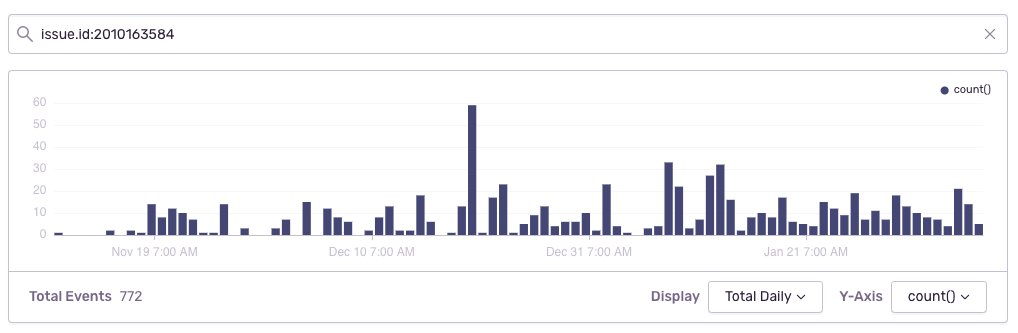
Based on the 90-day graph for this crash in Sentry Discover, it appears to be happening pretty steadily at ~10 per day on average (estimating from the graph). @khaykov if you decided to close this one as wontfix, would the best advice then be for people to delete the app completely and install it again from the Play Store to avoid the problem if they should happen to run into it?
WORDPRESS-ANDROID-X57: https://sentry.io/share/issue/b00c51c09d0944fc82de76dd5bec2e0c/
designsimply
on 8 Feb 2021
PS: I agree with @designsimply . ➕
ParaskP7
on 9 Feb 2021
Cool, let's leave this one be - it should naturally get away over time. Feel free to reopen in the future if necesary.
@designsimply yes, the best advice will be to uninstall the app and install it again from Play Store.
For documentation reasons, here is how to replicate the issue:
- Install bundletool, if you don't have it already (you can use brew:
brew install bundletool). - From AS Select Build -> Build Bundle(s) / APK(s) -> Build Bundle(s)
- When build is finished, press "locate" in the popup that will appear in the bottom right corner of AS.
- Use bundletool to convert resulting
aabfile intoapks:bundletool build-apks --bundle=org.wordpress.android-vanilla-debug.aab --output=app.apks - Change extension of resulting
apksfile tozipand unzip it. You will findsplitsfolder inside. - Locate
base-master.apkand install it onto device or emulator. - You should get the exception from this issue.
khaykov
on 9 Feb 2021
Related issues
 prtksxna
·
3Comments
prtksxna
·
3Comments
 maxme
·
3Comments
maxme
·
3Comments
 JavonDavis
·
3Comments
JavonDavis
·
3Comments
 jtreanor
·
3Comments
jtreanor
·
3Comments
 mzorz
·
3Comments
mzorz
·
3Comments
Most helpful comment
Cool, let's leave this one be - it should naturally get away over time. Feel free to reopen in the future if necesary.
@designsimply yes, the best advice will be to uninstall the app and install it again from Play Store.
For documentation reasons, here is how to replicate the issue:
brew install bundletool).aabfile intoapks:bundletool build-apks --bundle=org.wordpress.android-vanilla-debug.aab --output=app.apksapksfile tozipand unzip it. You will findsplitsfolder inside.base-master.apkand install it onto device or emulator.