Wordpress-android: Users unable to figure out how to remove Jetpack sites that are unreachable
When viewing a Jetpack site that's not reachable, the app behaves strangely:
- When viewing a site's settings, it'll attempt the load the settings, then kick you out of that screen with a toast that says "Couldn't retrieve site info".
- It looks like the handling is different than on WordPress.com – there, it looks like it automatically hides Jetpack sites that are unreachable. However they still show up in the Android app
To Reproduce:
- Either have (or create) a Jurassic Ninja site on your account. Don't access it for a long time so that it expires. Try to do things with it in the mobile app. Compare the handling of this site by the app with that of WordPress.com.
Tested on Samsung S9, WPAndroid 15.9.1
 jkmassel
All 4 comments
I'm marking this as low severity, because:
- The severity is low: the App is still usable, and it's only the experience within the inaccessible site that is sub-optimal. It's not even crashing or blocking any functionality.
- The impact is low: there's no reference in the issue to user reports, and given the nature of the report (a difference between WP Android and Web) I expect not a lot of users are having issues with this.
Additionally, I'm not sure it's the best idea to treat this as a simple bug fix since it's more of a UX enhancement that would probably need to be synchronized across iOS and Android. A single developer being assigned this task would probably be diving into a mini project disguised as a bug. Thoughts @jkmassel ?
I'm not sure who to ping for reviewing my observation... maybe @frosty or @yaelirub?
 diegoreymendez
on 2 Nov 2020
diegoreymendez
on 2 Nov 2020
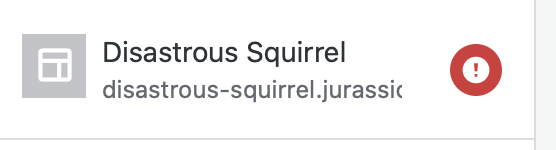
As a side note in WordPress web, I'm seeing the site flagged as broken, instead of hidden - It may be because I intentionally moved .php files in order to not have to wait for the jurassic.ninja site to break:
diegoreymendez
on 2 Nov 2020
Thanks @diegoreymendez – this came about because of a user report asking how they could get rid of that site – they couldn't figure out how (and I couldn't either).
Eventually, I showed them how to hide it in Android using the list filter.
Thanks for looking at this!
jkmassel
on 2 Nov 2020
Thanks @jkmassel, makes sense. That description feels a bit more focused.
But since I've marked it as low priority, and since @bummytime mentioned this was reviewed last week by @emilylaguna and @malinajirka, I'm removing the "Requires Triage" tag for now.
diegoreymendez
on 4 Nov 2020
Related issues
 guarani
·
3Comments
guarani
·
3Comments
 jtreanor
·
3Comments
jkmassel
·
3Comments
jtreanor
·
3Comments
jkmassel
·
3Comments
 designsimply
·
3Comments
designsimply
·
3Comments
 develric
·
3Comments
develric
·
3Comments