Wordpress-android: Login: Gboard one-tap clipboard suggestion overlaps the Continue button in the 2fa verification code screen on some devices
The "Continue" button gets overlapped by the new one-tap clipboard suggestions currently being A/B tested on the Gboard keyboard on Pixel devices according to 9to5google.
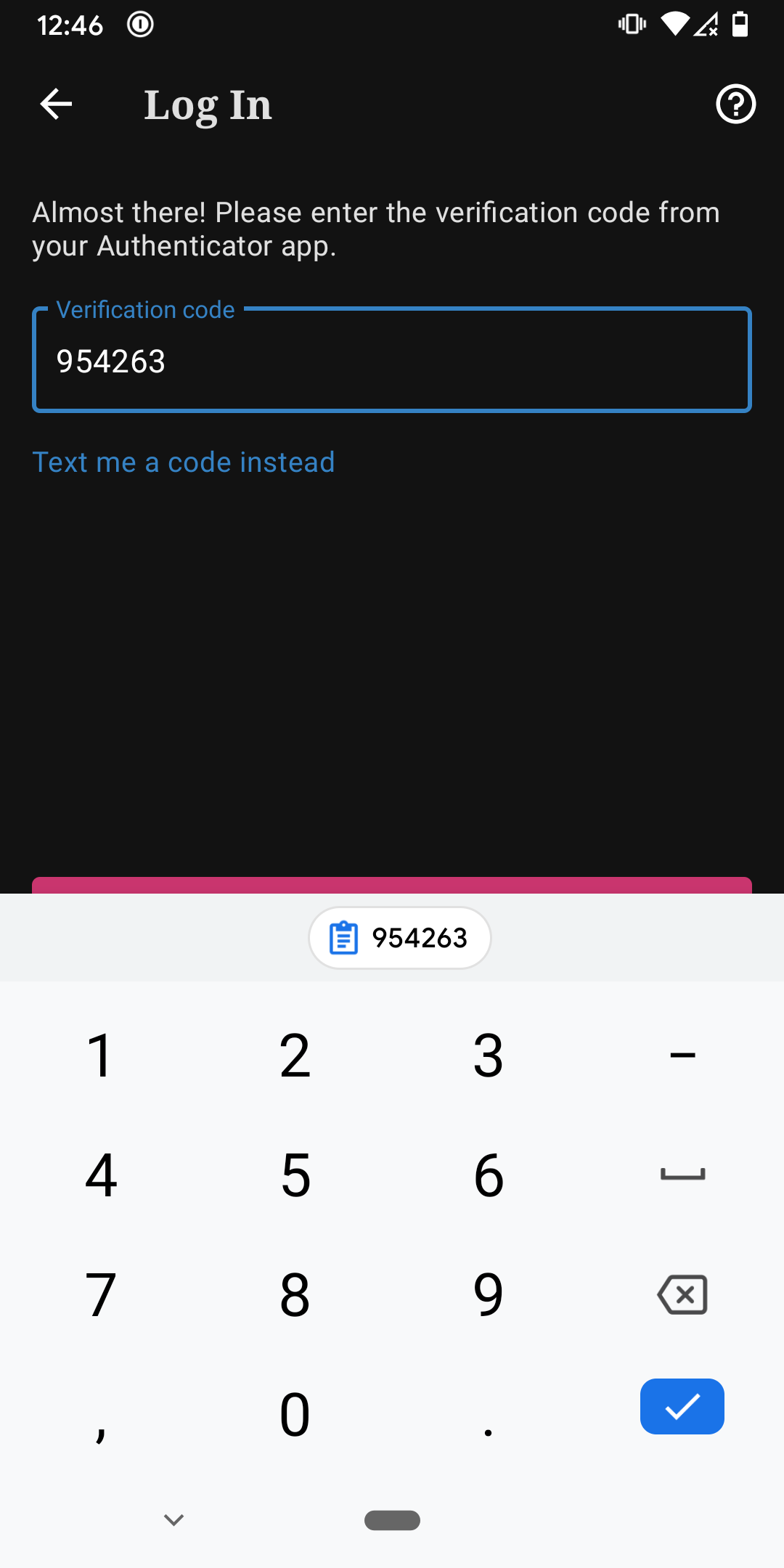
Tested with WPAndroid 15.7-rc-3 on Pixel 3 Android 11.
Note: I'm not quite sure how to set [Type] and [Pri] labels for this yet as it's a very new feature and even fully rolled out will only affect Gboard users and I'm not sure how much of our user base would be included in that. Setting as [Type] Enhancement and [Pri] Low for now and noting it may come up a little more often with others if/when this Gboard feature becomes more widely used.
 designsimply
All 12 comments
Hey @designsimply, i'm having the same issue, do you have any solution for this problem? Thanks
 raphaelbertholucci
on 14 Dec 2020
raphaelbertholucci
on 14 Dec 2020
Sure! The best temporary workaround right now is to tap the blue checkmark button in the keyboard (which also works just fine). I have also found that tapping the top edge of the pink button also works.
Past that, hearing from other users could help raise the issue in priority—otherwise, I'm not really sure how many people are affected by this issue.
designsimply
on 15 Dec 2020
Saw your comment on #14120
Might be a rare issue. But in case some default changes in future, I wonder if the position of the button could be redefined. Is it positioned X pixels below the field? Or is it positioned above the keyboard somehow?
 osullivanchris
on 3 Mar 2021
osullivanchris
on 3 Mar 2021
Let's see if @jd-alexander has space to do some quick research on this one during his upcoming Groundskeeping rotation that starts March 15. @jd-alexander I don't think this is a widespread issue, yet!, but would it be possible to timebox this and try to find out about how the suggestion row is positioned and whether it might be a quick fix to help users with Gboard who might be facing this issue?
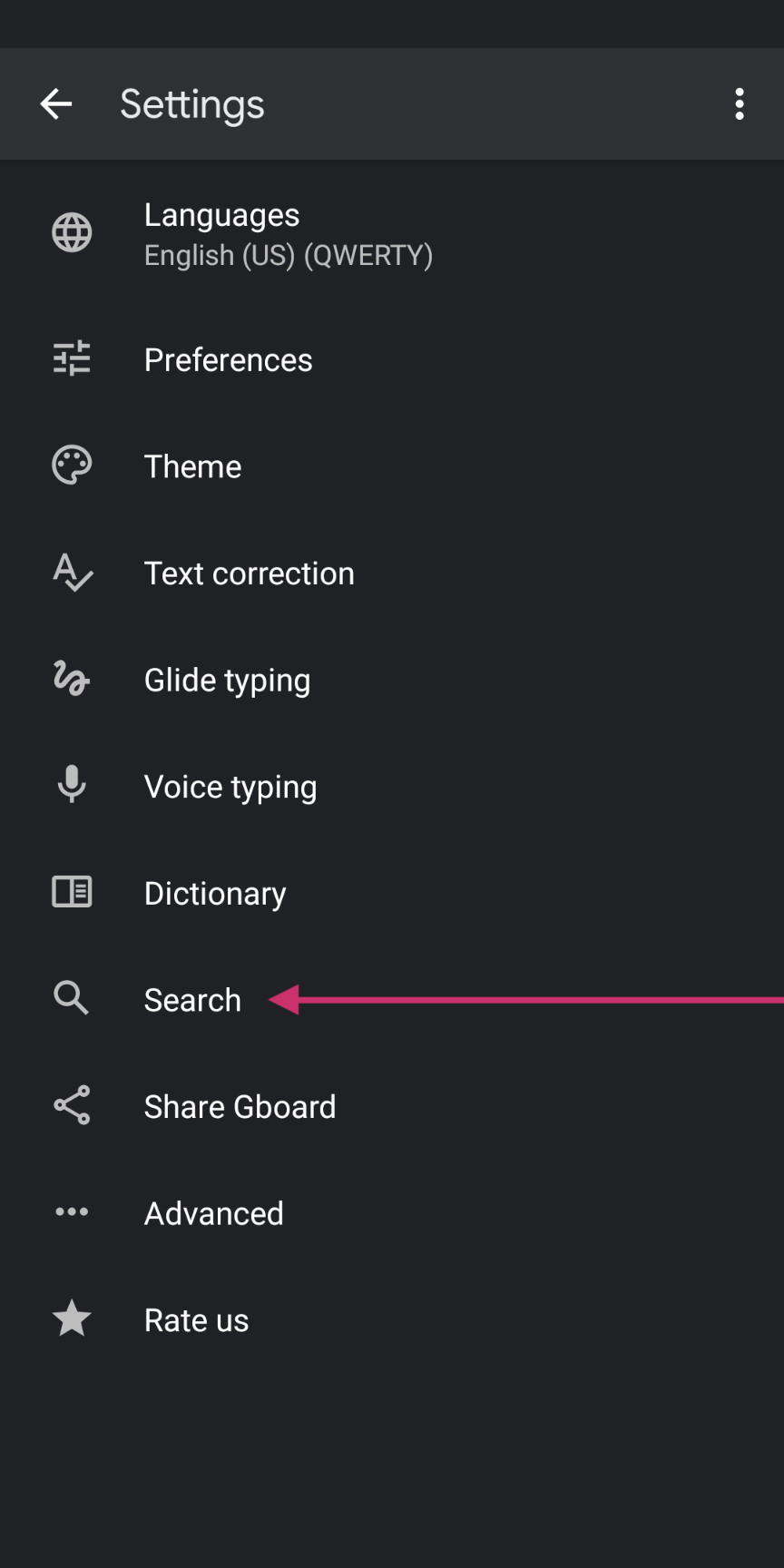
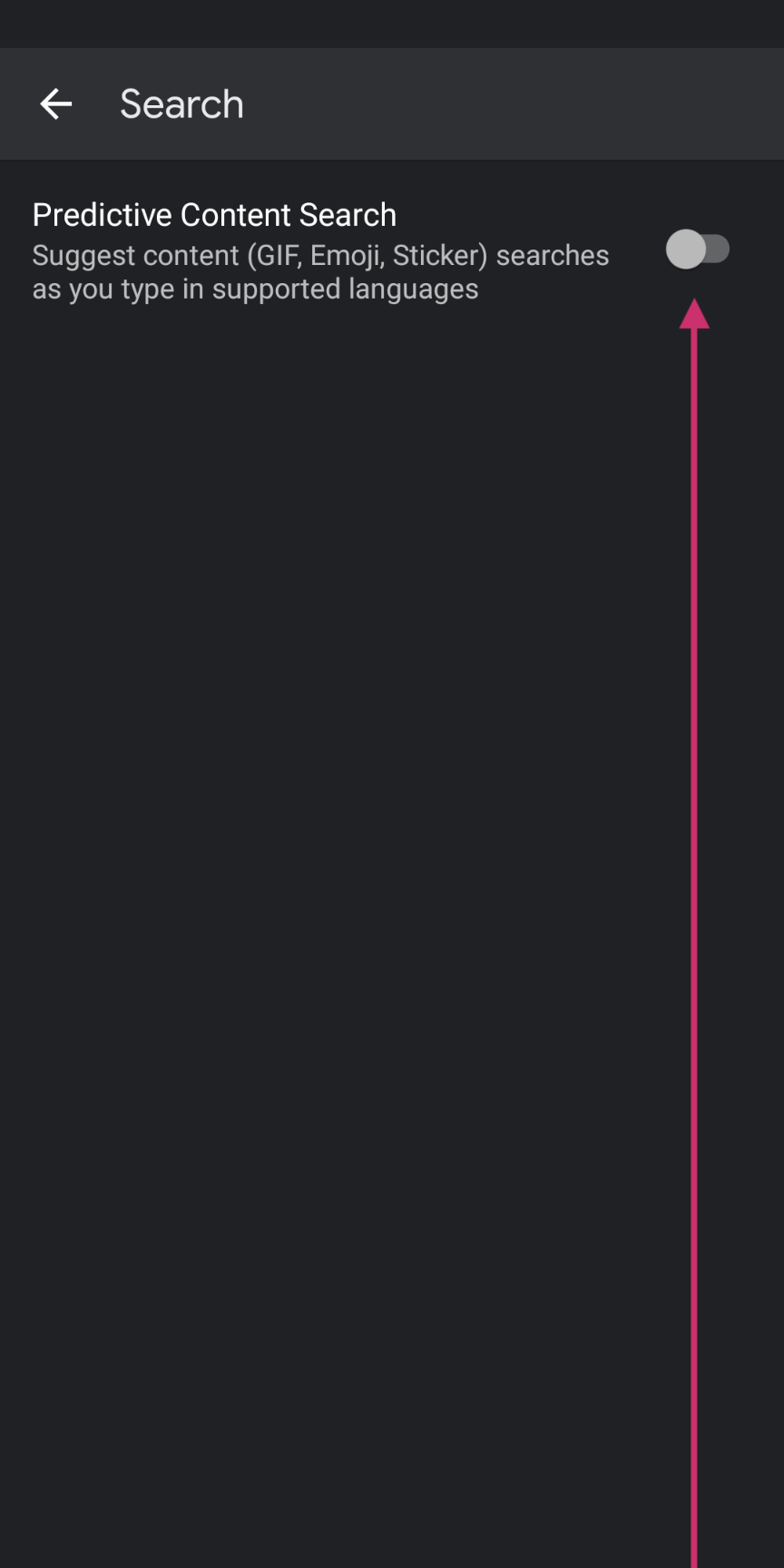
Aside: I tried messing around with my Gboard keyboard settings and now I'm not getting the suggestions or the overlap. Heh. Device Settings > System > Languages and input > On-screen keyboard > Gboard > Search ← toggled this setting off.
Gboard settings|Gboard > Search toggle|No more overlap
---|---|---
 |
| |
|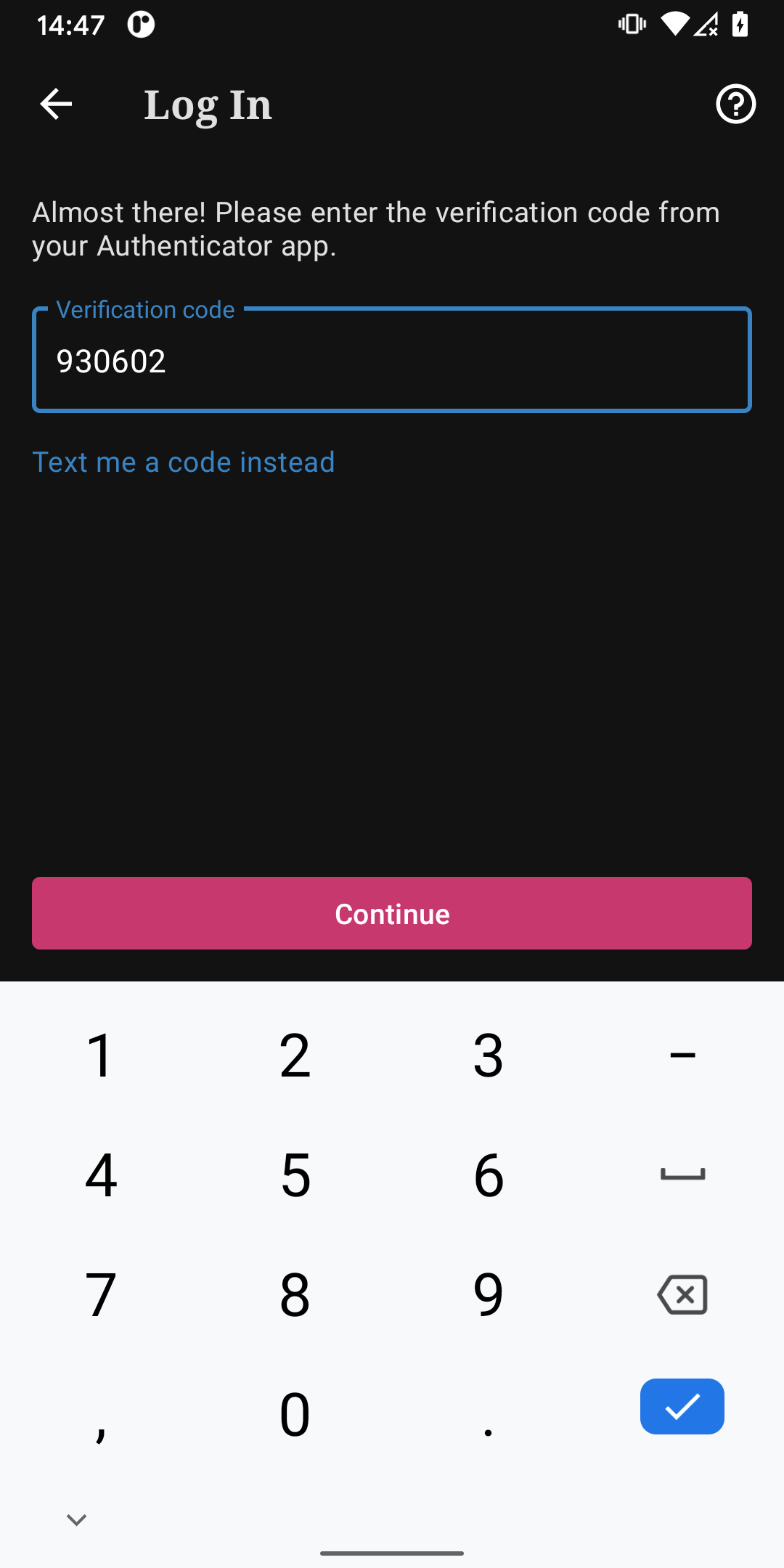
Tested with WPAndroid 16.8-rc-1 on Pixel 3 Android 11.
designsimply
on 3 Mar 2021
Thanks for the ping here @designsimply I can definitely look into this during groundskeeping.
 jd-alexander
on 4 Mar 2021
jd-alexander
on 4 Mar 2021
@designsimply I have started looking into this and it won't be easy to resolve in an optimal way because from a programmatic standpoint, I don't have access to the state of the Gboard to know when the suggestions are being shown or not. I am thinking I could check the device's clipboard or the autofill framework to see if it could give some details if the user has content in their clipboard and I could then use that to signal that I need to add bottom padding to the bottom.
Might be a rare issue. But in case some default changes in future, I wonder if the position of the button could be redefined. Is it positioned X pixels below the field? Or is it positioned above the keyboard somehow?
Hi @osullivanchris it is positioned towards the bottom edge of the screen so when the keyboard opens, it pushes the layout up. Google has not optimized its keyboard, because it should automatically put our layout above the keyboard, but it seems the internal inset behavior is off.
I am wondering if I could do a design change be done, where the Continue could be placed below the Text me a code instead? Wdyt @osullivanchris ?
If not I have a potential solution, that I could use to add some padding to the button.
jd-alexander
on 17 Mar 2021
@jd-alexander I realized I assumed this only affects Pixel users based on some Googling on my part, as a gut check though… do you agree it's limited in that way or do you think it might be happening for other devices? fwiw, we haven't seen any user reports about it yet (that I know of) besides the one already included above.
designsimply
on 17 Mar 2021
@jd-alexander I realized I assumed this only affects Pixel users based on some Googling on my part, as a gut check though… do you agree it's limited in that way or do you think it might be happening for other devices? fwiw, we haven't seen any user reports about it yet (that I know of) besides the one already included above.
Good question. Since Gboard is a keyboard that has support for a lot of device types it may be impacting other devices that choose to utilize Gboard as their default keyboard. I think Pixels get Gboard as the default. I don't think we have any metrics right now of keyboard usage. If we want to determine this, we could introduce an event in tracks that has the name of the input method.
jd-alexander
on 17 Mar 2021
So I think we may need to rely on design changes to resolve this issue. I am not able to check if autofill or clipboard suggestions are being shown so I don't know when I should adjust the padding of the button. The methods that allow checking this value are all hidden within the Android API for internal use only.
jd-alexander
on 18 Mar 2021
@mattmiklic going to tag you back in on this one as it was your baby. Sounds like an issue with Google's keyboard, we can't dynamically display the button in the right place. Would the suggestion to have it positioned below the field be acceptable?
osullivanchris
on 18 Mar 2021
Hmm, tough call here. The buttons are positioned at the bottom of the screen/above the keyboard to make them easier to reach when your hands are in a typing position. Moving the button up loses that for everyone, even those not affected by this bug. And makes the position inconsistent with all the other login screens.
Since you can still proceed with the blue check button on the keyboard, or tapping the top edge of the pink button, I almost wonder if we say this is Google's bug to solve with their keyboard, and not worry about it unless we start seeing more real-world reports of this being a problem.
 mattmiklic
on 18 Mar 2021
mattmiklic
on 18 Mar 2021
Thanks for the thoughts here @mattmiklic I agree with waiting on Google to resolve the bug. They have restricted all the internal keyboard APIs that would allow us to resolve the issues anyway and we would need to make a custom keyboard to get it resolved programmatically.
not worry about it unless we start seeing more real-world reports of this being a problem.
Indeed! If it becomes more impactful to the flow, we could definitely make some changes but until then the existing design can remain.
jd-alexander
on 18 Mar 2021
Related issues
 nbradbury
·
3Comments
nbradbury
·
3Comments
 maxme
·
3Comments
maxme
·
3Comments
 mzorz
·
3Comments
mzorz
·
3Comments
 khaykov
·
3Comments
khaykov
·
3Comments
 malinajirka
·
3Comments
malinajirka
·
3Comments
Most helpful comment
Hmm, tough call here. The buttons are positioned at the bottom of the screen/above the keyboard to make them easier to reach when your hands are in a typing position. Moving the button up loses that for everyone, even those not affected by this bug. And makes the position inconsistent with all the other login screens.
Since you can still proceed with the blue check button on the keyboard, or tapping the top edge of the pink button, I almost wonder if we say this is Google's bug to solve with their keyboard, and not worry about it unless we start seeing more real-world reports of this being a problem.