Wordpress-android: [GlobalStep] [Android] Application crashes on "Saving..." popup while publishing or saving drafts.
Environment:
Android: Samsung Galaxy S7 (v8), Samsung Galaxy Tab A (v9).
Build WPAndroid [version]: v14.9
Consistency : 5/5
Steps To Reproduce:
- Install and launch the application.
- Tap on "Log In".
- Log in to the app using valid credentials.
- Go to My site and tap on "Pages" icon.
- Go to Drafts and tap on "CREATE A PAGE" button.
- Select any one of the templates say "Service" and tap on "Apply" option.
- Insert images/gallery/cover block and upload pictures from any one of the options say "Take a Photo".
Scenario 1 (PUBLISH TAB):
- Note: while image is uploading, Tap on "PUBLISH" option.
- Tap on "PUBLISH NOW" option when "Ready to Publish?" popup appears .
- Note on "PUBLISHED" tab->Page with "Uploading media.." will get added to the list.
- Tap on create a new page icon on "DRAFTS" tab.
- Repeat steps 6,7 from above and 8,9 from here.
- Note on "PUBLISHED" tab->Page with "Uploading media.." will get added to the list.
- Now observe that the first page that you published will be displaying an error message "Queued Page". for this page tap on three dots icon.
- Tap on "View" option observe that application gets stuck on "Saving.." popup.
- Observe that on "PUBLISHED" tab, application crashes after gets stuck on "Saving.." popup when multiple pages are trying to get published and user taps on "View" option for a page which displays "Queued Page".
Note: Same is observed for this a page in published tab's list when viewed with this message: "We couldn't publish this page, but we'll try again later"
Scenario 2 (DRAFTS TAB):
- Tap back arrow icon
- Note that Page with "Uploading media.." will get added in the DRAFTS tab list.Tap on create a new page icon.
- Repeat steps 6,7 from above and 8 from here.
11.Note that Page with "Queued page.." will get added in the DRAFTS tab list - For Page with "Queued page.."-> Tap on three dots icon and then tap on View.
- Note application will get stuck on "Saving.." popup, now wait for few seconds
- Observe that On "DRAFTS" tab, application crashes after getting stuck on "Saving.." popup when multiple pages are uploading and user taps on"View" option.
Actual Result:
Application crashes on "Saving..." popup while publishing or saving drafts.
Expected Result:
Application should save the draft content and proceed ahead smoothly.
Attachment:
#2281.zip
 gglobalstep
All 12 comments
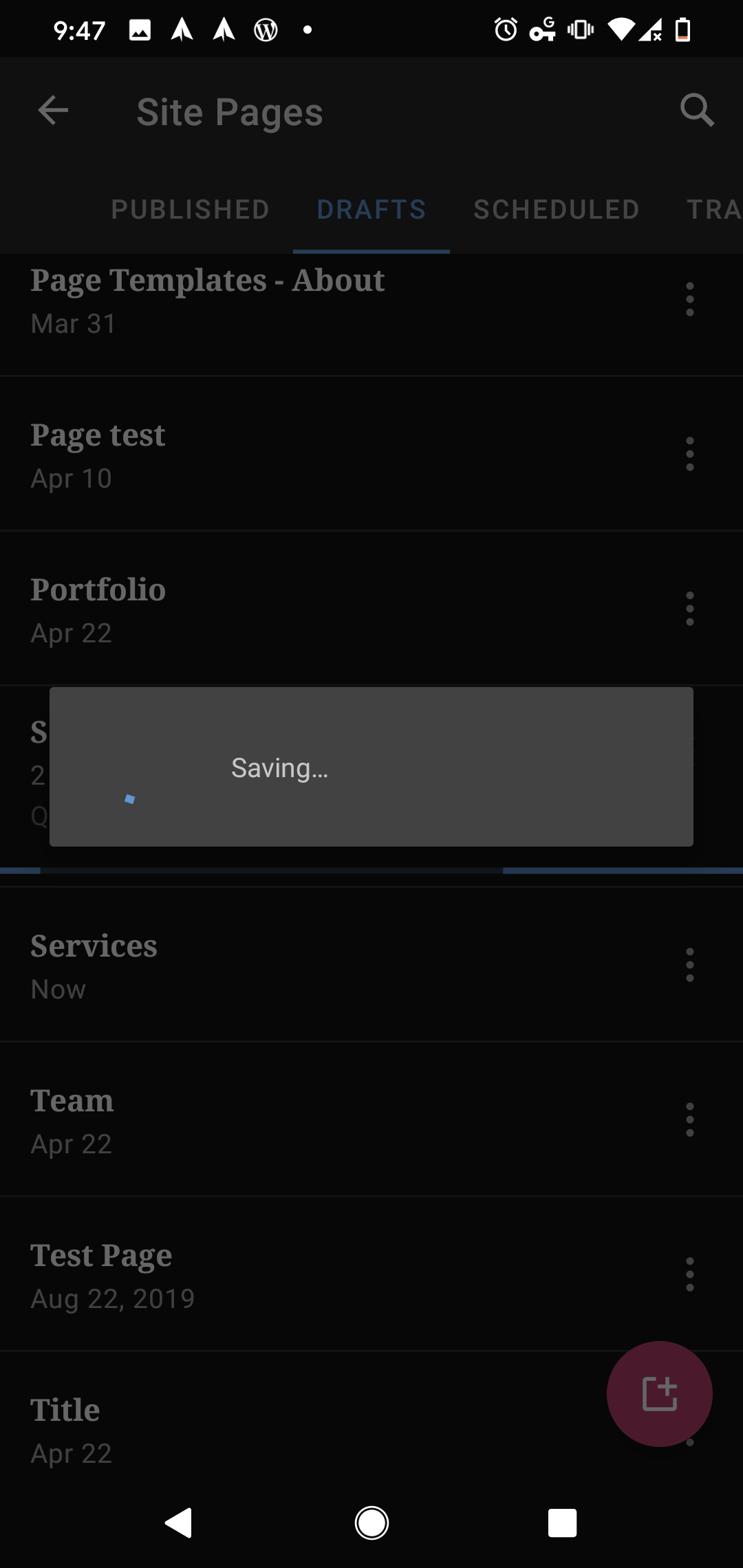
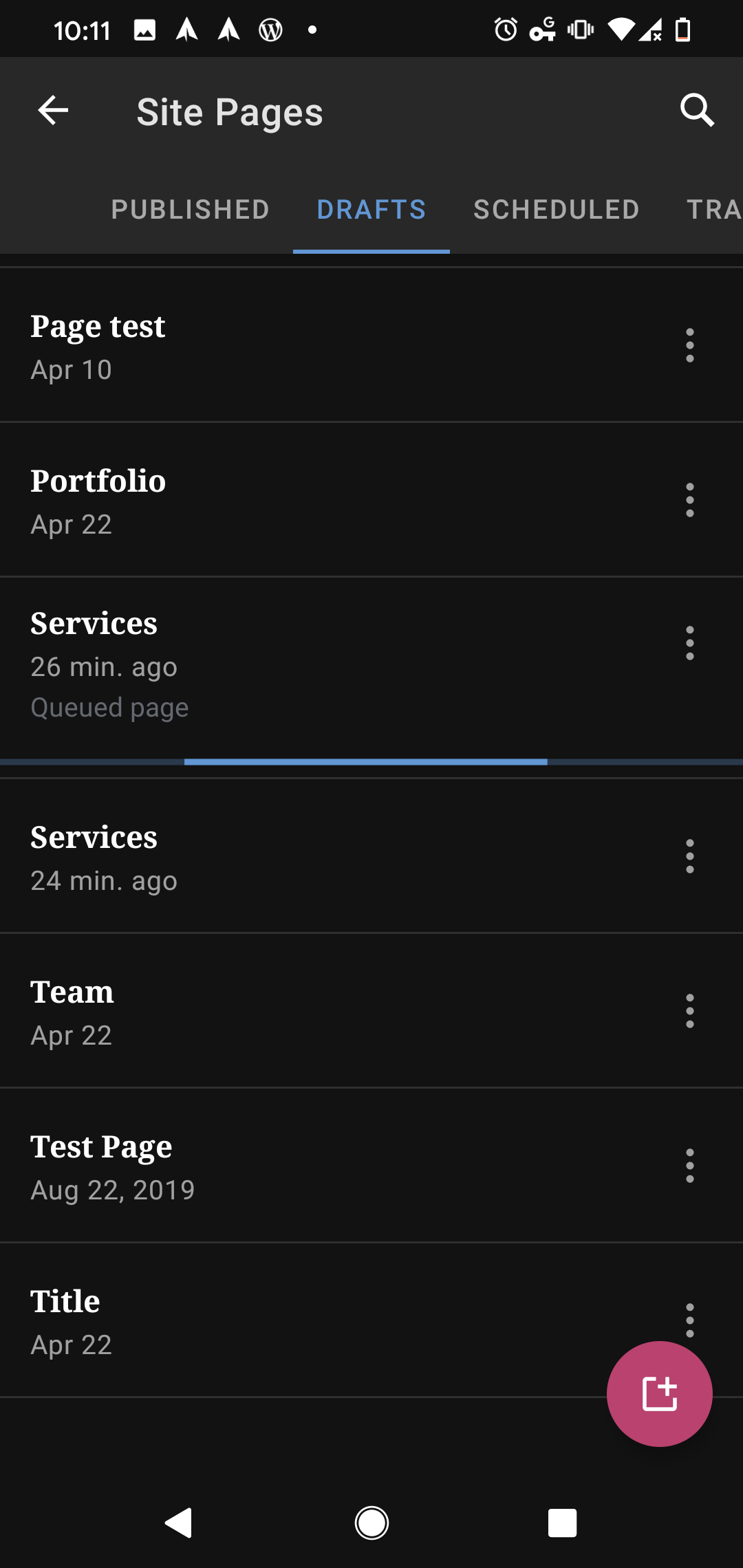
I tested using WPAndroid 14.9-rc-3 on Pixel 4 Android 10 and found that the "Saving…" pop-up felt stuck but eventually went away (I switched to a different app and back as well) and the "Queued page" and loading bar on the Drafts Post List for the 2nd page template in scenario 2 was still stuck that way after 25 minutes and longer, however, the app did not crash when I tested from my Pixel 4.
 designsimply
on 22 May 2020
designsimply
on 22 May 2020
Can't be fully sure without investigating deeper, but this this looks an issue with the sync/saving mechanism and the posts/pages lists screens. The editor is not quite involved there so, I'd suggest moving this ticket to the WPAndroid repo. Also, I see that @mchowning is assigned here but wondering if indeed investigation/work has started on this one or not. If not and y'all agree, let's unassign Matt.
 hypest
on 5 Jun 2020
hypest
on 5 Jun 2020
Hey @malinajirka , can you please take a look at this one?
 yaelirub
on 9 Jun 2020
yaelirub
on 9 Jun 2020
Hi there,
I've investigated the issue, but I'm not able to reproduce it. I never even reached the state where the page list would say "Upload Queued". I tried to slow down my connection on an emulator, but it didn't help. However, I encountered two issues while investigating. I think the second issue might be the crash behind this issue.
Issue 1 (Update: This issue will be investigated in its own ticket)
- Create a Page
- Apply "Services" template
- Add gallery block
- Select 3 images from the local storage
- Click on Insert
- Notice the gutenberg crashes (on debug build)
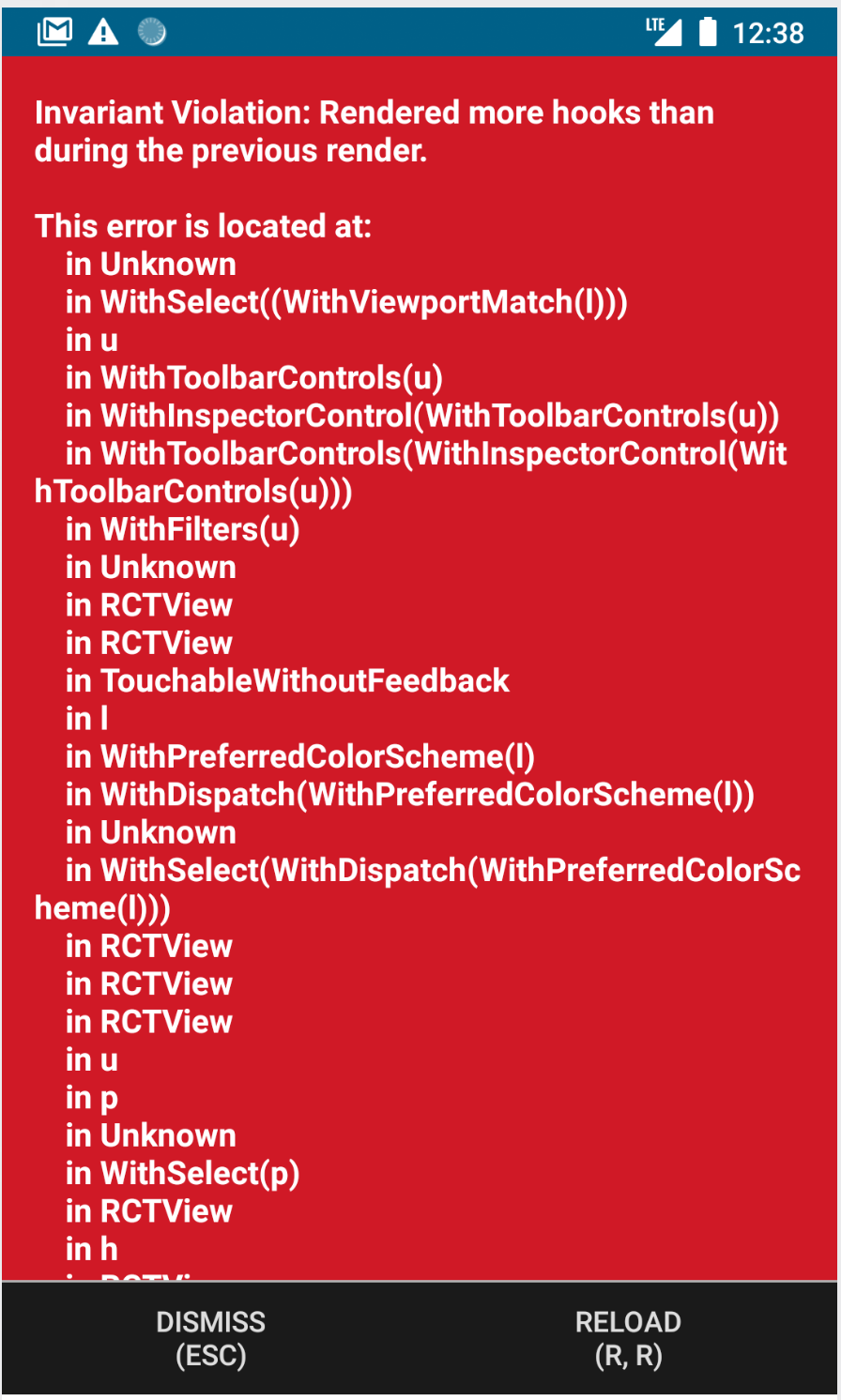
Reproduced on ec7e04cfcdcb0167fc757122331d421c7203943b (Emulator, Pixel 2, Api 27)
I've checked and it's not happening on 14.9
Issue 2 - Happens just sometimes
Create two posts as per the main description of this issue. Notice the app sometimes crashes with the following exception
2020-06-10 12:42:09.818 3157-3157/org.wordpress.android.beta E/AndroidRuntime: FATAL EXCEPTION: main
    Process: org.wordpress.android.beta, PID: 3157
    org.greenrobot.eventbus.EventBusException: Invoking subscriber failed
        at org.greenrobot.eventbus.EventBus.handleSubscriberException(EventBus.java:527)
        at org.greenrobot.eventbus.EventBus.invokeSubscriber(EventBus.java:509)
        at org.greenrobot.eventbus.EventBus.invokeSubscriber(EventBus.java:501)
        at org.greenrobot.eventbus.HandlerPoster.handleMessage(HandlerPoster.java:67)
        at android.os.Handler.dispatchMessage(Handler.java:106)
        at android.os.Looper.loop(Looper.java:164)
        at android.app.ActivityThread.main(ActivityThread.java:6494)
        at java.lang.reflect.Method.invoke(Native Method)
        at com.android.internal.os.RuntimeInit$MethodAndArgsCaller.run(RuntimeInit.java:438)
        at com.android.internal.os.ZygoteInit.main(ZygoteInit.java:807)
     Caused by: java.lang.NullPointerException: Attempt to invoke virtual method 'java.lang.String com.google.gson.JsonElement.getAsString()' on a null object reference
        at org.wordpress.android.ui.posts.mediauploadcompletionprocessors.ImageBlockProcessor.processBlockJsonAttributes(ImageBlockProcessor.java:34)
        at org.wordpress.android.ui.posts.mediauploadcompletionprocessors.BlockProcessor.processBlock(BlockProcessor.java:91)
        at org.wordpress.android.ui.posts.mediauploadcompletionprocessors.MediaUploadCompletionProcessor.processBlock(MediaUploadCompletionProcessor.java:78)
        at org.wordpress.android.ui.posts.mediauploadcompletionprocessors.MediaUploadCompletionProcessor.processContent(MediaUploadCompletionProcessor.java:59)
        at org.wordpress.android.ui.posts.mediauploadcompletionprocessors.MediaUploadCompletionProcessor.processContent(MediaUploadCompletionProcessor.java:60)
        at org.wordpress.android.ui.posts.PostUtils.replaceMediaFileWithUrlInGutenbergPost(PostUtils.java:429)
        at org.wordpress.android.ui.uploads.MediaUploadReadyProcessor.replaceMediaFileWithUrlInPost(MediaUploadReadyProcessor.java:25)
        at org.wordpress.android.ui.uploads.UploadService.updatePostWithMediaUrl(UploadService.java:611)
        at org.wordpress.android.ui.uploads.UploadService.updatePostWithCurrentlyCompletedUploads(UploadService.java:459)
        at org.wordpress.android.ui.uploads.UploadService.updateOnePostModelWithCompletedAndFailedUploads(UploadService.java:707)
        at org.wordpress.android.ui.uploads.UploadService.doFinalProcessingOfPosts(UploadService.java:993)
        at org.wordpress.android.ui.uploads.UploadService.stopServiceIfUploadsComplete(UploadService.java:670)
        at org.wordpress.android.ui.uploads.UploadService.stopServiceIfUploadsComplete(UploadService.java:655)
        at org.wordpress.android.ui.uploads.UploadService.onMediaUploaded(UploadService.java:951)
        at java.lang.reflect.Method.invoke(Native Method)
        at org.greenrobot.eventbus.EventBus.invokeSubscriber(EventBus.java:507)
        at org.greenrobot.eventbus.EventBus.invokeSubscriber(EventBus.java:501)
        at org.greenrobot.eventbus.HandlerPoster.handleMessage(HandlerPoster.java:67)
        at android.os.Handler.dispatchMessage(Handler.java:106)
        at android.os.Looper.loop(Looper.java:164)
        at android.app.ActivityThread.main(ActivityThread.java:6494)
        at java.lang.reflect.Method.invoke(Native Method)
        at com.android.internal.os.RuntimeInit$MethodAndArgsCaller.run(RuntimeInit.java:438)
        at com.android.internal.os.ZygoteInit.main(ZygoteInit.java:807)
Reproduced on ec7e04cfcdcb0167fc757122331d421c7203943b and on 14.9 (Emulator, Pixel 2, Api 27)
It seems the first crash is definitely in gutenberg/gutenberg-mobile. The second crash seems to be in ImageBlockProcessor. @mkevins It seems you might have know-how about both these crashes. Could you please take a look? Thanks!
 malinajirka
on 10 Jun 2020
malinajirka
on 10 Jun 2020
Issue 1 from @malinajirka's comment can be tracked with this issue, we are starting to investigate.
 pinarol
on 10 Jun 2020
pinarol
on 10 Jun 2020
One more note on "issue 2" from my comment. I tried to look up the issue in sentry - especially since I was able to reproduce it on 14.9. However, I wasn't able to find it there. So it's either not being recored (not probable) or users haven't encountered it yet (🤞 ).
malinajirka
on 10 Jun 2020
Hi @malinajirka
I believe the "issue 2" from your comment is the same as this one: https://github.com/wordpress-mobile/WordPress-Android/issues/12104, and a PR to guard the NPE (https://github.com/wordpress-mobile/WordPress-Android/pull/12114) has been merged. I think the reason it was hard to track in Sentry was that the exceptions were being masked (see: https://github.com/wordpress-mobile/WordPress-Android/issues/12105).
 mkevins
on 11 Jun 2020
mkevins
on 11 Jun 2020
Thanks Matthew! I can confirm the issue 2 is fixed on the latest develop.
I tried to reproduce the issue on v14.9 with the fix for "issue 2", but I'm still unable to reproduce it. When I slow down the connection on my emulator, I'm able to reach the "Upload Queued" state, but it always disappears when the upload finishes.
@designsimply I agree that the "saving" dialog feels stuck. Moreover, it's not cancelable which makes the UX even worse. I'd consider disabling the whole row when an upload is in progress - the user wouldn't be able to click on "View" so it'd technically solve even this issue. How would you feel about that?
malinajirka
on 11 Jun 2020
By "disabling the whole row" do you mean the row for the post in the posts list or the saving dialog, or both? Would the more menu (three dots) become disabled but the post itself would still be tappable so you could still open it in the editor?
My only concern would be what would happen if the upload continuously fails for whatever reason? Would the post essentially become stuck forever in the app?
designsimply
on 11 Jun 2020
By "disabling the whole row" do you mean the row for the post in the posts list or the saving dialog, or both?
I meant the row of the page in the page list.
Would the more menu (three dots) become disabled but the post itself would still be tappable so you could still open it in the editor?
Even the editor would be disabled at that moment. We currently disable the whole row on the post list when the upload is in progress.
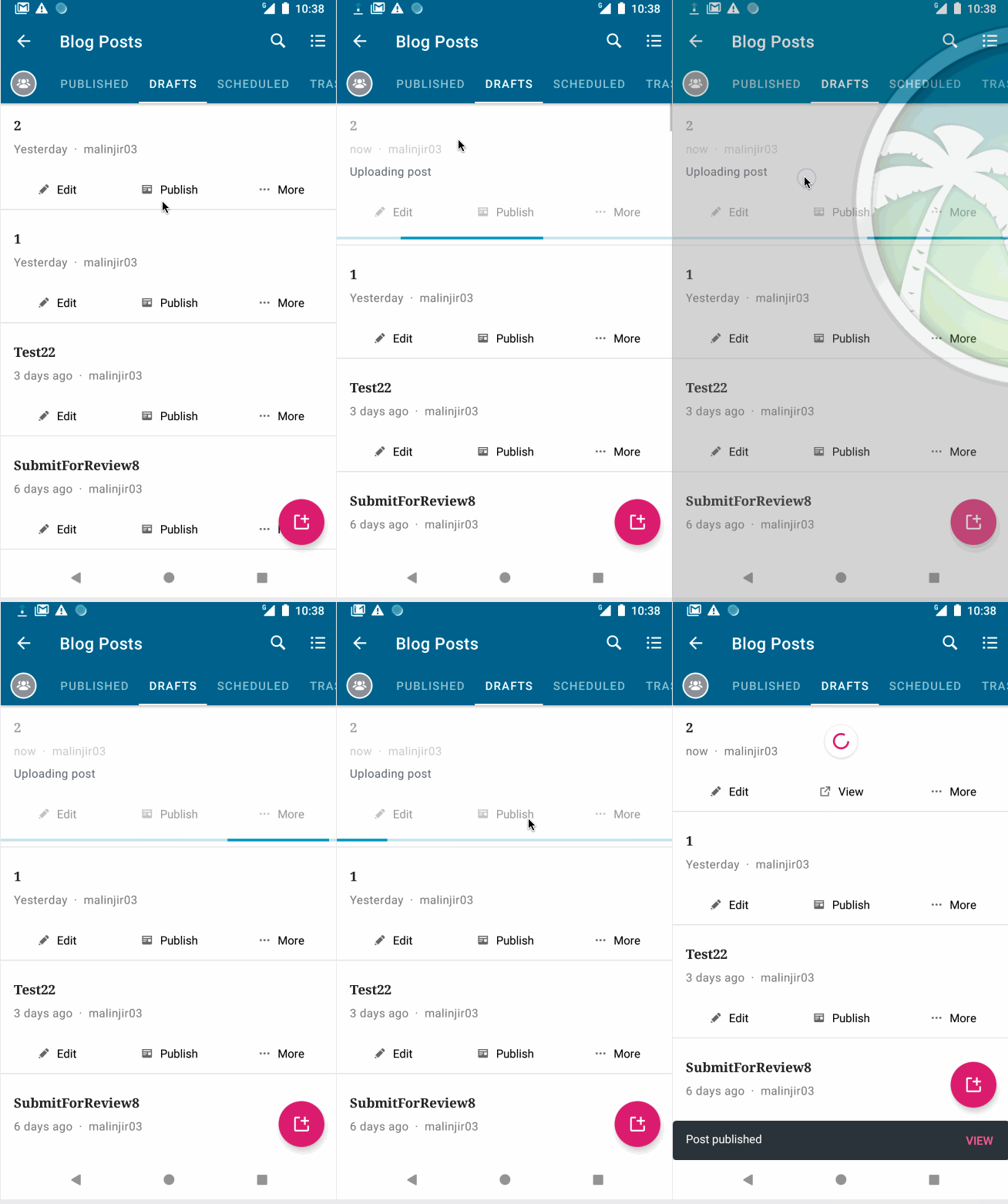
However, thinking about it a bit more it might not be the best idea. As we don't want to prevent the user from opening the post when media upload is in progress and disabling the row just for "page upload" wouldn't solve anything.
We might want to consider closing this issue as I believe the crash was fixed in https://github.com/wordpress-mobile/WordPress-Android/issues/12104. I'd create a separate issue with the stuck "saving" dialog - it should ideally be cancellable + it shouldn't get stuck when "view" is invoked during an upload. Wdyt?
malinajirka
on 11 Jun 2020
New issue sounds great. I will make one soon. 👍
designsimply
on 11 Jun 2020
Closing as issue 1 fixed in https://github.com/wordpress-mobile/gutenberg-mobile/pull/2371 (props @SergioEstevao 🎉), issue 2 addressed in https://github.com/wordpress-mobile/WordPress-Android/pull/12114 (props @mkevins 🎉), and issue 3 moved to https://github.com/wordpress-mobile/WordPress-Android/issues/12785.
designsimply
on 25 Aug 2020
Related issues
designsimply
·
3Comments
 hoverduck
·
3Comments
hoverduck
·
3Comments
 guarani
·
3Comments
guarani
·
3Comments
 roundhill
·
3Comments
roundhill
·
3Comments
 reginabally
·
3Comments
reginabally
·
3Comments
Most helpful comment
Can't be fully sure without investigating deeper, but this this looks an issue with the sync/saving mechanism and the posts/pages lists screens. The editor is not quite involved there so, I'd suggest moving this ticket to the WPAndroid repo. Also, I see that @mchowning is assigned here but wondering if indeed investigation/work has started on this one or not. If not and y'all agree, let's unassign Matt.