Wordpress-android: Keep facing build problem after downloading latest version
Hi, guys. I did download several times latest version 14.8, 14.9, when i start to build the project, Andrioid Studio keep showing "Unable to resolve dependency for ':libs:editor:WordPressEditor@debug/compileClasspath': Could not resolve project :react-native-gutenberg-bridge."
I never faced this issue when i use version no.14.6 so it stucks me many days, really need help here!
 plutonem-mobile
All 18 comments
I am having the same issue too. Can't build and deploy to device
 gibtang
on 8 Jun 2020
gibtang
on 8 Jun 2020
:wave: @plutonem-mobile and @gibtang ! So sorry you're running into these issues. We're in the process of making some changes to how the build process handles gutenberg-mobile, and we know there are still some rough edges we need to take care of, so thanks for bringing this up! :bow:
Can you check and make sure that your libs/gutenberg-mobile submodule is up to date. First, make sure that you don't have any changes in thelibs/gutenberg-mobile/ directory, and then run git submodule update --init --recursive. If you still get an error after that, please try deleting the libs/gutenberg-mobile/ folder and then run that same git submodule command again. Let me know if that helps.
 mchowning
on 8 Jun 2020
mchowning
on 8 Jun 2020
thanks @mchowning . I will give it a try later.
plutonem-mobile
on 9 Jun 2020
that command works quite good. I just finished my build without any problem!
and i see you just add this command suggestion in introduction page, very good hint here.

thanks again @mchowning .
plutonem-mobile
on 10 Jun 2020
bad news, bad news. I want to edit the previous comment.
yes, after i render the command "git submodule update --init --recursive", it did work at first - retrieving files about gutenberg, but when i build the project in Android Studio, the error becomes
"Process 'command 'libs\gutenberg-mobile\react-native-gutenberg-bridge\android\nulljsbundle\null\yarn\yarn-v1.22.4\yarn.cmd'' finished with non-zero exit value 1"
and even if i try deleting the libs/gutenberg-mobile/ folder and run that same git submoudle command again, i still face the same build error info in Android Studio.
may be something bad happened about yarn? i don't know.
you could check this out.
plutonem-mobile
on 10 Jun 2020
Sorry the build is still not working @plutonem-mobile . 😞
after i render the command "git submodule update --init --recursive", it did work at first - retrieving files about gutenberg, but when i build the project in Android Studio, the error becomes
"Process 'command 'libs\gutenberg-mobile\react-native-gutenberg-bridge\android\nulljsbundle\null\yarn\yarn-v1.22.4\yarn.cmd'' finished with non-zero exit value 1"
It looks like you're using Windows. We've basically only been able to test this new build process on Mac and Linux. To my knowledge, not many people have tried this with Windows, and I think that those who have tried it have run into problems similar to what you're seeing. So I suspect this may be a Windows-specific issue and, unfortunately, I don't have access to a Windows machine to test it out myself.
You could try to do a build from the command line (something like gradlew clean installWasabiDebug should do the trick) to make sure this isn't an Android Studio issue. I'd be very surprised if you didn't get the same error building from the command line though. This doesn't sound like an Android Studio problem to me, but it's worth a try.
We are hoping to move to a build setup that is much more similar to what we had before very soon. That would almost certainly resolve this issue because, among other things, it won't depend on yarn. I don't think that is being worked on yet though. @oguzkocer probably has a better idea about how soon we'll be working on that (also, he has a Windows machine, so he might have some ideas there too 🙂 ).
mchowning
on 10 Jun 2020
@plutonem-mobile I haven't had much luck with that error either. I think I am the only one who uses Windows in the mobile team and I also use mac OS as a secondary machine, so addressing this hasn't been a priority. Having said that, as @mchowning mentioned, we want to change how this Gutenberg is built as soon as possible which will fix the issue for Windows as well. In terms of timing, we are looking at between 1 to 2 months as we are wrapping up some other projects at the moment.
I am really sorry about this! We'll do our best to address it as soon as we can.
 oguzkocer
on 10 Jun 2020
oguzkocer
on 10 Jun 2020
@oguzkocer @mchowning you guys are so adorable, thank you so much for the time being spent on catching up this problem!
yes, the system i use to develop with wordpress is windows, a little bit wield ha~. i did not change my system for a very long time.
@mchowning i will try the command line build way later, if i have good luck there, i will let you know!
wish you could solve this build issue soon as possible as i really want to use the latest version of wordpress to continue the project.
for now probably the only option i could choose is to go back to version 14.6 temporarily, sad....
plutonem-mobile
on 11 Jun 2020
@plutonem-mobile Here is a workaround that is working for me on Windows:
- Add
wp.BUILD_GUTENBERG_FROM_SOURCE=trueto yourgradle.propertiesfile - Run the app
- Go to your site's settings and disable the block editor:
My Site->Settings->Use Block Editor
The reason this works is because the first step will turn the block editor to a runtime dependency instead of a compile-time dependency. (which is the build failure you experience) If you try to use the block editor with this setup, it'll likely crash because you'll need to setup your local environment to support it. However, with the 3rd step you can use the previous editor, which is completely native and the app will just work fine.
Let me know if you have any questions.
oguzkocer
on 12 Jun 2020
Thanks so much @oguzkocer !
When building with wp.BUILD_GUTENBERG_FROM_SOURCE set to true, you will also need to run yarn install from inside the libs/gutenberg-mobile folder. Also, you should re-run that command to refresh your libs/gutenberg-mobile/node_modules dependencies anytime you switch to a branch that uses a different submodule for gutenberg.
mchowning
on 12 Jun 2020
Hi, guys.
I just followed @oguzkocer method to add the configuration command to gradle.properties file. and after that i build it, AS tells me to manually run "yarn install" just as @mchowning said.
but after i download yarn (i never used this tool before) and type the command, i got this error

it seems like something bad happened about install process, i am not sure if it is my personal system problem or not.
I cannot run the app directly without yarn install process after add wp.BUILD_GUTENBERG_FROM_SOURCE=true to the properties file.
plutonem-mobile
on 15 Jun 2020
I also tried a second way to build with wp.BUILD_GUTENBERG_FROM_SOURCE set to true.
after i download the latest version of wordpress, i followed @mchowning previous answers:

to update libs/gutenberg-mobile submodule. And after that, i set wp.BUILD_GUTENBERG_FROM_SOURCE to true then start building. this time, the AS does not report error at first and everything goes fine (downloading lots of necessary packages) but after a while. it turns out to be this output:
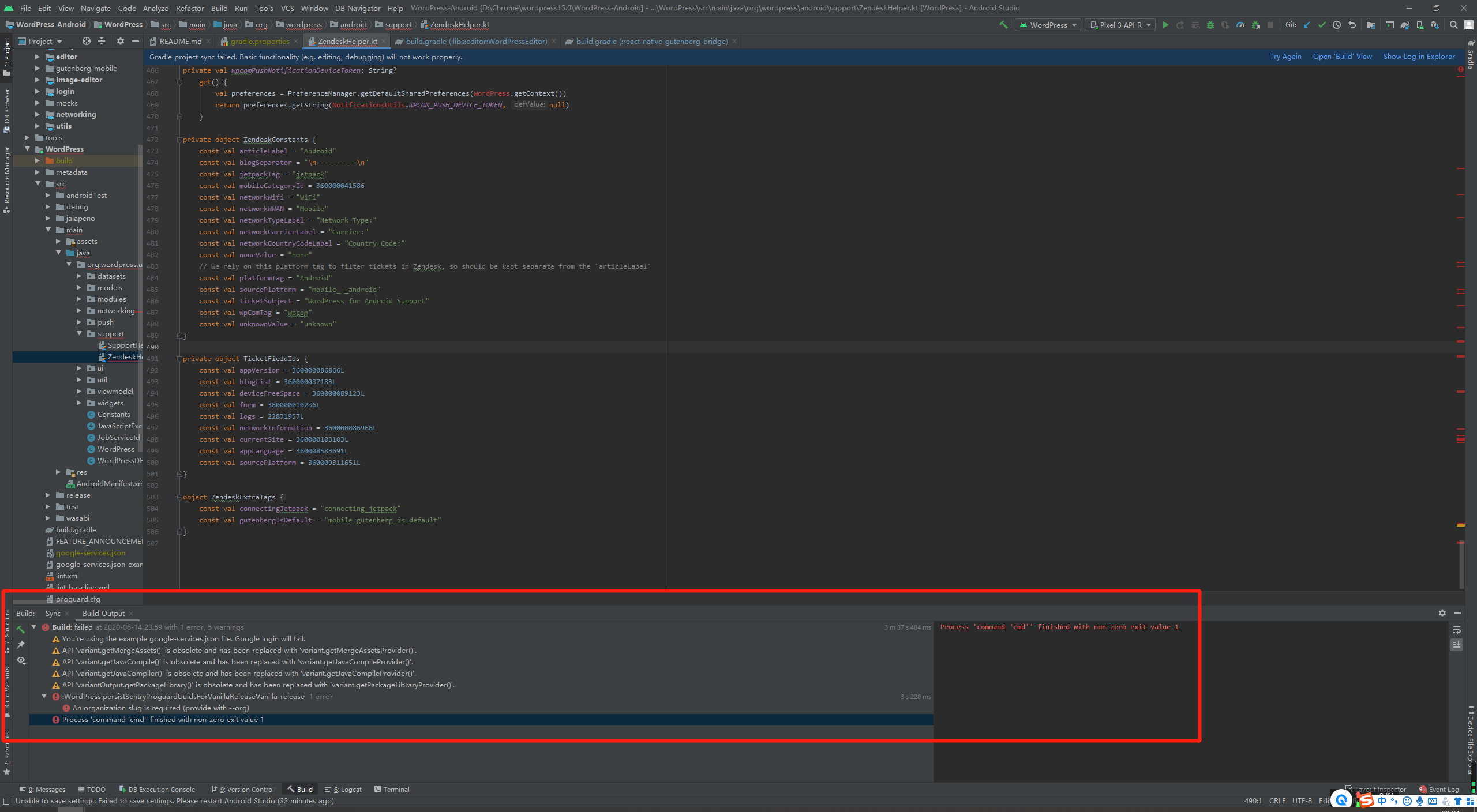
fails again.
i must say this whole new building process really challenges me a lot more than before. hope you could replace it with more easier way.
plutonem-mobile
on 15 Jun 2020
@plutonem-mobile About the issue with yarn, I've seen it happen on Windows for other people as well and unfortunately it's an issue with yarn and not the project. We don't have a lot of experience with yarn on Windows, so I don't think we can help much there. However, I use WSL to use yarn and that works fine, so if you have WSL setup, maybe you can look into that?
About the error you attached the screenshots for, can you try changing the build variant you're using to vanillaDebug or any of the ones that has Debug in it. The release build variants may expect some credentials you won't have access to. Once you fix this issue, you'll still need to run yarn install successfully at least once or otherwise you'll get another build issue.
i must say this whole new building process really challenges me a lot more than before. hope you could replace it with more easier way.
Hopefully this will be fixed soon.
oguzkocer
on 18 Jun 2020
Hi, @oguzkocer
it is being a little bit long time for me to test the build again.
not cool for me, i still got build issue on this one, even if i am using WSL to do the yarn install.
my whole process is:
- git clone wordpress from github.
- cp gradle.properties-example gradle.properties to set up the sample app credentials file.
- open the project in android studio and add wp.BUILD_GUTENBERG_FROM_SOURCE=true in gradle.properties file.
- run yarn install in libs/gutenberg-mobile folder from WSL Ubuntu 20.04 TLS (at this time, i got the following response, i think it's working)
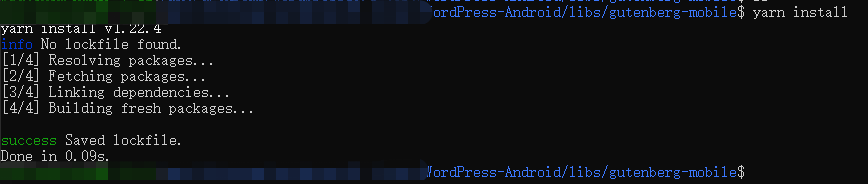
- return to android studio and starting build project.
- got this error:

@oguzkocer can you please show me your whole building process that works well in windows? so i can follow exactly what you've done. May be i forgot to download some components or missed some core steps?
plutonem-mobile
on 26 Jun 2020
Is it possible that i did not install some environmental components to make this building process work on windows?
cause from what i know when trying to build wordpress on mac os x this morning(btw, it works fine unlike windows), i did not install yarn and nodejs at first, so i met two issues during that time, one is to tell that i need to install yarn and the second is to tell i need to install nodejs.
so maybe i missed some core components that is needed in windows environment to finish building?
plutonem-mobile
on 26 Jun 2020
Sorry this is so painful on Windows currently @plutonem-mobile. We know this is broken and needs to be fixed.
i still got build issue on this one, even if i am using WSL to do the yarn install.
If you're using the latest code, we just merged to develop an update that switched from yarn to npm, so the command to run from libs/gutenberg-mobile/ is now npm install. Perhaps give that a try. npm install will take a while if it's working, and afterwards you should see a bunch of files in the libs/gutenberg-mobile/node_modules/ and libs/gutenberg-mobile/gutenberg/node_modules/.
mchowning
on 26 Jun 2020
Hi @mchowning , thank you so much for the suggestion gave above.
at this moment, i just use my mac to run the latest wordpress and my windows to do the developing. Although it's a little bit annoying that i need to switch to mac to see what's going on when running, i can handle that, anyway.
really thanks to you all guys for the time spending on this one!
plutonem-mobile
on 30 Jun 2020
@mchowning I've tried the latest and I'm still having issues building on Windows. Looking at logs a little closer, the error I'm seeing is "The syntax of the command is incorrect." and specifically it's the command "mkdir -p ..." in the "bundle:android:text" script of gutenberg-mobile/package.json
Seems like cmd.exe's mkdir doesn't like the -p option.
I did try manually creating that directory and removing mkdir and the build proceeds a little further but then starts complaining about "Import statement may only appear at top level" which I was unable to debug.
The workaround suggested with using wp.BUILD_GUTENBERG_FROM_SOURCE=true works for me.
 kaytat
on 6 Dec 2020
kaytat
on 6 Dec 2020
Related issues
 hoverduck
·
3Comments
hoverduck
·
3Comments
 maxme
·
3Comments
maxme
·
3Comments
maxme
·
3Comments
maxme
·
3Comments
 JavonDavis
·
3Comments
JavonDavis
·
3Comments
 guarani
·
3Comments
guarani
·
3Comments
Most helpful comment
@plutonem-mobile Here is a workaround that is working for me on Windows:
wp.BUILD_GUTENBERG_FROM_SOURCE=trueto yourgradle.propertiesfileMy Site->Settings->Use Block EditorThe reason this works is because the first step will turn the block editor to a runtime dependency instead of a compile-time dependency. (which is the build failure you experience) If you try to use the block editor with this setup, it'll likely crash because you'll need to setup your local environment to support it. However, with the 3rd step you can use the previous editor, which is completely native and the app will just work fine.
Let me know if you have any questions.