Wordpress-android: PostList: Upload media in offline and save draft
Expected behavior
- Open an existing draft
- Turn on airplane mode
- Add an image into the content
- Click on "Save" under more in the toolbar
You should see
- "Couldn't perform operation. We'll try again later" (yellow)
- "Cancel" (yellow)
- "Retry" (under more, grey)
Actual behavior
We don't show the "Cancel" action on drafts. However, I believe we should show it as the post might not be a draft in the remote so the user might still want to cancel the auto-upload action. Wdyt @osullivanchris?
Note: https://github.com/wordpress-mobile/WordPress-Android/pull/10446 needs to be merged first.
 malinajirka
All 6 comments
Agree with you @malinajirka
If we were certain it is a draft I would say its not needed. But as we don't know it sounds like a good safe guard.
A concern in this scenario is that the error message might not be clear. Imagine
- I have finished working on a post, I try to add an image to the draft on my phone and it fails due to connection.
- I go to Calypso later and add a different image, publish.
- When I go back on the phone it might upload the original image - is that right? Might be one of those bad user situations where something is published that they did not confirm.
Although it requires a very specific set of behaviours to create that scenario. Could the error message say something more specific like "Couldn't upload media. We'll try again later" to make it more clear what is happening? Or am I forgetting some limitation or generalisation we need to make?
 osullivanchris
on 30 Aug 2019
osullivanchris
on 30 Aug 2019
When I go back on the phone it might upload the original image - is that right? Might be one of those bad user situations where something is published that they did not confirm.
They did confirm saving the post as draft -> they explicitly clicked on "Save". If this scenario happens, it'll un-publish the post. Since the status in the app is still "Draft" and this status will be pushed to the server.
Another note: Image in a post is just another content of the post. From the implementation point of view an image is just a url in the content of the post.
Although it requires a very specific set of behaviours to create that scenario. Could the error message say something more specific like "Couldn't upload media. We'll try again later" to make it more clear what is happening? Or am I forgetting some limitation or generalisation we need to make?
Do we really need to differentiate between:
- can't upload a post without media in offline
- can't upload a post with media in offline
From the user point of view, they just need to retry (or wait for auto-retry) when the device becomes online. If the 3 auto-retries fail, the new message will be "Can't upload media." so they know what is wrong and they can fix it (3 auto-retries shouldn't fail unless there is something wrong).
I think (not 100% sure) we can differentiate the cases, but tbh I don't see any added value and I think it'll just make the "publish in offline" flow more confusing.
Wdyt?
malinajirka
on 30 Aug 2019
Thanks for the clarifications @malinajirka
Do we really need to differentiate
The only reason I would want to differentiate is because the outcomes are different with media uploads. It seems like we can't treat them as gracefully. But perhaps we are solving that here.
Re-reading this thread and your new comment, I think you're right. We are covering enough use cases already and differentiating these might make it more confusing. I don't know enough about it yet to make a confident proposal. so lets stick with the original proposal you made in this ticket.
osullivanchris
on 2 Sep 2019
I realized this ticket doesn't cover one important scenario.
- Open an existing draft
- Turn on airplane mode
- Edit the content
- Click on "Save" under more in the toolbar
=> We show "Local changes" label and "Cancel" action which doesn't make much sense since the user doesn't know what they are canceling.
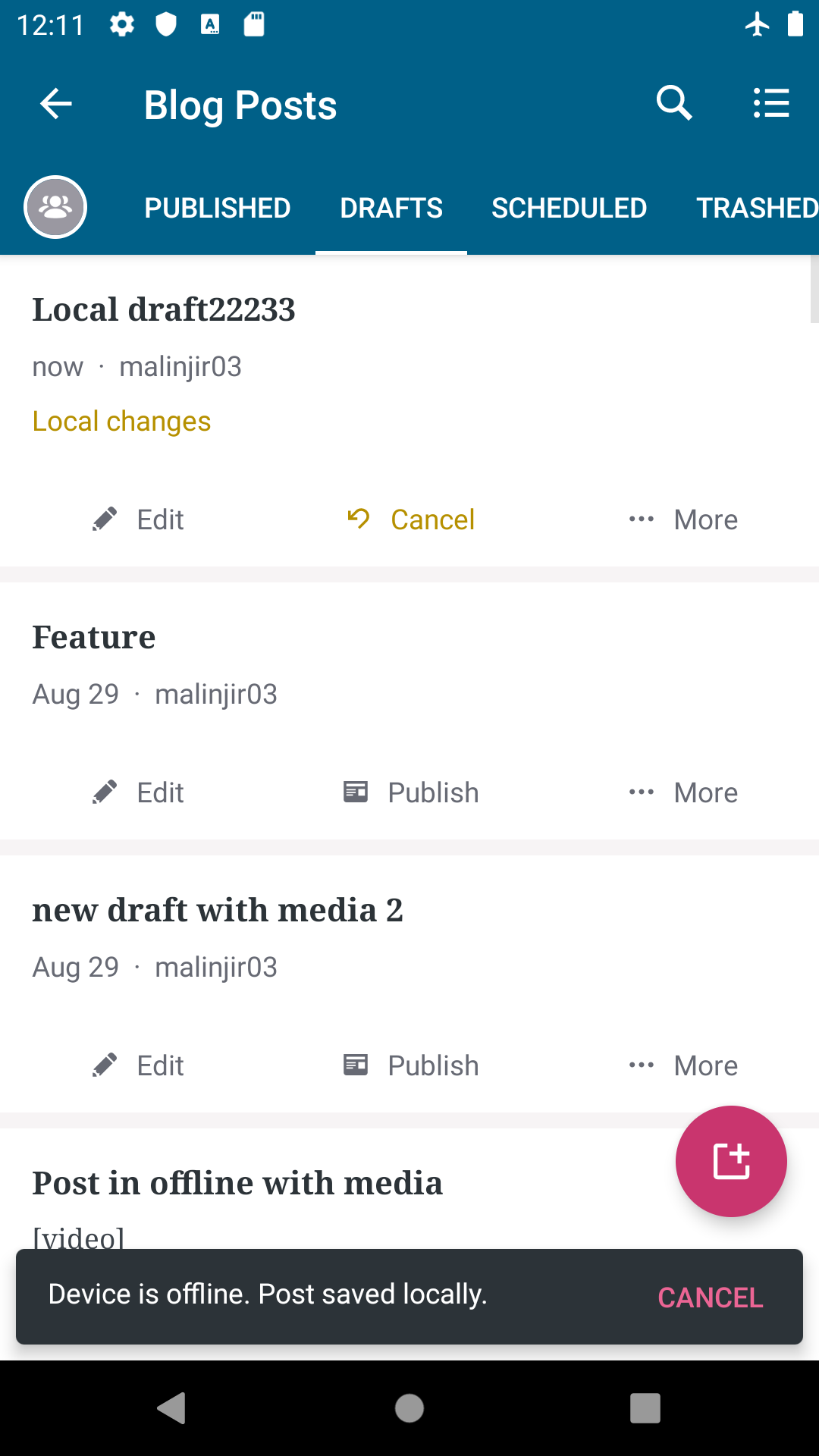
Proposals
- When the user confirms changes (clicks on "Save") change "Local changes" label to something similar to "Post will be published next time you device is online". For me this is the preferred solution as it's consistent with the behavior for the other post statuses. (We'll still be using "Local changes" label when the user doesn't confirm the changes -> the post is not awaiting auto-upload/save)
- Do not show the cancel action unless there is a failed upload. (When the upload fails we show "Couldn't perform operation. We'll try again later" so the "cancel" starts actions making sense. Downside of this solution is that the user won't be able to cancel the auto-save which might be inconvenient.)
~Wdyt @osullivanchris ?~
I realized Chris is afk, wdyt @shiki? I'd like to close this ticket asap.
malinajirka
on 23 Sep 2019
I realized Chris is afk, wdyt @shiki? I'd like to close this ticket asap.
@malinajirka Sorry, it took me a while to respond. I agree with your conclusion of:
I decided to show the cancel action on all drafts which are pending auto-upload
We ended up with the same functionality on iOS.
 shiki
on 25 Sep 2019
shiki
on 25 Sep 2019
shiki
on 25 Sep 2019
shiki
on 25 Sep 2019
Related issues
 guarani
·
3Comments
guarani
·
3Comments
 designsimply
·
3Comments
designsimply
·
3Comments
 jtreanor
·
3Comments
jtreanor
·
3Comments
 roundhill
·
3Comments
roundhill
·
3Comments
 JavonDavis
·
3Comments
JavonDavis
·
3Comments