Wordpress-android: Possible UX issue when reverting a published post to a draft
This was from https://github.com/wordpress-mobile/WordPress-Android/pull/10319#pullrequestreview-272784766 and can only be reproduced when using the master-upload-branch.
Jayson's Point of View
There does not seem to be a way to revert a published post into a draft. Using develop (870511b0ce), I can do this and it works:
- Edit the published post.
- Navigate to Post Settings. Change the _Status_ to _Draft_.
- Exit the editor by pressing the back button.
- The post will be automatically uploaded and reverted into a draft.
With this change, I get a “Draft is uploading” but it always ends up in the Post List saying these in sequence:
- Couldn't perform operation
- Local changes
Here is a video showing this.
Jirka's Correction
This is @malinajirka's comment in https://github.com/wordpress-mobile/WordPress-Android/pull/10319#issuecomment-519823141.
Hmm, I don't see the "Couldn't perform operation" error. Just the "Local changes" label and it seems like an expected behavior. The user hasn't confirmed the changes, they need to manually click on "SAVE" (in the overflow menu).
I guess we could show "Save" button instead of "Publish" button on the Post List in these cases. Or another option would be to introduce a completely new label.
The Question
- [x] For @osullivanchris, are we okay with leaving this change as is for now? Or do you think we should include Jirka's suggestion as part of the scope?
Decision 2019-Aug-12
Agreed in https://github.com/wordpress-mobile/WordPress-Android/issues/10369#issuecomment-520460904. We will leave the current flow as is. For now, users will use the _SAVE_ button to revert posts to draft.
 shiki
shiki
All 5 comments
We are continually running into UX issues with the change status menu in post settings. I think there is ambiguity as a user because its not clear at what point the change is committed. We have patched this for publishing by saying we should show the confirm publish dialogue. I think it would be a good idea to create a separate task (maybe outside of offline project) to add a confirmation button at some point either before leaving that dialogue or before leaving the post settings page.
For now yeah I agree the action would make more sense to be 'save' - @maxme worked through the logic of which action should appear in the header when. Is that consistent with your work?
 osullivanchris
on 12 Aug 2019
osullivanchris
on 12 Aug 2019
For now yeah I agree the action would make more sense to be 'save' - @maxme worked through the logic of which action should appear in the header when. Is that consistent with your work?
In that case, in the editor, we currently shows the "Save" button as the secondary action and the "Publish" button as the primary action (like we do for any draft). I agree with @shiki things get weird when you hit the back button. But I think having a "save" button in the post list won't help much. What does "save" means if you can't see the post status in the list: "am I saving my published post?". We (devs) associated the verb "save" with "draft", but it's not very explicit. "Save as draft" would be better in that case.
Note: this is somehow related to https://github.com/wordpress-mobile/WordPress-Android/issues/10365 - there is no indication when the user set a post from "Published" to "Private" and the primary action says "Publish".
Sidenote: I'd really like us to kill that Status menu, and replace it with something else. Calypso design seems pretty good to me (except for the "pending review" checkbox):
- Visibility selector: Public/Private/Password.
- For published post, a "Move to trash" action (no way to set it back to draft directly).
- Pending review checkbox (which automatically updates the visibility selector).
 maxme
on 12 Aug 2019
maxme
on 12 Aug 2019
@maxme @osullivanchris Based on your responses, I think there are 2 options.
a. Leave it as is. The user will have to use the secondary _SAVE_ button to revert a post to a draft.
b. Change the _PUBLISH_ button to _SAVE_.
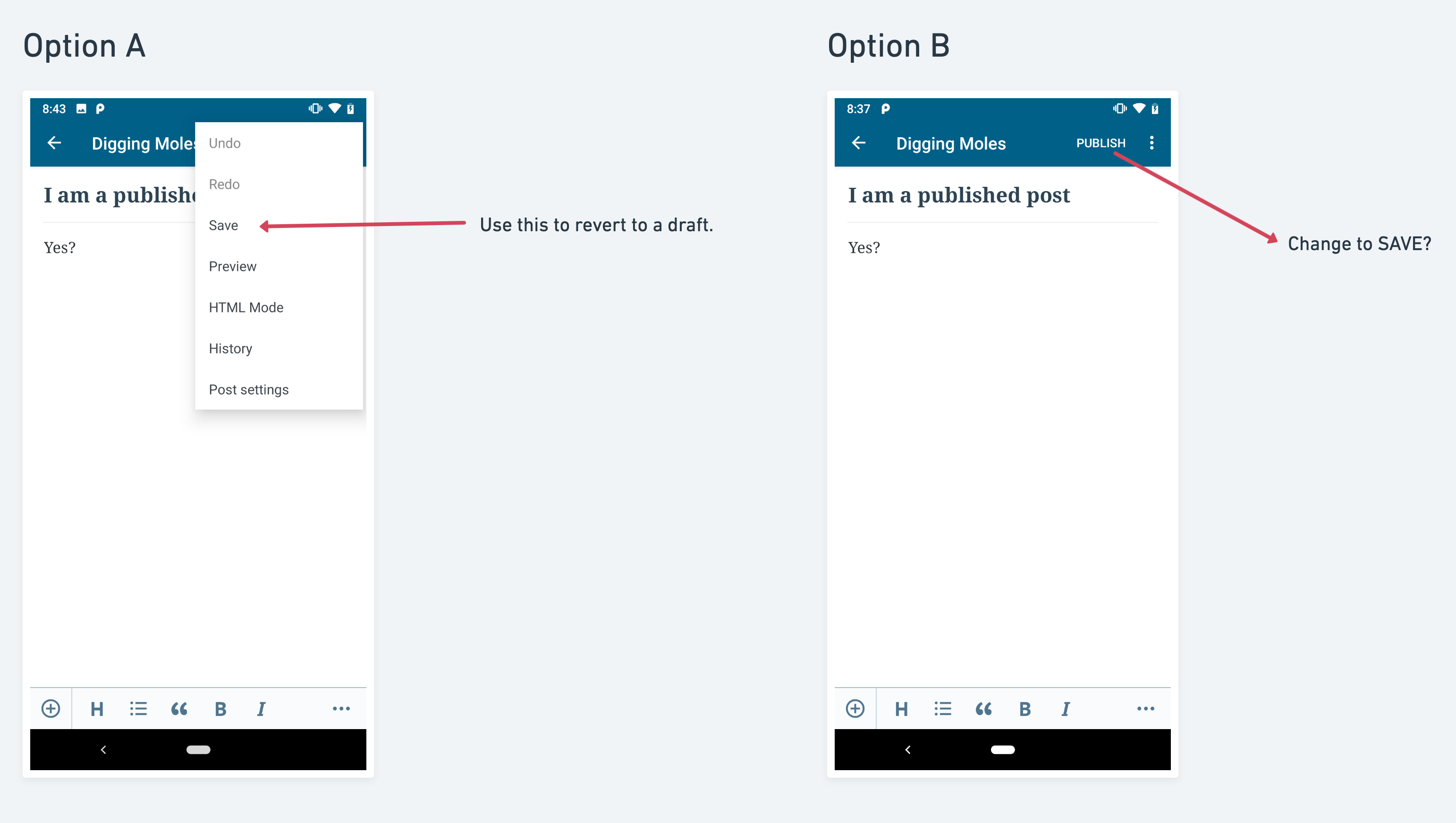
Considering the available time we have, I'm leaning towards Option A and making Option B a separate issue that is out of the scope of the project.
shiki
on 12 Aug 2019
@shiki yes I agree lets leave it as is. @maxme made a good point that save is not clear either, so we would be making a change and not getting much more clarity for the user.
Sidenote: I'd really like us to kill that Status menu, and replace it with something else. Calypso design seems pretty good to me (except for the "pending review" checkbox):
Yes! I don't know if you saw the start of my comment but I was saying I want to look at this too. I'll capture it separately to look into.
osullivanchris
on 12 Aug 2019
Thank you for the quick responses, @osullivanchris, and @maxme.
Based on Chris' comment in https://github.com/wordpress-mobile/WordPress-Android/issues/10369#issuecomment-520460904, it sounds like creating a separate issue for changing the _PUBLISH_ button to _SAVE_ may not be a good idea. The future changes may make that useless. Also, as Maxime commented, the _SAVE_ button is also not clear. I won't create an issue for that then. Please let me know if I should though.
Decision: For now, users will use the _SAVE_ button to revert posts to draft.
shiki
on 12 Aug 2019
Related issues
 jtreanor
·
3Comments
jtreanor
·
3Comments
 guarani
·
3Comments
guarani
·
3Comments
 khaykov
·
3Comments
khaykov
·
3Comments
 JavonDavis
·
3Comments
JavonDavis
·
3Comments
 jd-alexander
·
3Comments
jd-alexander
·
3Comments