Wordpress-android: iOS and Android: Consistent messaging in Publicize to Facebook
This covers both iOS and Android but we're mainly tracking it here in this Android issue.
Problem
In p7cLQ7-DY-p2, we found that there are inconsistencies in how the mobile apps present information regarding the requirements for successfully connecting a Facebook account.
Connecting a Facebook account can be achieved by navigating to a site and tapping on Sharing → Facebook.
Here is a connection flow diagram that shows the inconsistencies:
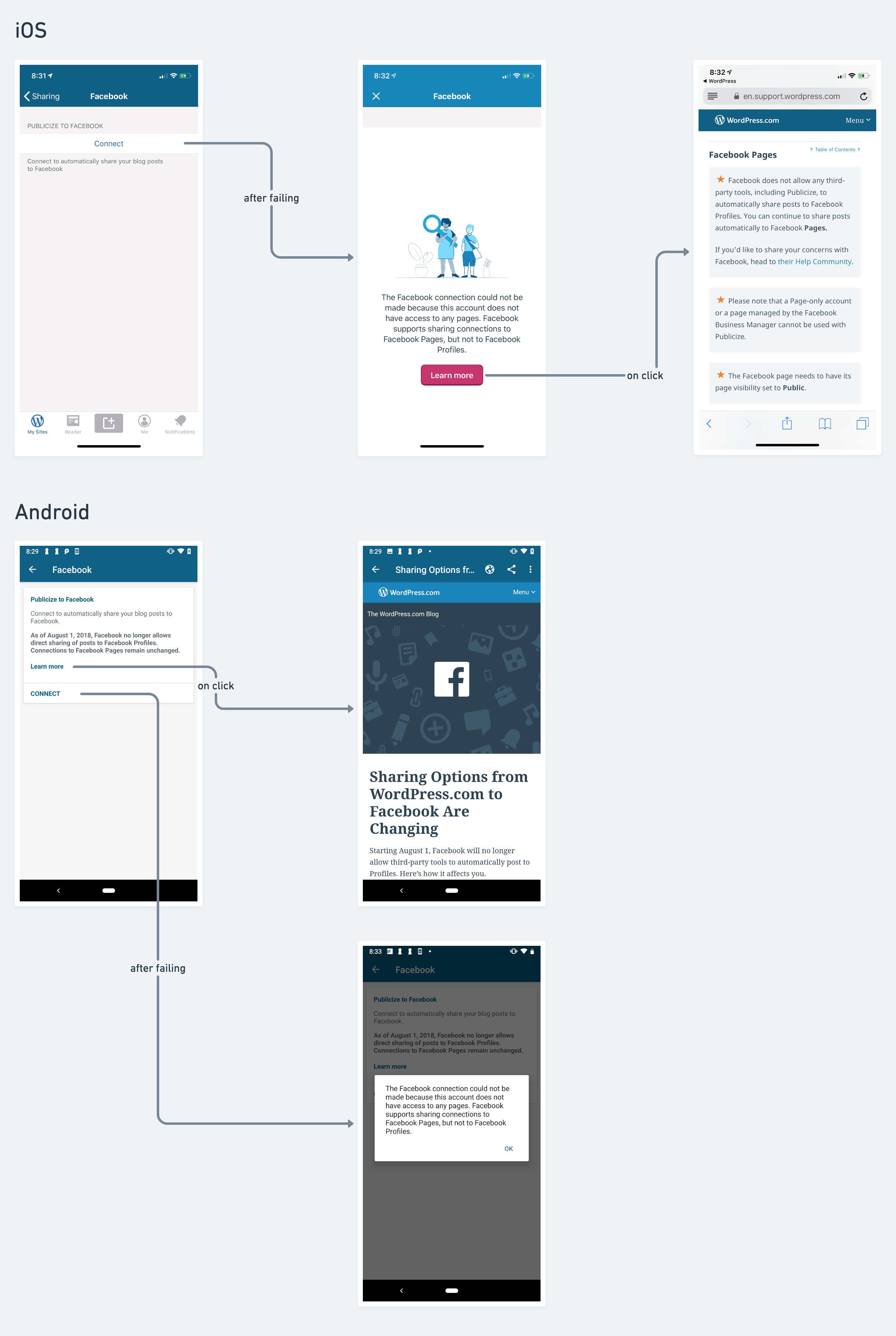
- iOS does not show any requirements information on the first page but shows it after the user fails to connect.
- Android shows some requirements information on the first page but the link is pointing to an old blog post, not the support page.
Connection Requirements
The known requirements to successfully connect a Facebook account are:
- The user should have a Facebook Page.
- The user should select a Facebook Page when going through the connection flow.
- The Facebook Page should be set to Published.
This information is displayed on our support page. However, there is no mention of it in the apps.
Solution
@thehenrybyrd, @rfaile313, and I propose to make these changes.
Copy changes
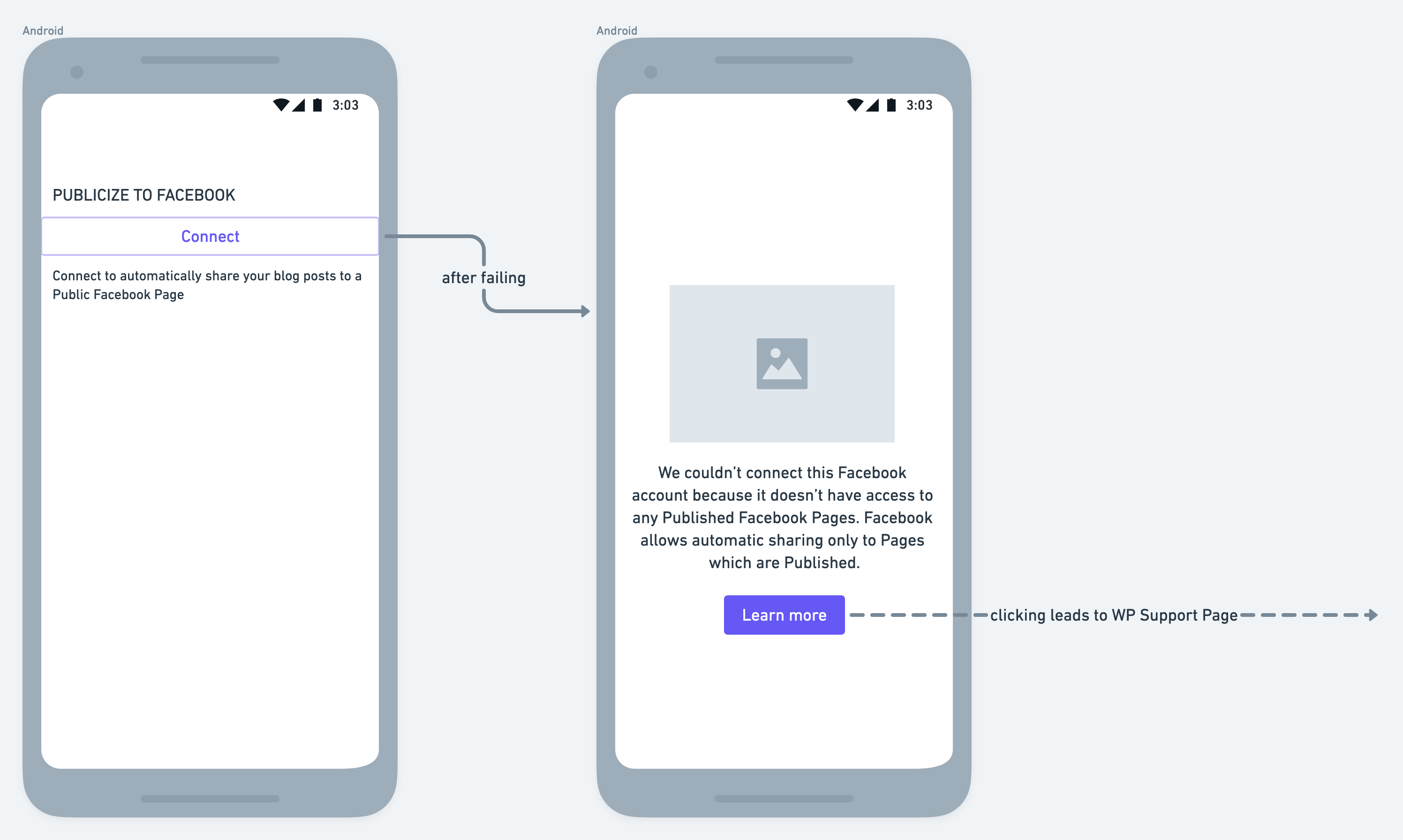
On the first page, the description can be modified slightly to describe the requirement for Pages to be published.
Connect to automatically share your blog posts to a Published Facebook Page
The error message shown after failing to connect can be made more concise and mention the requirements.
We couldn’t connect this Facebook account because it doesn’t have access to any Published Facebook Pages. Facebook allows automatic sharing only to Pages which are Published.
Android Flow
The first page on Android shows outdated information. We propose to change the flow on Android to match iOS instead. This wireframe shows the desired flow as well as the proposed copy changes.
Editorial Team
We'd love to have your input on the copy changes we're proposing.
Design Team
We'd love to hear your input on this as well. Does the existing iOS design still match our current standards? Or is there something that should be changed?
Tasks
- [x] Wait for input from Editorial and Design
- [x] Create an issue for iOS https://github.com/wordpress-mobile/WordPress-iOS/issues/12228
- [x] Implement on iOS. Done in https://github.com/wordpress-mobile/WordPress-iOS/pull/12337
- [ ] Implement on Android
 shiki
shiki
All 12 comments
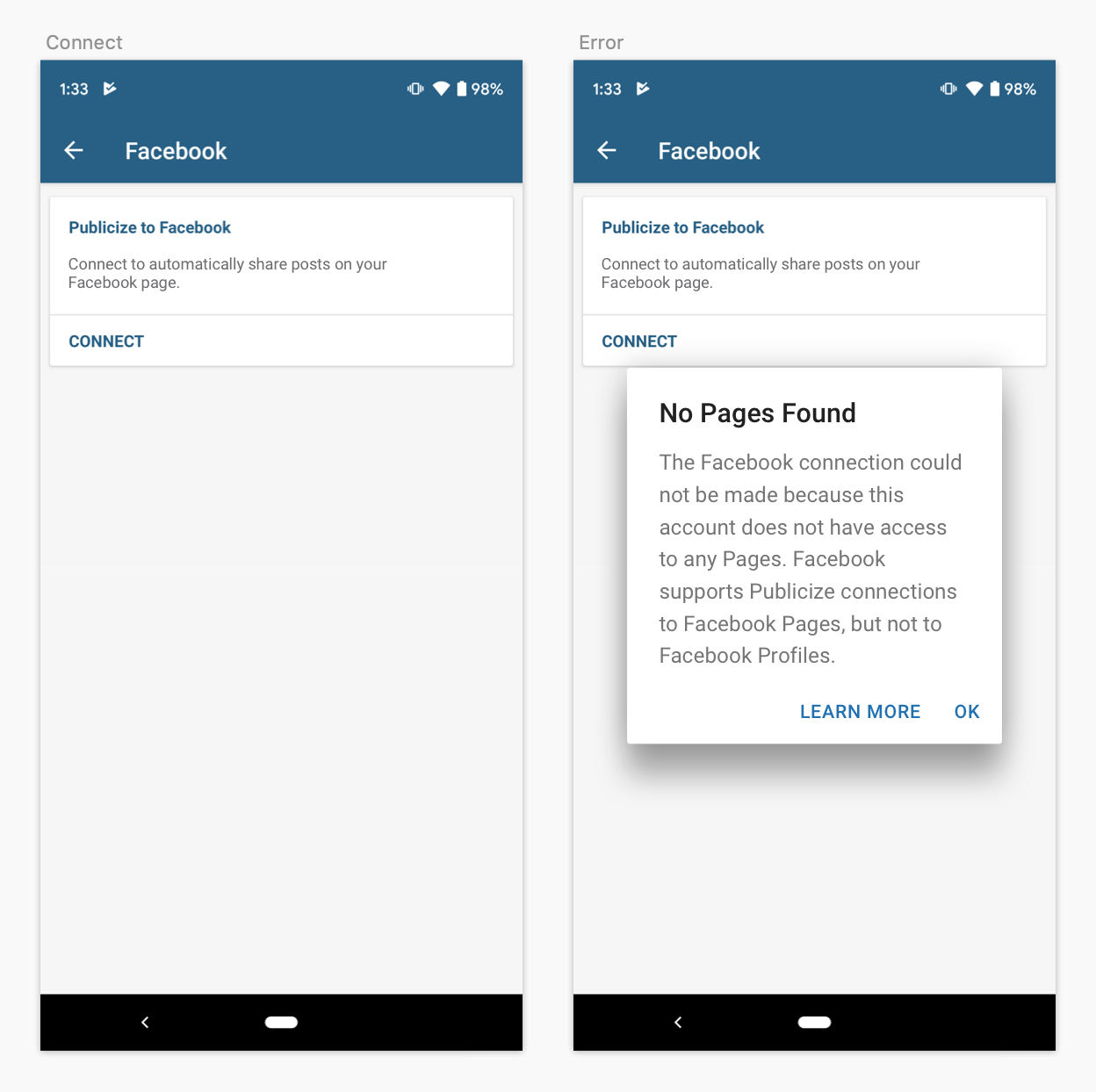
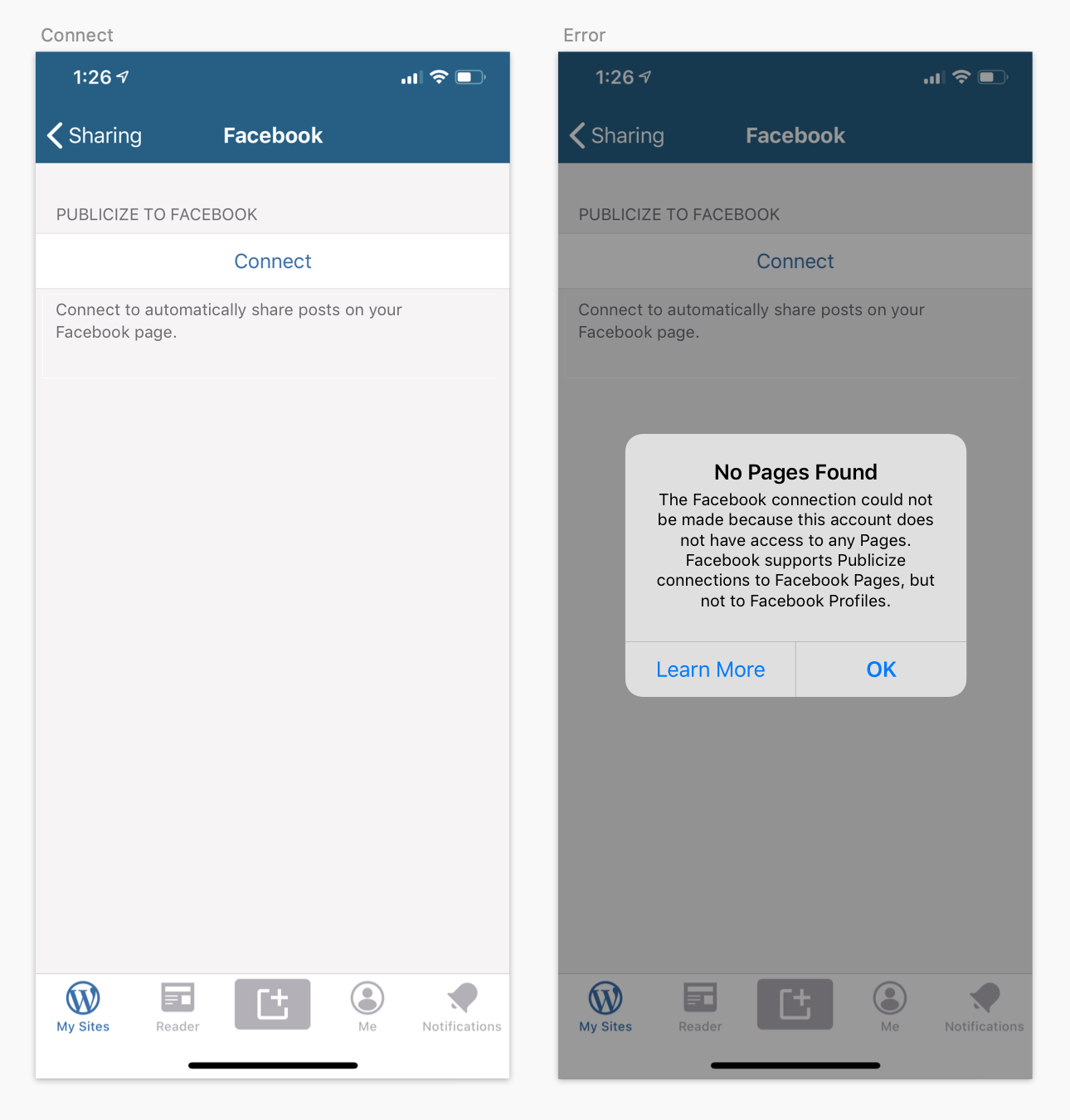
I think we could actually simplify this a bit to standardize on something closer to what Android is doing rather than iOS. For a couple of reasons:
- a dialog (Android) or alert (iOS) is the standard way to handle an error message that should be acknowledged by the user before continuing.
- Using a full-screen modal for the error state feels like it's over-emphasized, and the illustration is superfluous.
- We can align the copy with what's now being used on WordPress.com.
- I've used "No Pages Found" as a title for the dialog/alert so it's consistent between platforms (since alerts should have a title on iOS), but maybe Editorial could weigh in with a better title.
- The "Learn More" button in these would link to the support article.
Android:
iOS:
 mattmiklic
on 24 Jul 2019
mattmiklic
on 24 Jul 2019
I agree that the current "The facebook connection could not be made because..." message is too wordy, though. Ideally it would just be a short sentence or two. Saying "we" couldn't connect feels a little strange when it's an app saying it, but I defer to Editorial's guidance on how we could make that message more concise.
mattmiklic
on 24 Jul 2019
Hello everyone! Chipping in from Editorial - thanks for pinging us!
I would perhaps take out the capitalization of 'Published':
Connect to automatically share your blog posts to a published Facebook Page.
Error message:
The Facebook connection cannot find any Pages. Publicize cannot connect to Facebook Profiles, only Pages.
Instead of 'No Pages Found' we could perhaps use something a little friendlier such as:
Something went wrong!
Oh no, missing Pages!
Pages won’t reply!
 carolynannewells
on 24 Jul 2019
carolynannewells
on 24 Jul 2019
@carolynannewells Thank you for responding!
Regarding the error message you suggested:
The Facebook connection cannot find any Pages. Publicize cannot connect to Facebook Profiles, only Pages.
In the description above, https://github.com/wordpress-mobile/WordPress-Android/issues/10278#issue-472347068, the proposed error message mentioned the "published" requirement:
We couldn’t connect this Facebook account because it doesn’t have access to any Published Facebook Pages. Facebook allows automatic sharing only to Pages which are Published.
Do you think that's no longer necessary in this context?
shiki
on 24 Jul 2019
We can add the word published back in to make that clearer:
The Facebook connection cannot find any Pages. Publicize cannot connect to Facebook Profiles, only published Pages.
carolynannewells
on 24 Jul 2019
Thank you for the quick feedback, @mattmiklic and @carolynannewells!
shiki
on 24 Jul 2019
Hi there, I am working actually this enhancement for ios project and I 2 have a questions.
1. Where are located the copies for the other languages? I've sought here Translations but I've couldn't find any resource for the alert title(No Pages Found). This is my first contribution, my apologies if I've missed something.
2. Regarding to the positions and the style of the action buttons for the ios alert, is not possible to sort in the way that you specify, action button styles are:
- Default - text style is normal - selected for learn more
- Cancel - text style is with bold - selected for OK
- Destructive - text color is with red
The positions for them depends on the selected style as you see, i've applied the same style as you wish but the "OK" shows first(this is done by the OS) because the styles has priority.
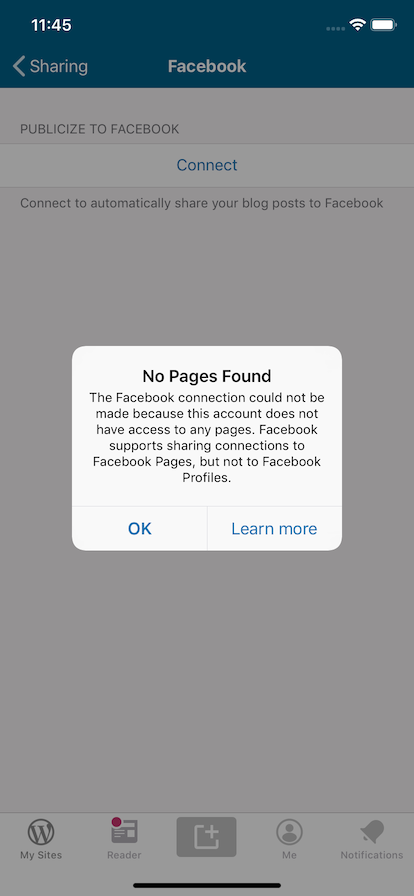
 cerezo074
on 18 Aug 2019
cerezo074
on 18 Aug 2019
The positions for them depends on the selected style as you see, i've applied the same style as you wish but the "OK" shows first(this is done by the OS) because the styles has priority.
@cerezo074 That's just fine. I didn't realize the button ordering was set by the system, that's good to know.
For the message text, let's use what @carolynannewells suggested above. For the title I believe the clearest possible message would be "Not connected" -- we want to let the user know as clearly as possible that the Facebook connection they just attempted couldn't be made. That title would do it.
So we should have something that looks like:
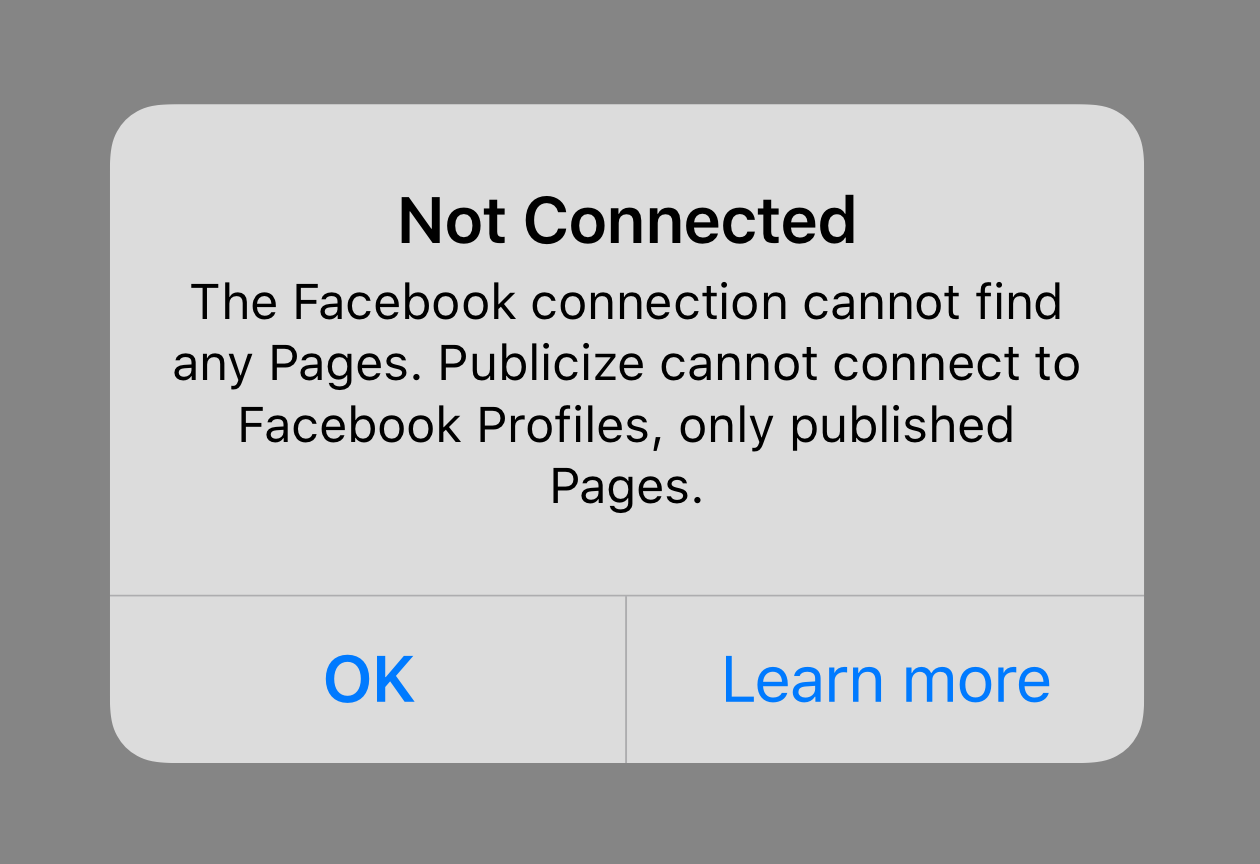
mattmiklic
on 19 Aug 2019
@cerezo074
- Where are located the copies for the other languages?
You shouldn't need to worry about other languages. As long as you use NSLocalizedString() like this, the translators will take care of the rest.
shiki
on 19 Aug 2019
@shiki I am looking into this issue and I just wanted to know if the UI of Android should be changed to match iOS in design style or the current design can remain and the flow is just made identical?
The only new design would be error page right?
 jd-alexander
on 11 Mar 2020
jd-alexander
on 11 Mar 2020
@jd-alexander my recommendation above was to keep Android the same, and switch to using a modal dialog to display the error on iOS.
mattmiklic
on 11 Mar 2020
Thanks @mattmiklic I was super focused on the original issue description when I asked that. Thanks for pointing this out. I appreciate it 🙏
jd-alexander
on 11 Mar 2020
Related issues
 malinajirka
·
3Comments
malinajirka
·
3Comments
 develric
·
3Comments
develric
·
3Comments
 guarani
·
3Comments
guarani
·
3Comments
 maxme
·
3Comments
jd-alexander
·
3Comments
maxme
·
3Comments
jd-alexander
·
3Comments
Most helpful comment
Thanks @mattmiklic I was super focused on the original issue description when I asked that. Thanks for pointing this out. I appreciate it 🙏