Wordpress-android: Page scheduled in offline doesn't have any indication it's not synced with server
Expected behavior
When I schedule a page while in offline I expect the item in the pages list will show an indication it hasn't been synced with the server yet (eg. "local changes" or "local draft" label).
Actual behavior
When I schedule a page while in offline it seems like the page has been synced with the server as the item in the list doesn't have "local changes" or "local draft" label.
Steps to reproduce the behavior
- My Site
- Blog Pages
- Create a page
- Enter title
- Turn on airplane mode
- Go to page settings
- Schedule the page for tomorrow
- Click on "Schedule" in the toolbar
- Go to Scheduled tab
- Notice the item doesn't show any indication it hasn't been synced with the server yet

Tested on [device], Android [version], WPAndroid [version]
Pixel 3 Api 28
Emulator Api 28
 malinajirka
All 11 comments
Just for the record, this is how the app behaved before we introduced the Post Status filters/tabs.
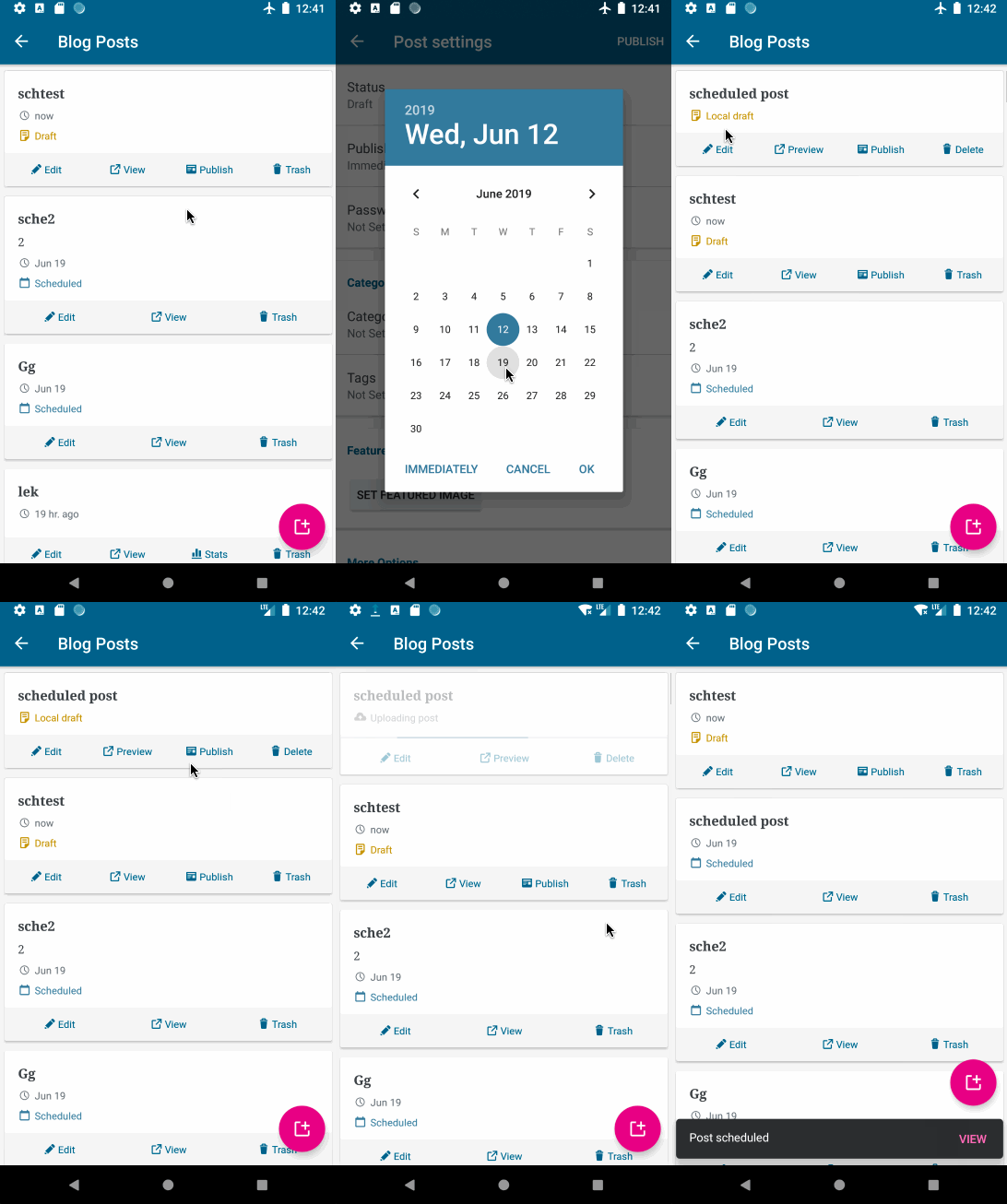
We can
- Show the "Local draft" label and display the post in "Scheduled" tab
- Show the "Local draft" label and display the post in "Drafts" tab
- Come up with another solution
malinajirka
on 12 Jun 2019
@osullivanchris I think this is one of the issues which might be quite easy to tackle. It's not urgent so take your time. ;) Thanks!
malinajirka
on 25 Jun 2019
@malinajirka I prefer option 1. The user should be able to feel like they can complete the task of scheduling something while offline. Being offline might even be a use case for scheduling.
2 things
- Suggestion: I would change the snackbar to clarify that it is scheduled and will be posted as long as they come online before that date (obviously in less words than that!)
- Question: I would assume that when the user comes back online the post would sync with the server and continue to be published without any user interaction. Is that true?
 osullivanchris
on 28 Jun 2019
osullivanchris
on 28 Jun 2019
Thanks @osullivanchris
Suggestion: I would change the snackbar to clarify that it is scheduled and will be posted as long as they come online before that date (obviously in less words than that!)
Yes, I agree it'd be a nice improvement.
Question: I would assume that when the user comes back online the post would sync with the server and continue to be published without any user interaction. Is that true?
Yes, this is the current behavior on Android. However, it's dependant on a decision we'll make in https://github.com/wordpress-mobile/WordPress-Android/issues/9555.
malinajirka
on 1 Jul 2019
Possible copy:
When you 'update' a post while offline, you get the following message
"Device is offline. Post saved locally"
So perhaps here we could say the following to be consistent
"Device is offline. Post scheduled locally"
Ignoring consistency, if I was writing it from scratch I'd probably say "Post will be scheduled next time you're online"
Tagging for copy review to give us the best option here.
Otherwise think we're good here with this decision @malinajirka ?
osullivanchris
on 1 Jul 2019
With a wee tweak to specify what needs to be online -- "Post will be scheduled next time your device is online" -- I think this is as a short and clear as you're gonna get! Sounds good.
 michelleweber
on 1 Jul 2019
michelleweber
on 1 Jul 2019
Capturing that this is related to #9555
Ticket here: Scheduling publishing while offline
9555 : Publishing immediately while offline
osullivanchris
on 1 Jul 2019
I've fixed the original issue When I schedule a page while in offline it seems like the page has been synced with the server as the item in the list doesn't have "local changes" or "local draft" label. in https://github.com/wordpress-mobile/WordPress-Android/pull/10153.
I caused a lot of confusion when I didn't realize this issue is about Pages and not about Posts.
The current behavior (after the fix)
- When you schedule a PAGE in offline, it's displayed in the Scheduled tab and has "Local changes" label. We don't show any SnackBar message.
- When you schedule a POST in offline, it's displayed in the Drafts tab and has "Local changes" label. Also "Device is offline. Post saved locally." SnackBar message is shown (I've created a separate issue for improving the message https://github.com/wordpress-mobile/WordPress-Android/issues/10154)
Unfortunately, afaik it's not trivial to move locally scheduled _post_ from Drafts tab to Scheduled tab. The filtering is done on the server. I'll think about it as I'm not 100% sure, but I can't think of a non-hacky solution right now. It might be easier to move local scheduled _page_ from Scheduled tab to Drafts tab. However, the Post List and Pages List isn't consistent in a lot of other things so I don't think we should worry about it now. The UX is good enough in both sections it's just a shame it's not consistent.
cc @osullivanchris
malinajirka
on 4 Jul 2019
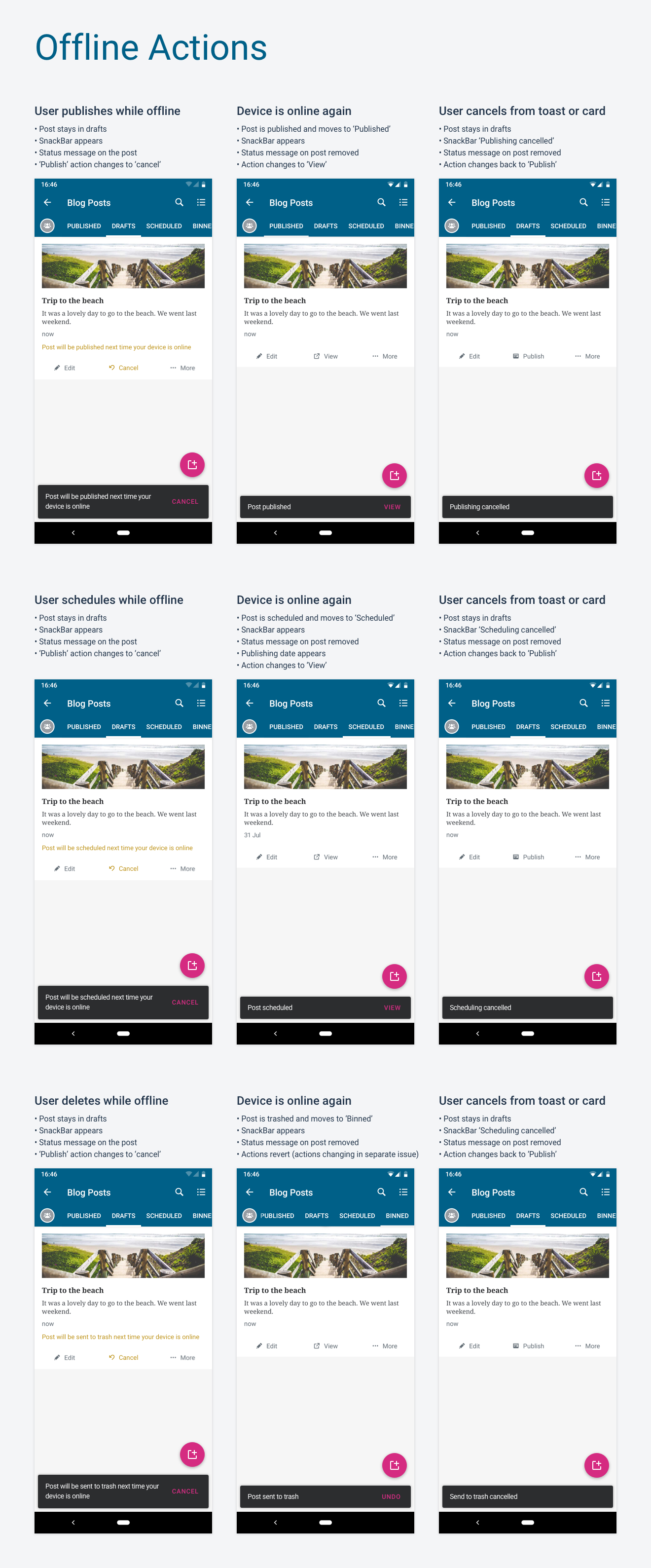
@malinajirka the pattern I've been going towards is
- Tell the user _what will happen_
- Show label on the item to say 'x _is going to happen_ when you come online'
- Don't move it until it actually happened
Lets discuss across a few of these issues next week. I also thought we were talking about posts not pages as we've been so focused on posts.
In any case the posts behaviour here is ok for now.
osullivanchris
on 5 Jul 2019
@malinajirka did we make any changes here? Should we open a separate task for scheduling a post (rather than a page) to be in line with this proposal?
osullivanchris
on 10 Jul 2019
@osullivanchris We've added "Local changes" label to a scheduled pages which haven't been uploaded to the server yet. Which I believe solves the original issue this ticket was about. I'd suggest creating a separate issue(s) for other related tasks.
The proposal looks good, however, let's discuss it in the new ticket(s).
malinajirka
on 11 Jul 2019
Related issues
 hoverduck
·
3Comments
hoverduck
·
3Comments
 nbradbury
·
3Comments
nbradbury
·
3Comments
 guarani
·
3Comments
guarani
·
3Comments
 jd-alexander
·
3Comments
jd-alexander
·
3Comments
 maxme
·
3Comments
maxme
·
3Comments
Most helpful comment
Possible copy:
When you 'update' a post while offline, you get the following message
"Device is offline. Post saved locally"
So perhaps here we could say the following to be consistent
"Device is offline. Post scheduled locally"
Ignoring consistency, if I was writing it from scratch I'd probably say "Post will be scheduled next time you're online"
Tagging for copy review to give us the best option here.
Otherwise think we're good here with this decision @malinajirka ?