Wordpress-android: After publishing while offline, the "retry" button on the Post List button will publish the Post
Imported from this comment https://github.com/wordpress-mobile/WordPress-Android/issues/9555#issuecomment-492858217
This is how things currently work right now:
- Android: Publishing while offline and retrying will lead to the post being uploaded and published
- iOS: Publishing while offline and retrying will lead to the post being uploaded as a draft
I'm not sure which one is right but Android's behavior is scary for me as a user.
Decision
As the user intended to publish the post, retrying should also publish the post
To clarify, we should amend the error state to mention posting. Error message should say "Could not upload media. Post not published." Then its clear that retry relates to posting, not just media.
To make this work we need to differentiate the error state in publishing/saving/scheduling scenarios.
User publishes and media upload error (use case in this issue)
Error Message: "Could not upload media. Post not published."
Action and behavior: Retry. Retrying publishes the post if media uploads successfullyUser schedules and media upload error (scheduling rather than publishing)
Error Message: "Could not upload media. Post not scheduled."
Action and behavior: Retry. Retrying schedules the post if media uploads successfullyUser saves and media upload error (user did not intend to publish)
Error Message: "Could not upload media."
Action and behavior: Retry. Retrying only retries uploading the media as the user has not changed the post state
Related Issues
https://github.com/wordpress-mobile/WordPress-iOS/issues/11420
 maxme
maxme
All 15 comments
Subscribing @wordpress-mobile/ravenclaw
 shiki
on 24 May 2019
shiki
on 24 May 2019
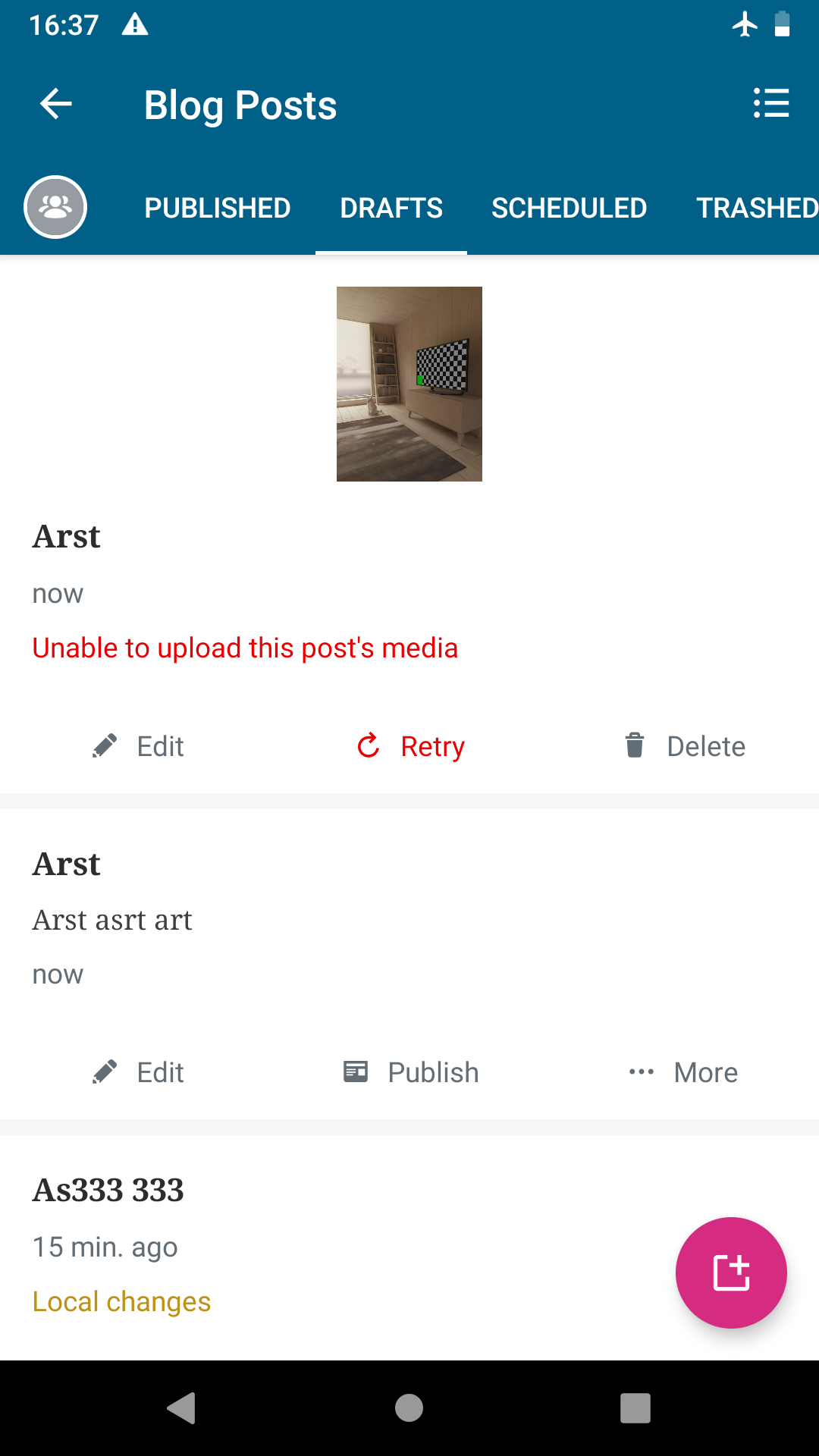
Note: the "retry" button only appear when there is a failed upload on a media. There is also a "retry" button in the notification.
post list | notification
-|-
 |
| 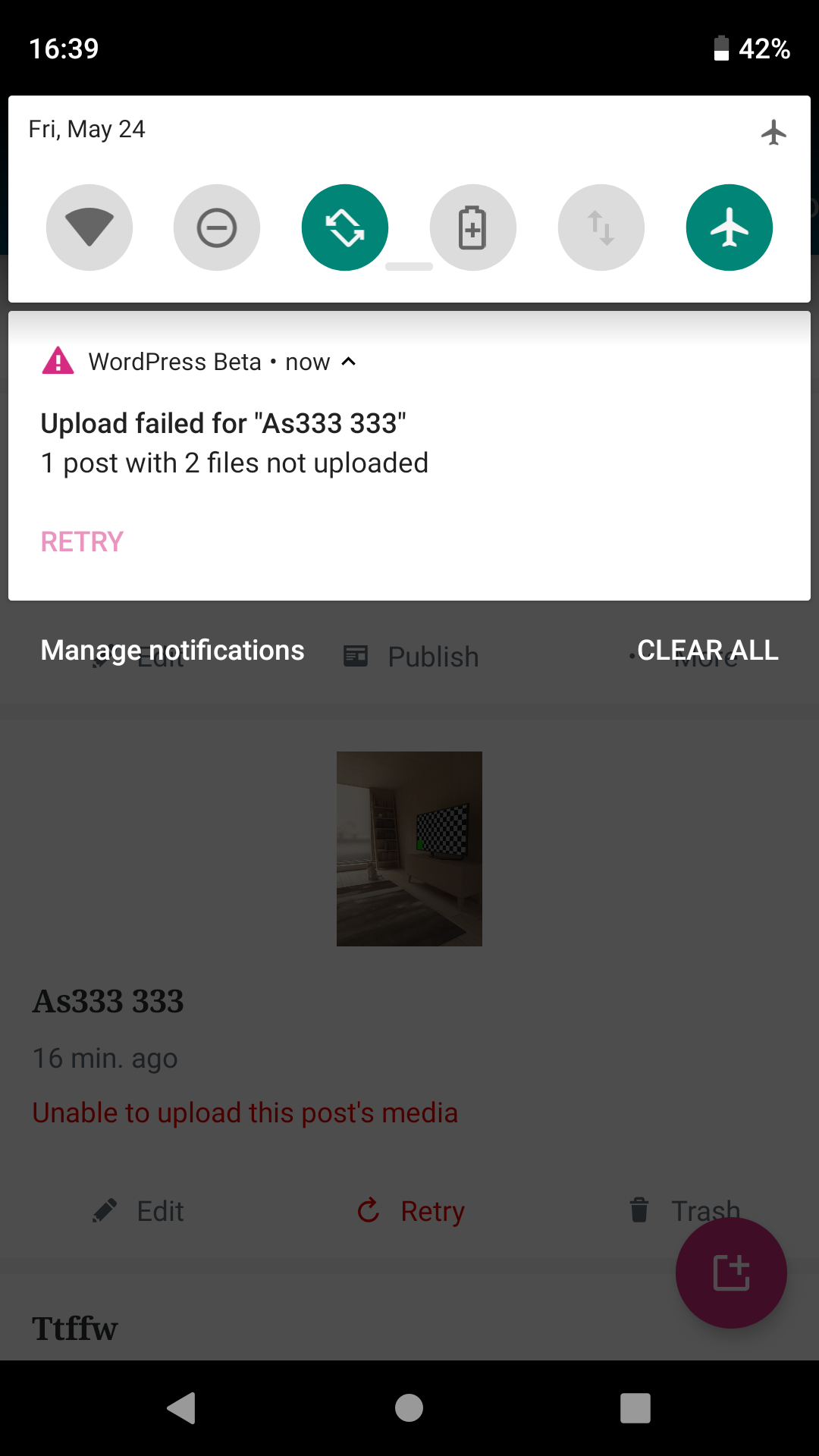
I agree with this comment, I think "retry" is unclear in this case. I prefer the iOS approach.
maxme
on 24 May 2019
I opened a discussion related to this in https://github.com/wordpress-mobile/WordPress-iOS/issues/11420.
shiki
on 28 May 2019
Hey @maxme, is there a decision for this one (there's an iOS related one) or do we need to discuss more?
 yaelirub
on 25 Jun 2019
yaelirub
on 25 Jun 2019
Not yet, there is a draft PR for it: https://github.com/wordpress-mobile/WordPress-Android/pull/10053
Added the "Needs design" label since it's an UX issue.
maxme
on 25 Jun 2019
 osullivanchris
on 28 Jun 2019
osullivanchris
on 28 Jun 2019
@osullivanchris - I read discussions on these tickets, looks like we want to close this one and keep this behavior. I wonder if we should change the button label though, "Retry to Publish" maybe.
maxme
on 2 Jul 2019
Description of the issue and decision:
- User tries to publish
- There is an issue with the media they have included in the post
- We do not publish because the media was not attached correctly
- Tell the user the post did not publish due to the media issue
- To resolve the user can 'retry' which will try publish again (and fix the media issue at the same time)
For copy review
- The error message: "Unable to upload this post's media" could say something meaning "Could not publish due to an issue with this post's media". However this error also occurs in a draft post. So we can only really say "Could not upload media" as a generic. Could consider two separate errors but it would be extra work. So preferable if only one.
- The action "Retry" We think it should say something that clarifies you're "Retrying publishing" which will try re-upload the media and publish.
the two are tied together.
Will post the final solution to the related iOS issue https://github.com/wordpress-mobile/WordPress-iOS/issues/11420 once we finish the copy review.
osullivanchris
on 8 Jul 2019
As a user, "Could not upload media" does not necessarily imply to me that the post wasn't published -- maybe it published, but without my images. It'd be nice to specify: "Could not upload media. Post not published."
You could then reinforce that with "Retry" as the action. (You could do "Retry publication," but I think making the first message clearer allows you to stick with the shorter action.)
 michelleweber
on 8 Jul 2019
michelleweber
on 8 Jul 2019
Sounds great to me. Thanks @michelleweber
Are you happy to go with that @maxme ? The only copy change would be on the error message. If this gets your thumbsup I'll capture the decision on the iOS task as well.
osullivanchris
on 8 Jul 2019
Works for me! Thanks @michelleweber
maxme
on 8 Jul 2019
The original decision in the PR description confused me so I crossed it out and linked to https://github.com/wordpress-mobile/WordPress-Android/issues/9933#issuecomment-509146998 instead.
Crossed out original:
We have decided to take the iOS approach and prevent the Retry button on local draft from automatically publishing the post
shiki
on 8 Jul 2019
Just to clarify the decisions made here and in https://github.com/wordpress-mobile/WordPress-Android/issues/9555.
If the post contains a media and the user clicks on publish in offline -> we'll show one of the messages/actions Maxime summarized in the description of this issue.
If the post doesn't contain any media and the user clicks on publish in offline -> we'll show the message from https://github.com/wordpress-mobile/WordPress-Android/issues/9555
Error Message: "Offline. Publishing when connection returns."
Action and behavior: Cancel. Changes the status of the post to "Draft".
---> When the device becomes online and we try to upload it, but the upload fails, we'll show the current error message (usually "GENERIC_ERROR" and retry button). I think we might want to consider improving this scenario as part of this ticket as well.
cc @osullivanchris
 malinajirka
on 10 Jul 2019
malinajirka
on 10 Jul 2019
@malinajirka sounds right to me. I'd like to know more about the generic error scenario. I feel like it might be a separate ticket though. Noting that #9555 has been updated with final UI and copy for clarity
osullivanchris
on 10 Jul 2019
I'd like to know more about the generic error scenario. I feel like it might be a separate ticket though.
I've created a separate issue https://github.com/wordpress-mobile/WordPress-Android/issues/10200
Noting that #9555 has been updated with final UI and copy for clarity
Perfect, thanks @osullivanchris !
malinajirka
on 11 Jul 2019
Related issues
 develric
·
3Comments
develric
·
3Comments
 wptester9845
·
3Comments
wptester9845
·
3Comments
 roundhill
·
3Comments
roundhill
·
3Comments
 jd-alexander
·
3Comments
jd-alexander
·
3Comments
 prtksxna
·
3Comments
prtksxna
·
3Comments
Most helpful comment
The original decision in the PR description confused me so I crossed it out and linked to https://github.com/wordpress-mobile/WordPress-Android/issues/9933#issuecomment-509146998 instead.
Crossed out original: