Wordpress-android: Notification Settings: “All My Followed Sites” list doesn’t match Reader: “Followed Sites” list
Expected behavior
Both “Followed Sites” lists would list the same set of sites.
Actual behavior
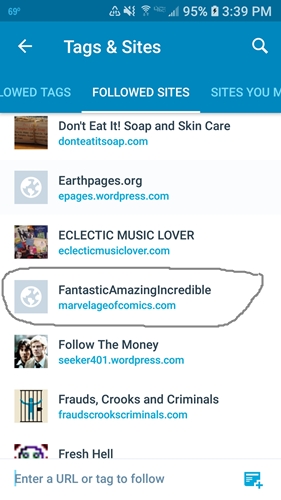
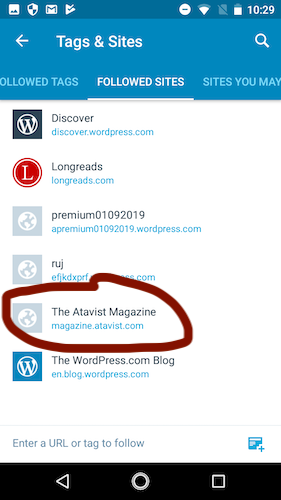
Reader > Settings (gear icon) > Followed Sites lists shows all sites.
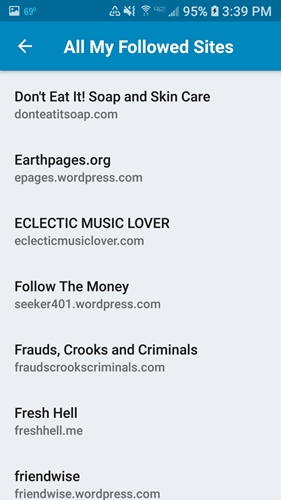
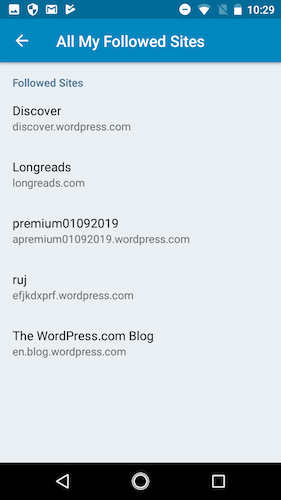
Me > Notification Settings > All My Followed Sites appears to be missing non-WordPress.com/Jetpack sites.
These sites are followed via RSS, and their posts do appear in the Reader.
My guess here is that the lists are different because of the difference in notifications behavior. WordPress.com doesn't control notifications for those RSS sites, since they don't use Jetpack or WordPress.com.
However, I don't think most users are aware of this. It would be better to have the lists match, to reduce confusion. Perhaps in the notifications section we could add "Followed via RSS - no notifications" below those sites.
Steps to reproduce the behavior
Make sure you're following a mix of WordPress.com/Jetpack sites and some that are followed via RSS (add the URL in Reader > Manage to follow by RSS.).
Reader > Settings (gear icon) > Followed Sites to see all your followed sites.
Go to Me > Notification Settings > All My Followed Sites and note that some sites (the RSS ones) are missing.
Screenshots from user report:
Reader:
Notification Settings:
Screenshots from my own testing:
Reader:
Notification Settings:
Tested on Nokia 2, Android 7.1.1, WPAndroid alpha-161
User reported from Samsung SM-G930V, WPAndroid 12.0
 thehenrybyrd
All 5 comments
I tested this using my Pixel 3 Android 9 device and confirmed that a site followed via RSS does not show up in Me > Notification Settings > All My Followed Sites.
I followed http://marvelageofcomics.com/ by entering that URL at Reader > Followed Site > Mange > Follow Something New in Calypso.
I followed https://gostica.wordpress.com/ by going to https://gostica.wordpress.com/ in a browser and clicking the "Follow" option at bottom right.
On the All My Followed Sites screen in the app, I can see "GOSTICA" gostica.wordpress.com listed but I cannot see "FantasticAmazingIncredible" marvelageofcomics.com listed.
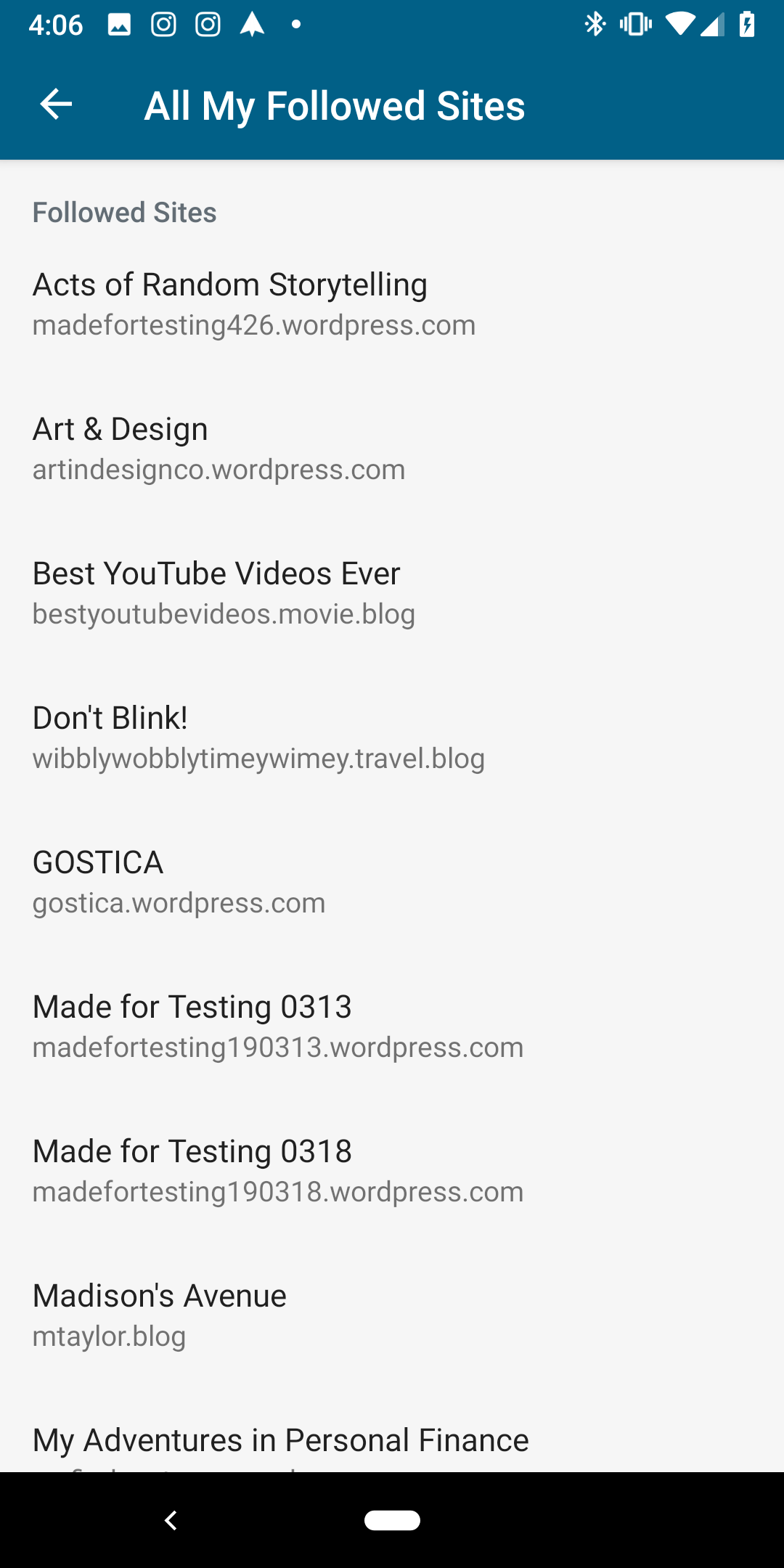
Me > Notification Settings > All My Followed Sites tested with WPAndroid alpha-163 (12.2 alpha) on Pixel 3 Android 9.
On Calypso, I noticed that the site missing from the "All My Followed Sites" notifications settings screen in the app also has a "Settings" option missing at Reader > Followed Sites in a desktop browser view.
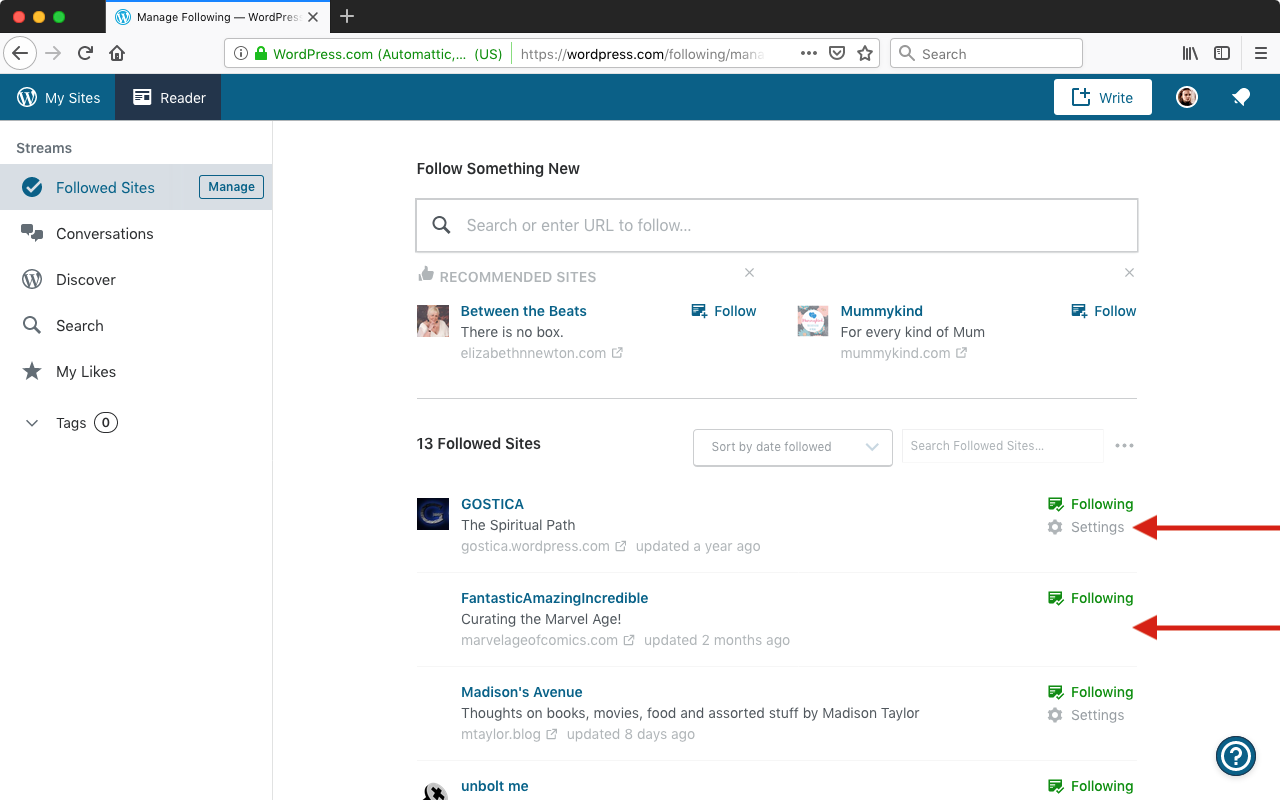
Seen at https://wordpress.com/following/manage logged in as user0313.
Oddly, I couldn't find the equivalent of the All My Followed Sites screen in Calypso > Me > Notifications Settings so I think that's an app-only list.
 designsimply
on 11 Apr 2019
designsimply
on 11 Apr 2019
I tested this again today using WPAndroid alpha-164 (12.2 alpha) on Pixel 3 Android 9 and found the same result: when I go to Reader > Settings (gear icon) > Followed Sites for account user0313 I can see 20 followed sites. When I go to Me > Notification Settings > All My Followed Sites I can see 17 followed sites and these are the three that are missing: marvelageofcomics.com, www.youtube.com/channel/UC5J-hZ4wNf7OlkzIn49LHoQ, www.strategic-culture.org (all of these are subscriptions via RSS, two are not WP sites and the WP site is self-hosted without Jetpack).
designsimply
on 17 Apr 2019
Yep, those lists are different. The Reader > Edit tags and sites > Followed Sites list has all sites shown in the Reader. The Me > Notification Settings > All My Followed Sites list has all sites that have notification settings. As mentioned above and shown in the Calypso screenshot, certain followed sites (i.e. feeds) don't have notifications settings.
Another possible solution would be to include feeds in the Me > Notification Settings > All My Followed Sites list, but indicate they are disabled by giving them a different text color and showing a "Feeds do not have notification settings" or similar message when those items are tapped.
 theck13
on 17 Apr 2019
theck13
on 17 Apr 2019
Should we implement the suggested solution @osullivanchris ?
 planarvoid
on 2 Oct 2019
planarvoid
on 2 Oct 2019
@planarvoid Hey, I agree with the suggestion from @theck13
Although you can't do anything with the sites that don't have notification settings, the user may not know why they're no on the list. Greying them out and showing the message on tap makes it clearer to the user.
We already have a style for disabled fields in Me>Account settings>username (which can't be changed). We could use the same grey out treatment here.
On tap I would present a basic native dialogue. I think the text "Notifications are not supported for this site" would be ok. When we have something to show here we could ask for editorial review.
 osullivanchris
on 2 Oct 2019
osullivanchris
on 2 Oct 2019
Related issues
 maxme
·
3Comments
maxme
·
3Comments
 malinajirka
·
3Comments
malinajirka
·
3Comments
 develric
·
3Comments
develric
·
3Comments
 reginabally
·
3Comments
reginabally
·
3Comments
 prtksxna
·
3Comments
prtksxna
·
3Comments
Most helpful comment
@planarvoid Hey, I agree with the suggestion from @theck13
Although you can't do anything with the sites that don't have notification settings, the user may not know why they're no on the list. Greying them out and showing the message on tap makes it clearer to the user.
We already have a style for disabled fields in Me>Account settings>username (which can't be changed). We could use the same grey out treatment here.
On tap I would present a basic native dialogue. I think the text "Notifications are not supported for this site" would be ok. When we have something to show here we could ask for editorial review.