Wordpress-android: Comments: Copy the URL to a specific comment
Let's make it possible to copy the URL for a comment in the app. When the URL is copied, a toast message saying something like URL copied to clipboard can confirm the action.
A description of locations for copying the comment URL is below. A few outstanding questions:
- Should we include Notifications List and Comments List or only the Notifications Detail and Comments Detail?
- If Notifications List is included, where should be tap target be (there is no timestamp label)?
- If Comments List is included, how should we handle the existing multi-select mode activated with a long press?
Notifications List
- Go to Notifications tab.
- Long-press comment in notifications list.
- Notice message that comment URL is copied.
Notifications Comments List
- Go to Notifications tab.
- Tap post in notifications list.
- Tap Comments icon in post footer.
- Long-press timestamp label for comment in comments list.
- Notice message that comment URL is copied.
Notifications Detail
- Go to Notifications tab.
- Tap comment in notifications list.
- Long-press timestamp label for comment.
- Notice message that comment URL is copied.
Comments List
- Go to My Site tab.
- Tap Comments item under Publish section.
- Long-press timestamp label for comment in list.
- Notice message that comment URL is copied.
Comments Detail
- Go to My Site tab.
- Tap Comments item under Publish section.
- Tap comment in comments list.
- Long-press timestamp label on comment.
- Notice message that comment URL is copied.
Reader
- Go to Reader tab.
- Tap Comments icon in post footer.
- Long-press timestamp label for comment in comments list.
- Notice message that comment URL is copied.
Internal ref: p4a5px-2gF-p2
 rachelmcr
All 10 comments
@rachelmcr just picking this one up as one of my Hack Week pieces.
The concept is pretty clear to me. Just wanted to understand what the use case for copying the url to a comment is? Would it be for sharing it with someone else within my org? Or for copying to use on desktop/refer to, or something else entirely? Just want to know the workflow we have in mind here.
Thanks!
 osullivanchris
on 24 Jul 2019
osullivanchris
on 24 Jul 2019
Also just testing this on Calypso and unless I'm missing something - I can't see a place on a comment to copy a url there either. Is that right?
osullivanchris
on 24 Jul 2019
@osullivanchris Thanks for picking this up! My understanding from the original (internal) discussion was that this was mostly a power user feature, especially for the first case you mentioned: sharing the comment with someone else within an org (e.g. copy the link and share in Slack/email/etc).
Also just testing this on Calypso and unless I'm missing something - I can't see a place on a comment to copy a url there either. Is that right?
Copying the comment URL from Calypso can happen in a few places:
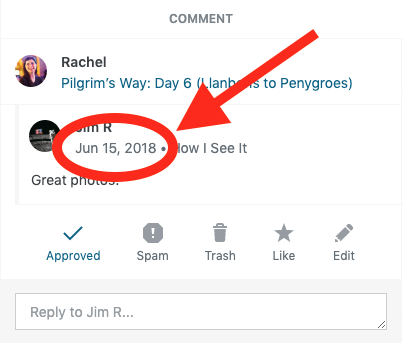
Notifications detail: Right-click (on desktop) or long tap (on mobile web) on the comment timestamp.
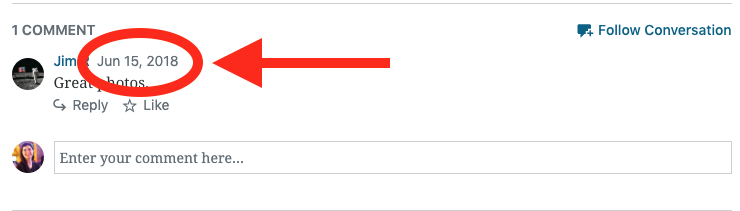
Reader: Right-click (on desktop) or long tap (on mobile web) on the comment timestamp.
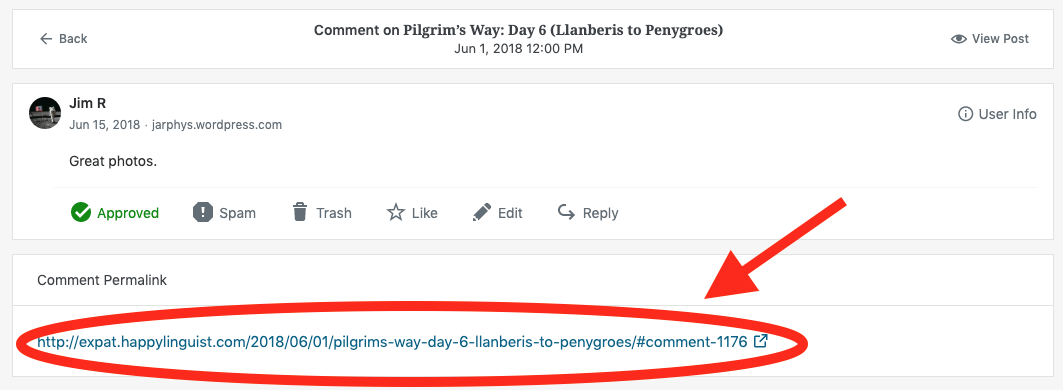
Comment detail (under My Sites > Site > Comments): Select a comment and copy the comment permalink listed under the comment.
rachelmcr
on 26 Jul 2019
Here's some work I did on this for hack week @rachelmcr !
A couple of changes to the proposed solution after working through it.
- I don't think we should add the functionality to the notification screen. The reason being - then different items on that screen will have different functionality. Some notifications would have long press (or a button or whatever) to copy, but others would not.
- Using a button for the action rather than long press. Long press is not always discoverable, and especially in this context if users do not expect to long press on other notifications/items I think it makes it clearer/more disoverable
- Although its buried one level deeper being on the details screen, its a feature for advanced users and something that only needs to be learned once.
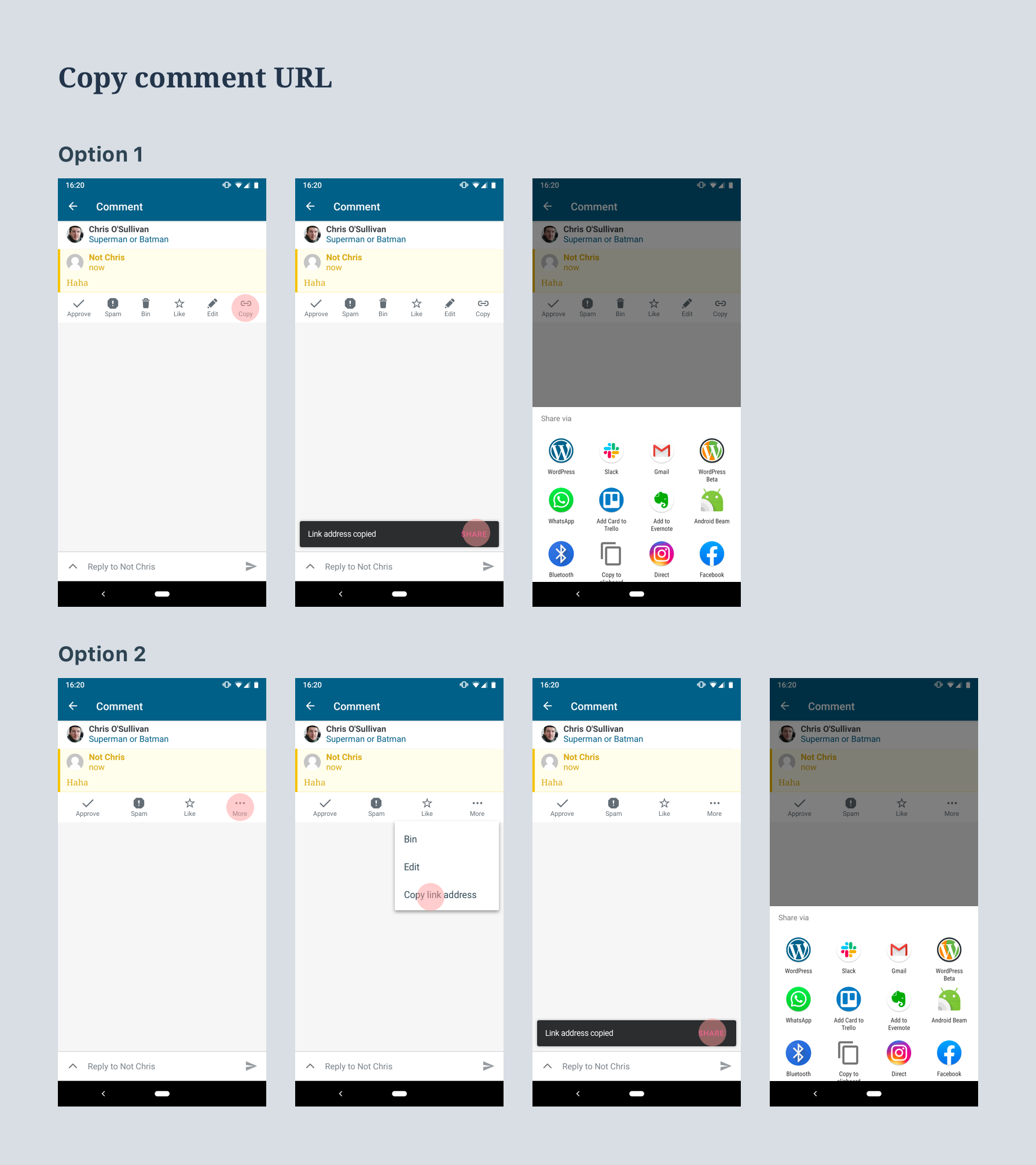
Please see the mocks below
- Version 1 I added an extra icon to the list of actions. I already think there might be too many actions. And this new one pushes it over the limit especially on small screens, so
- In version 2 I added a 'more' icon and moved some of the actions into the menu that appears (can re-arrange which ones are on view initially if you think some are more important or if we have any data).
- Also thought it might be nice to give the user the option to share directly from the Snack Bar that appears
Open to opinion here, I would suggest go with option 2.
osullivanchris
on 29 Jul 2019
These options look great!
In version 2 I added a 'more' icon and moved some of the actions into the menu that appears (can re-arrange which ones are on view initially if you think some are more important or if we have any data).
I like the idea of a 'more' icon to give a bit more space (reducing the fear/reality of hitting the wrong button).
As for order, we don't have data on how often comments are edited from here (as far as I see) but of the other actions Approving and Liking are by far the more popular ones so it makes sense to keep them where they are. Trashing and spamming comments are done at similar rates with a _slight_ preference for Trash, so it could be worth swapping those but it could go either way.
rachelmcr
on 30 Jul 2019
This looks great! I much prefer option 2.
While I like the ability to share from the snackbar, I do wonder about having that be the only place where that functionality is available.
 megsfulton
on 31 Jul 2019
megsfulton
on 31 Jul 2019
Thanks for the feedback @rachelmcr @megsfulton
Sounds like we're unanimous with option 2. Going to move this issue to 'done' from design POV. We should make a duplicate iOS issue also.
🚢
osullivanchris
on 1 Aug 2019
While I like the ability to share from the snackbar, I do wonder about having that be the only place where that functionality is available.
Forgot to reply for this. I'm not too worried about it for now. Its not something you can do today, and it wasn't part of the request. Its a nice extra. If we get some feedback that its hard to share we could make this more prominent.
osullivanchris
on 1 Aug 2019
Moving this into the dev Groundskeeping project with a note to ask Groundskeepers if this is something small enough to include in a one-week maintenance rotation or if it should be recommended as project work instead.
 designsimply
on 13 Aug 2019
designsimply
on 13 Aug 2019
@designsimply ace! Thanks for moving it forward
osullivanchris
on 14 Aug 2019
Related issues
 maxme
·
3Comments
maxme
·
3Comments
 malinajirka
·
3Comments
malinajirka
·
3Comments
 mzorz
·
3Comments
mzorz
·
3Comments
 guarani
·
3Comments
guarani
·
3Comments
 nbradbury
·
3Comments
nbradbury
·
3Comments
Most helpful comment
Here's some work I did on this for hack week @rachelmcr !
A couple of changes to the proposed solution after working through it.
Please see the mocks below
Open to opinion here, I would suggest go with option 2.