Wordpress-android: Replace Noticons with Gridicons in Notifications Tab
Expected
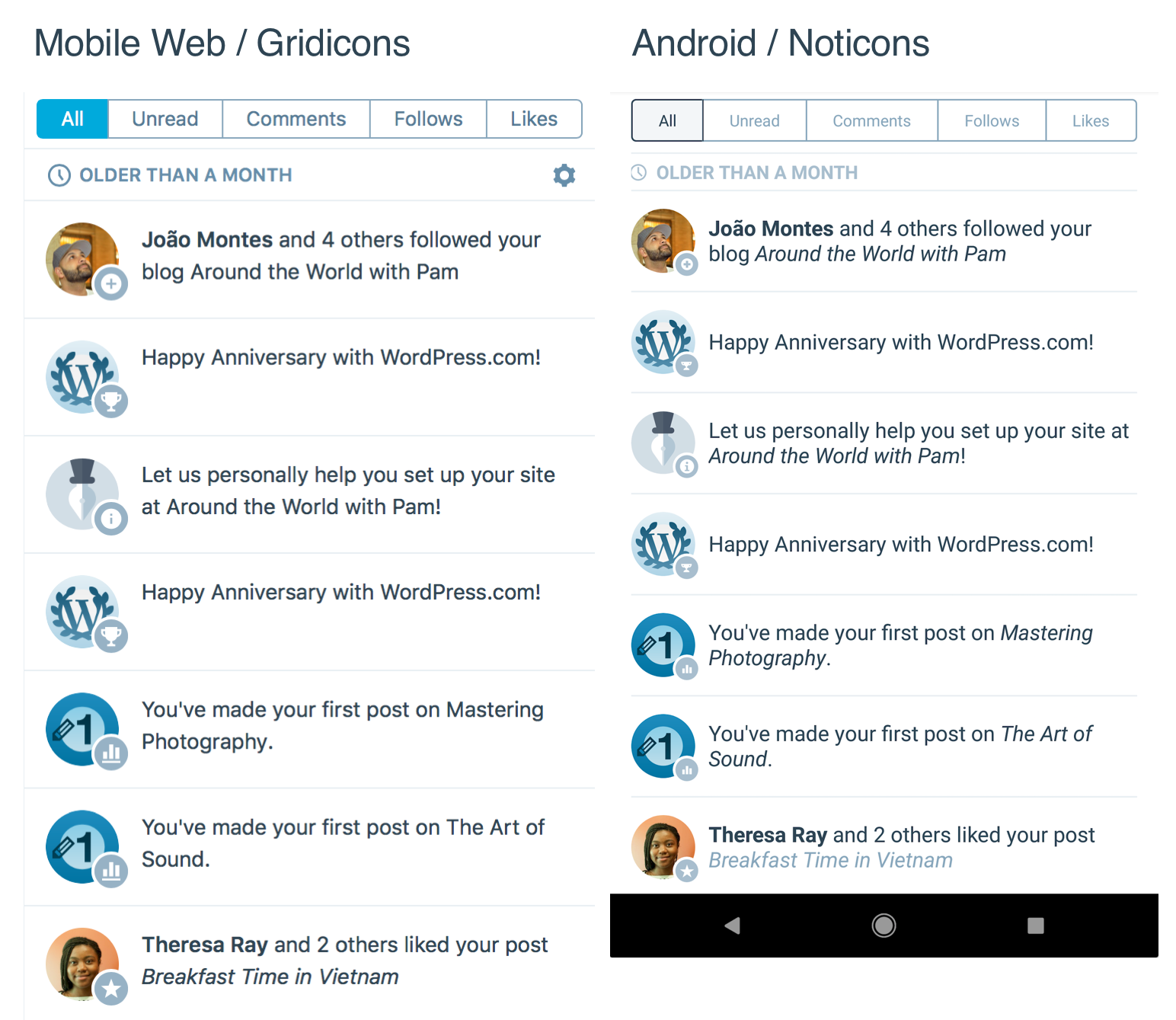
Icons in the Notifications tab show the updated Gridicons.
Observed
Icons in the Notifications tab show the outdated Noticons.
Reproduced
- Go to Notifications tab.
- Notice icons are Noticons.
The clock to the left of the text OLDER THAN A WEEK, the white comment bubble in the blue-grey circle in the lower right-hand corner of the avatar, and the back arrow to the left of the text Maxime are the Noticons to be replaced in the screenshot below.

Tested
Google Pixel on Android 7.1.1 with WordPress 6.2
 theck13
All 6 comments
This is still an issue; noticed today.
 mattmiklic
on 12 Apr 2018
mattmiklic
on 12 Apr 2018
This issue has been marked as stale because:
- It has been inactive for the past year.
- It isn't in a project or a milestone.
- It hasn’t been labeled
[Pri] Blocker,[Pri] High, orgood first issue.
Please comment with an update if you believe this issue is still valid or if it can be closed. This issue will also be reviewed for validity and priority (cc @designsimply).
![stale[bot] picture](https://avatars.githubusercontent.com/in/1724?v=4&s=40) stale[bot]
on 12 Apr 2019
stale[bot]
on 12 Apr 2019
This is still an issue.
theck13
on 12 Apr 2019
I've moved this into a project cause it's still an issue. In the recent color changes the background color of icons changed from grey to blue. I think that's not intentional @osullivanchris ?

 planarvoid
on 2 Oct 2019
planarvoid
on 2 Oct 2019
I think we are using blue icon backgrounds for unread notifications, and grey for read ones. So that is probably intentional.
Gonna ping @mattmiklic here as he's been working on color updates and also replied to this thread previously.
 osullivanchris
on 2 Oct 2019
osullivanchris
on 2 Oct 2019
we are using blue icon backgrounds for unread notifications, and grey for read ones. So that is probably intentional.
Yep, 💯! And thanks @planarvoid; it will be great to get these replaced with Gridicons.
mattmiklic
on 2 Oct 2019
Related issues
 maxme
·
3Comments
maxme
·
3Comments
 mzorz
·
3Comments
mzorz
·
3Comments
 nbradbury
·
3Comments
nbradbury
·
3Comments
 jd-alexander
·
3Comments
jd-alexander
·
3Comments
 wptester9845
·
3Comments
wptester9845
·
3Comments