Woocommerce-services: Automatically mark order as complete after creating label
To save merchants time, we should automatically mark an order as completed after they print a shipping label.
 c-shultz
All 18 comments
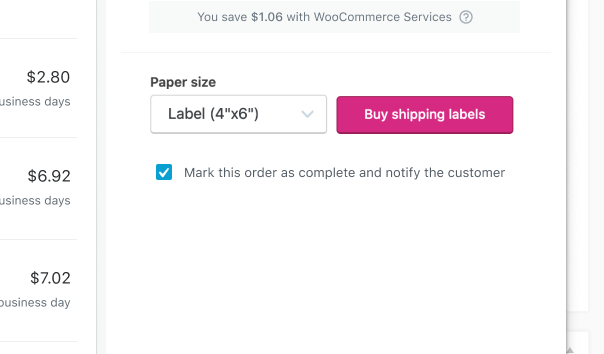
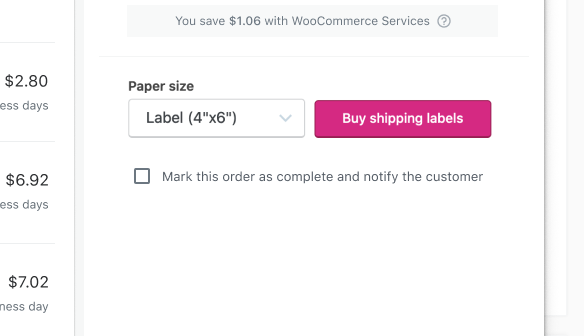
One option here could be to include a checkbox that's selected by default. This way the merchant can have some control over when the customer will be notified.
The copy could probably use some work. What do you think @c-shultz @aleftick ?
Mark this order as complete and notify the customer
Selected
De-selected
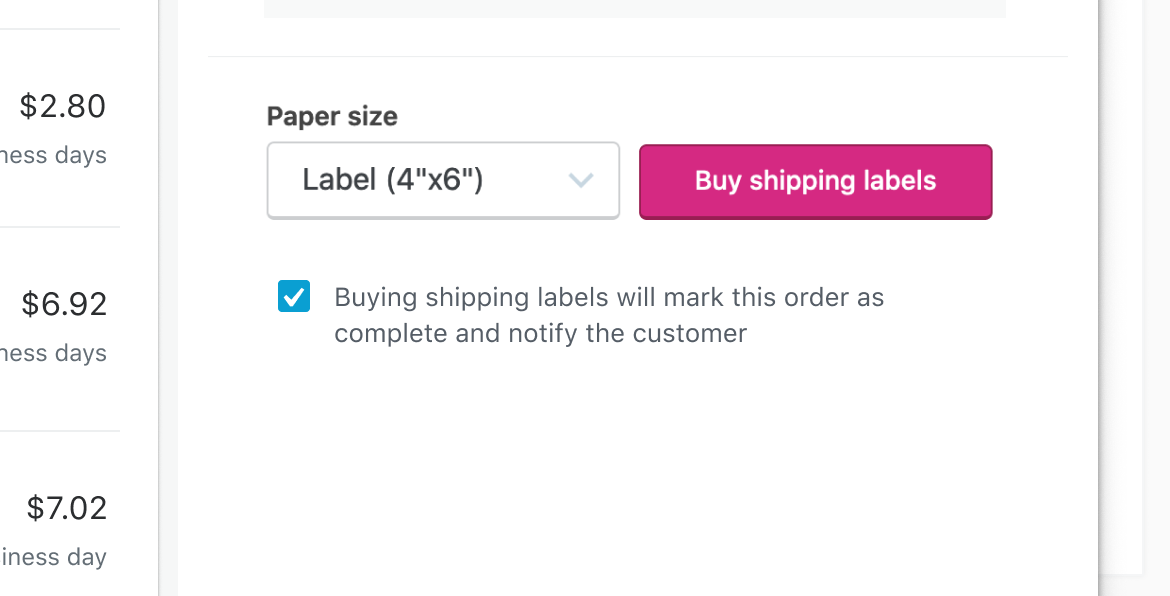
Alternatively, we could try something more explicit.
Buying shipping labels will mark this order as complete and notify the customer
Figma:
https://www.figma.com/file/fcebyhNqZ9RhkFUzPHAtUG/WCS?node-id=34%3A2413
 elizaan36
on 18 Feb 2020
elizaan36
on 18 Feb 2020
Buying shipping labels will mark this order as complete and notify the customer
To me, it sounds more like a warning that I would need to be concerned with.
Mark this order as complete and notify the customer
It sounds more like an FYI. This language seems more appropriate.
Mark this order as complete and notify the customer (will include the tracking number if available).
Thought: Should we include something regarding including the tracking number in the email to highlight that benefit?
 aleftick
on 18 Feb 2020
aleftick
on 18 Feb 2020
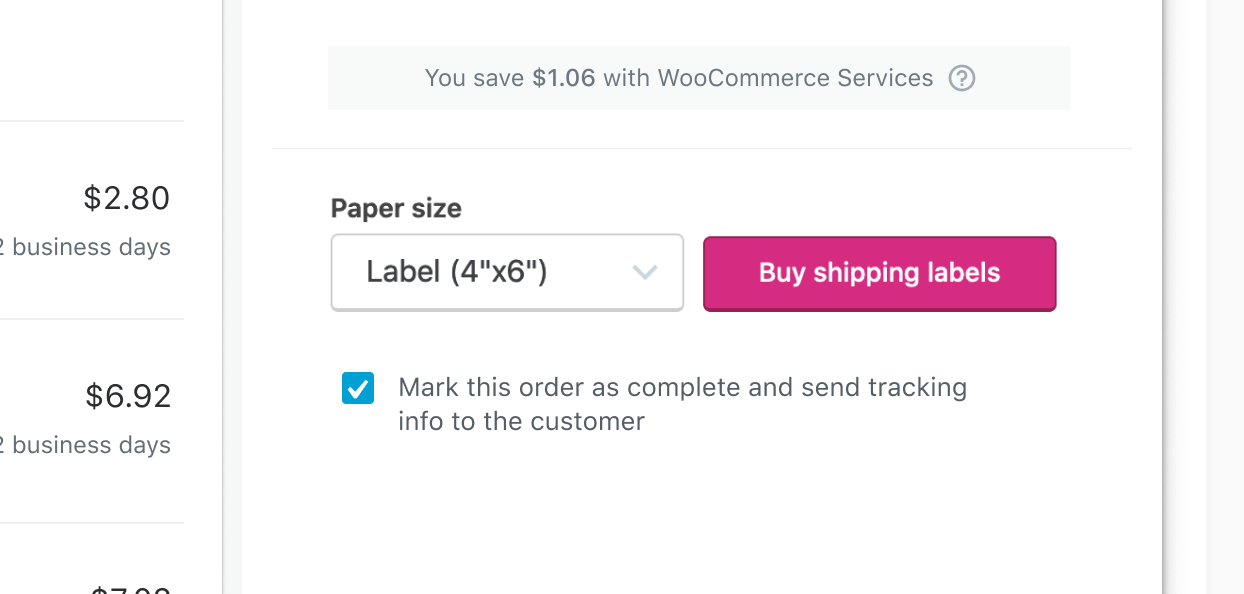
How about:
Mark this order as complete and send tracking info to the customer
elizaan36
on 19 Feb 2020
Mark this order as complete and send tracking info to the customer
The only problem is it isn't available for all services (for example FCM) hence the "if available". If you think it's convoluted, we can keep it simple to what you originally proposed.
aleftick
on 19 Feb 2020
Ah ok. In that case I'm afraid it's a lot to digest for the checkbox detail text and people may be confused. So I'll move ahead with this text for the prototype:
Mark this order as complete and notify the customer
elizaan36
on 19 Feb 2020
With the service differentiation work we're doing, we'll know if tracking is available for the chosen service. We could display the tracking info version if it's available:
Mark this order as complete and send tracking info to customer
And this version if there's no tracking:
Mark this order as complete and notify the customer
c-shultz
on 19 Feb 2020
My concern is that it makes things more complicated for the edge cases:
- How do we handle orders that have two or more packages and one of them doesn't have tracking?
- In the future, as we want to tackle partial orders, are we making it harder to introduce it?
aleftick
on 19 Feb 2020
My concern is that it makes things more complicated for the edge cases
Those are good points. I'm good with just keeping it simple to keep this issue small and avoid future complications and edge cases.
This text looks good to me then:
Mark this order as complete and notify the customer
c-shultz
on 24 Feb 2020
Looks like support for this was started already https://github.com/Automattic/woocommerce-services/blob/develop/client/extensions/woocommerce/woocommerce-services/views/shipping-label/label-purchase-modal/sidebar.js#L59
It seems to be mostly working too.
It was originally introduced as two options. Mark order as complete and send note to customer. Marking an order as complete automatically sends an email notice to the customer that the order is complete so doing both seems redundant.
But if the order is not already complete the option to mark it as complete essentially does nothing.
So with this new option:
Mark this order as complete and notify the customer
What should we do in the case where the order is already complete? Do we want to make it do nothing? Or send a note to customer that the shipping was updated?
 superdav42
on 26 Feb 2020
superdav42
on 26 Feb 2020
I decided to make it send a notice if the order is already complete and the merchant leaves this option checked. The label is updated in this case to say, Notify the customer with shipment details. See PR for screenshots.
superdav42
on 27 Feb 2020
Also we may want to follow up with a way to indicate this new status to the merchant. After they print the label they'll be on the same order page but the status will not be updated and the notes will not indicate it shipped. If they refresh the page it will show the updated status. We may want to consider automatically refreshing the page but this may be unwanted. Or we could add a prompt to refresh to see changes.
superdav42
on 27 Feb 2020
What should we do in the case where the order is already complete? Do we want to make it do nothing? Or send a note to customer that the shipping was updated?
Hey @superdav42 So I understand correctly, the use case is when the order is complete already and the merchant is re-printing the label or printing a new label (for an exchange possibly.), or they potentially haven't printed a label at all yet and manually marked the order complete.
- From the merchant perspective, it's safe to assume that if they're shipping an exchanged item or printing a label for the first time they would want to notify the customer of the tracking so I think what you've done here is a good call. If they're only re-printing a label, they'd probably not want to send the customer the same information again.
- The only thing is, wouldn't we run into the same issue here (as mentioned in the convo above) since there are some service types that don't provide tracking and it sort of complicates the message to try and explain that?
After they print the label they'll be on the same order page but the status will not be updated and the notes will not indicate it shipped. If they refresh the page it will show the updated status.
Are you referring to the label status in the USPS panel? (I just tried to test it out on my site and the WCS modal froze. I'll create a new issue for that.)
elizaan36
on 27 Feb 2020
In the case where the order is already complete chose to use the message "Notify the customer with shipment details". It does not mention tracking so I think it's safe to use. We may want to default it to unchecked for this use case though.
superdav42
on 27 Feb 2020
After they print the label they'll be on the same order page but the status will not be updated and the notes will not indicate it shipped. If they refresh the page it will show the updated status.
Are you referring to the order status and order notes, or the label status in the USPS panel?
I'm referring to the order status and order notes that is part of WC Core. Updating the order status dropdown via JS would be pretty easy but updating the order notes via AJAX would be more tricky.
superdav42
on 27 Feb 2020
Notify the customer with shipment details
So just to confirm in this use case the customer would receive the same email as when the order is marked as complete?
I'm referring to the order status and order notes that is part of WC Core.
Gotcha, in that second comment you were referring to the original use case where the order is marked complete after buying the shipping label.
A couple questions:
- What do you think would be unwanted about doing an automatic refresh after the label purchase? I think we have an opportunity to do that because the merchant may go to print the actual label, and if they don't print right away there's a moment to refresh before the modal is dismissed.
- Cool that updating the status would be easy. Would the order notes not update right away with the automatic refresh, or would there be an additional step to update the order notes via AJAX?
elizaan36
on 27 Feb 2020
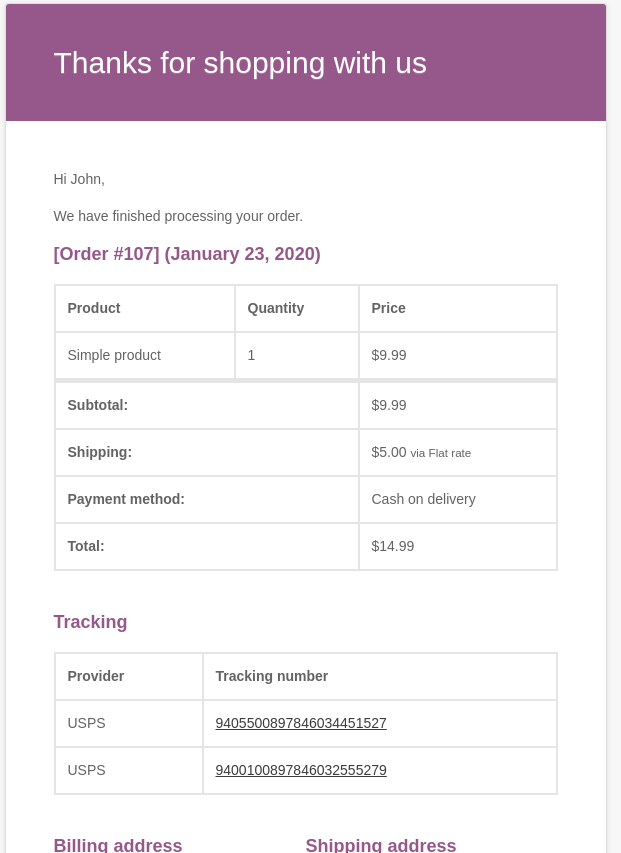
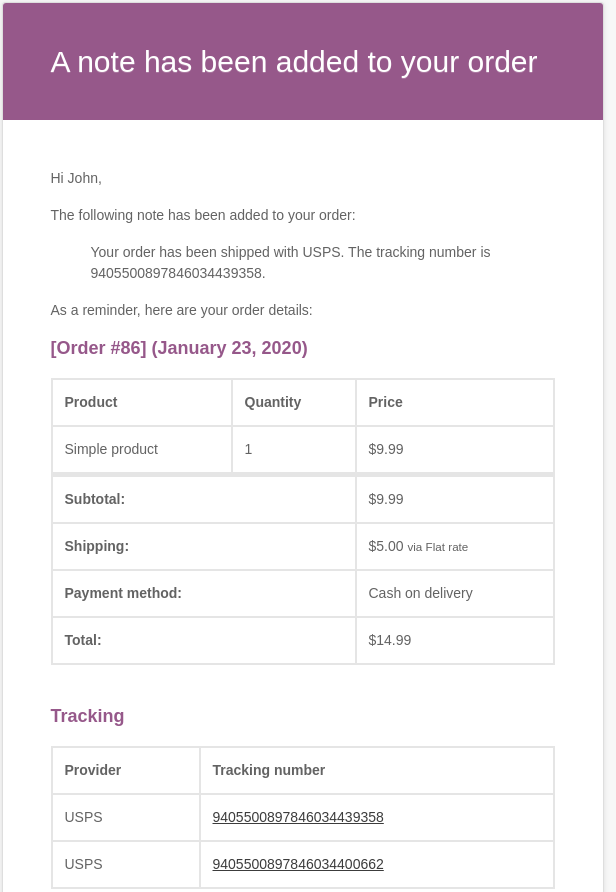
So just to confirm in this use case the customer would receive the same email as when the order is marked as complete?
No it's slightly different.
Order complete email is like this:
When printing an additional label after it is complete it looks like:
superdav42
on 5 Mar 2020
What do you think would be unwanted about doing an automatic refresh after the label purchase? I think we have an opportunity to do that because the merchant may go to print the actual label, and if they don't print right away there's a moment to refresh before the modal is dismissed.
Refreshing the page will interfere with the print dialog and it would be tricky to know when that dialog is closed. Also the user may have unsaved changes on that page related to many different fields we wouldn't want to refresh and risk loosing those or making it seem like they were saved.
Cool that updating the status would be easy. Would the order notes not update right away with the automatic refresh, or would there be an additional step to update the order notes via AJAX?
We're going to make a follow up issue to address this problem. We should be able to update the status and load new notes via AJAX so no refresh will be needed.
superdav42
on 5 Mar 2020
Nice, your solution to include the checkbox message Notify the customer with shipment details when an order is already complete makes even more sense now. Thanks for clarifying and sharing those screenshots.
We're going to make a follow up issue to address this problem. We should be able to update the status and load new notes via AJAX so no refresh will be needed.
Ace!
elizaan36
on 5 Mar 2020
Related issues
 allendav
·
4Comments
allendav
·
4Comments
 nabsul
·
3Comments
nabsul
·
3Comments
 FreshPhil
·
3Comments
FreshPhil
·
3Comments
 DanReyLop
·
3Comments
nabsul
·
3Comments
DanReyLop
·
3Comments
nabsul
·
3Comments