Woocommerce-services: Inform users of products that should be entered exclusive of tax, but are not
Edit from @v18: two solutions for this are suggested below:
https://github.com/Automattic/woocommerce-services/issues/1367#issuecomment-389895119
Reported in 1068062-zen, most probably related to #1309
To reproduce:
- Set store base address in London, UK
- Enable automated taxes,
- Enter and display prices including tax, calculate taxes based on shop address,
- Create a £20 Flat Rate for shipping.
- Add product to cart and observe shipping price & totals in order summary (shipping cost is £20 this time, totals add up correctly):
Screenshot: http://cld.wthms.co/xwOBw1
- Place the order and observe payment confirmation page - shipping cost has increased from £20 to £24 without updating the total:
Screenshot: http://cld.wthms.co/7MFh51
The same values are also passed over to payment gateways, which can cause errors that the total is not the sum of all order items.
We should either treat shipping cost as entered inclusive of tax, or apply the taxes on top of the entered shipping price from the beginning, so they can be included in order total.
 madeincosmos
All 25 comments
Unfortunately, with the way the TaxJar API is working right now, the taxes have to be excluded. #1321 addresses the issue by reverting the problematic settings and disabling them when automated taxes are enabled. It's not shipped yet but should be included in the next release.
However, the settings wouldn't be reverted if the taxes are enabled before the change is shipped. I'll add a fix for this.
But in general, this is by design. The users have to enter prices excluding the tax and calculate prices based on the user's address.
 marcinbot
on 9 Apr 2018
marcinbot
on 9 Apr 2018
Also, CC @jeffstieler who might know about some hidden TaxJar feature that would help
marcinbot
on 9 Apr 2018
Thanks @marcinbot! Most European countries use inclusive prices, so if they need to switch to exclusive instead to be able to use TaxJar, that's very important information. Is there a way to include this info in Tax settings perhaps?
madeincosmos
on 9 Apr 2018
I'm not sure if automated taxes feature is needed by stores set in the European countries. The UK has a VAT rate of 20%. It should be sufficient to use the core tax settings and tax classes (standard, reduced or zero rate)
If selling internationally outside the EU it should be easy to configure the tax to not be included using the core settings as well (since the merchants only need to exclude/include the countries, not states or postcodes)
marcinbot
on 9 Apr 2018
@marcinbot I still think that @madeincosmos has a point for the UX then. If it's indeed better to not have automated taxes if you're in Europe, ideally this would be clearly communicated to the customers (or you skip that step in the onboarding wizard based on the shop base address).
 jobthomas
on 16 Apr 2018
jobthomas
on 16 Apr 2018
@jobthomas @madeincosmos hey, I was wondering what you were thinking might work better for the UX.
Automated taxes are installed automatically for the merchant when they go through the setup wizard (OBW) in WooCommerce Core. The settings are applied automatically.
If there are users who manually install WooCommerce Services Automated Taxes, I'm not aware of how they do it, so let me know if you have more information about that.
Do you think we should change the OBW to include specific information for merchants located in the UK?
Happy to hear suggestions and open issues based on that! :)
 v18
on 17 May 2018
v18
on 17 May 2018
@v18 I think just making sure that it's clearly indicated that if they use automated taxes they need to enter product costs exclusive of VAT would already be an improvement - we've had several people being surprised that they can't use automated taxes because it conflicts with that setting
Or on the tax settings page, if automated taxes are enabled, making sure they can't change the settings to "entering prices inclusive of VAT", with a short explanation why that's the case.
Something like this:
Link to image here: http://cld.wthms.co/iNLLcl.
jobthomas
on 17 May 2018
(And a similar warning during the onboarding wizard would make sense as well)
jobthomas
on 17 May 2018
Cool, those are great suggestions. Going to edit the title to make it clear what this issue is about.
v18
on 17 May 2018
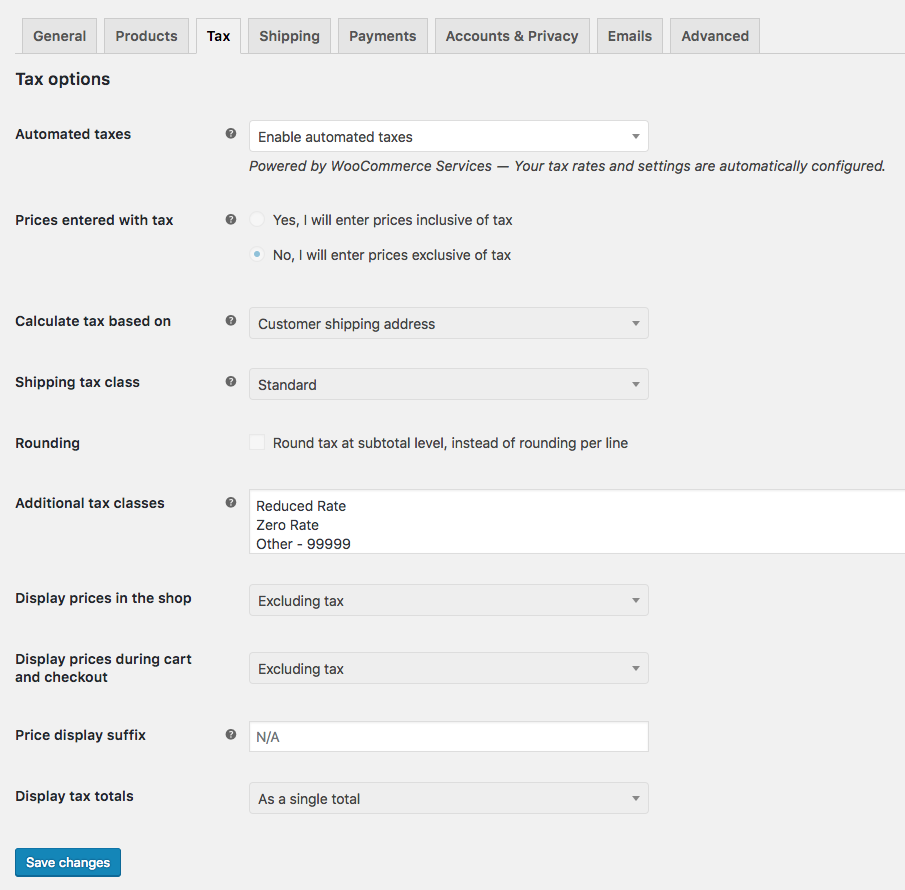
Does anything else need to be done here? https://github.com/Automattic/woocommerce-services/pull/1372 added the following message, set tax options to required values, and disabled the inputs:
 jeffstieler
on 30 May 2018
jeffstieler
on 30 May 2018
Ping @madeincosmos :)
jeffstieler
on 4 Jun 2018
@jeffstieler what happens if a product's price was already entered with prices including taxes, and then WCS's automated taxes was enabled? Does that break things for the user?
v18
on 4 Jun 2018
@v18 I believe in that case the prices would be too high - effectively double taxed.
jeffstieler
on 4 Jun 2018
@jeffstieler in that case, sounds like we should inform users of products that would be double-taxed. What do you think? Perhaps by listing them out on the settings screen you posted (img), or maybe by linking to another page with a list?
v18
on 4 Jun 2018
@jeffstieler looks good to me 👍 If someone had prices entered inclusive of tax and then enabled automated taxes, I'd add a message on the settings screen - something along the lines of "Automated taxes are applied on top of the prices you entered. Please make sure these product prices were entered exclusive of tax"
madeincosmos
on 5 Jun 2018
Updated the issue title to reflect what still needs to be done.
v18
on 5 Jun 2018
Another user affected by this in 3363887-zen.
- store based in the UK
- automated taxes enabled by default through setup wizard
- tax-exclusive prices enabled by default, with no option to change it.
In countries where tax-inclusive prices are the norm it makes sense to me not to enable automated taxes by default.
madeincosmos
on 1 Oct 2020
Steps to reproduce the remaining problem.
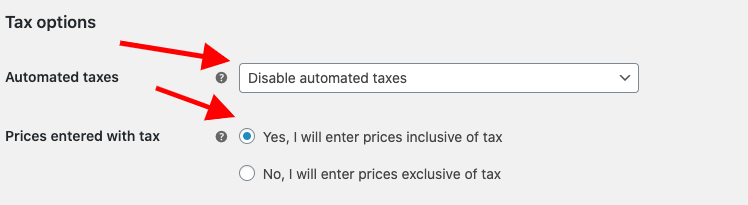
Make sure WCS' Automated Taxes is "Disabled automated taxes" and "Yes, I will enter prices incluesive of tax" is checked.
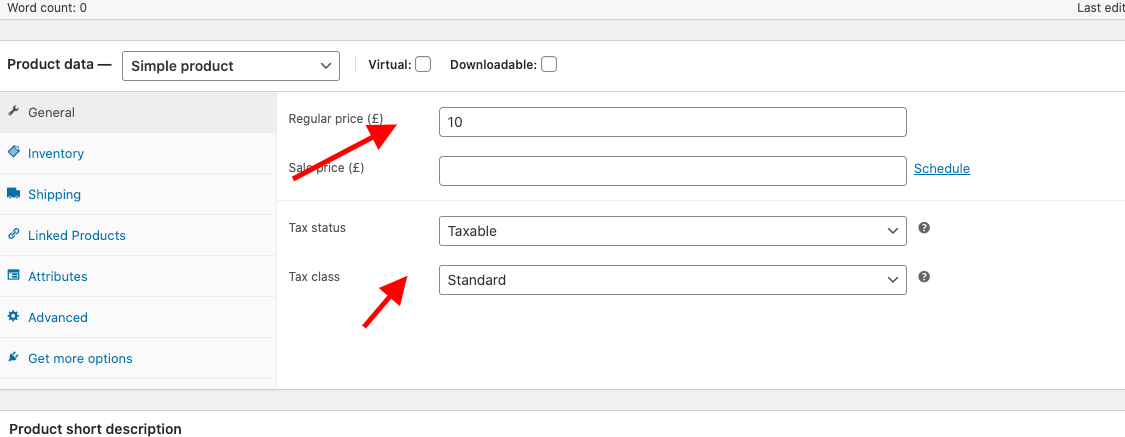
Create a Simple Product, with tax status "Taxable" and tax class "Standard". Say $10 including tax.
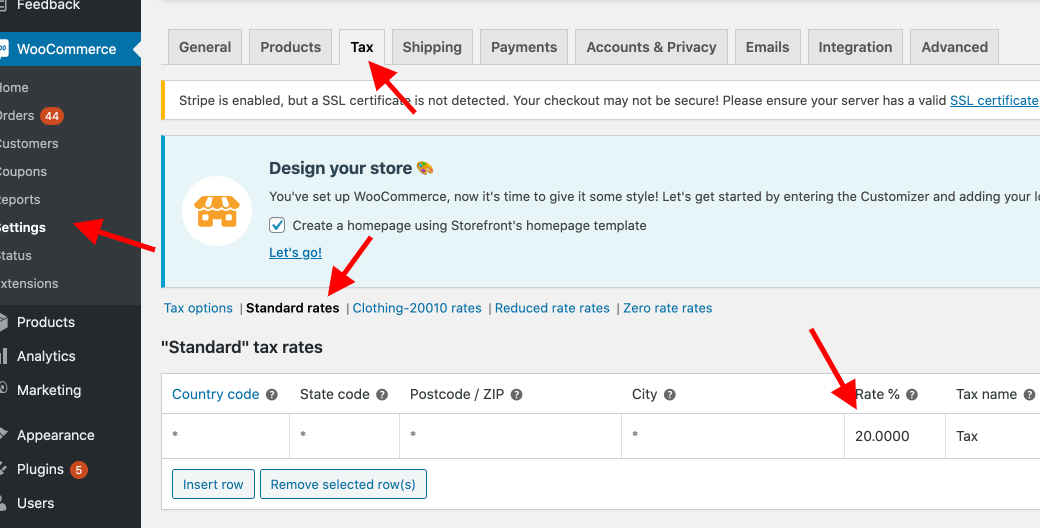
For this example, make it 20% tax for everywhere.
Add the product to cart. Ship from an UK address to another UK address. I randomly picked 2 Starbucks location on Google Map.
Store location, Starbucks 1: 12 Copthall Ave, London EC2N 2DL, United Kingdom
Ship to, Starbucks 2: 61-63 High St, Scunthorpe DN15 6SA, United Kingdom
Because it is tax inclusive, cart should show tax deducted amount (-20%) as "Subtotal". ie 8.33 * 1.2 = 10
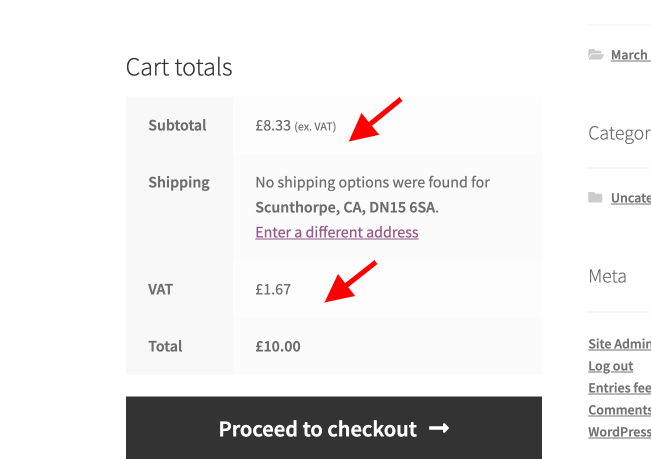
Turn on automated tax. Observe "No, I will enter prices exclusive of tax" is selected now.
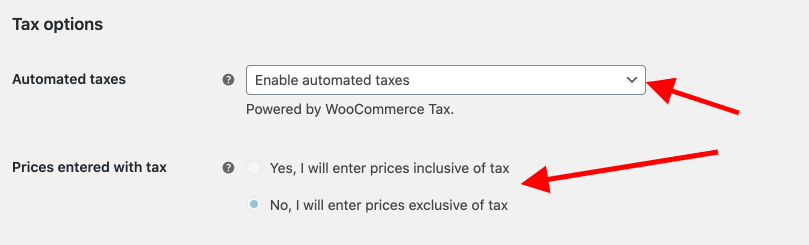
Refresh cart or repeat process of checking out item to cart
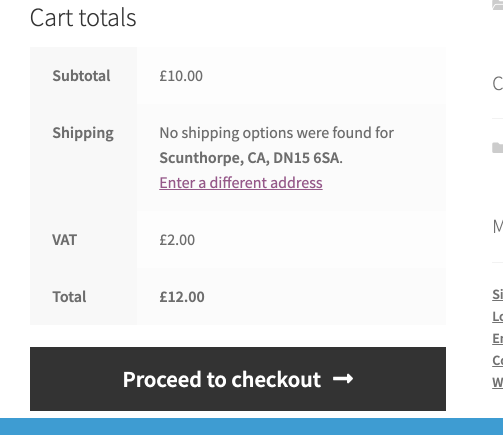
Observe tax is calculated twice. There is another $2 on top, totalling
$12. So tax is calculated as 8.33 * 1.2 * 1.2 ~=12
 harriswong
on 26 Oct 2020
harriswong
on 26 Oct 2020
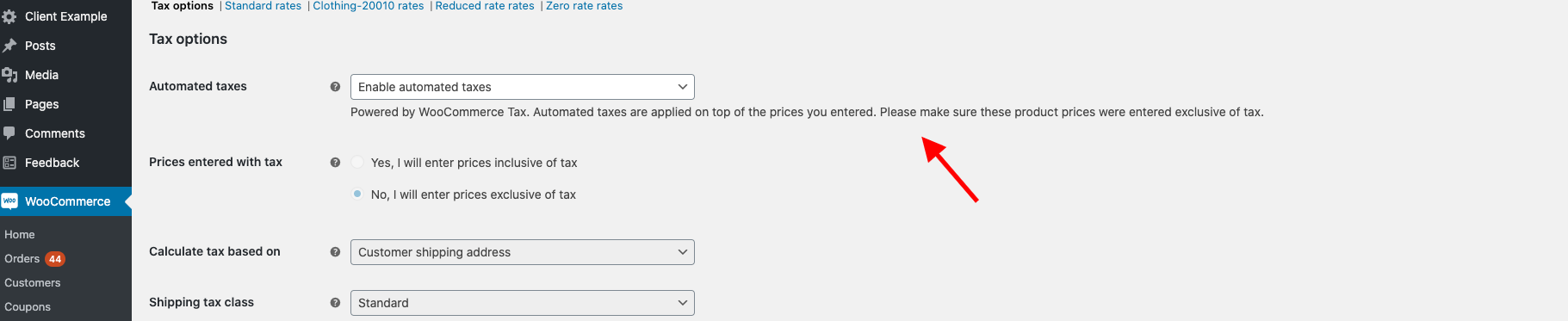
Added additional message to explain why exclusive tax is needed when WCS Automated Tax is enabled.
harriswong
on 26 Oct 2020
Hi @elizaan36!
We want to help user understand that automated tax only works with "exclusive tax". ie. Product prices can't include tax. I added this message and want to ping your thoughts:
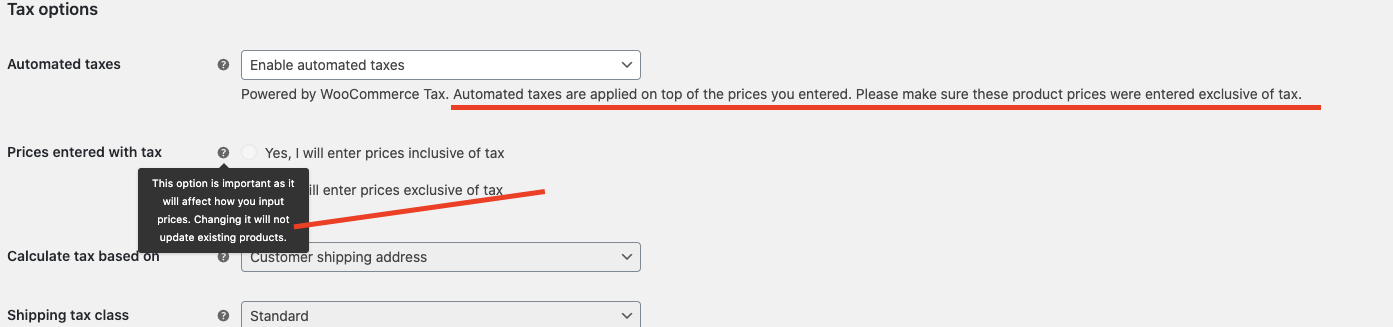
I thought adding the message after Powered by WooCommerce Tax. is a good location to let the user know about the "exclusive tax" requirement. But our tooltip already has a similar message. Is this okay or should we change the copy a bit? Thanks!
harriswong
on 28 Oct 2020
Hey @harriswong - when automated taxes are enabled do you think it would be a good idea to default to the Yes, I will enter prices exclusive of tax option and disable the other one?
Then you don't need the extra message after "powered by WooCommerce Tax". The tooltip you're showing there isn't very clear. Could it say something like, "If automated taxes are enabled, you'll need to enter prices exclusive of tax."
 elizaan36
on 28 Oct 2020
elizaan36
on 28 Oct 2020
@elizaan36 Yep! We actually already do that. When the user first install WCS and we activate automated taxes for them, or if they click "Enabled automated taxes" manually, we default the option to "No, I will enter prices exclusive of tax". It would look like this:
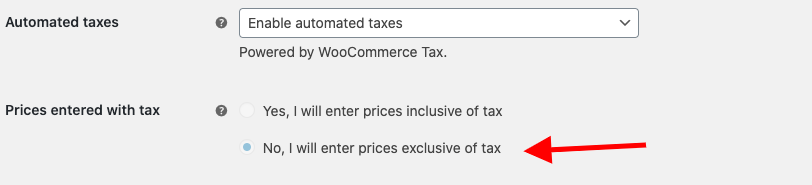
One problem is that in places where inclusive-tax is the norm, new users aren't aware of us enabling automated tax for them. Since automated tax can only be enabled with "tax-exclusive" setting, all these users get double tax by default when using WCS.
One low hanging fruit idea is to present a message to these user so at least they realized that we enabled the automated tax + exclusive tax system for them. I can update the tooltip to "If automated taxes are enabled, you'll need to enter prices exclusive of tax." and remove my extra text. I think the tooltip should be enough for them to realize that they need to update the settings back to "Disabled automated taxes".
harriswong
on 28 Oct 2020
One problem is that in places where inclusive-tax is the norm, new users aren't aware of us enabling automated tax for them. Since automated tax can only be enabled with "tax-exclusive" setting, all these users get double tax by default when using WCS.
One low hanging fruit idea is to present a message to these user so at least they realized that we enabled the automated tax + exclusive tax system for them.
Ah ok, thanks for the details @harriswong ! Just to clarify, would this message be useful in the Products area when the merchant is entering their pricing for each product? I could see it being useful if WCShip could trigger a tooltip to inform users there (the first time they enter a price after automated taxes are enabled), in case people don't make it to their Settings.
elizaan36
on 29 Oct 2020
I wonder if another option is to disable the option of enabling Automated Taxes if Prices Entered with Tax is "inclusive of tax". This could be supplemented with a notice saying that Prices Entered with Tax needs to be exclusive in order to activate Automated Taxes and that prices may need to be recalculated since they will be changed when editing that setting.
 tommyshellberg
on 29 Oct 2020
tommyshellberg
on 29 Oct 2020
@elizaan36 I think adding the message in the product price area is useful. It also helps user to realize that they need to update their existing product tax-inclusive pricing, which they created prior to installing WCS.
I also like @tommyshellberg's suggestion. Instead of doing the low hanging fruit message, maybe we can disable "automated tax" for users that have selected "No, I will enter prices exclusive of tax", plus a notice on the settings page.
This maybe a slightly higher low hanging fruit but not too bad :D
harriswong
on 29 Oct 2020
Related issues
 nabsul
·
3Comments
nabsul
·
3Comments
 allendav
·
4Comments
allendav
·
4Comments
 tijosh
·
5Comments
tijosh
·
5Comments
 budzanowski
·
4Comments
budzanowski
·
4Comments
 c-shultz
·
4Comments
c-shultz
·
4Comments