Woocommerce-ios: Dashboard: Dashboard Stats don't match with WooCommerce Reports
Expected behavior
Dashboard Stats to match with WooCommerce Reports.
Actual behavior
Dashboard Stats don't match with WooCommerce Reports.
Steps to reproduce the behavior / more details
Several users reported that the stats in the app don't match what they see in WooCommerce reports. We are able to fix it for them by running Jetpack data resync using our internal tools but we shouldn't be doing this.
Let's collect the cases here to see if we could find any patterns and solve this.
This issue may as well go in hand with https://github.com/woocommerce/woocommerce-ios/issues/380 (no orders are being loaded or error when refreshing the orders view).
Affected tickets
- 1501499-zen
- 1518848-zen
- 1497092-zen
- 1504216-zen
- 1553280-zen
- 1570819-zen
Tested on [device], iOS [version], WCiOS [version]
1501499-zen:
- iPhone XSMax
- iOS v. 12.0.1
- WooCommerce iOS v. 0.9
1518848-zen:
Collecting details.
1497092-zen:
App Information:
App Name: WooCommerce Mobile
App Version: 0.8 (20181002)
Installed App Version: 0.8 (20181002)

Device Information:
Device: iPhone7,2
iOS Version: 12.0
Language: en-US (English (United States))
Carrier: Virgin
Timezone: PDT
Architecture: N/A
Connection Status: WiFi
Paired Apple Watch: N/A
1504216-zen:
App Information:
App Name: WooCommerce Mobile
App Version: 0.8 (20181002)
Installed App Version: 0.8 (20181002)

Device Information:
Device: iPhone10,3
iOS Version: 12.0.1
Language: en-US (English (United States))
Carrier: T-Mobile
Timezone: PDT
Architecture: N/A
Connection Status: WiFi
Paired Apple Watch: N/A
1553280-zen:
- iPhoneX
- iOS v. 12.0.1
- WooCommerce iOS 0.8 (20181002)
1570819-zen:
Collecting details.
 juliaamosova
All 9 comments
There was a reported issue (1710754-zen) where the weekly stats were incorrect. I was able to repro this behavior on my test site:
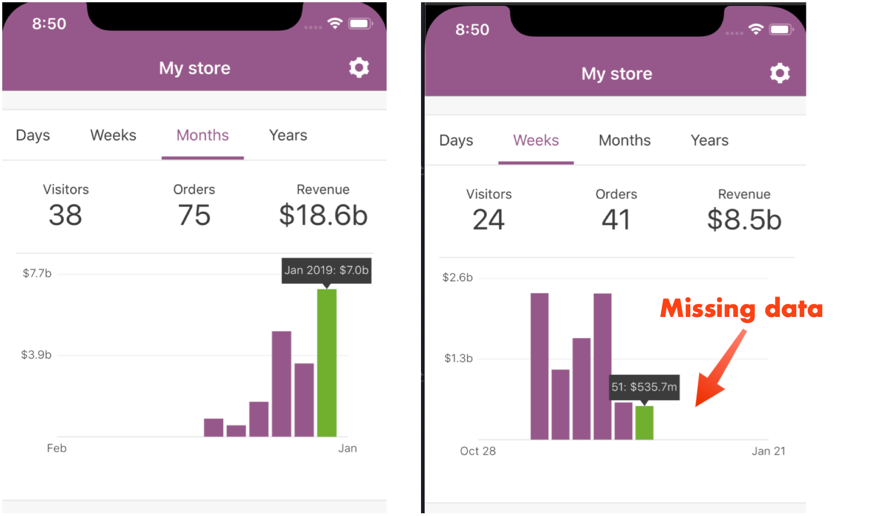
It turns out the endpoint was returning incorrect data to the app for granularity == week:

in the response data array ☝️ note that the W1-2019 thru W4-2019 values are labeled as "2018". Additionally the data is incorrect.
As of 1/29/2019, we are waiting on a server-side fix to land which will address this issue immediately.
 bummytime
on 29 Jan 2019
bummytime
on 29 Jan 2019
@astralbodies @juliaamosova @melindahelt just a heads up — the server-side fix for incorrect weekly data ☝️ has been deployed (for all users) and the data looks much better.
bummytime
on 30 Jan 2019
All tickets mentioned in this issue have been responded to! Thanks @bummytime
 melindahelt
on 30 Jan 2019
melindahelt
on 30 Jan 2019
@bummytime
497092-zen responded that it is still not fixed for them. See details above.
They provided screenshot:
Image Link: http://cld.wthms.co/s3qKca
with note: I just looked, and the data isn’t displaying correctly. We have about $50,000 in sales this month, and it shows $9.4k for the month.
I an do a re-sync if you think that will help and/or let us me know what you think.
melindahelt
on 30 Jan 2019
@melindahelt I will check out that specific user's issue. FWIW, we are going to release another stats data fix (#654) in v1.1, but I don't think it will address such a large discrepancy.
bummytime
on 4 Feb 2019
@bummytime @melindahelt we asked user in 1761007-zen if they could navigate to https://wordpress.com/store/stats/orders/day/{theirsiteurl} while logged into their WordPress.com/Jetpack account and see if they are able to see historic stats there.
Their answer was that they could not see the historic stats there.
Documenting it here for now and setting the ticket on-hold.
juliaamosova
on 5 Feb 2019
Got another one - 1785960-zen
Moving the ticket to the Woo Mobile queue. I've kicked off a full sync in the meantime so by the time they see my message it should be good 🤞
 dougaitken
on 8 Feb 2019
dougaitken
on 8 Feb 2019
@bummytime @astralbodies pinging you regarding 1761007 zen because they got back to us saying that stats in Calypso are correct now. I SSPd as them and I see the same stats (including 2017) in both Calypso and the mobile app.
They're saying that the stats in the mobile app are still incorrect, I asked them to re-install.
They have some new "symptoms" which may or may not be related and I've reported that here https://github.com/Automattic/jpop-issues/issues/3620
 grig-23
on 5 Mar 2019
grig-23
on 5 Mar 2019
Closing this since we haven't seen any new reports coming in for more than a month.
 mindgraffiti
on 11 Jul 2019
mindgraffiti
on 11 Jul 2019
Related issues
 kyleaparker
·
3Comments
kyleaparker
·
3Comments
 stephhjacq
·
3Comments
stephhjacq
·
3Comments
 eshurakov
·
3Comments
eshurakov
·
3Comments
![sentry-io[bot] picture](https://avatars.githubusercontent.com/in/12637?v=4&s=40) sentry-io[bot]
·
3Comments
sentry-io[bot]
·
3Comments
 jaclync
·
3Comments
jaclync
·
3Comments
Most helpful comment
@astralbodies @juliaamosova @melindahelt just a heads up — the server-side fix for incorrect weekly data ☝️ has been deployed (for all users) and the data looks much better.