Woocommerce-admin: Admin notifications not displaying on several WooCommerce screens
Describe the bug
When running WooCommerce Admin 0.26.1 admin notifications were wrapped up and accessible through the 'W' icon on screens with the nav bar. Clicking the icon revealed the messages:
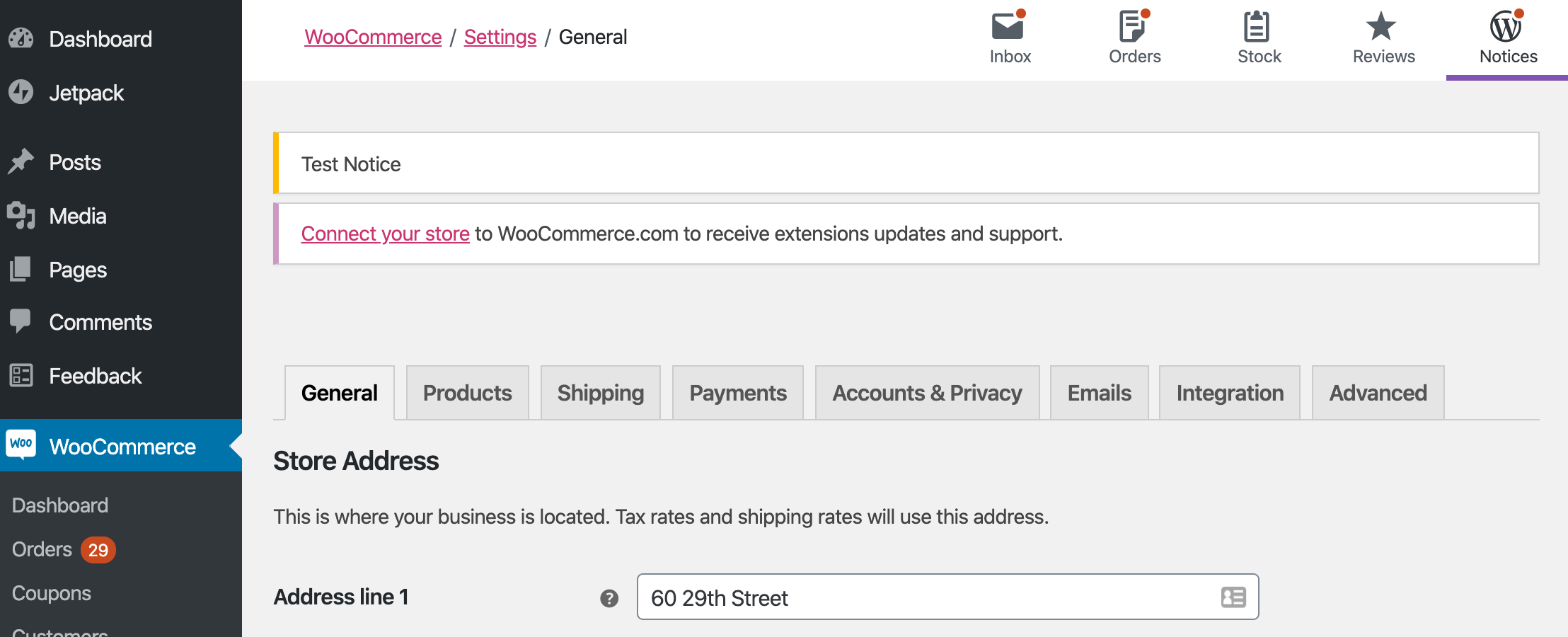
For the WooCommerce settings screen when running 1.0.0 and up the 'W' icon has been removed but the notifications are still hidden:

The notifications are present in the mark-up (just hidden with CSS).
To Reproduce
Steps to reproduce the behavior:
- Install WooCommerce Admin 0.26.1 and navigate to the WooCommerce settings screen
- Click on the 'W' icon
- See admin notifications
- Install WooCommerce Admin 1.0.0 or up and navigate to the WooCommerce settings screen
- There is no way to see the admin notifications (but you can check the page source to ensure they are being sent to the browser)
Expected behavior
Where the 'W' icon has been removed, admin notifications should be visible.
This looks like a side-effect of the change in https://github.com/woocommerce/woocommerce-admin/pull/3827, perhaps just affecting more screens than intended?
Interestingly, the order screen behaves fine. So perhaps this is an issue limited to the settings screen for some reason?
Additional context
- Browser: Chrome 80
- WC 3.9.2
- WP 5.3.2
 jrodger
All 10 comments
Screens affected seem to be Reports, Settings, Status, and Extensions.
 rrennick
on 26 Mar 2020
rrennick
on 26 Mar 2020
~Dashboard, Customers, and all screens in Analytics are also affected.~ This are not legacy pages, so they are not affected. They should hide the admin notices.
 mattsherman
on 27 Mar 2020
mattsherman
on 27 Mar 2020
@timmyc @jameskoster Should the admin notices be visible on both legacy (embedded) WooCommerce pages (Orders, Products, etc.) and woocommerce-admin pages (Dashboard, Reports, Analytics), or just legacy pages?
3827 testing instructions seems to say that they should only appear on legacy pages, but I wanted to confirm!
mattsherman
on 27 Mar 2020
@mattsherman Legacy pages.
rrennick
on 27 Mar 2020
Yes the current solution was to keep notices hidden on wc-admin pages: Analytics Dashboard, All items under Analytics Menu ( Reports + Settings ), and the Customers Report/Page.
Long term I feel we might need a solution to toggle them again ( @jameskoster ) but this route was taken based upon the pattern used in Jetpack pages.
All other Woo legacy pages impacted here: Settings, Status should show admin alerts.
 timmyc
on 27 Mar 2020
timmyc
on 27 Mar 2020
For the wc-admin screens, I'm inclined to say we should just continue to align with Jetpack, probably until the notifications feature is added to core.
 jameskoster
on 30 Mar 2020
jameskoster
on 30 Mar 2020
@jameskoster I'm not terribly familiar with how Jetpack handles admin notifications. What exactly are you proposed we do with this issue? From what I have observed in Jetpack, it hides admin notifications on some screens (Dashboard, Settings, VaultPress) and shows them on others (Site Stats, Akismet Anti-Spam).
@pmcpinto @timmyc What are your thoughts on how we should handle this?
mattsherman
on 31 Mar 2020
Hey @mattsherman, I think that the idea is to display the notifications in the following screens that are not part of the new wcadmin experience: Reports, Settings, Status, and Extensions.
All the other non-wcadmin screens already display the notifications
 pmcpinto
on 31 Mar 2020
pmcpinto
on 31 Mar 2020
Hey @mattsherman, I think that the idea is to display the notifications in the following screens that are not part of the new wcadmin experience: Reports, Settings, Status, and Extensions.
All the other non-wcadmin screens already display the notifications
Okay, that was my original understanding and how I implemented things in #4019.
mattsherman
on 31 Mar 2020
All the other non-wcadmin screens already display the notifications
@pmcpinto Some notices were also being hidden in #3964.
rrennick
on 31 Mar 2020
Related issues
 joshuatf
·
3Comments
joshuatf
·
3Comments
 jessepearson
·
4Comments
pmcpinto
·
3Comments
jessepearson
·
4Comments
pmcpinto
·
3Comments
 jeffstieler
·
3Comments
jeffstieler
·
3Comments
jeffstieler
·
3Comments
jeffstieler
·
3Comments
Most helpful comment
@mattsherman Legacy pages.