Woocommerce-admin: Remove breadcrumb in the top bar
In all our recent screen designs, we're simply displaying the screen title in the top bar. The breadcrumb has questionable usability benefits and is causing issues like this for screens that exist outside of the WooCommerce hierarchy.
The screen title should utilise the Text - Subtitle Small component.
 jameskoster
All 11 comments
@jameskoster do we still want to remove the breadcrumbs?
 timmyc
on 25 Aug 2020
timmyc
on 25 Aug 2020
Yes.
jameskoster
on 26 Aug 2020
Going to set this one aside for @Dygerati
timmyc
on 23 Sep 2020
Right now this logic also drives how the page title (as in the text displayed on the browser tab) is generated.
For example:
Breadcrumb: WooCommerce / Home
Site Title: Home < WooCommerce < JoelWoo - WooCommerce
Just wanted to confirm that we _do not_ want this behavior to change for the site title, and only for the breadcrumbs themselves @jameskoster ?
 joelclimbsthings
on 25 Sep 2020
joelclimbsthings
on 25 Sep 2020
I'll defer to @elizaan36 on that one :D
jameskoster
on 28 Sep 2020
hey @joelclimbsthings, I don't see any reason we'd need to change the behavior in the page title in the browser tab as well. Even though there's a lot more information there, it does reflect the same title.
 elizaan36
on 28 Sep 2020
elizaan36
on 28 Sep 2020
Regarding the new screen title and optional back button, do we need a separate issue for that in parallel to removing the breadcrumb? Want to make sure we don't remove the breadcrumb first with no navigation in the top bar to replace it.
Here's a quick example of the screen title/back button behavior that will replace the breadcrumb.
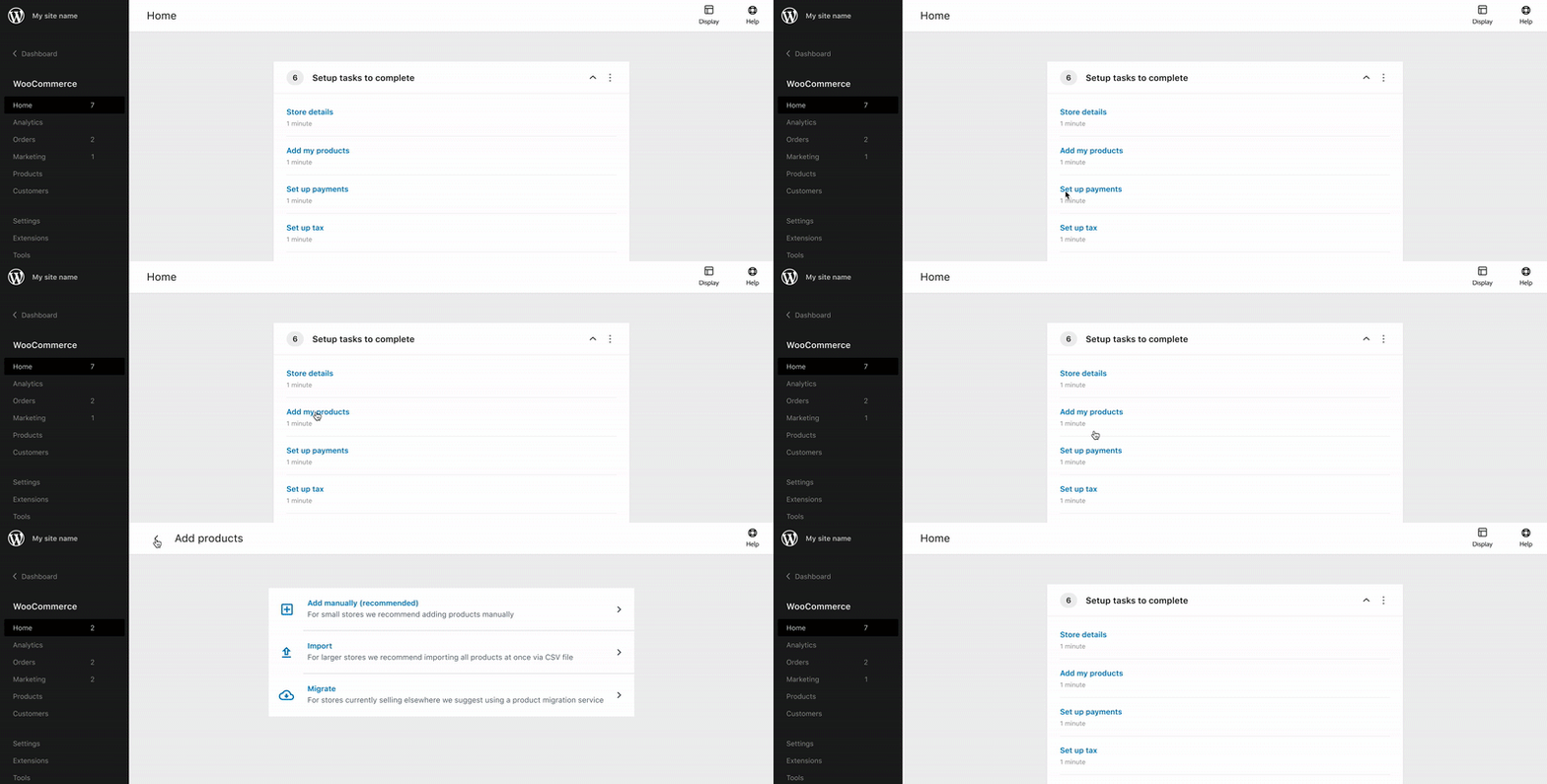
Let me know if I can provide any more deets. As Jay mentioned, the title uses the Text - Subtitle small component.
elizaan36
on 28 Sep 2020
Good question @elizaan36 , it _sounds_ like those items would make sense push through together in a single PR.
I'm trying to get a little clarity on the scope and the exact requirements here (I'm new, so sorry if any of this is obvious!)
A couple questions:
- Exact hierarchy that determines back button behavior
Basically which pages display the back button, and which page they direct to. I feel that a certain amount of this I can derive from the current breadcrumbs and side-nav structure, but there are a few uncertainties:
Tasks. The tasks you show in your example actually aren't reflected in the breadcrumbs at all right now. It's probably a safe assumption that they're intended to be included, and all redirect to the _Home_?
Analytics pages. I'm looking at the behavior for each of these pages when I click on the breadcrumbs one step back, which would be the _Analytics_ link. All of the subpages, except for _Overview_ and _Revenue_ (which link to themselves), actually link back to _Revenue_. Would the Analytics pages use this back button at all, and if so would they direct to _Revenue_ as would seem to currently via the breadcrumbs?
Tabbed pages. Right now the tabbed pages, such as _Settings_ and _Status_ have the current tab included in the breadcrumb, and clicking one step back in the breadcrumb tree simply directs to the first tab. If these are intended to include a back button at all, where would they direct?
- Just wanted to confirm that this behavior is statically defined, in that it doesn't change depending on how the user arrived at the page? For example, this would _not_ mimic the browser back-btn behavior, but instead the various subpages would simply all link back to their defined parent _even if they didn't arrive there from the parent_?
Thanks!
joelclimbsthings
on 29 Sep 2020
Great questions @joelclimbsthings - I think you are going down a good mental path there, but I _think_ the contextual back button is something we might need to tackle as part of the larger navigation project and how pages register for support there. /cc @psealock @joshuatf for your thoughts on that... but seems like we could use the page registration data in the nav project to determine what the parent level would be.
I think the issue here is kind of an interim step between the current breadcrumbs, and the new navigation. So thinking for now we could just remove the breadcrumbs, and show the Page Title ( i.e. the last item shown in the breadcrumb currently )
timmyc
on 29 Sep 2020
Yeah, great questions and thinking @joelclimbsthings
Tasks. The tasks you show in your example actually aren't reflected in the breadcrumbs at all right now. It's probably a safe assumption that they're intended to be included, and all redirect to the Home?
Yep, the Task screens need a title. It's fine that they're not reflected in the main navigation as tertiary pages, but there should be some screen title there.
@timmyc
thinking for now we could just remove the breadcrumbs, and show the Page Title ( i.e. the last item shown in the breadcrumb currently )
This makes sense for now. I can't think of any major drawbacks offhand with taking the first step of showing the page title with no back button, considering the parent level pages are available in the (new or old) nav.
Edit: I'll have a closer look at the IA diagram that Jay worked on here
...so we can identify and see the primary, secondary, and tertiary screens and make sure there aren't any edge cases where people can get stuck.
Would the Analytics pages use this back button at all, and if so would they direct to Revenue as would seem to currently via the breadcrumbs?
That's odd, the parent of Analytics secondary pages (like Orders, Coupons, etc) would be the Analytics Overview (not Revenue.)
Right now the tabbed pages, such as Settings and Status have the current tab included in the breadcrumb, and clicking one step back in the breadcrumb tree simply directs to the first tab. If these are intended to include a back button at all, where would they direct?
The tabbed pages are one step beyond the tertiary screens, so their page title should be the tertiary screen name. So for example if you're in Settings > Shipping > USPS the screen title would still be Shipping with a back button that directs to Settings.
That's my understanding at least, @jameskoster let me know if that's not the intention.☺️ It may improve usability if some of those tabbed items are pulled up one level to become tertiary screens themselves.
elizaan36
on 29 Sep 2020
The settings tabs are weird because only one (General) of many adjacent menu items are represented in the (existing) main navigation.
Due to this inconsistency my instinct is that we should not treat them as "tertiary" in respect to the principles we outlined for this ui element. Ergo, no back button on settings screens.
Probably the main reason is that it is not clear (ito the iA) where that back button would take you when clicked. For example, if I browsed: General Settings > Shipping > Tax... I'm not sure where I'd expect that back button to take me. Back to Shipping? Or back to General Settings?
jameskoster
on 30 Sep 2020
Related issues
 zhongruige
·
3Comments
zhongruige
·
3Comments
 Aljullu
·
3Comments
Aljullu
·
3Comments
 LevinMedia
·
3Comments
LevinMedia
·
3Comments
 pmcpinto
·
3Comments
pmcpinto
·
3Comments
 KZeni
·
4Comments
KZeni
·
4Comments