Woocommerce-admin: User deletion from Wordpress does not remove entry from wp_wc_customer_lookup
When removing a user from Wordpress via the users section, it seems that Woocommerce Admin does not remove entries under wp_wc_customer_lookup


 RikshaDriver
All 67 comments
Further to this, manual removal of entries from wp_wc_customer_lookup still doesn't appear to remove the Customer list under WC Admin.
RikshaDriver
on 2 Mar 2020
Hi @RikshaDriver
Thank you for reporting the issue.
I can reproduce it using your steps in 3.92 and 4.0 RC
A user deleted from the Users section is not removed from the WooCommerce Admin Customers section. They are however removed from the WooCommerce / Reports / Customer / Customer List
WooCommerce Admin is being developed in another repository: https://github.com/woocommerce/woocommerce-admin
I am going to move your bug report there so that the right team could take a look further and advise if this is a bug.
 tammullen
on 3 Mar 2020
tammullen
on 3 Mar 2020
I feel like this is working as designed, but want to pull in @LevinMedia to double check that. If I recall correctly we opted to retain the customer lookup table entry to reflect the sales activity even if the WordPress user account was deleted.
We do support deletion of data from the customers table when the GDRP tooling is used to perform a deletion of user data though.
 timmyc
on 3 Mar 2020
timmyc
on 3 Mar 2020
If I recall correctly we opted to retain the customer lookup table entry to reflect the sales activity even if the WordPress user account was deleted.
This is correct since we keep user data tied to any orders that were made with guest accounts.
However, it's possible that a user account is created and an order is not created alongside them. We'll need to decide if we want to keep orphaned user data that's not tied to orders; my gut feeling is that we should not but /cc @LevinMedia for feedback on this.
At a minimum, we should remove the customer_id from the customer lookup table since these users no longer exist.
 joshuatf
on 6 Mar 2020
joshuatf
on 6 Mar 2020
I chatted with @LevinMedia about this, and I think what you said at the end @joshuatf is exactly what we need to test to see what happens, and change if needed. The case of a user that does place an order, then the wp-user row is deleted, making sure the customer lookup table clears out the customer_id properly.
timmyc
on 11 Mar 2020
It does make sense for the admin Customer list to be a separate entity from its corresponding User profiles, for the sake of backing up the sales record, but it should at least be _possible_ to completely delete the record everywhere. Ideally, I should think there would be an option where admins/shop managers could select whether to sync the Customer list with the User profiles (and therefore delete the Customer record if the profile is deleted), anonymize the Customer data if the profile is deleted, or fully retain the Customer data if the record is deleted (though it should still be deleted or anonymized in GDPR requests). In any case, shop managers should be able to manage the Customer list to correct inaccuracies.
In my particular use case, I've run many test orders through PayPal Sandbox in an effort to debug an issue on the frontend, and now I have a whole list of fake customers in the Customers list that I'm going to have to go digging through the database to get rid of.
 shoelaced
on 1 Apr 2020
shoelaced
on 1 Apr 2020
Noting from https://github.com/woocommerce/woocommerce/issues/26054 that the Customer report includes a link to the non-existent WP user profile.
 rrennick
on 1 Apr 2020
rrennick
on 1 Apr 2020
as @shoelaced stated I am trying to create a cloned/sanitized copy of my site for some testing and all users, orders, products, images have all been deleted but there is still all these customers showing. There should be a way to remove them or to "reset" the data.
This also brings up a GDPR issue as the email is still shown for every user that had an account or was captured as a guest....so I've removed all traces of that info yet it still appears in this report? and the report is downloadable with that data. That's simply not right for GDPR removal compliance either.
 ChrisColotti
on 14 Apr 2020
ChrisColotti
on 14 Apr 2020
@ChrisColotti as I mentioned above the customers report data is included as part of the GDPR Erasure request process. So if that tool is used to process a customer's request to delete all data, the data in the customers table will be scrubbed. Here is a blog post with details on how to use that tool.
timmyc
on 14 Apr 2020
Also in this ticket
2874449-zen
2877554-zen
 mouligreenlaw
on 15 Apr 2020
mouligreenlaw
on 15 Apr 2020
Thanks saw that after but deleting/scrubbing 500+ records that’s not an option as it’s 1:1. We need a better tool to remove these from the lookup DB en mass.
ChrisColotti
on 15 Apr 2020
@ChrisColotti - in your flow for creating your scrubbed site, what methods are you using to purge/clean both the order and customer data ( thinking more on the registered side of customers here )? Just trying to see what would work for your specific use case.
timmyc
on 17 Apr 2020
One more user reporting this in 2891641-zen
Lots of test data populating their Customer reports with no option to remove them.
 madeincosmos
on 19 Apr 2020
madeincosmos
on 19 Apr 2020
Another report in 2896189-zen
 anant1811
on 20 Apr 2020
anant1811
on 20 Apr 2020
Hi
I'm facing the same problem: I made a lot of test before going live and now I have ghost WC users, there is no SQL stuff to remove them?
Thanks
EDIT: I have found a way to delete them:
In PHPMyAdmin I searched those ghosts customers by e-mail dans delete anything related to them, after deleting delete ALL my transients with https://wordpress.org/plugins/transients-manager/ and they are gone ;-)
 pako69
on 29 Apr 2020
pako69
on 29 Apr 2020
Another report 20738202-hc
anant1811
on 14 May 2020
Similar situation where I need to be able to delete the Customers. I created a development site, so there are test customers. I used All-In-One Migration to move the dev site to the production site and now I have these customers that I can't delete eventhough the users have been deleted. I realize that not allowing it to be removed is about integrate of the data but now my data is compromised by the test data. I deleted the records from wc_customers_lookup and it is still showing in the site. How can I remove it?
 killianconsulting
on 17 May 2020
killianconsulting
on 17 May 2020
@killianconsulting You can go to Analytics -> Settings -> Historical Import. From there you can delete the imported data, wait for that to complete then re-run the import.
rrennick
on 18 May 2020
Another case here 20990324-hc
 zdenys
on 21 May 2020
zdenys
on 21 May 2020
And in 21493529-hc. Clicking the customer's name generates a 500 error.
 dsmithweb
on 29 May 2020
dsmithweb
on 29 May 2020
I have the same issue. I deleted test users and all of the associated orders, but still see the test customer accounts in WooCommerce.
 ravingsoftware
on 30 May 2020
ravingsoftware
on 30 May 2020
@pmcpinto / @jameskoster Thoughts on this one? Seems like the original assumption of retaining customer data in the reporting system is not aligning well with expectations of a number of users. Perhaps we could slate an update to this logic in the next sprint to delete customer data in the reporting tables upon user delete too.
timmyc
on 3 Jun 2020
That would be awesome, thanks for considering it @timmyc @pmcpinto @jameskoster
ravingsoftware
on 3 Jun 2020
@pmcpinto / @jameskoster Thoughts on this one? Seems like the original assumption of retaining customer data in the reporting system is not aligning well with expectations of a number of users. Perhaps we could slate an update to this logic in the next sprint to delete customer data in the reporting tables upon user delete too.
I think it makes sense to move forward with that change. Ideally, we should provide the option of retaining the sales activity data or at least make it clear that removing customers can impact that data as well.
 pmcpinto
on 4 Jun 2020
pmcpinto
on 4 Jun 2020
Providing the option to sync the customers with the users would be helpful, keeping in mind the available option to allow Guest checkout. I should think the ideal default would be to sync the customer data with the user profiles, automatically if a new user profile is created with the same email address as a past Guest customer, and also give the option to Admins/Store Managers of what should happen when a user is deleted -- i.e. whether customer data should be retained, anonymized, or deleted when the user is deleted. Additionally, adding checkboxes with a bulk delete option to the Customers list for manual control in the case of test orders, etc., for example if the above setting is changed after orders have been made. Some possible way of syncing a past Guest customer with a new user profile that has a different email address would also be a nice-to-have, for example if a customer creates an account with a different email and wonders where there past order is. Perhaps simply allowing manual update of the email addresses in the Customers list would accomplish this, since past orders can already be manually connected to a certain customer.
This would be my personal ideal scenario, though obviously there may be other use cases.
shoelaced
on 4 Jun 2020
Is there a current manual method to clean up the customer data? Running different user/customer imports resulted in a 300 customer store increasing up to a 2,300 customer store erroneously.
 nickmadedesign
on 8 Jun 2020
nickmadedesign
on 8 Jun 2020
Looking also for a solution to clean this up. Cannot find any SQL query or manual action to correct this. All users already have been deleted but it still shows sensitive data including e-mail address and zip code.
Update: I simply delete all data from the table wp_wc_customer_lookup.
 sanderkie
on 16 Jun 2020
sanderkie
on 16 Jun 2020
I had the same problem. I first deleted the orders and then emptied the trash. Then I deleted the corresponding users from the database table "wp_wc_customer_lookup". However, they were still displayed to me.
If you delete orders but do not empty the recycle bin and then delete the users in the database table "wp_wc_customer_lookup", they will no longer be displayed. So create a new order and carry out the steps as described and all deleted users will no longer be shown closely.
 dirkner
on 17 Jun 2020
dirkner
on 17 Jun 2020
Another report here: 22088427-hc
 ktyfuller604
on 22 Jun 2020
ktyfuller604
on 22 Jun 2020
Another report here: 22139840-hc
 danieldanilov
on 24 Jun 2020
danieldanilov
on 24 Jun 2020
Another report: 22060251-hc
 hacchism
on 4 Jul 2020
hacchism
on 4 Jul 2020
AFAIK, the way this was handled originally was to allow for the deletion of any customer. The details were stored at the order level - allowing you to keep the details about the customer address/contact details, but the order would revert to being a “guest” order.
So it seems the best option here is to maintain the pre-existing workflow here and allow for the deletion of users and ensure that the entry is also removed from the customer list, while retaining the details at the order level.
To confirm: will that address the issues raised here?
 garymurray
on 14 Jul 2020
garymurray
on 14 Jul 2020
@garymurray Not quite the way I'd been thinking of it - the issue is that currently, customers are not removed from the Customers list under any circumstances and with no way to manually delete them, when the expected behavior would be that they'd be automatically removed when there are no other references to them (i.e. A user account or an order).
The customer details should still be stored at the order level, and if a user account is deleted then yes, any associated orders should retain the customer info and revert to 'guest' orders, but as long as either a user account or an order exists, the customer should still remain in the Customers list. But if the user account, all associated orders, and all guest orders with the same billing email are all deleted, then the entry should be deleted from the Customers list as well.
From a store management perspective, the Users list contains all users, the Orders list contains all orders and customer info, and the Customers list should aggregate both. In other words, the Customers list should consist of all users with the "Customer" role AND all customer data from all orders, merged by email address where possible. The Customers list, therefore, shouldn't even have its own table in the DB except perhaps for caching purposes - it should only aggregate data from the Users and Orders.
Also noting that the reverse should be true as well - i.e., If a guest order exists and a user account is later created using the same email as the order's billing email, then the order should be automatically associated with the user account. The use case for this would be when past orders are migrated from a different system and past customers may need/want to create a new account on the new site in order to see their past orders. I've just done a project like this and at the moment we have to wait for customers to create a new account and then email about why they can't see their past orders, and then we go manually associate the past orders with their new user account.
Hope this helps clarify it.
shoelaced
on 14 Jul 2020
Following as I need to create a clone of a store for a different country, but with no order or customer data.
 simonclay
on 21 Jul 2020
simonclay
on 21 Jul 2020
Wow, this is a bummer! I really have to scan the database for manually deleting customers? Seriously? Please fix that. Give us a delete feature in the customers table.
 MKJJJ
on 30 Jul 2020
MKJJJ
on 30 Jul 2020
This sucks.. please fix
 smitherines
on 30 Jul 2020
smitherines
on 30 Jul 2020
And please keep in mind that Woocommerce customers and WordPress customers are not the same. If you let guests place orders, they will never appear in the WP users list but only in the WOO customers list. I simply don't understand why we can't just delete customers in the WOO customers list. While this list can be a useful feature, it should be better implemented as a plugin. The same is true for the new WOO dashboard. It is NOT a good idea to make these powerful but memory intensive applications part of the core.
MKJJJ
on 30 Jul 2020
it has been months, why is this issue still not resolved?
just allow us to delete all customers data
many of us do want an option to delete for security reasons or due to testing.
 BigBox2020
on 1 Aug 2020
BigBox2020
on 1 Aug 2020
Come on WooCommerce, fix that Privacy Policy Concern issue! You should already know that in Europe GDPR is applied. I am one step away from switching to Magento and Prestashop. Come on! Come on!
 pickmeok
on 2 Aug 2020
pickmeok
on 2 Aug 2020
The best solution for this issue would be the _personal data from table WooCommerce > Customer to get deleted_ when WP’s Delete Personal Data feature is carried out and not an _independent/manual deletion_. Please take this into account!
pickmeok
on 3 Aug 2020
FYI, the solution for me was to completely delete WooCommerce Admin.
what do u mean?
BigBox2020
on 3 Aug 2020
The best solution for this issue would be the _personal data from table WooCommerce > Customer to get deleted_ when WP’s Delete Personal Data feature is carried out and not an _independent/manual deletion_. Please take this into account!
yep. agree. what is the point of the tool if it does not delete any data
BigBox2020
on 3 Aug 2020
FYI, the solution for me was to completely delete WooCommerce Admin.
FYI, the solution for me was to completely delete WooCommerce Admin.
what do u mean?
I have not installed WooCommerce Admin plugin, only WooCommerce plugin, and that table is still present with all personal data visible from deleted accounts' data and anonymized orders' data (after WP's delete personal data feature and account deletion are carried out).
pickmeok
on 3 Aug 2020
The plugin is now part of the WOO core. So, not a solution, I guess.
MKJJJ
on 3 Aug 2020
Hello all - we are looking at possibly hooking into the delete user action to remove data from the customers lookup table in our next sprint cycle.
Until then I want to re-iterate what Ron posted above that there is currently a button in the UI which allows for you to delete all Analytics data, including the Customers Report.
You can go to Analytics -> Settings -> Historical Import. From there you can delete the imported data
It is mentioned in the support document here too
Please Note that this deletes all analytics data. You can re-import data again if you please, but I feel this is a work-around for people who reported in this thread of wanting to clear out all test data on a site before handing over to a client, or when cloning a site or something like that.
@BigBox2020 as for the GDPR side of things - as I mentioned before - the customer's report in WooCommerce fully supports the tooling built into WordPress core around User Data Deletion Requests. So if a GDPR request to delete personal data is processed through the core WP flows, customer data is deleted from WooCommerce reports. Here is a link to the original PR that added this support for personal data erasure
timmyc
on 4 Aug 2020
@rrennick and @timmyc hello,
Will the latest version of Woocommerce include support to delete personal data from Woocommerce Reports when WP's delete personal data request is processed?
I can see that both files CustomersScheduler.php and SchedulerTraits.php are already inside Woocommerce directory.
Do I have to replace them with this and this respectively in order for personal data in WooCommerce Reports to get deleted when WP's delete personal data requests are processed?
Thank you
pickmeok
on 5 Aug 2020
Hello all - we are looking at possibly hooking into the delete user action to remove data from the customers lookup table in our next sprint cycle.
Until then I want to re-iterate what Ron posted above that there is currently a button in the UI which allows for you to delete all Analytics data, including the Customers Report.
You can go to Analytics -> Settings -> Historical Import. From there you can delete the imported data
It is mentioned in the support document here too
Please Note that this deletes all analytics data. You can re-import data again if you please, but I feel this is a work-around for people who reported in this thread of wanting to clear out all test data on a site before handing over to a client, or when cloning a site or something like that.
@BigBox2020 as for the GDPR side of things - as I mentioned before - the customer's report in WooCommerce fully supports the tooling built into WordPress core around User Data Deletion Requests. So if a GDPR request to delete personal data is processed through the core WP flows, customer data is deleted from WooCommerce reports. Here is a link to the original PR that added this support for personal data erasure
i would like to point out, I use guest orders instead, so there is no user to delete from the users list
this issue exists from guest orders as well, Please clarify this will be fixed aswell
BigBox2020
on 5 Aug 2020
@pickmeok the feature already supports personal data erasure, but if you are seeing behavior otherwise, please do open up a new bug report on the repository here for us to investigate further.
@BigBox2020
i would like to point out, I use guest orders instead, so there is no user to delete from the users list. this issue exists from guest orders as well, Please clarify this will be fixed aswell
So the original intent of this issue is the case of a user ( registered Woo user ) being deleted from the Users system in wp-admin should result in removal of the entry in the customer analytics table.
What is your expectation for guest users? The one flow I could think of is when deleting the original order that a guest user is attached to, that should then delete the entry in the customer analytics table? Also really interested to hear if this is something you are encountering when building sites, or just a preference on a production site.
timmyc
on 5 Aug 2020
@pickmeok the feature already supports personal data erasure, but if you are seeing behavior otherwise, please do open up a new bug report on the repository here for us to investigate further.
@timmyc could you please clarify: Processed WP's Delete Personal Data automatically delete WooCoomerce's Customer Analytics Table now on WooCommerce 4.3.1 ? We Don't have to replace the pr / code provided by @rrennick ?
Regarding Personal Data, please let me clarify how they are stored using WooCommerce:
1) Registered Users having ordered products: His Acount and his Orders contain his Personal Data.
2) Guests/Visitors having ordered products: His Orders only contain his Personal Data.
Regarding Personal Data, please let me clarify when they are Deleted:
1) Registered Users having ordered products:
a) When an Account is deleted, Personal Data from Account are deleted but not from his Orders.
b) When WP's Delete Personal Data Request is processed, Personal Data in Account are deleted and in Orders are anonymized (ok for gdpr). However, Acount remains active with the email address he registered < Email is deleted with Account deletion.
2) Guests/Visitors without account having ordered products: Orders contain personal data. WP's Delete Personal Data Request can be processed though to delete Guest's Personal Data.
In my opinion Woocommerce Analytics should function in this manner:
1) When an account is deleted (personal data in Orders are not deleted), WooCommerce Analytics should follow the retention periods from : Woocommerce > Settings > Accounts & Privacy Tab > Personal data retention.
2) When a Delete Personal Data request from a registered user or a Guest is processed, WooCommerce Analytics should delete all personal data of all Orders of these Customers.
3) For Guests, having personal data only in Orders they have made, WooCommerce Analytics should follow the retention periods from : Woocommerce > Settings > Accounts & Privacy Tab > Personal data retention.
pickmeok
on 5 Aug 2020
@pickmeok the feature already supports personal data erasure, but if you are seeing behavior otherwise, please do open up a new bug report on the repository here for us to investigate further.
@BigBox2020
i would like to point out, I use guest orders instead, so there is no user to delete from the users list. this issue exists from guest orders as well, Please clarify this will be fixed aswell
So the original intent of this issue is the case of a user ( registered Woo user ) being deleted from the Users system in wp-admin should result in removal of the entry in the customer analytics table.
What is your expectation for guest users? The one flow I could think of is when deleting the original order that a guest user is attached to, that should then delete the entry in the customer analytics table?
yes, that would make perfect sense. orders that have been deleted should be removed from the system completely (customer analytics table)
BigBox2020
on 6 Aug 2020
@pickmeok
could you please clarify: Processed WP's Delete Personal Data automatically delete WooCoomerce's Customer Analytics Table now on WooCommerce 4.3.1 ? We Don't have to replace the pr / code provided
Correct, WooCommerce Analytics supports WP's Delete Personal Data flow automatically - I just linked to the pull request where that was implemented for your reference. That code has been in WooCommerce Admin and WooCommerce core so as long as you are running a current version you should be all good there.
The logic implemented in that PR covers both registered and unregistered users specifically around data in the Customers Lookup Table which powers the Customers report.
When a Delete Personal Data request from a registered user or a Guest is processed, WooCommerce Analytics should delete all personal data of all Orders of these Customers.
This is already in place as I noted in this comment above.
For Guests, having personal data only in Orders they have made, WooCommerce Analytics should follow the retention periods from : Woocommerce > Settings > Accounts & Privacy Tab > Personal data retention.
When an account is deleted (personal data in Orders are not deleted), WooCommerce Analytics should follow the retention periods from : Woocommerce > Settings > Accounts & Privacy Tab > Personal data retention.
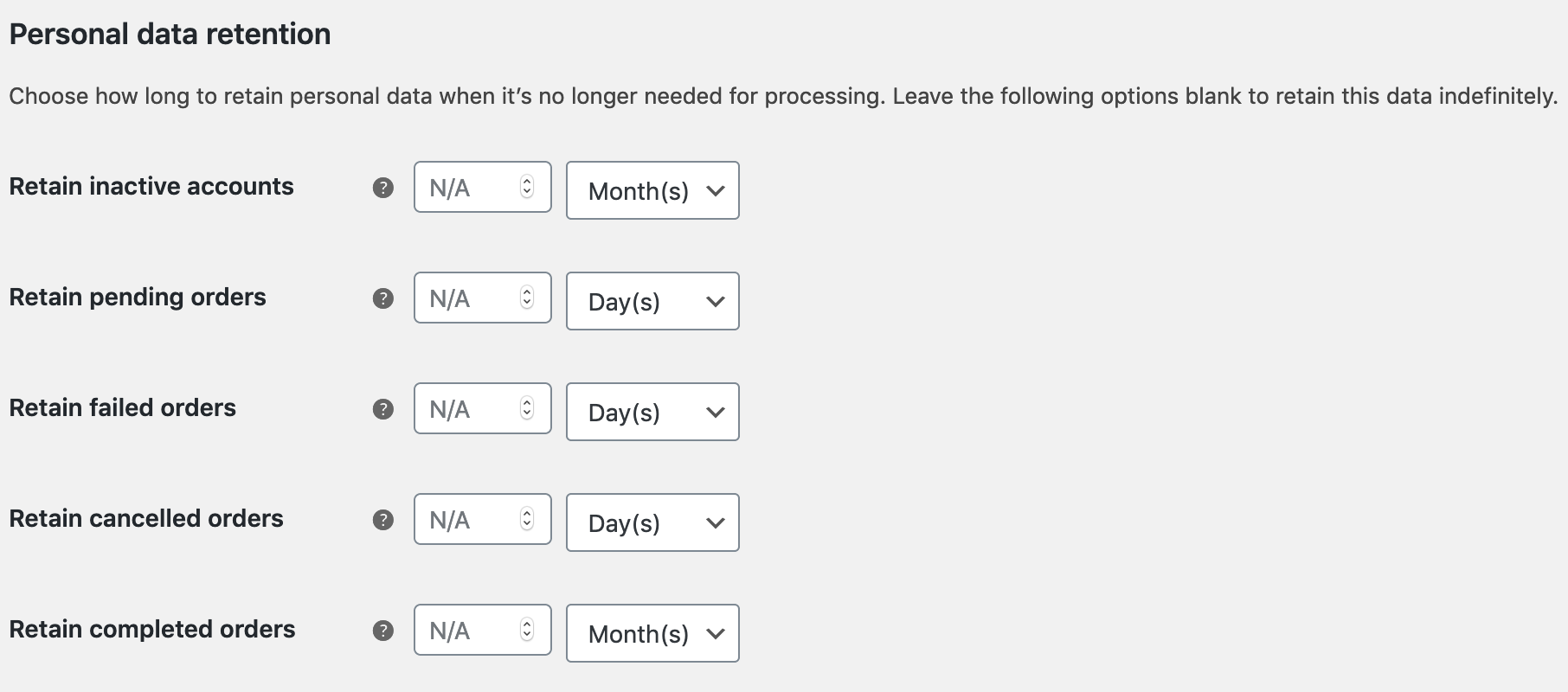
The one setting here that would impact Analytics is the final one of "Retaining Completed Orders". And I concur this seems like the correct thing to do, and aligns with @BigBox2020 's request of having any related data to a guest checkout in the customers report deleted when the original order is deleted.
Since that is a bit different then what this issue was originally created to discuss, I've opened a new issue #4946 to track and discuss further.
timmyc
on 6 Aug 2020
FOUND A SOLUTION
I don't know if woocommerce developpers would recommend it as a proper solution; but YES IT WORKS.
Steps
- deleted the wp new created or unwanted users
- deleted data in wp_wc_customer_lookup table in PHPMyAdmin
- cleared the transient in woocommerce>status>tools
- Download this plugin --> https://wordpress.org/plugins/transients-manager/
- Go to Wp-admin > Tools > Transients
- Click straight on DELETE ALL TRANSIENTS option at the top.
Thats it. All delete users should be gone
Below is an alternative solution for those who don't want to use the plugin
- deleted the wp new created users
- deleted wp_wc_customer_lookup in PHPMyAdmin
- cleared the transient in woocommerce>status>tools
- flushed my cache
source --> https://wordpress.org/support/topic/delete-customers/page/2/
The first solution worked for me.
 ezybusy
on 13 Aug 2020
ezybusy
on 13 Aug 2020
That worked for me, thanks.
Bit crazy you have to do it via the database though.
 itsgrahamfoster
on 2 Oct 2020
itsgrahamfoster
on 2 Oct 2020
Another case in 16446791-hc where I shared the workaround from above.
zdenys
on 15 Oct 2020
Another case in 25203776-hc where I shared the workaround from above.
zdenys
on 27 Oct 2020
I just have one serious question, which probably haven't been asked efore:
How this (option to delete customers data missing!) complies EU and worldwide law regulations?! Normally I'm - as the e-store owner/admin - obligated by law under freakin huuuuge fee to delete any custmer info anytime by the customer request. I can delete some data using "Order" tabs but if there are customers who didn't buy anything, I simply can do nothing with their accounts and personal details.
Yes, processing the Customer requests works fine. But still the Customer account is present in the "Customers" tab?!
Deleting the accounts manually by digging in the DB is completely ridiculous for me even if I know that kind of stuffs.
I'm seriously looking forward to get that option for example in the "Customers" tab.
 cdarmosz
on 8 Nov 2020
cdarmosz
on 8 Nov 2020
..and another thing is that even if everything is removed using 'ezybusy' method there is still some data stored. Customer can still log in to the deleted account. Then it will appear again in th WP users list!
How the hell is that possible and how can it be that it can not be simple deleted. We have 21st century and we are about to colonize the space and we can not provide simple IT tools for normal people?!. It's general, nor only about WP or WooCommerce.
cdarmosz
on 8 Nov 2020
"deleted data in wp_wc_customer_lookup table in PHPMyAdmin"
is that performed by a TRUNCATE of the table?
 B8europe
on 9 Nov 2020
B8europe
on 9 Nov 2020
"is that performed by a TRUNCATE of the table?"
Yes. I have just checked/executed it again:
- WP user deleted
- Customer tab is empty
- no Orders
But I still can log in to "my account" on the shop site
Before, while my mail was still used in the "Customer" tab I have add myself as an WP user with admin rights. However I have deleted everything related with my account.
Interesting thing is that if I perform "Tools" -> "delete personal data" and send request to remove personal data to my mail + will execute personal data delete - I receive following message (free translation so originally in EN might be a bit different):
"User personal data have been found but not deleted. Rights to download have been kept."
I have no idea what kind of rights are these and how can I remove them.
Additionally I should mention I use multisite for this project. But user is removed from each site.
Btw.: user data (name) which appears in the shop after I log in is the one I have set as WP admin user. So looks like it somehow somewhere remembers WP users (I guess it is related with these download rights or something).
And all the mess is becaouse being shop customer (but no WP user in the project yet) I have added these account as WP admin. Then I couldn't in fact operate all tools as an admin, I had still limited rights. I think it somehow confuses customer and WP admin user even if it shouldn't.
Basically I want to get completely rid off my mail and all details as a customer and use it only for WP admin user purpose.
Thanks a lot for your quick response.
Regards
cdarmosz
on 10 Nov 2020
Since this closed issue is still getting a few notes, I wanted to test out the original bug report and confirm that it is indeed fixed in the latest Woo.
I tested the following flow in WooCommerce 4.7:
- Created an order, and selected to create an account during checkout
- Verified that a customer account was created under the Users section of WordPress
- Verified that the customer record was shown in WooCommerce Customers
- Next I _deleted_ the user account for this customer under the Users section of wp-admin
- I then went to the WooCommerce > Customers listing, and verified the user account I just deleted was no longer shown
As such, the original bug reported on this issue has been fixed, so there shouldn't be any need to use any of the work-arounds in this thread if you are running 4.6 or greater of WooCommerce.
@cdarmosz sounds like you might have a different use case here. If you feel you have encountered a new bug, please open a new issue here on Github:
Additionally I should mention I use multisite for this project. But user is removed from each site.
There could indeed be something specific to multisite that might be a distinct issue, so again please do open a new issue if you feel there may be a bug specific to multisite - I did not test this out myself.
timmyc
on 11 Nov 2020
Hi there
To be sure I have tested again following flow but now in WooCommerce 4.7 too (before WooCommerce 4.6:
- Created an order using completely new user details not related with any other account and created an user account
- Verified that customer account was created under the User section of WP and shown under WooCommerce Customers
- Verrified that Order is shown under Orders in WooCommerce
- Same as you - I have then deleted user account of this customer under User of WP
User recors still shown in WooCommerce Customers - Then I have deleted Personal Data under WooCommerce Order section. It was possible although Order has not been completet
- I have removed order completely (also from the trash)
Then user details under WooCommerce Customer have been marked as "deleted" - user record (row) itself still there. This is the big difference comparing to version 4.6 (where details remains too) - Then I tried to log in using deleted user Login (and mail too) and Password and it was possible
After that WP User appears again in wp-admin - AgainI have deleted WP User and additionally I have tried to remove personal data of that user in Tools -> Remove personal data (with reguest sending to user mail). All data have been removed except - again - download rights! Although I have never gave any additional rights to the user. But still it was possible to log in to the deleted user account. And user appears again in WP Users section of wp-admin (?)
So or there is something wrong (download rights?) or multisite does some mess indead. Btw. I have WooCommerce activated only on one site in the project.
Additional concern is that if there will be any user who has never ordered anything - it will not be possible to delete his/her details even form Customer of WooCommerce section (since I could do it only via WooCommerce Orders tabs).
P.S.: Have you tried to log in to the deleted user account on the shop online? It appears in WP Users again doesn't matter what. Even after TRUNCATE operation.
With all the respect - I don't see a point to open any another task, doesn't matter if it is for multisite project or not. People still use work around method - so it means something might still be wrong in both - multisite or classic. Beside I don't know if it make sense to produce separate task for multisite projects.
And thanks a lot again for quick response. I appreciate your proffessionalism and time.
Cezary
cdarmosz
on 11 Nov 2020
Sorry for making another post but I forgot to mention one thing: I really don't understand why there caouldn't be an option in the Customers of WooCommerce to delete completely Custmer record, right after WP User will be deleted. But I understand there might be some reasons.
Thank You again
Cezary
cdarmosz
on 11 Nov 2020
@cdarmosz looks like you did a few different things in your flow, like deleting the customer data from the Order object itself - which would _not_ trigger an update to the original WooCommerce > Customers record. But you stated that you did delete the customer record from the WordPress Users tool, which is what should trigger the removal from the WooCommerce > Customers section.
I really don't understand why there caouldn't be an option in the Customers of WooCommerce to delete completely Custmer record, right after WP User will be deleted.
This is actually what was done in #4977 to fix this original issue. The implementation there was to hook into the delete_user action from WordPress core, and schedule a job to remove the data from WooCommerce Customers. So one possibility for you to look into is to see if the ActionScheduler Job that got queued for your site after you deleted the WP User got processed or not. The job history can be viewed at wp-admin/admin.php?page=wc-status&tab=action-scheduler - here is what the job looked like from my test I detailed above:

timmyc
on 11 Nov 2020
I just did all the tests one more time (according your flow without touching Orders).
- User created and shown in WP Users and WooCommerce Customers
- WP User deleted
- WooComerce Customer still shown in the Customers lists. I don't have any Action in the ActionSheduler related with user/customer deleting.
But I do have Action: wc-admin_import_customers - probably anytime when I log in to Customer account (of the WP User previously deleted)
Additionally I have checked again - only if I delete Order then somehow Customer details are also deleted (if WP User has been deleted before too)
So missing action in the sheduler might be the issie. I guess it means action has not been triggerred
cdarmosz
on 11 Nov 2020
So or there is something wrong (download rights?) or multisite does some mess indead.
In WordPress multisite, a site administrator does not have permissions to delete a user from the network. They can only remove the user from the site/subsite they are administering. Only super admins can remove user accounts which they do via Network Admin.
rrennick
on 18 Nov 2020
I'm currently struggeling with removing the customer data. Or rather making it invisible for external tech support user with "admin rights". Yeah, I know admin can usually do everything – I'm talking of taking away certain rights using the user rights editor. Unfortunateky this doesn't seem to work as woocommerce only comes with 2 user rights "areas" to work with.
To solve the problem in the end, I not only truncated wp_wc_customer_lookup, but also wp_wc_order_product_lookup.
 didymos
on 30 Nov 2020
didymos
on 30 Nov 2020
Bug report for multisite: https://github.com/woocommerce/woocommerce-admin/issues/5914
 aheckler
on 18 Dec 2020
aheckler
on 18 Dec 2020
Related issues
 mujuonly
·
3Comments
mujuonly
·
3Comments
 peterfabian
·
3Comments
peterfabian
·
3Comments
 JoshuaGoode
·
3Comments
timmyc
·
4Comments
JoshuaGoode
·
3Comments
timmyc
·
4Comments
 jeffstieler
·
3Comments
jeffstieler
·
3Comments
Most helpful comment
FOUND A SOLUTION
I don't know if woocommerce developpers would recommend it as a proper solution; but YES IT WORKS.
Steps
Thats it. All delete users should be gone
Below is an alternative solution for those who don't want to use the plugin
source --> https://wordpress.org/support/topic/delete-customers/page/2/
The first solution worked for me.