Woocommerce-admin: Endless requests breaking sites
This is a copy of an issue logged in WooCommerce, https://github.com/woocommerce/woocommerce/issues/23868.
While adding products in after the update, I started having issues with my server maxing out the entry processes. I went to the logs to see what was happening. I discovered that there were some endpoints that were being repeatedly hit thousands of times until the server resources were expended. Here are the urls that were called over and over and over.
GET /wp-json/wc/v4/admin/notes?page=1&per_page=25&status=unactioned&type=error%2Cupdate&_locale=user
GET /wp-json/wp/v2/users/me?context=edit&_locale=user
GET /wp-json/wc/v4/admin/notes?order=desc&orderby=date&page=1&per_page=1&type=info%2Cwarning&_locale=user
GET /wp-json/wc/v4/products?low_in_stock=true&page=1&per_page=1&status=publish&_locale=user
GET /wp-json/wc/v4/reports/orders?page=1&per_page=0&status_is%5B0%5D=processing&status_is%5B1%5D=on-hold&_locale=user
GET /wp-json/wc/v4/admin/notes?page=1&per_page=25&status=unactioned&type=error%2Cupdate&_locale=user HTTP/1.1" 200 1064
cc @BodyStatements
 psealock
All 8 comments
Note the additional comment suggesting this was related to having PHP 5.6 & updating to 7.X fixed it.
 rrennick
on 6 Jun 2019
rrennick
on 6 Jun 2019
I did note that and I added that information to Wordpress.org too. However,
that did not fix the issue for me. I downgraded to the prior version of
Woocommerce and that "fixed it". That wasn't really a "fix", so let me
change that and say that I got my account up and running again by
downgrading.
On Wed, Jun 5, 2019 at 9:08 PM Ron Rennick notifications@github.com wrote:
Note the additional comment suggesting this was related to having PHP 5.6
& updating to 7.X fixed it.—
You are receiving this because you were mentioned.
Reply to this email directly, view it on GitHub
https://github.com/woocommerce/woocommerce-admin/issues/2365?email_source=notifications&email_token=AL4BLG4ROJUYP4PPRP4POUDPZBPQHA5CNFSM4HT6SZK2YY3PNVWWK3TUL52HS4DFVREXG43VMVBW63LNMVXHJKTDN5WW2ZLOORPWSZGODXBOC4I#issuecomment-499310961,
or mute the thread
https://github.com/notifications/unsubscribe-auth/AL4BLG56REBFUPM6XSJACKLPZBPQHANCNFSM4HT6SZKQ
.
 BodyStatements
on 6 Jun 2019
BodyStatements
on 6 Jun 2019
I have been attempting to recreate this issue locally - so specifically seeing if I can recreate a problem where on legacy Woo pages ( i.e. Orders, Products, Product Edit ). The pattern of the API requests shown in the OP here align with the requests generated from the Activity Panels. Here is a screen grab of my network tab when loading a product listing page:

Doing standard operations like editing products I could not recreate the flood of requests noted by a few users in the forums. So I decided to make some of the endpoints fail on purpose using die() in WC_Admin_REST_Admin_Notes_Controller::get_items() to possibly simulate a server that might be overloaded due to historical data import jobs overloading a DB/server's resources, and subsequently having the API return 500s.
So with this simulated REST API crashing in place, fresh-data continues to retry the requests every 2 seconds, which results in:
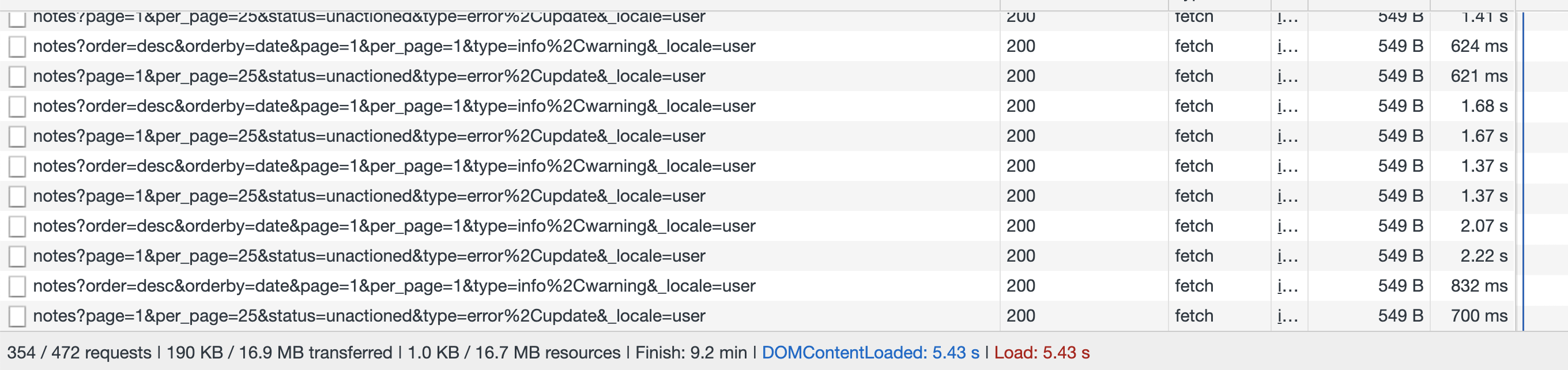
... and the fans on my laptop going crazy.
So if this is indeed what is happening - all REST API requests failing on a legacy page for whatever reason, the above scenario will be x4, which would be quite a few requests being issued to an already languishing server.
Additionally it appears that our implementation to reduce the freshness interval ( #1549 ) is not being respected anymore, as the retries are happening every 2 seconds. And @jeffstieler's fix to not dispatch REST API requests via fresh-data when a window is not active in the browser is not preventing the requests from firing ( #1732 ).
So if a site's REST API server is down, and a tab is even running in the background, things could very likely escalate to what is being reported here.
I propose we do the following - likely spawning off some new issues for each:
- Add logic to fresh-data to chill a bit on the retry logic. If a request fails 2x in a row with a 500 error, should we really keep retrying? /cc @coderkevin
- Investigate why the freshness interval set in our store is not being used
- Harden the logic to not do fresh-data requests if the browser/window tab is inactive
 timmyc
on 6 Jun 2019
timmyc
on 6 Jun 2019
Hmm, this is pretty strange behavior. I'll set up a test environment to check this out too.
 coderkevin
on 7 Jun 2019
coderkevin
on 7 Jun 2019
Another report: 2092809-zen
 zwiesman31
on 7 Jun 2019
zwiesman31
on 7 Jun 2019
I've been trying this out locally on a vvv build and I've not been able to make this happen. If I insert a die(); line in a get_items() function of an API controller, I get HTTP 200 responses every 20 seconds, and if I insert gibberish to make the PHP parse fail, I get HTTP 500 responses every 20 seconds.
20 seconds is interesting, since it's not what's being set, from what I can tell, but it is the default for fresh-data. Not sure where the timeout requirement isn't being set to make it go to default.
But anyway, is there some other trigger I can try to make this happen?
BTW, this is on current master for both woocommerce-admin and woocommerce
Update: I've even tried the following to simulate a 403 situation and still it only goes every 20 seconds.
        http_response_code(403);
        die();
I managed to make this happen by switching tabs after the timeout starts occurring. This results in a rapid requesting of the timed out resource. I've created a fix in #2387
coderkevin
on 11 Jun 2019
@BodyStatements to which version did you revert?
 jeroensijbom
on 12 Jun 2019
jeroensijbom
on 12 Jun 2019
Related issues
 pmcpinto
·
3Comments
pmcpinto
·
3Comments
 LevinMedia
·
3Comments
LevinMedia
·
3Comments
 zhongruige
·
3Comments
zhongruige
·
3Comments
 JoshuaGoode
·
3Comments
JoshuaGoode
·
3Comments
 jeffstieler
·
3Comments
jeffstieler
·
3Comments
Most helpful comment
I have been attempting to recreate this issue locally - so specifically seeing if I can recreate a problem where on legacy Woo pages ( i.e. Orders, Products, Product Edit ). The pattern of the API requests shown in the OP here align with the requests generated from the Activity Panels. Here is a screen grab of my network tab when loading a product listing page:
Doing standard operations like editing products I could not recreate the flood of requests noted by a few users in the forums. So I decided to make some of the endpoints fail on purpose using
die()inWC_Admin_REST_Admin_Notes_Controller::get_items()to possibly simulate a server that might be overloaded due to historical data import jobs overloading a DB/server's resources, and subsequently having the API return 500s.So with this simulated REST API crashing in place, fresh-data continues to retry the requests every 2 seconds, which results in:
... and the fans on my laptop going crazy.
So if this is indeed what is happening - all REST API requests failing on a legacy page for whatever reason, the above scenario will be x4, which would be quite a few requests being issued to an already languishing server.
Additionally it appears that our implementation to reduce the freshness interval ( #1549 ) is not being respected anymore, as the retries are happening every 2 seconds. And @jeffstieler's fix to not dispatch REST API requests via fresh-data when a window is not active in the browser is not preventing the requests from firing ( #1732 ).
So if a site's REST API server is down, and a tab is even running in the background, things could very likely escalate to what is being reported here.
I propose we do the following - likely spawning off some new issues for each: