Woocommerce-admin: Category Segments: Child categories included in totals, but not segments
This is a copy/paste from https://github.com/woocommerce/woocommerce-admin/pull/1911#issuecomment-476373476.
If I compare a parent category (this happens with some, but not all), I can see the numbers don't add up:
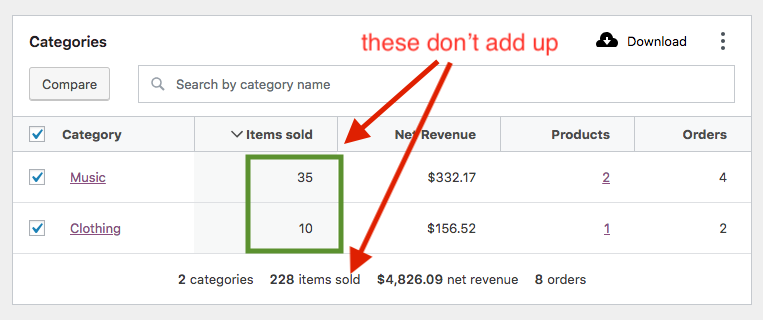
When, I click through on Music category to bring up the Single Category view, I can see the 35 items sold number reflected correctly
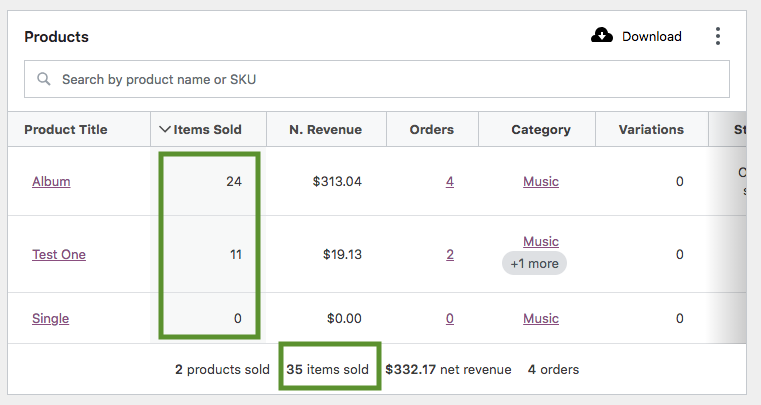
But if I click through on "Clothing" to inspect it in Single Category view, I can now see where the original 228 figure comes from , 193 (clothing) + 35 (music) = 228.

This leads me to believe either:
1) The chart and table values are undercounting in the original "Compare" screen and the totals are correct.
2) The totals are over counting and the chart and table values are correct.
3) There is a way we calculate products relating to categories and parent categories that is off/wierd. When comparing a parent category and its child, its possible to that a child category has more sales because we don't automatically tag a child category with its parent.
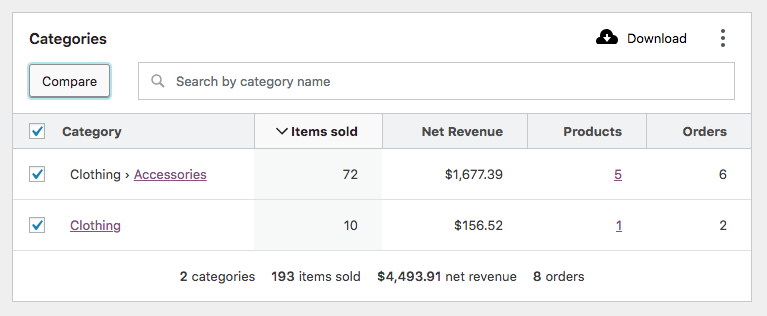
In fact, if we drill down to view each separately, items that are found in Clothing › Accessories are also found in Clothing. And those sales are reflected in the totals, but not in the table/chart found in the Compare view. This leads me to believe 1) above is the likely scenario.
I see from @Aljullu's screenshots that he has the same issue, but @LevinMedia was not able to reproduce this issue (at least with "Clothing"). @Aljullu are you seeing something similar when drilling down into Single Category view?
Continuing, it seems like totals use get_products_by_cat_ids to grab all the products to look for to gather data pertaining to a category, which counts all child categories as well. But segments use another mechanism which does not.
 psealock
All 14 comments
cc @joshuatf
psealock
on 26 Mar 2019
@Aljullu are you seeing something similar when drilling down into Single Category view?
Thanks for writing this down @psealock, I see exactly the same you pointed out:
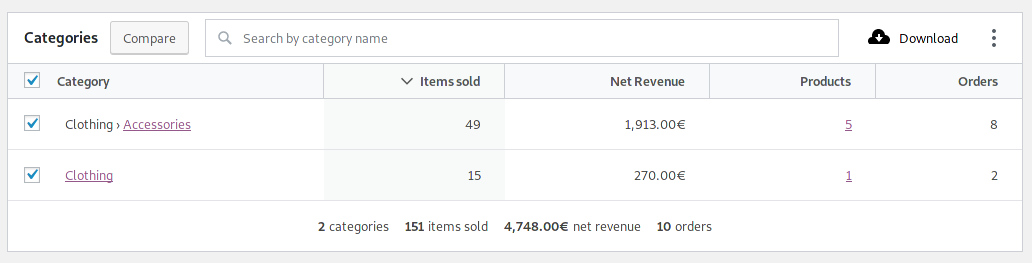
I have this Categories structure:
- ...
- Clothing (15 products -- notice only 1 is a direct child)
- Accessories (5 products)
- Hoodies (4 products)
- Tshirts (5 products)
- ...
The discrepancy comes from the fact that _Clothing_ only includes its direct child (1 product) in the table values but it includes all descendants (15 products) when the totals are calculated.
In case it helps, this is a screenshot comparing all clothing categories:
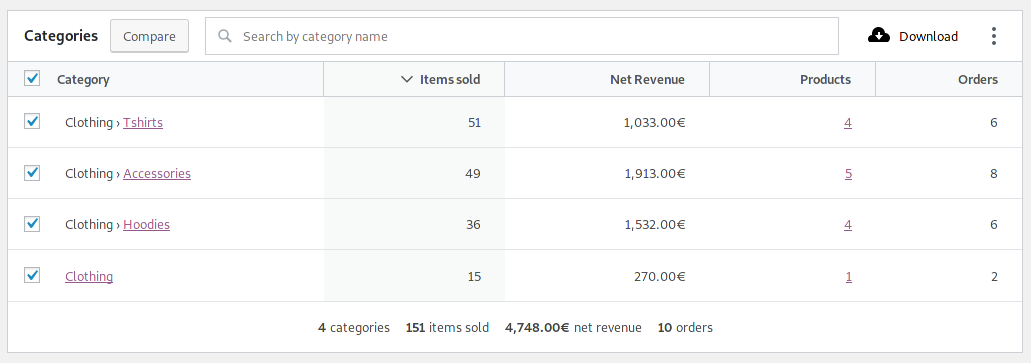
The chart and table values are undercounting in the original "Compare" screen and the totals are correct.
The totals are over counting and the chart and table values are correct.
That depends on whether we want categories to include all its descendants (then, 1 is correct) or only its direct children (then, 2 is correct).
 Aljullu
on 26 Mar 2019
Aljullu
on 26 Mar 2019
cc: @josemarques
 LevinMedia
on 26 Mar 2019
LevinMedia
on 26 Mar 2019
Thanks for these awesome outlines @psealock and @Aljullu!
I'm fairly certain we'd want to include all descendants. As a basic example of this, consider I'm a store owner and I have a category Clothing and subcategory of Hoodies. If I sell 2 hoodies, it would be incorrect to say that I had not sold any items of clothing.
IMO, store owners want to be able and view parent/child category relationships data in this way. But please confirm that your thinking aligns with this @LevinMedia @josemarques.
 joshuatf
on 29 Mar 2019
joshuatf
on 29 Mar 2019
I'm going to wait until we get confirmation on this before moving forward as this won't be a quick PR. I see a few options for handling this:
- Hierarchical join - Add the
category_parent_idto the product lookup table and self join. Unfortunately this is going to be restricted to newer versions of MySQL for a true recursive option. With older versions we can self join with a set number of levels deep, but we can't predict this and the query will be slow. - Categories lookup table - This would be easy and the most performant, but ends up with a good amount of data duplication between this table and the products lookup table.
- Mapping in PHP - Query as usual, but grab category children and map them to parents in the data store. We would also want to swap the
categoriesparam filtering to use something similar to the one used inWC_Admin_Reports_Data_Store::get_included_products_array(). Adds 1-2 extra queries but no major data structural changes needed.
I think (3) from above is the most realistic at this point, but open to other ideas. /cc @peterfabian
joshuatf
on 29 Mar 2019
IMO, store owners want to be able and view parent/child category relationships data in this way.
We agree! Thanks @joshuatf
LevinMedia
on 29 Mar 2019
I attempted option 3 from above here and this gave way to performance and sorting issues. Going to unassign myself for the time being until we decide on the best way to handle this.
Further discussion in p7bje6-1jR-p2
joshuatf
on 10 Apr 2019
Since we haven't had much traffic on the p2 post, nor here, and due to the level of effort behind building a solution that will make things add up properly, I'm wondering if we might implement a quicker fix to, ummmm, sweep this bug aside until we can come up with a good long-term solution.
Per my comment on the p2, I concur with the notion that the probable best long-term solution is to pursue a lookup table for terms. But I also think this is something that should be done with an eye towards performance improvements throughout woo core too.
Anyhow I wanted to summarize the issue, just for my sake, and to also propose an alternate fix until a more performant way of doing this can be built:
- The bug only happens when in comparison mode in the categories report
- The bug only happens when a parent category is being compared, and child categories of that parent have sales during the period being evaluated.
I would say this is kind of edge-casey, but I also fully agree and understand why being able to view the full descendants in this scenario would be both powerful and helpful to store operators.
As an interim fix - my proposal is to simply hide the table footer / summary numbers when in comparison mode on this report. :disappear: homer emoji.
I'll keep this issue in the next sprint, just in case we want to do that interim fix or something similar.
 timmyc
on 26 Apr 2019
timmyc
on 26 Apr 2019
I had to go through my own attempt at option 3 to really understand the issue here. I agree now that the best solution is option 2.
As an interim fix - my proposal is to simply hide the table footer / summary numbers when in comparison mode on this report.
:disappear:homer emoji.
@timmyc - it looks like the footer/summary numbers are actually correct in this scenario and the totals above the chart/graph as correct as well. I'm not sure that hiding the summary numbers helps - perhaps we do nothing but document the bug/behavior?
 jeffstieler
on 2 May 2019
jeffstieler
on 2 May 2019
perhaps we do nothing but document the bug/behavior?
That seems like a good approach too.
timmyc
on 7 May 2019
@mikejolley What do you think we should do about this one? I know its an interesting bug, and one that doesn't affect everyone, but what are your thoughts on it? Should we pause and leave it out of the current sprint or do you have capacity to make a push on the open PRs?
psealock
on 26 Jul 2019
@psealock I think the PR is ok for a review/2nd look. It was working for me last I checked. I guess it may be out of sync now. I don't know how common the issue is though.
 mikejolley
on 26 Jul 2019
mikejolley
on 26 Jul 2019
Cool, thanks @mikejolley. I can ask to have that reviewed, should it be updated first?
psealock
on 28 Jul 2019
@psealock I've brought it back into sync. https://github.com/woocommerce/woocommerce-admin/pull/2253
mikejolley
on 29 Jul 2019
Related issues
LevinMedia
·
3Comments
jeffstieler
·
3Comments
 pmcpinto
·
3Comments
pmcpinto
·
3Comments
 justinshreve
·
3Comments
timmyc
·
3Comments
justinshreve
·
3Comments
timmyc
·
3Comments
Most helpful comment
Thanks for these awesome outlines @psealock and @Aljullu!
I'm fairly certain we'd want to include all descendants. As a basic example of this, consider I'm a store owner and I have a category
Clothingand subcategory ofHoodies. If I sell 2 hoodies, it would be incorrect to say that I had not sold any items of clothing.IMO, store owners want to be able and view parent/child category relationships data in this way. But please confirm that your thinking aligns with this @LevinMedia @josemarques.