Woocommerce-admin: Customers Report: Advanced Filtering by strings not right
Describe the bug
How we handle filtering by things like email don't make sense. For instance, I might want to see all customers with gmail accounts, so I'd expect to send a parameter such as email_includes=gmail, but our UI searches for a user by email in the filter and instead sends along an id, ie email_includes=76.
Affected filters
- Name
- Country
- Username
To Reproduce
- Customers Report > Show > Advanced Filters.
- Filter by email and see how the flow doesn't allow to search by a string.
 psealock
All 6 comments
Are you proposing that we swap the token field search with a text input that will result in a LIKE query on the email field?
_(cc: @timmyc @LevinMedia)_
 jeffstieler
on 5 Feb 2019
jeffstieler
on 5 Feb 2019
I think the token fields are OK, but it doesn't need to be backed with the <Search /> component. It should pass along the string so the resulting query is
?email_includes=whatever,string,i need
The pattern thus far has been to use the token field approach in the filters - and a more fuzzy string match approach in the table filter that @Aljullu has worked on in Products / Taxes etc. Definitely think we should get some feedback from @LevinMedia to make sure of the direction here.
 timmyc
on 5 Feb 2019
timmyc
on 5 Feb 2019
I think the token fields are OK, but it doesn't need to be backed with the
<Search />component.
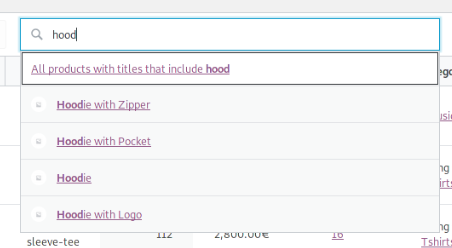
Using the prop allowFreeTextSearch, the <Search /> component can accept any input, not only the ones returned by the autocompleter. So we could still use it here with little modifications, and this way we don't lose all the <Search /> features like autocompleters, accessibility and keyboard navigation.
You can see it in-action in the table search:
 Aljullu
on 6 Feb 2019
Aljullu
on 6 Feb 2019
Circling back with convo from Slack - seems like everyone is on-board with @Aljullu 's solution above ( @josemarques commented in Slack with the +1 too ).
And to prioritize the list in the original issue, I'm thinking we mainly focus on Name first, then email. Username and country, not feeling like those are as critical - the token field solution seems fine to me.
timmyc
on 7 Feb 2019
Closing in favor of https://github.com/woocommerce/wc-admin/issues/1455 and https://github.com/woocommerce/wc-admin/issues/1457.
Per Slack convo:
can we leave the advanced filter as-is for now, and just update the search in the table? seems like a good first step
just leave the email advanced filter as-is too, and we can look at that after the table/search by customer name
jeffstieler
on 8 Feb 2019
Related issues
 LevinMedia
·
3Comments
timmyc
·
4Comments
LevinMedia
·
3Comments
timmyc
·
4Comments
 JoshuaGoode
·
3Comments
JoshuaGoode
·
3Comments
 mujuonly
·
3Comments
mujuonly
·
3Comments
 justinshreve
·
3Comments
justinshreve
·
3Comments