Woocommerce-admin: Product review placeholder image
Describe the bug
The placeholder image looks odd with the white background when an image is not set. Almost looks like 2 misaligned images.
To Reproduce
- Add a product with no image.
- Open the "Reviews" tab from the wc-admin header.
- Note the placeholder image with the adjacent user avatar.
Expected behavior
Expected a border, slight gray background, or different placeholder image. @LevinMedia what do you think? Does this look okay to you or are changes warranted?
Screenshots

 joshuatf
All 5 comments
/cc @LevinMedia and @josemarques
 timmyc
on 12 Dec 2018
timmyc
on 12 Dec 2018
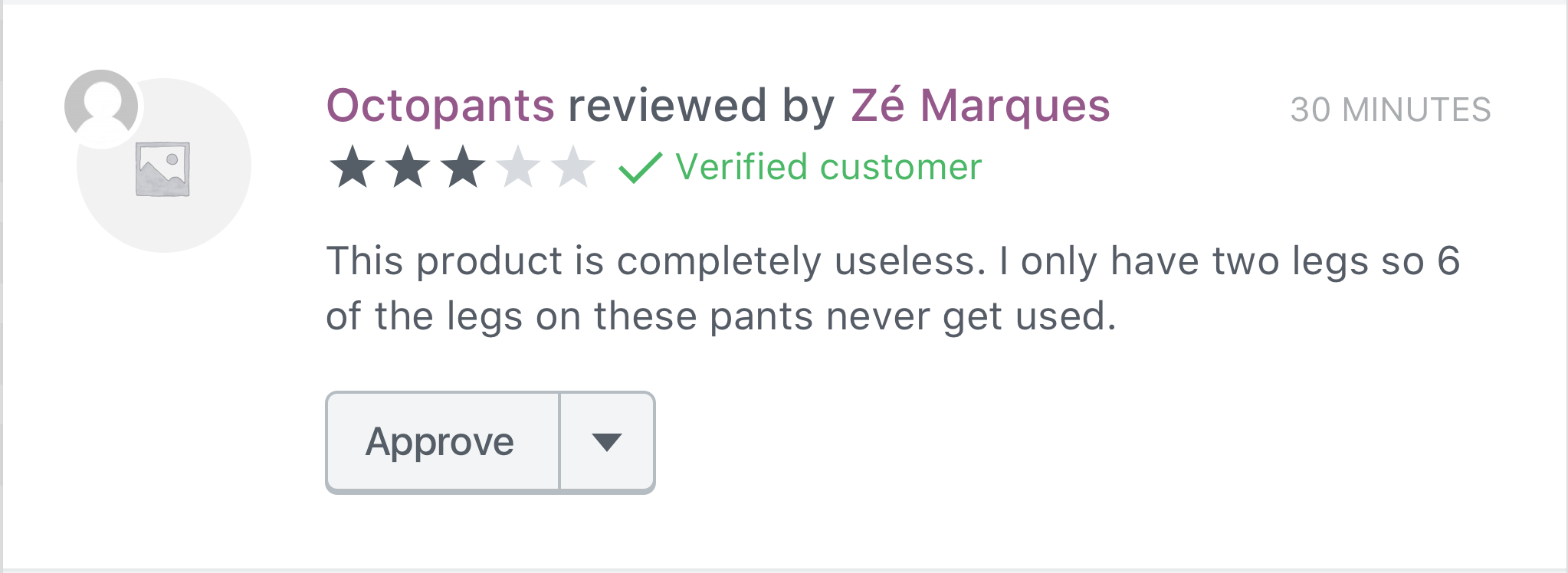
In cases where a product image hasn't been set, let's add a $core-grey-dark-500 color overlay to the placeholder product image with 10% opacity.
 LevinMedia
on 13 Dec 2018
LevinMedia
on 13 Dec 2018
@LevinMedia I was taking a look at this issue and it looks like the placeholder image we use has a white background:
https://github.com/woocommerce/woocommerce/blob/master/assets/images/placeholder.png
Do you know if we have a similar asset with gray or transparent background?
 Aljullu
on 21 Mar 2019
Aljullu
on 21 Mar 2019
@Aljullu Heya! I don't think we do... I could always create one. I ran into the same problem while designing, my proposed solution was using a grey color overlay on the image:
In cases where a product image hasn't been set, let's add a $core-grey-dark-500 color overlay to the placeholder product image with 10% opacity.
Would you prefer a transparent png?
LevinMedia
on 21 Mar 2019
@LevinMedia my bad, I read it too fast. :man_facepalming:
Would you prefer a transparent png?
No need for that, thank you!
Aljullu
on 21 Mar 2019
Related issues
 KZeni
·
4Comments
timmyc
·
4Comments
KZeni
·
4Comments
timmyc
·
4Comments
 pmcpinto
·
3Comments
pmcpinto
·
3Comments
 peterfabian
·
3Comments
peterfabian
·
3Comments
 zhongruige
·
3Comments
zhongruige
·
3Comments
Most helpful comment
@LevinMedia my bad, I read it too fast. :man_facepalming:
No need for that, thank you!