Wled: Effect in 2 different length strips to have the same duration
Congrats on this fantastic project Aircoookie!
I have 2 different length strips running parallel, one with 150leds and one with 130leds
I'd like for wled to automatically adjust the speed of both so that a "wipe" effect for example can start and finish on both at the same time.
That would be great!
Thanks all
 sirs2k
All 27 comments
Hi,
are you running these on separate ESPs? If yes, you can sync them up via UDP by pressing the sync button in the UI.
If they are wired in series, you can create two segments and both set them to the same effect.
If they are wired in parallel, unfortunately the first 130 LEDs of both strips will always be identical.
Also make sure you have WLED 0.9.0 installed, I believe it hasn't been too long ago that I added Wipe having the same speed everywhere regardless of LED count :)
 Aircoookie
on 23 Jan 2020
Aircoookie
on 23 Jan 2020
Thanks for the prompt reply.
Yes they are on 2 different ESP's. If u do connect them in series, which pins do I use? D4 and which?
Yeah I meant to have the opposite effect.
Yeah that confirms my fear. So I'll have to set their speeds manually to achieve them both starting/finishing at the same time. That feature would be very handy though as in many situations you have different lengths of strips that you want to have the duration of wipe across.
Another question, when I do sync effects via UDP, most times they take effect on each strip with massive delay between.
For example, it effects strip 1 and then after 5 seconds the changes take effect on strip 2, many times it doesn't even sync. How can I fix that?
Using ubiquiti gear if that helps
sirs2k
on 23 Jan 2020
Hi @sirs2k, connection "in series" does mean that you connect the last DOUT pin from the first strip to the first DIN pin of the second strip:
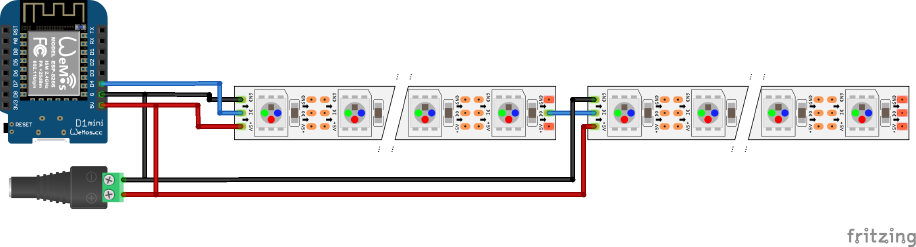
After having done this (only one ESP with both strips connected to each other) you need to change in the LED preferences the LED count to 280 and then on in the main UI on the Segments tab change the Stop LED of segmant 0 to 150 add another segment 1 with Start LED set to 150 and Stop LED set to 280 (remember to click on the ✔️ to accept the LED changes every time you change numbers here).
Most effects have the same total duration regardless of the length - so they should be both start AND finish at the same time (WIPE is one of them: ledIndex = (prog * SEGLEN) >> 15; )
This does mean that with one ESP and 2 segments these segments are in sync when you select them both (both segments ☑️ on the Segments tab) and then select the _effect_, the _speed_ and the _intensity_.
Comming to the UDP sync: this should "normaly" a matter of milliseconds - if it takes soooo long this looks like having a bad WiFi signal. What about the UI does it take a while to load ? Is it responsive ? Or does everything "take a while" when changing things in the UI, too ?
 Def3nder
on 23 Jan 2020
Def3nder
on 23 Jan 2020
Hi @Def3nder , thank you for the great explanation about connecting them in series. I will be trying to route a wire between the 2,it will be very hard since it's a tiles bathroom (unless I work from the other side of the bathroom to route that wire.
The network connection isn't too bad, on my unifi controller I see having a tx/rx of around 60mbps
However, the ui does take a while to load/execute action, and many times "typeError, cannot rear property, success of null" showing up
sirs2k
on 23 Jan 2020
Hi @sirs2k, the errors in the UI may result from "too fast requests from the UI to the ESP" - each request allocates memory and the ESP does run "out-of-memory" quite fast.
One hint: if you need to bridge a long distance (some meters) you should use thick cables. AWG 18 (0,75mm²) should work good as they do have a lower resistance and therefore less voltage drop.
Def3nder
on 24 Jan 2020
The Wifi performance is pretty poor to be honest.
Every time I fire up wled android app to turn on the lights it says that the nodemcu is offline and stays that way until I power cycle the esp. Even then, the esp comes back on the network and I can see it, but the app still shows it as offline for a few mins.
I had esphome flashed on it before wled (exact same location) and it never skipped a beat, either while changing light effects (even if too quick) and also when waking up the esp at any time.
Is there a setting that I overlooked that's causing these issues? Or perhaps it's a bug to be looked at?
I'm on 0.9.0-b1
sirs2k
on 25 Jan 2020
Hi @sirs2k, I know ESPhome, too. I personaly think that WLED does far more "computing stuff" than ESPhome.
You can try to disable all things that you don't need in the platformio.ini (or directly in wled00.ino if you do not use PlatformIO):
 -D WLED_DISABLE_OTA
 -D WLED_DISABLE_ALEXA
 -D WLED_DISABLE_BLYNK
 -D WLED_DISABLE_CRONIXIE
 -D WLED_DISABLE_HUESYNC
 -D WLED_DISABLE_INFRARED
With this, the loop will be faster - perhaps this does the trick ?
Def3nder
on 26 Jan 2020
That sounds like a great idea, how do I do that? :D I don't use platformio.ini
But I'd rather leave the OTA on
sirs2k
on 27 Jan 2020
which release binary did you use now ?
If you tell me the binary name, I can compile a release with everything disabled but OTA.
https://github.com/Aircoookie/WLED/releases
Do you use WLED as "standanlone" solution (without MQTT or Alexa etc.?)
Def3nder
on 27 Jan 2020
That's very kind of you.
Well all I've done so far is flash it (nodemcu) and using it through the app, and was about to look for a way to integrate it into HA but these problems made me hesitant
Can wled use the native HA integration like esphome?
You know I'm using a nodemcu. Can you work your magic and give me a file to flash that you think I should test?
Right now I've got 0.9.0-b1 on it
Thank you
sirs2k
on 27 Jan 2020
Hi @sirs2k, I compiled from th actual master with for following modules disabled:
Alexa, Blynk, Cronixie, HueSync. I've left MQTT and IRremotes on as you will need the first for HA integration and IRremotes are quite usefull 😄
The PINs are configured this way:
LEDPIN  2 (D4 on NodeMCU)
BTNPIN  0 (D3)
IR_PIN  4 (D2)
To use an IRremote, you simply connect an 38 kHz IR receiver (like TSOP4838 or TSOP2238 - see here)to 3.3V and GND and the OUT PIN to PIN D2. Then you can use any IR remote (like from TV's etc) and the cheap China-remotes in credit-card-format as well.
WLED_0.9.0-b1_ESP8266_pre0.9.0b2_only_OTA.zip
Since HA 1.0.3 WLED is supported as a nativ integration, so you can go to "Configuration" -> "Integration", hit the ➕ and search for "WLED". Then all you have to do is enter the IP-address of the device.

DrrZzzz has made quite a few YouTube videos of the WLED integration into HA.
Def3nder
on 27 Jan 2020
Thank you again for compiling that. The responsiveness of each esp is much better now, but the sync does not work at all...
Changed udp port, same problem. Also, why does it not let me save in Sync settings without filling all the Phillips Hue details first? When I press save, "Please fill in this field" pops up on Poll hue light.
I don't even have Hue enabled on WLED Broadcast.
sirs2k
on 27 Jan 2020
the HUE part of the form seems to be set as required in the html file. Not ideal. Similar stuff reported in #553. I should open an PR as I know where this needs to be changed. I just need some time to do a once-over to see if I can find all cases.
 fishbone-git
on 27 Jan 2020
fishbone-git
on 27 Jan 2020
Yeah, it seems no matter what info I change in the Sync section. The hue part is required.
Even when I put in some details, the next time I'm in that section it asks for it again.
I guess because it's been disabled?
Anyhow, sync is still not working at all for me unfortunately
sirs2k
on 27 Jan 2020
Oh no, sorry about the HUE issue! I recently added that the Hue settings no longer exist if it is disabed to save further memory.
Un-requiring those fields might make the most sense.
Aircoookie
on 28 Jan 2020
@Def3nder where does this leave me?
I can't sync the 2 lights with the compile you gave me until the hue issue is fixed in the next release?
Sorry just wanted to know what's next
sirs2k
on 29 Jan 2020
Hi @sirs2k, hmmm - I don't think that the "HUE issue" has anything to do with that. AFAIK this is only about firefox preventing to "SAVE the settings" when the IP-Address in the HUE section is empty.
You can just put "0" in every blank field and it saves well.
So, if the sync is still not working it could be something completely different.
Just to re-cap what you want to achieve:
- you have two ESPs with same WLED version on it (let's name it WLED1 and WLED2)
- WLED1 with 130 pixel attached
- WLED2 with 150 pixel attached
You want to have the effect wipe running in sync so that both strips start at the same time and end at the same time.
So - in theorie - when starting without setting the USP port is the same on both devices (port 21324).
Both WLEDs should be set to "sync" - you can check this with http://[your_WLED_IP]/win an look for the XML-parameter ns (send) and nr (receive) (they should be both set to 1. If not set to 1 you can do the with the HTTP API: http://[your_WLED_IP]/win&NS=1&NR=1 on both WLEDs.
Then - if network performance is good - they should be in sync, if you use the same values for the speed of the effect - you can set this with http://[your_WLED_IP]/win&FX=3&SX=[your_speed] (the intensity slider (&IX=[value]) is not used in this effect).
If you do all this, what is the result ? Can you try to move both ESPs both to the same access point so that we can exclude the network as issue ?
Def3nder
on 29 Jan 2020
Hi @Def3nder.
Thank you for the detailed reply.
I can confirm that the network is not an issue, when I operate each ESP the change is instant.
Never mind about the main issue of syncing at the same wipe speed, for now I'm just trying to get them to sync to start off with 😄
I have made sure that both ns and nr are set to 1 on both ESPs
I've also forwarded the port on their IPs to port 21324.
Still they are no where near syncing.
I even reverted back to Beta 1, still the same issue
I've even tried different UDP ports and forwarded them again but no dice
When I put in http://{mDNS address}.local I get "This site can’t be reached". Could this be related?
sirs2k
on 31 Jan 2020
Hi @sirs2k, hmmm - this is it what it looks like if I sync two strips with wipe effect:
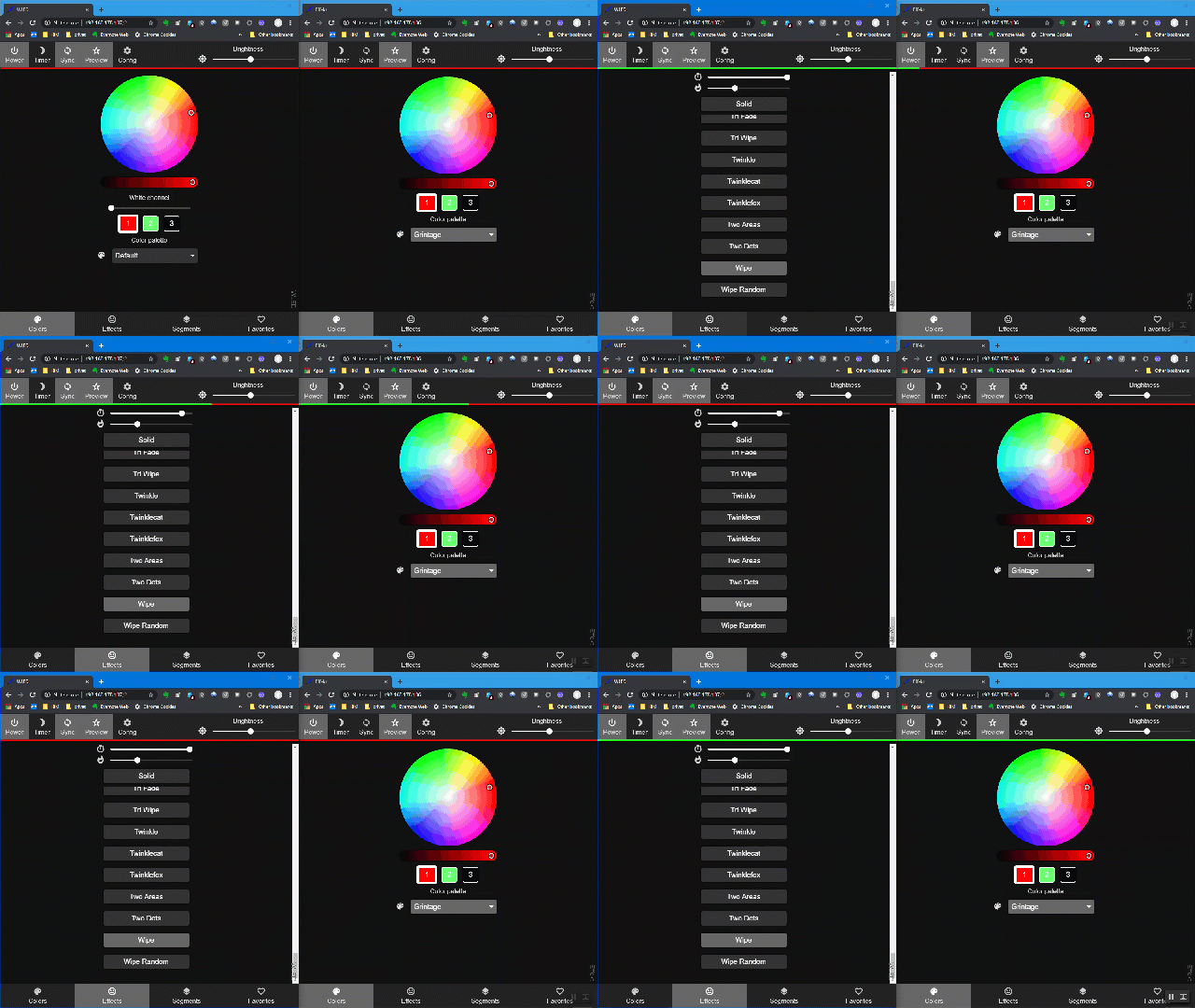
...and this capture was even made with one WLED running on ESP8266 and the other on ESP32.
So in the configuration there must be a difference.
Let me think about a posibility to export and then compare our configurations.
Maybe a usermod ? Or an special JSON respone ? The problem is that this uses twice to amount on the heap to create/display it - but anyway: I try to write something to get the configuration "comparable" ...
...concerning your "this site could not be reached": no, this does only work on Mac machines.
Please try http://[WLED-name]/ so only the mDNS name without ".local" - but even this does right now only work on some of my WLED instances. Others give me the same error as yours.
Def3nder
on 31 Jan 2020
Thanks @Def3nder.
I would be over the moon if I had the sync this responsive and close together.
I forgot to mention, when I do operate the ESPs individually, the effect takes place. But then it reverts back to an effeft I had running a while ago. I think the sync does work but with great delay.
Colour sync never works.
Even when I turn them off, they turn back on a short time after, I have to turn them off a few times before they stay off.
Just a reminder, I'm using ubiquity gear with only one AP. Both ESPs have very good responsiveness when operated individually.
Looking forward to seeing you work your magic!
sirs2k
on 31 Jan 2020
Hi @sirs2k, I#ve added some of the not-already-imncluded settings to the JSON-API.
So if you flash this version:
WLED_ESP8266_pre0.9.0b2_moreJSON.zip
...and then open http://[WLED-IP]/json, you get some more information.
Could you pls. do this on both NodeMCUs and save the result (press <_CTRL_>+<_S_> in the browser), rename the files from json.json to json1.txt and json2.txt and upload them here ?
This is the only from my NodeMCU-32S:
json.txt
jsoneditoronline is a good place to display these files then ...
Def3nder
on 1 Feb 2020
Hi @Def3nder,
Apologies for the delayed reply, been flat out at work.
Here are the json files you requested, hope it sheds some light on what could be the problem
sirs2k
on 3 Feb 2020
Hi @sirs2k, weird, I cannot see anything that would lead to "not syncing correctly".
The Wifi strength is "not the best": RSSI=-63 / signal=74.
Is there a way for you to put the ESPs next to an access point, so that the signal will be somewhere in the 90th ?
If then the sync does not work, we can exclude the Wifi signal...
Def3nder
on 3 Feb 2020
Hi @Def3nder
I don't believe that is the reason. Because as mentioned earlier, when I do change effects on each esp individually, the change is instant.
The problem isn't that the sync is delayed, but that it never works period
Also it's very hard to move the esp's with the strips as it's all mounted
It might be worth mentioning that on my ubiquiti controller, it's showing both ESPs as having "Power Saving Mode" on.
I can't see that on any other ESP I have setup using esphome and they've all worked flawlessly.
Could that be the issue perhaps?
sirs2k
on 3 Feb 2020
Hi @sirs2k,
thx for the "power safing mode" info - that's another point to look into - I did not knew this either.
And as e.g. ESPhome does not show this, we can compare the Wifi implementations.
Let's see - maybe we can solve this 😄
But looking to a quick solution for you:
Would it be possible to connect both strips together (at least the data line) and define two segments on the one ESP that is driving both then ?
I think the data line could easily be 2-3m long if you use a cable with AWG 18 (0,75 mm²).
Def3nder
on 5 Feb 2020
Hey @Def3nder, thank you very much for opening that issue in an attempt to fix my problem.
I did upgrade to latest FW and turned off sleep mode, but sadly it still didn't fix the sync issue I'm having. So now we know it's not the sleep mode, in fact it's not the Wifi range whatsoever because the effect takes place instantly when I make changes through the app. But the sync takes effect after a few mins...
However, I have noticed that when trying to login to the interface using the ip of esp or the app I have to try a few times before it reaches it
Could that be related?
sirs2k
on 27 Feb 2020
Hey! This issue has been open for quite some time without any new comments now. It will be closed automatically in a week if no further activity occurs.
Thank you for using WLED!
![stale[bot] picture](https://avatars3.githubusercontent.com/in/1724?v=4&s=40) stale[bot]
on 26 Jun 2020
stale[bot]
on 26 Jun 2020
Related issues
 JoshWobbles
·
3Comments
JoshWobbles
·
3Comments
 brausepaule
·
3Comments
brausepaule
·
3Comments
 PKCubed
·
4Comments
PKCubed
·
4Comments
 vigne
·
3Comments
vigne
·
3Comments
 Mombonav
·
4Comments
Mombonav
·
4Comments