Wled: Using Wled with Xlights - Universes
Hi. Firstly, Loving the software. I'm using it to control my arches both through the App and Xlights.
I'm also using it for my Megatree, and here's where the problem is.
I have 8 x 150node WS2812b strips on my tree which has 1200 nodes in total running off a D1 mini on the D4 pin. With a level shifter.
When using the app all the strips work perfectly, all 1200 pixels. Colours are good (lots of power injection), all the effects are working. I could run the tree just off the app.
BUT the effects in WLed don't really lend themselves to being on a megatree (no swirl or fan type effects.
I've set E131 and the universe number in Wled.
So I'm controlling the megatree through xlights and I've selected the universe number and I have the universe size set to 510 in xlights. Only about 750 nodes will lightup using Xlights.
Any ideas as to what's going on please?
Thanks
 tinseltunes
All 54 comments
I had this issue. WLED is excellent but for e1.31 I got them all to light but they were badly delayed for anything over 700 lights. I'm not sure if it is a memory thing or something else. Next year I would be interested in looking at what espixelstick does differently for e1.31 as I can expand multiple sticks and have thousands of lights on that. WLED wouldn't expand past 2 nodemcus. I love WLED and would rather use that so I hope a solution is found. Just be aware others have similar issues and if using e1.31 you may want to use espixelstick until a fix is found. Though if you somehow do get this working let us all know. Maybe I am doing something dumb. I use them all unicast on a network with nothing but FPP and the nodemcus so it shouldn't be network congestion.
Sent from BlueMail
On Nov 17, 2019, 5:44 PM, at 5:44 PM, tinseltunes notifications@github.com wrote:
Hi. Firstly, Loving the software. I'm using it to control my arches
both through the App and Xlights.I'm also using it for my Megatree, and here's where the problem is.
I have 8 x 150node WS2812b strips on my tree which has 1200 nodes in
total running off a D1 mini on the D4 pin. With a level shifter.
When using the app all the strips work perfectly, all 1200 pixels.
Colours are good (lots of power injection), all the effects are
working. I could run the tree just off the app.
BUT the effects in WLed don't really lend themselves to being on a
megatree (no swirl or fan type effects.
I've set E131 and the universe number in Wled.So I'm controlling the megatree through xlights and I've selected the
universe number and I have the universe size set to 510 in xlights.
Only about 750 nodes will lightup using Xlights.Any ideas as to what's going on please?
Thanks--
You are receiving this because you are subscribed to this thread.
Reply to this email directly or view it on GitHub:
https://github.com/Aircoookie/WLED/issues/355
 CaffeinatedFunctionality
on 18 Nov 2019
CaffeinatedFunctionality
on 18 Nov 2019
Hi! I just updated WLED to the ESPAsyncE131 library. It is now be possible to address up to 1190 LEDs (sorry tinseltunes :D that's the limit for 7 universes, just 10 LEDs short) and it should now work better than before, at least with the 50ms xlights mode! The configurations I tested are 500 LEDs at 60fps and 1000 LEDs at 30fps.
 Aircoookie
on 18 Nov 2019
Aircoookie
on 18 Nov 2019
Great thank you for the replay and update to accommodate this.
Shame about the last 10 LEDS.
In the future I would love to move away from Xlights. It's just the megatree effects that I need.
tinseltunes
on 18 Nov 2019
How come there can't be 8 universes?
tinseltunes
on 19 Nov 2019
@tinseltunes there can be. I decided to draw the line at 7 because that was the maximum that seems to be working with a decent framerate. For a slow moving megatree effect where 20 fps are enough though, up to 10 universes may work!
You can change it in line 440 of wled00: #define E131_MAX_UNIVERSE_COUNT 8.
I might even consider setting 8 as the default limit with a warning recommending to not use more than 1000 LEDs (which is pretty much my recommended limit for how many LEDs you should run with WLED anyways)
Aircoookie
on 19 Nov 2019
Awesome. Do I edit the file then upload with arduino ide? As I tried this (loaded the libraries) and got all sorts of compiling errors not related to the libraries. Originally I uploaded the bin file with home flasher.
tinseltunes
on 21 Nov 2019
tinseltunes, look at the errors in the compiler, duplicate library warnings are ok, look for the libraries you are missing. Google them then download the library and unzip it to your arduino libraries folder(keeping the folder name), or clone it to keep up with the source.
Aircoookie,
I think I'm seeing the same issue with 300 LEDs on a NodeMCU 12e.
Just a wild guess, but it seems a single multi universe send isn't getting handled correctly. I built with the latest code and also tried all the way back to .81 binaries.
If I address universe 1 or 2 by themselves it's fine, but addressing both universes it pukes. I'm not that adept with Arduino, but I'm trying to figure out how to throw some stuff to the console so I can help to debug it(perl and c based old fart trying to get my feet wet)
I tried Xlights 2019.65(and .64), sACNview, and da_e131 as test software. I tried controller type of unknown and epixelstick. I moved those same strings to a PI and used Falcon Pi Player as an E1.31 host and it was ok with the 3 software tests addressing both universes. A beaglebone running FPP with an 8 string F8-B cape has no issues with the 3 softwares either. With WLED I can get either universe to wiggle discreetly but can't get them both to work at the same time.
I've been digging at it and I'm at a loss. I'll try it on an ESP32 tomorrow to see if there's any difference.
 illuxions
on 23 Nov 2019
illuxions
on 23 Nov 2019
@illuxions thanks for the feedback! What exactly do you mean by "it pukes"? Does WLED crash or become unresponsive, is the framerate way too low or are the colors off after about 170 LEDs?
In the last case, the sender software needs to send all three RGB bytes of a pixel in the same universe. So the maximum universe length is 510 (512 is the standard). In LedFx (the sound visualization program I use for testing) you can set that. If some important software (like for example Xlights) doesn't support that, I'll have to change the logic but that will slow down the implementation a bit.
By the way, did you try Unicast, multicast or both?
Thanks for your gift by the way :)
Aircoookie
on 23 Nov 2019
@Aircoookie No problem, I'm happy to a buy a beer or 4 or people sharing good toys that I use.
Unicast is all I can try for now. My main router doesn't support IGMP Proxy and Snooping, I'll dig for one of my old routers so I can flash DD-WRT on it to try multicast.
I tried frame delays in da_e131 but when there's more than 1 packet with a different universe nothing happens at all, wled behaves as if it doesn't see the packet. This is the same behaviour I see in Xlights as well and using the beaglebone running FPP and an e1.31 output. I also tried setting different universes as different outputs with different priority on the beaglebone with the same thing, wled just sits there. It doesn't lock up, I have 2 instances of da_e131 open, 1 set to universe 3-3 and the other set to 1-2. 3 fires ok, but 1-2 does nothing.
Watching with wireshark, it seems that when there is more than 1 universe all of the software sends them in consecutive packets with the universe ID in each packet.
I wonder if it's something with the E1.31 ring buffer. I'll trying to play with that to see what I can break
Here's just part of the madness I'm playing with. https://i.imgur.com/gqTUmdP.jpg
illuxions
on 23 Nov 2019
I'm sitting in a pile of routers trying to nail down this issue, it looks like the router must support IGMP or even unicast to multi universes doesn't work with WLED and ESPAsync libraries. I spent 8am - 7pm so far toying with this.
Test setup:
NodeMCU ESP12e with WLED .87-dev master code with 4 x 50 WS2811 on MainNet
NodeMCU ESP32 with WLED .87-dev master code with 4 x 150 WS2812 on LightNet
FPP Master in Docker on Synology NAS on 'MainNet ' - FPPM
FPP Remote on Beaglebone black on 'LightNet' - BBB
Linksys WRT3200ACM(no IGMP - stock latest firmware) - MainNet
TPLink Archer C3200(all IGMP features - stock latest firmware ) - LightNet
Also tested with:
Asus RT AC68U (Asuswrt-Merlin firmware updated to latest 384.13_1)
Testing results for Multiple Universes;
FPPM -> ESP12E -> Unicast No, no multicast on router = no multicast
FPPM -> ESP32 -> Unicast YES, Multicast can't traverse subnets without explicit IGMP proxy
BBB -> ESP12e -> Unicast No, can't multicast to MainNet
BBB -> ESP32 -> Unicast YES, Multicast YES
Single universe works Unicast in all tests.
The one that really caught me was the FPPM to ESP32, from a non IGMP subnet to the IGMP LightNet Unicast works!
I crashed my whole home automation, cameras, and other junk replacing the WRT3200ACM with the TPLink Archer then fired up the AC68U so both subnets have full IGMP. Multicast works on each subnet and Unicast works across subnets or their own subnet with WLED.
I don't know IGMP networking interaction so I'll abuse one of my networking guys on Monday to see if we can understand why.
Unicast _should_ work without IGMP, it works with the other hosts like FPP as an E1.31 bridge with a Pi or BBB. Maybe it's something in the ESPAsync libraries.
Tomorrow I'm going to flash my WRT3200ACM with DD-WRT and see if that makes it happy. I'm also going to peruse the FPP code and compare it with the ESPAsync libraries to see if I can't find anything useful
Pardon the edits, ~I'm an enjineer,~ I can't spell
illuxions
on 24 Nov 2019
Hi to add in, I was using the 0.8.5 Release Binary with 625 LEDs in 4 universes from XLights. The communication was sort of working, i.e. the lights would go off as I told XLights to output to the lights, then the display would start quite a long time later with a lot of "holes".
I've just built the latest code for NodeMCU V2 and tried that. Again the lights turn off when I tell XLights to output to the lights, but now there is no display at all.
 pierslawson
on 24 Nov 2019
pierslawson
on 24 Nov 2019
Aircookie, are you able to release a bin file that has the 8 universes please? I'm having so many issues trying to compile the wled000. Ini in arduino ide. That would make my life so much easier. Please please. 😀
tinseltunes
on 24 Nov 2019
@tinseltunes you could try using VSCode with the PlaformIO plugin. This worked for me #374 but as I said above, there were still problems with the ESP8266 and e1.31
pierslawson
on 24 Nov 2019
I'm not sure what that means. Sorry
tinseltunes
on 24 Nov 2019
VSCode = Visual Studio Code, a free IDE fro Microsoft. PlatformIO IDE is one of the plugins available for it.
pierslawson
on 24 Nov 2019
I've just built the latest code for NodeMCU V2 and tried that. Again the lights turn off when I tell XLights to output to the lights, but now there is no display at all.
My bad... I had the universe IDs set wrong. So I can confirm that when there is a single universe XLights can control WLED and it is responsive. However, if I change Xlights to use 2 or more universes WLED stops responding altogether (this is with a build of the latest master).
pierslawson
on 24 Nov 2019
However, if I change Xlights to use 2 or more universes WLED stops responding altogether (this is with a build of the latest master).
My bad again... I think I have been misunderstanding XLights. I now have for universes to control 625 WS2812B LEDs and it is working fine. The response time between starting a sequence in XLights and it appearing is very good. I am using Unicast.
pierslawson
on 24 Nov 2019
@pierslawson did you manage to get your's working. I still can't drive more than one universe without the other lighting random pixels. I've tried to compile the Wled000.ini in Visual Studio and change the universe number to 8 but VS can't fix all the #includes errors.
I'm in so much trouble trying to get this to work with xlights patterns on my mega tree.
tinseltunes
on 25 Nov 2019
@tinseltunes sorry for all the trouble :( I meant to send you a binary supporting 8 universes but forgot about it... Will send in about 8 hours!
Aircoookie
on 26 Nov 2019
That would be awesome. I appreciate all that you do for this community. Someone said something in a comment about buying you a coffee or something? Is there a donate system?
Edit: I found the donate button. I'll send something your way.
tinseltunes
on 26 Nov 2019
In the last case, the sender software needs to send all three RGB bytes of a pixel in the same universe. So the maximum universe length is 510 (512 is the standard). In LedFx (the sound visualization program I use for testing) you can set that. If some important software (like for example Xlights) doesn't support that, I'll have to change the logic but that will slow down the implementation a bit.
@Aircoookie xlights supports changing the universe size. I use 510 for my universe size.
 thedannymullen
on 27 Nov 2019
thedannymullen
on 27 Nov 2019
Hi, Sorry I was just seeing how you're getting on with that bin file. My display is due to go live on the 1st December. I appreciate your help.
tinseltunes
on 27 Nov 2019
@tinseltunes
I'll clean this up later and maybe it can be a wiki page.
For a windows install;
I uninstalled arduino and deleted my AppData\Local\Adruino15 folder.
For something using a CP2102 USB UART these are the drivers https://www.silabs.com/products/development-tools/software/usb-to-uart-bridge-vcp-drivers. If you are using a bare ESP8266 and an FTDI board, you'll need to find the drivers till your device shows up.
Using the zip file version of arduino from here https://www.arduino.cc/en/Main/Software I unzipped it to c:\Arduino meaning arduino.exe is in the root of that folder.
I ran Arduino.exe and went to preferences (crtl + comma) then I added https://arduino.esp8266.com/stable/package_esp8266com_index.json to the additional board manager urls, add a comma and https://dl.espressif.com/dl/package_esp32_index.json if you need ESP32 also.
Close preferences
Go to tools -> board -> boards manager.
Type ESP and hit enter.
for ESP32 change the dropdown to 1.0.2 then hit install. For ESP8266 hit 2.5.2 and press install.
I'm not sure if git or downloading zips it easier. for now I'll show the git way.
I opened a command prompt and cd \, md 1, then cd 1 to create c:\1 to work in.
Git clone https://github.com/Aircoookie/WLED.git
In Arduino IDE file -> open -> C:\1\WLED\wled00\wled00.ino
Tools -> boards -> NodeMCU 12e for me changed upload speed to 921k, IWP 1.4 higher bandwidth, erase flash all, and port to com 3 which my NodeMCU is showing up on.
You can look in the platformio.ini to get some hints on what's next
lib_deps_external =
[email protected]
[email protected]
[email protected]
ESPAsyncUDP@697c75a025
[email protected]
Esp Async [email protected]
[email protected]
multiple library warnings don't matter the important one it "NeoPixelBrightnessBus.h: No such file or directory"
Google "NeoPixelBrightnessBus.h" and find https://github.com/Makuna/NeoPixelBus
in the command prompt again. cd \, cd arduino, cd libraries.
git clone --branch 2.5.1 https://github.com/Makuna/NeoPixelBus.git
I don't want to spend all night going through each error to show how to figure it out, so let's follow the includes from the platformio.ini.
git clone --branch 3.3.2 https://github.com/FastLED/FastLED.git
git clone https://github.com/me-no-dev/ESPAsyncTCP.git
git clone https://github.com/me-no-dev/ESPAsyncUDP.git
git clone https://github.com/me-no-dev/AsyncTCP.git
git clone https://github.com/me-no-dev/ESPAsyncWebServer.git
git clone --branch v2.5.5 https://github.com/crankyoldgit/IRremoteESP8266.git
(me-no-dev doesn't like tagging for some reason)
Go back to Arduino IDE...It builds. Do reset + program button routine on Nodemcu then press Upload in Arduino IDE. Magic. Open my phone and look for the wifi, feed it my router info(I actually changed it in wled00.ino so I didn't have to do that part) then change its name and start playing.
I'll walk through using VS Code, installing PlatformIO plugin, then letting it handle the dependencies this weekend. I used Arduino IDE and google when I got started.
None of this will help if you can't traverse out of a single Universe. It doesn't matter how long your strings are, you are addressing a specific set of pixels. Are you using 12v strings? Do you have have a buffer on the control line like a Hex inverting Schmitt trigger or other level fast level shifter? With 12v strings the 3.3v out of the ESP8266 is just bordering not enough voltage. It would be a lot happier at 5v. You might be having the same router issues I was having as well. If you can get 170 to work flawlessly but not 171, you need multicast but it's up to the router how it handles it.
illuxions
on 27 Nov 2019
@tinseltunes wow I am a dork, so sorry for making you wait! I did already compile the binary but forgot to send it 🤦♂ I just set a reminder so I'll definitely send it when I get back to my main computer in about 5hrs.
Aircoookie
on 27 Nov 2019
@tinseltunes Here you go, finally :) https://drive.google.com/open?id=1X5tZCVWzHSNnzgjLm-mJNnq5eCg3a_xK
Actually forgot about it again but luckily remembered before going to sleep!
Aircoookie
on 27 Nov 2019
I'm writing this in caps as I want everyone to know:
@Aircoookie YOU MY FRIEND ARE A GENIUS. The extra universe worked a treat, My megatree works like a dream. I can either run it with Wled or xlights with the full 1200 pixels. I'll pop up a link to a video in the next couple of days.
Thank you very much. I'll through a little $$ your way after payday. :)
tinseltunes
on 28 Nov 2019
Hey, sorry for the delay in replying @tinseltunes Great you got there in the end... I only have 675 LEDs this year (so far) so hadn't hit the universes limit. @Aircoookie I can confirm the build I made from master is working very well with E1.31.
pierslawson
on 30 Nov 2019
Here's the display 90% finished. Thanks to everyone who helped especially @Aircoookie https://youtu.be/iBllIS7s8M4
tinseltunes
on 30 Nov 2019
Here's the display 90% finished. Thanks to everyone who helped especially @Aircoookie https://youtu.be/iBllIS7s8M4
video unavailable :(
 dhpete
on 2 Dec 2019
dhpete
on 2 Dec 2019
Sorry, I took that one down. It only uploaded in 480p. New link. https://youtu.be/PmEHZLp7TSQ
tinseltunes
on 3 Dec 2019
Looks great! Have any issues when xlights is idle?
My display kept turning orange and I could not get that disabled.
thedannymullen
on 8 Dec 2019
Yes same thing happens. It only happens when xlights or x scheduler stops outputting.
So at the end of the night the house is off (not on wled) but fence, megatree and star stay lit until the timer on the power kicks it.
I have turn lights off after powerout/reset too.
tinseltunes
on 9 Dec 2019
My display kept turning orange and I could not get that disabled.
orange is the default color... go into the LED Preferences page and set whatever color/pattern/palette you want as the default on power up / reboot / no xlights(etc). You could set it to black as the default color so there's no apparent output when xlights (etc) isn't running.
 samstreak
on 9 Dec 2019
samstreak
on 9 Dec 2019
@samstreak I tried that but the setting would either not save or when they didn’t e1.31 did not function. I plan on setting up a test rig after holidays to debug. For now I switched to espixel stick.
Their newest version had some issues also. I suspect a library problem somewhere as common libraries are used. I suspect This because when I build the binary with source from a year ago it behaves the same as their current binary. When I use the binary built a year ago it works.
thedannymullen
on 10 Dec 2019
Hi @tinseltunes,
I also want to build such a fancy pixel tree.
Currently, I am struggeling with the cable management (see my professional picture).
You wrote, that you are just using one D1 mini.
How, did you connect the strips ot the bottom of the tree ?
How much spacing is there between the different strings?
How often did you inject power?
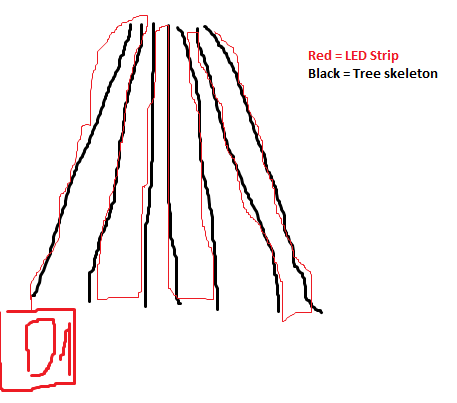
Thanks a lot for helping!
 PaulNBerlin
on 3 Jan 2020
PaulNBerlin
on 3 Jan 2020
Just hat the idea using junper wire for longer distances at the bottom?
Like this: http://s.click.aliexpress.com/e/buqEtUlE
PaulNBerlin
on 3 Jan 2020
Hi @PaulNBerlin . Why not make a led strip for each 'pole', and feed both power and data via a spliter to every (smaller) led strip?
 raoulteeuwen
on 3 Jan 2020
raoulteeuwen
on 3 Jan 2020
Hi @raoulteeuwen, please correct me if I am wrong, but following your suggestion will result in same effects in each strip. Something like circles or moving text will not be possible.
PaulNBerlin
on 3 Jan 2020
I would not know, but didn't know what effect you were after. Maybe check out https://www.youtube.com/watch?v=ZFO_QOBG9Bs and https://www.youtube.com/watch?v=8a6JCIeZ6rU ?
raoulteeuwen
on 3 Jan 2020
I built a couple of small trees with a D1 Mini and 100 LEDs... each vertical segment is essentially 12 LEDs high from bottom of the tree to top, and then between each down-to-up is 2 LEDs (which can be used or not... just have to set up your model)... the building pattern is 2 LEDs at the start, then 12 to the top, 11 back down (since on my tree the 12th one is where the LEDs sit on the upper ring (see drawing below), then 2 LEDs... do that 2x then join the 2 50-LED strands and continue with the other 2 sets. So there are 8 vertical strands. I didn't inject power for the 100 LEDs, but I usually set my WLED to 35 brightness (out of 255) which is plenty for what I'm doing. If you would like, I could upload my small tree model I built for xLights. Please note in the drawing below, the spacing on the actual physical trees are more even, but it would be hard to show on a drawing.
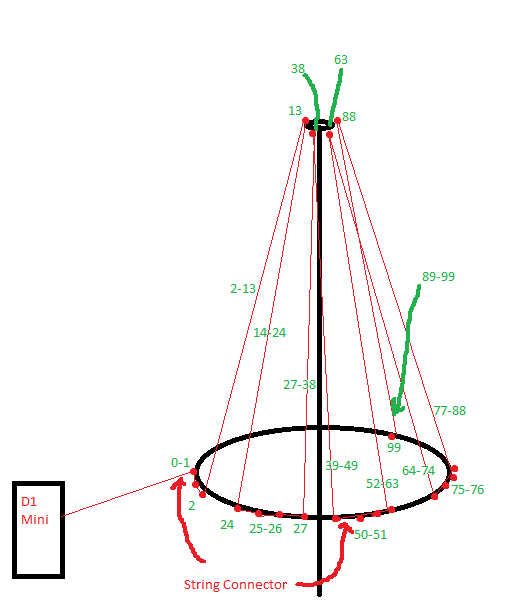
If you were to make it bigger (like 50-LED strand for each vertical), you could inject power from just the bottom, as power can go either direction through the strand, just the signal wire needs to be continuous from start to finish.
Hope this helps!
samstreak
on 3 Jan 2020
Hi @samstreak,
thank you very much. You really gave me a lot of extrem valuable input!
I am quite eager seeing your XLights model (would assume the config for shutting down the 2 leds is made there!?).
May I ask another question: If I using 16 string with 50 LEDs each, I need to think about power injection. I would use a 20 Amps power supply (to much?). Are there any consideration required regarding AWG cable strenghts (e.g. 18g or 20g or something totally different).
Thanks and best regards,
Paul
PaulNBerlin
on 3 Jan 2020
I haven't figured out yet how to turn off those LEDs in xLights, just in my WLED controller (with the 0.90b1 you can set up segments, so I did that and WLED is much better for these trees) for individual autoruns without the e1.31 running... but here's the model I've got right now. I haven't gone over it with a fine-toothed comb yet to ensure everything lines up 100%, but it's close enough for my first attempt at learning this stuff.
samstreak
on 4 Jan 2020
I think I just found A way to do it - not sure if it's the "right" way or not...
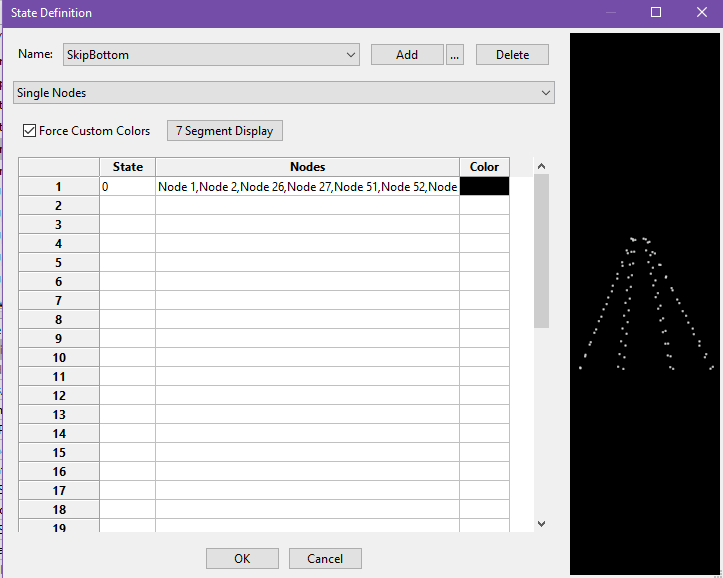
In the tree model, go down to the 'States' in the first section (mine is Poly Line because that was what I based my tree from), click the --Click To Edit--, then click the "..." box to bring up the States Definition box.
Click the Add button to add a new "state". I called mine SkipBottom, but whatever makes sense to you...
Check the Force Custom Colors box
In the first row of the list box, give the State column a value (I just put a 0, but 'off' or whatever makes sense to you is good)
In the first row Nodes column, click the empty box and hold control button on the keyboard while you click on the nodes you want to disable. Please note that WLED and xLights differ between the LED notations, so WLED's first LED is 0, while xLights' first LED is 1, so the numbers in my previous post won't work right on xLights - you need to add 1 to all of their numbers.
In the first row Color column, click it and pick black as the color.
Click OK to the State Definition box.
Go to the Sequencer tab, and insert a new "State" effect on the model (box with a black A on a white background and a white B on a black background), and pick the state name you made earlier in the State Definition box. Then in the States group box, with the State radio button selected, pick the 0 (or 'off' or whatever you put in the first line of the States column of the State Definition box). Stretch out the State effect over the whole timeline (or as desired).
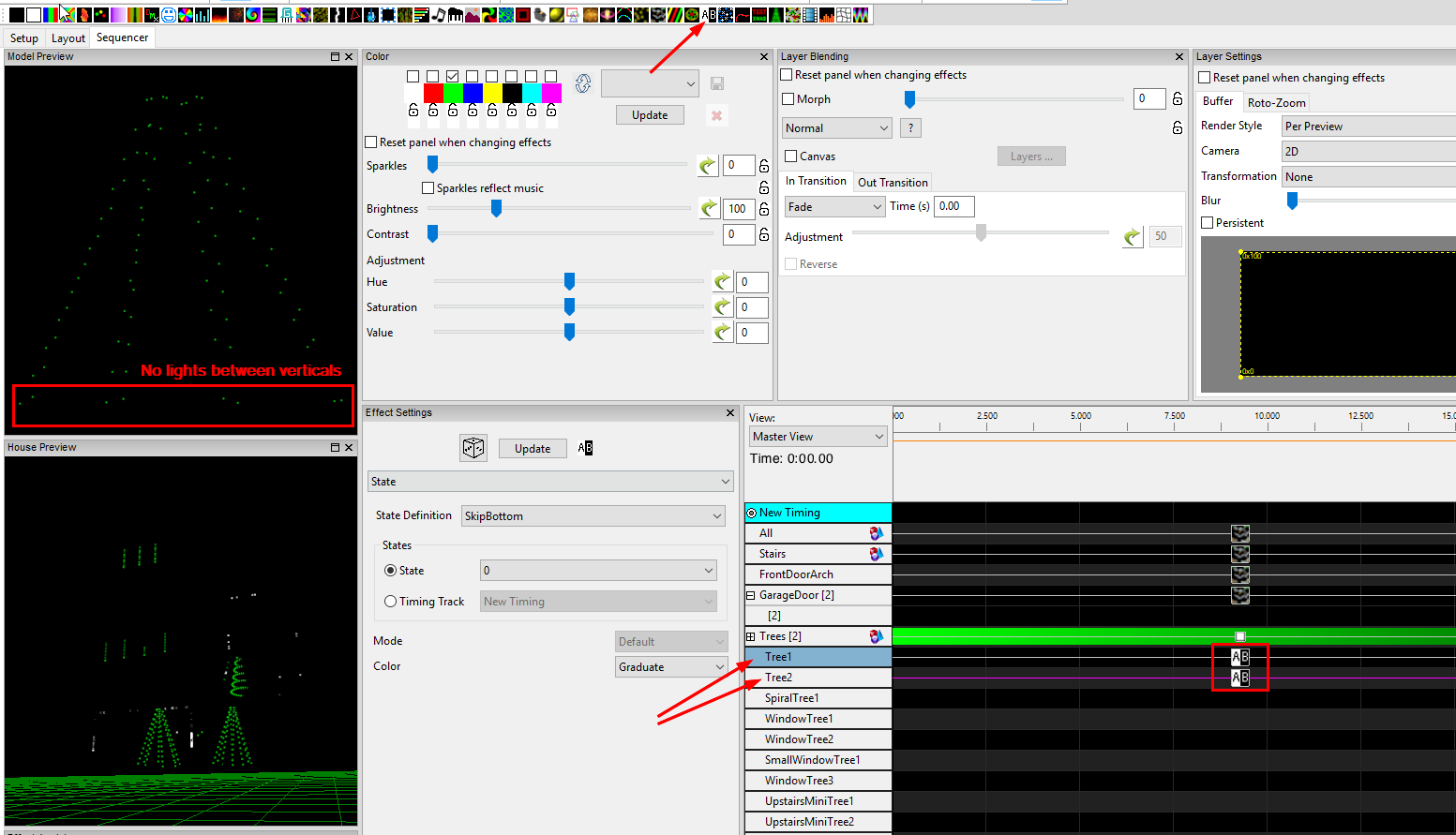
I'm sure there MUST be an easier way to do that, but it's just what I came up with on the fly.
samstreak
on 4 Jan 2020
Hi, thanks a lot for your help.
I am struggeling with the model you send me.
What do I have to do make working it as a "tree"?
On the screenshot you can see that I inserted your model and a tree from xlights.
Adding the same effect to both result in the following:
- Your tree changes all colours at ones (also changed the config a bit in other tries but nothing really worked as expected)
- The xlight tree behaves as expected.
Is it possible sharing more that just the model?

PaulNBerlin
on 4 Jan 2020
to make a tree use the megatree model. See this link: https://youtu.be/2dJlWqKrsKg
If you have 16 50led strings tied to one d1 you need to set like i show in video. Set as one string in xlights with 16 strands. Then set nodes/string to 800. In xlights a "string" is the number of controller connections a "strand" is the actual strings of leds in the tree. It is very confusing the first time.
thedannymullen
on 5 Jan 2020
@samstreak to turn things off you use the off button in the sequencer.
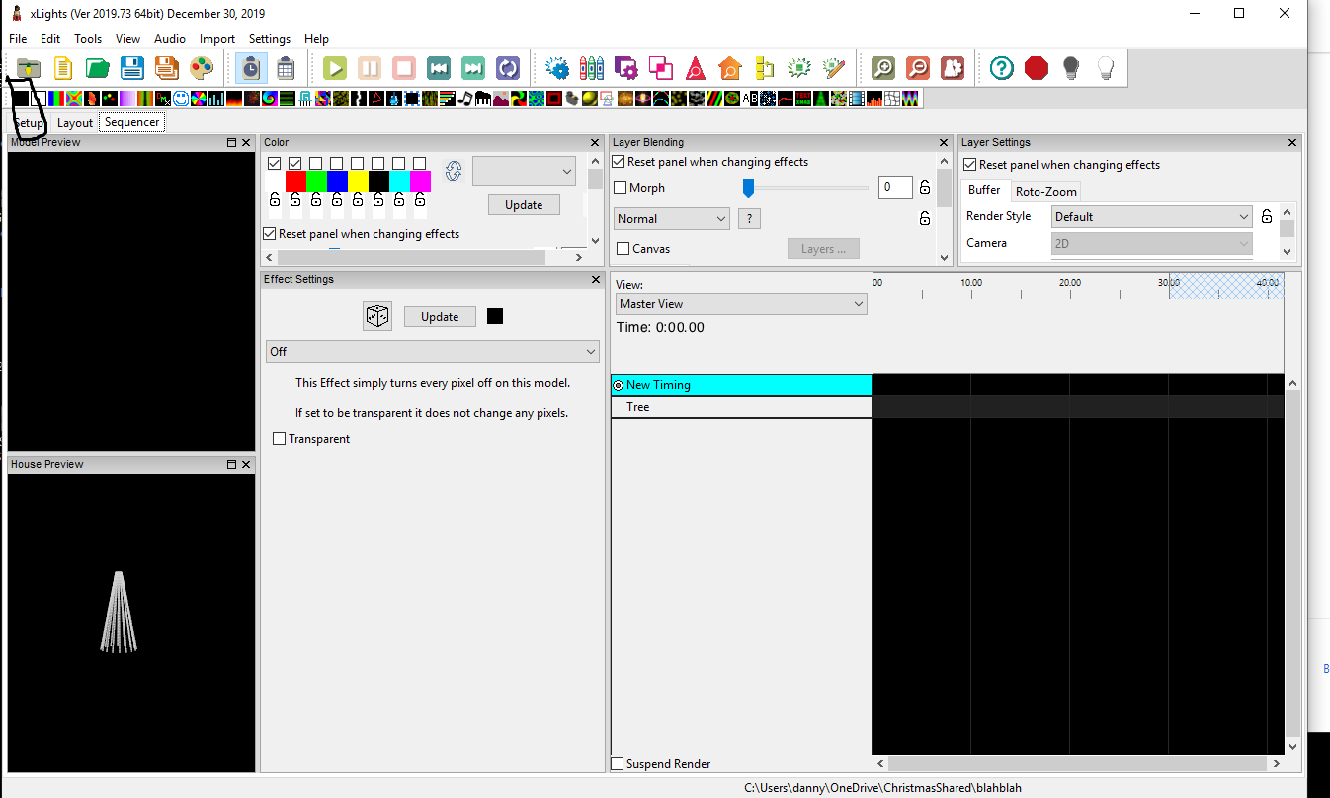
Look in upper left the black square.
Turning things off with wled was an issue I had in xlights and switched back to espixelstick. Wled defaulted back to the orange color when data not being sent. So If you see orange you can try to set the default color to black. This setting did not work for me when I tried. I plan to debug further in a week when I take my light show down.
thedannymullen
on 5 Jan 2020
@samstreak & @thedannymullen
Wouldn't you want to click the icon second from the right (black lightbulb)? For me this turns my WLED connected LEDs off but does not stop transmitting to it so it does not revert back to WLED local effect. If I click the stop sign then it stops the E1.31 transmission and WLED reverts back to local control. I just started playing with Xlights about a month ago so I might be completely off base.
 brentbrooks70
on 5 Jan 2020
brentbrooks70
on 5 Jan 2020
@brentbrooks70 Yes to quit sending the data to xlights you want to click the dark light by the stop sign.
When wanting to turn lights off during a sequence you want to us the turn lights off. For example I have a few effects that when the sequence is done the lights stay on. I needed to go add the "off" effect so at the end of the sequence that light would turn off. If I did not do this then going into the next sequence in my player the light stayed on.
I misunderstood @samstreak question until I just re-read it. He was wanting to turn off lights in the middle of a model. When I first read I believed he wanted to turn off lights at the end of a sequence.
He could actually do what he wants with the effect I sited I believe. @samstreak I believe, if you created a group with the pixels you want to be off you could then use the "off" effect I stated on the group for the whole sequence. Don't think I will have time to test this until next week.
thedannymullen
on 5 Jan 2020
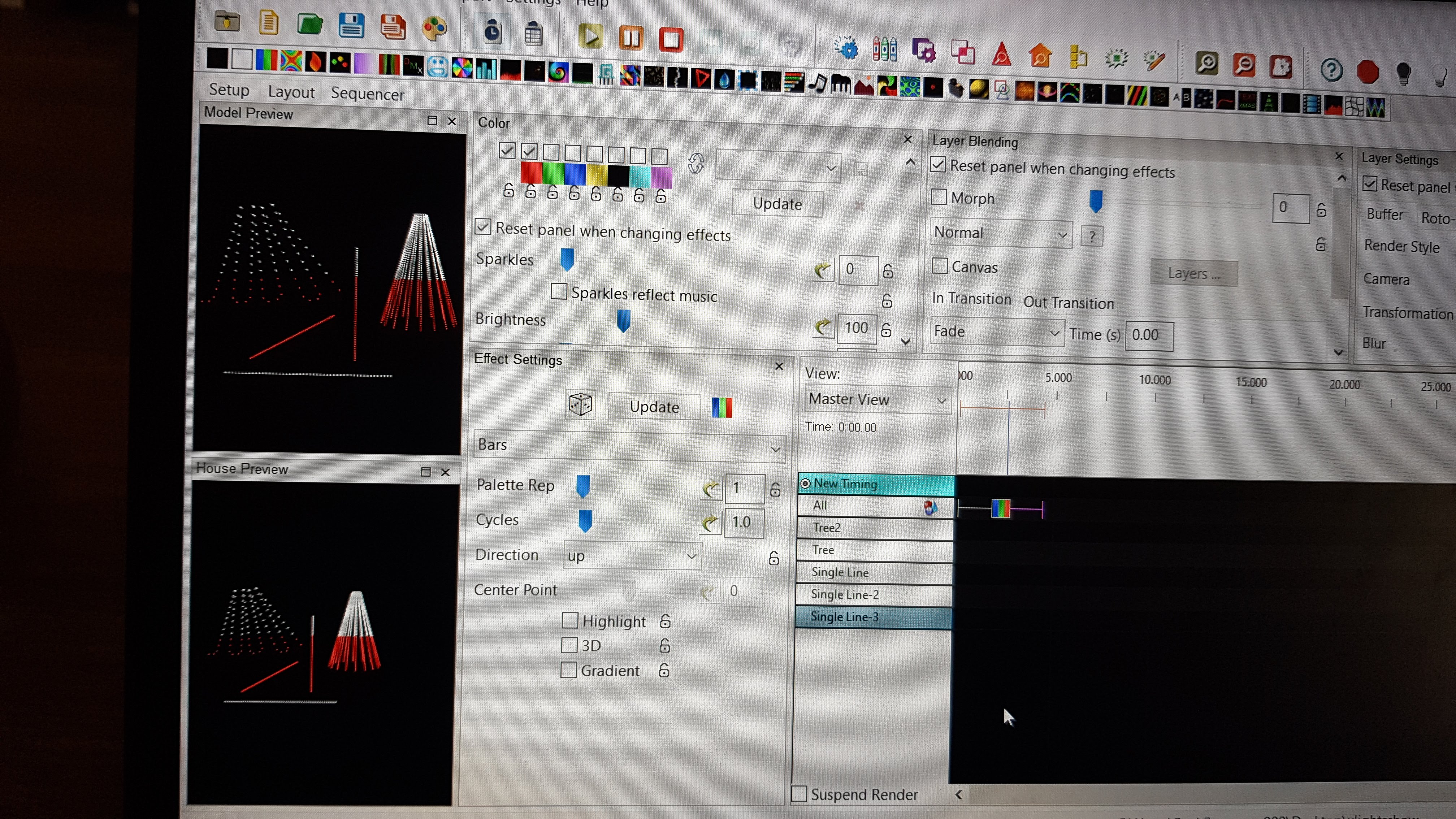
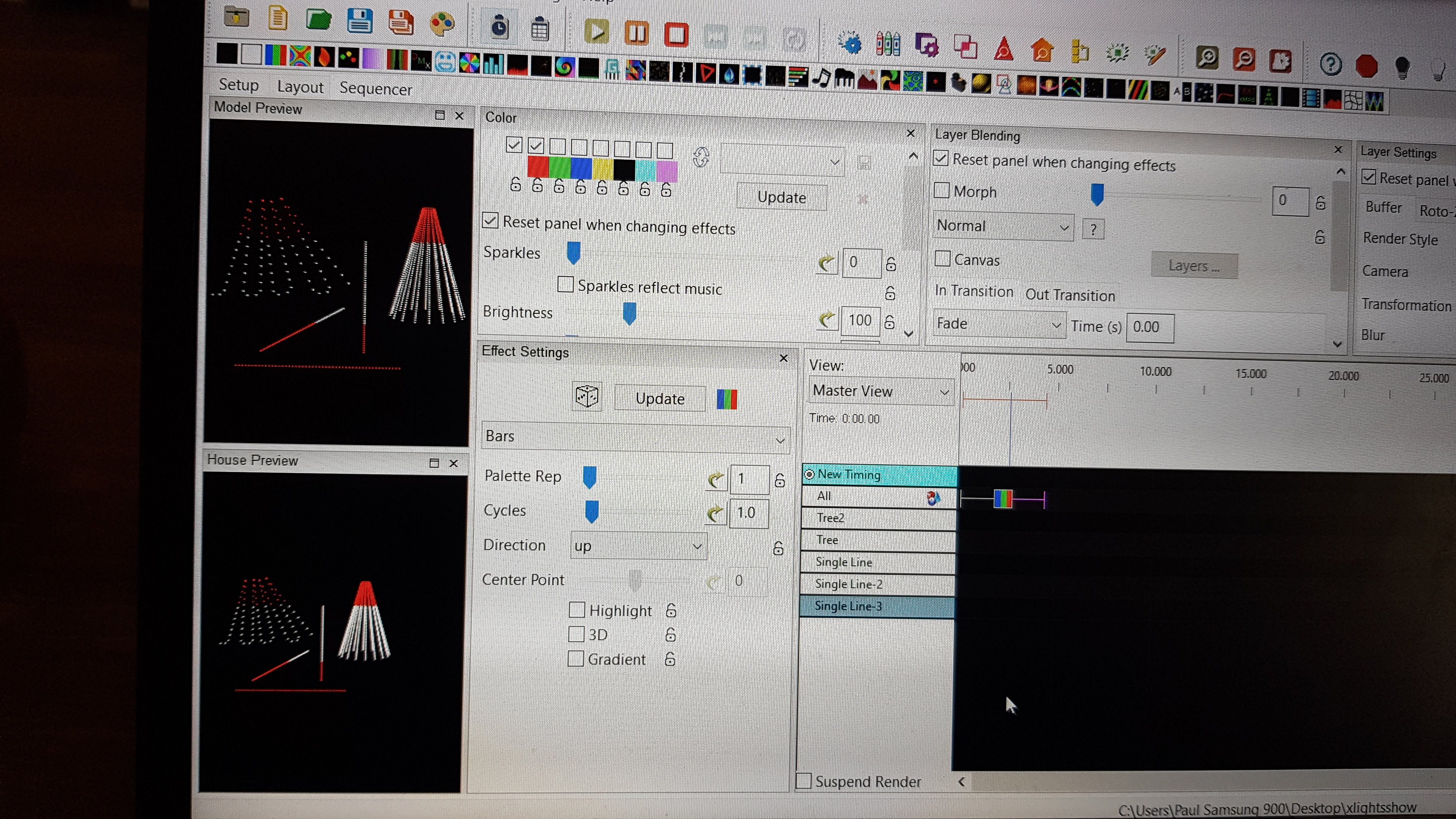
Regarding Tree setting: I got it working to see the effects with both: Polyline from @samstreak and Tree.
Figured out that the polyline behaves like a tree when I add it to a group. Dont know why adding to a group is needed but I am happy that it is working.

PaulNBerlin
on 5 Jan 2020
Sounds good!! Glad to hear!
thedannymullen
on 5 Jan 2020
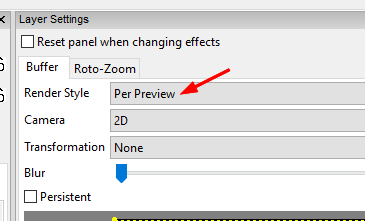
I had to set the Render Style in the Layer Settings section to "Per Preview" to get my trees working right... sorry, forgot about that part.
samstreak
on 5 Jan 2020
So I found an "easier" way to get rid of the extra pixels in my tree model... using submodels:
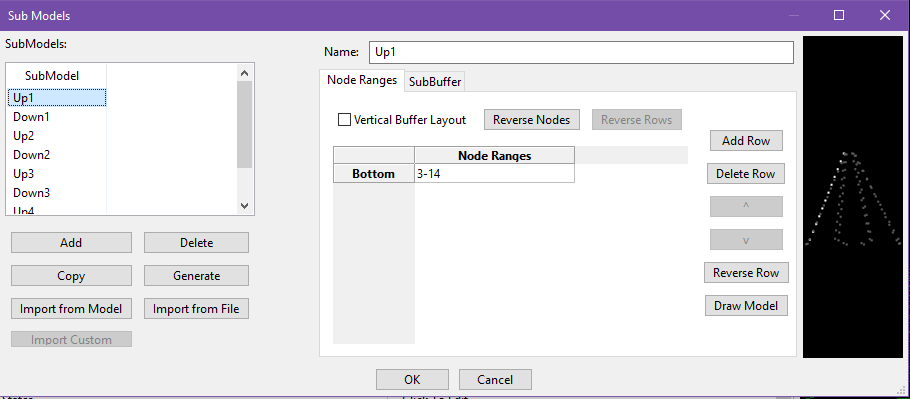
Go into the Tree1 model and down to the Sub Models at the bottom of the first section. Click the ... button. Add a New Sub Model for each vertical section. I named mine Up1, Down1, Up2 (etc), and then on the right side specified the node numbers to include in that model:
After that, add a group for just the sub-models (I named mine Tree1WithoutSkipPixels, but again, whatever makes sense to you), and make sure to check the "Show submodels to add" check box so you see the sub-models in the list of things to add to the group
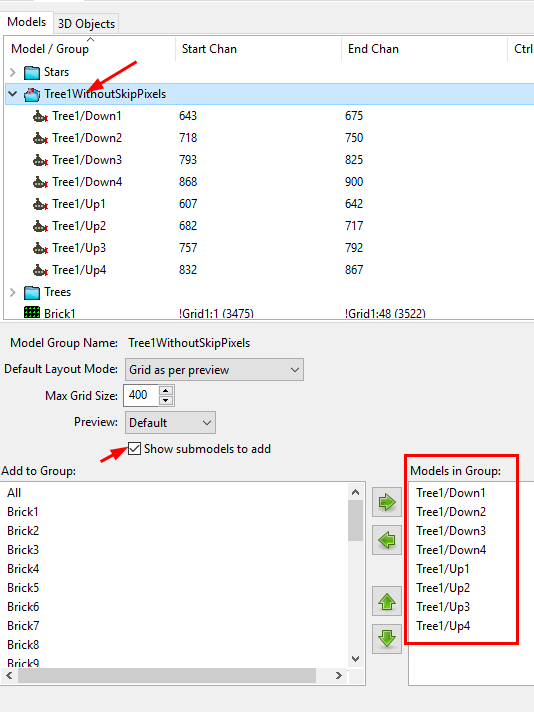
Then you just use the new group in your sequences as you would any other model. The render style still needs to be set to "Per Preview" for this to work right, but you can totally skip the State stuff I went through before.
Hope this helps!
samstreak
on 5 Jan 2020
@samstreak that is working fantastic. Thank you very much!
Also a big thank you to @thedannymullen
PaulNBerlin
on 5 Jan 2020
Hey! This issue has been open for quite some time without any new comments now. It will be closed automatically in a week if no further activity occurs.
Thank you for using WLED!
![stale[bot] picture](https://avatars3.githubusercontent.com/in/1724?v=4&s=40) stale[bot]
on 4 May 2020
stale[bot]
on 4 May 2020
Related issues
 yetdog
·
30Comments
yetdog
·
30Comments
 Cosmicbase
·
27Comments
Aircoookie
·
33Comments
Cosmicbase
·
27Comments
Aircoookie
·
33Comments
 schroepfer
·
28Comments
schroepfer
·
28Comments
 ozzi91
·
61Comments
ozzi91
·
61Comments
Most helpful comment
to make a tree use the megatree model. See this link: https://youtu.be/2dJlWqKrsKg
If you have 16 50led strings tied to one d1 you need to set like i show in video. Set as one string in xlights with 16 strands. Then set nodes/string to 800. In xlights a "string" is the number of controller connections a "strand" is the actual strings of leds in the tree. It is very confusing the first time.