Wled: Effect request: One lit white LED every X leds
can you add a popular led effect that I see around is a single-pixel white LED every few meters around the house? think the old school can light that are in the eaves every 2 meters. this would be a NON-holiday effect for all the other nights of the year. maybe allow the num of pixels skipped to be configurable?
Example pic below
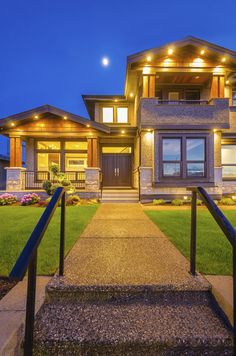
 dpackham
All 34 comments
+1 would like to see this.
 kcoop99
on 12 Nov 2019
kcoop99
on 12 Nov 2019
nice feature
 lpacchin
on 12 Nov 2019
lpacchin
on 12 Nov 2019
Yes, i can easily add this effect soon!
 Aircoookie
on 12 Nov 2019
Aircoookie
on 12 Nov 2019
I think it could be really cool to be able to just specify a pattern for off leds. Thus you could specify 1 led on, 10 off with primary white to achieve OP's objective. But if you just have close LEDs and want to space them out, you could specify 1 on, 2 off (spacing out 8-9 inches) but then the effect, color options on would run as though ON LEDs are all that matter. So you could still chase, or flash, or whatever but it would treat ON LED as the sequence.
 ironosity
on 13 Nov 2019
ironosity
on 13 Nov 2019
Suggestion
Use the primary color picker as usual
Use the speed slider to set the number of LED on
Use the intensity slider to set the number of LED off
Repeat sequence for the number of LED available in the strip
What do think?
lpacchin
on 13 Nov 2019
could it just be
Use all current sliders as now implemented
Use a new SKIP box to set the number of LED skipped starting from first LED?
this way ANY effect would work?
save to a preset and boom..
dpackham
on 13 Nov 2019
I really like @dpackham's solution as that would then also work with various other effects. I would also suggest an effect that just alternates between your primary and secondary colors. That way, for Christmas (for example), you could have Red x x x White x x x R x x x W x x x R etc.
Side note: I would actually beg for this because I convinced my wife to let me wire our Christmas lights (vs paying thousands) with the promise that I could do the above :) Once I chose WLED as the best option, I realized I actually couldn't do that.
Aircookie, if you're able to add dpackham's solution and a primary/secondary effect, I would gladly donate funds to the cause. :)
 brnielsen44
on 15 Nov 2019
brnielsen44
on 15 Nov 2019
@brnielsen44 I agree this would be useful. A setting could be added to LED Setup called Repeating pattern. for simplicity it could be a comma separated list of hex colors. Off could be black for consistency. So F00,000,000,000,FFF,000,000,000 would repeat [Red,off,off,off,White,off,off,off] over and over.
Some additional options:
You could default the effect to just alternate primary and secondary with no space when no pattern specified in settings.
Effect speed could be solid for 0 and do some other effect such as running 2
Effect intensity could add off leds between pattern
Effect intensity could add repeating on (or off as well) leds such that above pattern would be [r,r,x,x,x,w,w,x,x,x]
These are just initial thoughts.
ironosity
on 15 Nov 2019
@ironosity Yes, I thought through that also... only reason I didn't suggest that as the first option is I kind of like the idea of skipping LEDs with some of the other effects also (like Circus or Halloween) but yes, that would work for various effects.
Also, noticing a lot of LED folks are from Utah. I just moved to Lehi from Texas (and just learned that Dr Zzs is from Alpine area too). Small world.
brnielsen44
on 15 Nov 2019
@brnielsen44 that's funny. Small world! shoot me a message! Let me know where in lehi you're at! https://www.facebook.com/ironosity
ironosity
on 15 Nov 2019
AF here... we should have an LED meetup :)
I like the ideas being generated. I think this gives Aircoookie some good options on how to best code this
dpackham
on 16 Nov 2019
ironosity
on 19 Nov 2019
NICE! Ok.....so how do we add it?? Can it be added via OTA?
kcoop99
on 19 Nov 2019
@kcoop99 It will be in next binary release presumably since it's in master. But if you want it now, you'd have to compile the latest master creating your own binary and flash that.
ironosity
on 19 Nov 2019
Yes, it is in! However it is near impossible to set the amounts of on and off LEDs precisely with the sliders, this mode is more meant for APIs. I will add another "spots" mode soon which will let you specify how many "spotlights" you want and how many LEDs each one should be :)
Aircoookie
on 19 Nov 2019
Awesome! Can you direct me on how to update my current version?
kcoop99
on 19 Nov 2019
@Aircoookie
It works very well, thank you!
If it possible to add a + and - buttons near the slider, it is easier to set the amount of on and off LEDs, a sort of fine tuning
lpacchin
on 19 Nov 2019
Downloading now.
dpackham
on 20 Nov 2019
AF here... we should have an LED meetup :)
I live in Cache County and work in Clearfield. I'd love an invitation to this "Utah LED Makers Meetup". :)
 joelevi
on 20 Nov 2019
joelevi
on 20 Nov 2019
Ok, I finally got code to compile and took some photos showing what @dpackham was asking for. Phone photos...in the dark...so not great. :) https://photos.app.goo.gl/9zBYbhGkTJ8iAstK7
IRL, it looks good. Thanks @Aircoookie!
API Request: http://christmas.local/win&FX=83&SX=0&IX=32&R=255&G=255&B=255&SW
ironosity
on 21 Nov 2019
@ironosity that looks AWESOME! I am going to go out on a limb here and say that this effect is still not ready for average Joe right now? I'll need to wait until it is in a release from Aircookie. Hopefully the next realease has it!
kcoop99
on 21 Nov 2019
@kcoop99 I haven't noticed any problems with it. If you don't want to go through the hassle of compiling, here's the one I compiled. https://drive.google.com/open?id=1YJDpRD8rb5ygJ-HR9H5NPXjoDH0LVzqQ
ironosity
on 21 Nov 2019
@ironosity great work! I do have a few NodeMCU's around but would this .bin work on my D1 mini?
kcoop99
on 21 Nov 2019
@kcoop99 oh...no. Sorry. That was my first compile so I didn't even think of that. It wouldn't work. It was for a esp2866 12E nodemcu board.
ironosity
on 21 Nov 2019
@ironosity @kcoop99 thanks for sending the binary, I need to make a PIO setup that auto-creates the binaries for me... About 12E, Wemos D1 mini also uses that chip, so the binary will likely work :)
Aircoookie
on 21 Nov 2019
@Aircoookie this is what you are looking for: https://community.platformio.org/t/how-to-deploy-a-release-with-travis-co/294
 debsahu
on 21 Nov 2019
debsahu
on 21 Nov 2019
Absolutely. Great Idea!!! And I agree the color should be whatever color you want, not just white.
IN FACT, one could include "Random Static" and get the same effect as the multi-colored xmas lights on a a string. The colors are choosen at random when initialized and remain that color for the duration.
 fijit586
on 4 Dec 2019
fijit586
on 4 Dec 2019
@fijit586 in the latest code, there is a new "static pattern" fx that uses prim, sec, tri colors. AND I added a setting to disable LEDs in order to spread out colors (this works with ALL effects).
ironosity
on 4 Dec 2019
Ah,
I’m running v8.5.
Thanks, i’ll check and reload wled.
Regards,
Fred Tangelder
248-953-5122
Sent from my iPhone
On Dec 4, 2019, at 1:47 PM, Eric Merrill notifications@github.com wrote:
@fijit586 in the latest code, there is a new "static pattern" fx that uses prim, sec, tri colors. AND I added a setting to disable LEDs in order to spread out colors (this works with ALL effects).—
You are receiving this because you were mentioned.
Reply to this email directly, view it on GitHub, or unsubscribe.
fijit586
on 4 Dec 2019
latest code
I don't see a "static pattern" only a "solid pattern" and no way to disable LEDs... found it. in settings Disable Repeating N LEDs #
so every time I go to select this pattern I need to enable this setting? and when I want to go Christmas colors on all LEDs I need to disable this?
hmm maybe need a macro of quick set etc or set it with HomeAssistant if I can change the pattern with that
dpackham
on 4 Dec 2019
@dpackham yeah, Solid Pattern is what I mean. or Tri Color Pattern for 3 colors. The disable N Led isn't specifically meant for this pattern. Rather, it's meant to just spread out on LEDs for all patterns/effects. Typically Christmas light strands space things out 5-9" where as LED strips/strings are much closer. Thus the setting is global. Everlights, a popular commercial permanent light installer spaces theirs out 9"
ironosity
on 4 Dec 2019
Right. I would just like to see the Skip button on the main UI to toggle that effect of skipping N number of LEDs. ill have to figure out how to use HomeAssistant to toggle I think with the API. like Christmas lights on all LEDs to the solid pattern on every 6th etc.
dpackham
on 5 Dec 2019
Can you please share how this can be implemented in my current version 8.6? Can it be updated OTA? Is there a simple process? Thank you all for your work on this!
kcoop99
on 5 Dec 2019
@kcoop99 It can't be done in 8.6. You have to use the binary I posted above or compile it yourself. You can flash it by going to Settings, Security & Updates, Manual OTA Update. select the .bin and press Update.
ironosity
on 6 Dec 2019
Related issues
 poofyteddy
·
43Comments
poofyteddy
·
43Comments
 timothybrown
·
76Comments
timothybrown
·
76Comments
 MopheusDG
·
39Comments
MopheusDG
·
39Comments
 ozzi91
·
61Comments
ozzi91
·
61Comments
 jamestutton
·
31Comments
jamestutton
·
31Comments
Most helpful comment
Yes, i can easily add this effect soon!