Hey,
I use 120 WS2812 wit a 4A 5V power supply (limit 3800mAh). The firmware is 0.8.5 on two different ESP8266 boards. I want to use a self soldered ESP12E board with minimal space requirements. With this board I have some LED glitches. Most of the time the selected color is shown, but randomly short burst with a different color appears. A single level shifter is also used, but the led stripe works flawless with a nodemcu even without a level shifter.
If I set the brightness the glitches don't appear, all other glitches are with full brigthness. If I use only a red color, those glitches are mostly green, sometimes blue. Most of the time the complete stripe is affected, but sometimes only the first LEDs burst the wrong color.
Any hints where to search for solving the issue?
 coelner
All 67 comments
Hello,
please, which pin/method are you using ? Are you sure that voltage drop is not big ? Sometimes this could be the issue of random color glitches.
 theshadowsvk
on 26 Sep 2019
theshadowsvk
on 26 Sep 2019
I use GPIO2. I flashed it with a CH340G directly over the gpio pins and took this one: WLED_0.8.5_ESP8266.bin
Which voltage drop do you mean? with full brightness it is 4.9V and at end 4.2V (With power limit set to 3800mA). But this should not be a problem, the nodemcu can be used for this and there are no glitches at all (at the end 3.8V)
coelner
on 27 Sep 2019
Hmm okay, can you drop schematics of your board ? This sounds like other
problem
theshadowsvk
on 27 Sep 2019

coelner
on 27 Sep 2019
One question, is the common ground shared between 5v and 3.3v line ?
Sorry I see now, it's shared. I saw that cross line wrong. I'll check my schematics of my board and let you know
theshadowsvk
on 27 Sep 2019
Yes, it is.
coelner
on 27 Sep 2019
Your setup looks good to me. I actually believe that this is indeed a software issue because I have had it too on two of my lights. I was suspecting that the reason was a missing levelshifter, but might be an occasional flipped or dropped bit in the UART after all.
 Aircoookie
on 27 Sep 2019
Aircoookie
on 27 Sep 2019
I'm not sure. The nodemcu works well even without a levelshifter. At least I get there no glitches. And the single ESP12 feels hotter than the nodemcu (measured with my finger tip...) but this could be the missing pcb underneath.
I assume two issues, one with flipped values in the UART, but somewhere a hardware vault.
https://streamable.com/o8lsz
coelner
on 27 Sep 2019
Thanks for the video! For me it looks exactly the same, albeit at a much lower frequency at one glitch per 20-60 minutes, not every few seconds. This indeed seems like more of a hardware issue, but since there is no hardware difference with the pin between ESP12 and NodeMCU I can't see where. Did you try without the levelshifter? I've recently heard that some models modify the waveform enough to cause issues.
Aircoookie
on 27 Sep 2019
Yes, I added the level shifter after these glitches appear.
Those esp12 are mass products, maybe something is broken inside (which would explain the hotter surface). sadly I have no oszilloscope otherwise I would inspect this furthermore.
You can close the issue and leave a reminder if LEDs are flickering that it is maybe a direct hardware issue.
coelner
on 27 Sep 2019
Ok, even the nodemcu has got the glitches, but more like one in a hour.
coelner
on 29 Sep 2019
I'm experiencing the same random flashing problem with 249 LEDs on an older Lolin NodeMCU on pin D4/GPIO2.
I didn't have this problem with FastLED on another GPIO pin.
 frustreermeneer
on 1 Oct 2019
frustreermeneer
on 1 Oct 2019
Experiencing the same issue. Random color flashes. Running 12v lights. Has this been determined to be hardware only?
Here is video of my glitch examples. Solid blue then with Halloween effect.
https://youtu.be/TGyMkZldP5s
 kcoop99
on 22 Oct 2019
kcoop99
on 22 Oct 2019
Swapped my wemos d1 mini for a node mcu and am running into same issue. Leads me to think it's software and not hardware.
kcoop99
on 23 Oct 2019
My leds seems to flicker all together when changing color. Will make a video tomorrow.
 wardwygaerts
on 25 Oct 2019
wardwygaerts
on 25 Oct 2019
I get the flashes as well (every few seconds) with couple interesting observations below.
My setup: Two LED strips controlled by two nodeMCUs, two level shifters and 40amp power supply.
1) If only one LED strip is running, I don't get any flashes.
2) If I turn the second LED strip on, the flashes appear.
3) If both LED strips are set to halloween, no flashes. I have tried other effects, but only found halloween working without flashes when both are ON.
 dhami220
on 25 Oct 2019
dhami220
on 25 Oct 2019
Tried a few additional items without success:
- I have wire nut on the data cables. Replaced that with soldered joint. Same result.
- Removed level shifter (connected directly to nodemcu). Same result.
Next steps:
- I have two small strips. Going to give those a try right next to mcu to rule out data cable length and/or excessice number of LEDs on my main strips (~320 per strip is what i have. the small ones have ~20 LEDs).
RESULTS: No flashes. Could be the length of the data cables or number of LEDs or some abnormality with connections on the main strips.
Used LED as the signal booster with the main strips.
RESULT: Flashes.Replicate flashes with longer data cable and small strips (Isolate longer data cable variable from the number of LED or connection abnormality).
RESULT: -I have seen some posts about capacitor. Will give that a try if I can find a similar capacitor.
RESULT:Place Nodemcus closer to the strips.
RESULT: inconsistent node MCU power behavior. When the strips are on, the nodemcus turned off. I measured the voltage and it was close to 3.04V. It appears that this may be related to voltage drop from the power supply. I had nodemcus connected to the same power supply, and may be nodemcus (even when closer to the power supply) are not getting sufficient power and that causes data signal issues. Two items to try: Ordered 60amp power supply from amazon; try powering nodemcus from a separate power supply.
Final Outcome:
After watching Dr's stream today, gave the booster LED another shot. This time, I ran both strips from one NodeMCU (same signal split to both). Soldered all joints (replaced jumper cables with 20 gage wire segments and soldered). Flashes are gone!!!
dhami220
on 26 Oct 2019
Can anyone confirm or deny that a logic level shifter DOES work???
kcoop99
on 28 Oct 2019
Yes I'm using it, without any problem
theshadowsvk
on 28 Oct 2019
Would you be able to share which one you are using and how you have it wired?
kcoop99
on 28 Oct 2019
Hello,
that sounds to me like EMV problems, or actually voltage dips due to pulsating currents in the effects. A good buffering with capacitors near the MCU should help. It is even better if the MCU gets its own power supply. So the "big power supply" for the LEDs can be switched from the MCU and the MCU itself is independent from the currents of the LED's. When designing the GND line you have to be careful that the current through the LED's does not influence the voltage of the MCU! For me such a setup with more than 900 LED's works very well.
 Physikus74
on 12 Nov 2019
Physikus74
on 12 Nov 2019
Thank you for your great effort with this project. I really appreciate it.
I too experience the random flashing of the lights.
Running WLED 0.8.5, and using a 5 m 300 LED strip. My power supply is 12V (12.5 A) directly to the LEDs sharing the common ground with the NodeMCU. My NodeMCU has D4 connected to the
LED´s program wire. When setting Max current to 12500 mA, the LEDs flashes like strobe light. I need to set the LED Max current to below 2000 mA, to stabilize it, but even then it will flash randomly. When I disconnect the D4 connection, it's stable, even at 12500 mA.
The D4 connecting cable is 8 cm long.
Setting "skip the first led" in the configuration dit not help
EDIT: Upgraded to WLED 0.8.6, and the strobe-like flashing is gone, even at 12.5A. Now it only dips to lower intensity randomly. This behavior seems to be gone when max power is set to 5A, but then the brightness/intensity is too low.
 palengh
on 3 Dec 2019
palengh
on 3 Dec 2019
I am using WS2811 LED's and I get the flickering issue quite badly when using default GPIO2 (D4 on D1 Mini) or GPIO3(Rx on D1 Mini) for the LED data. Strangely, the flicker only happened if I set the current to above 1000mA. If I limit the brightness, no flicker at all.
I decided to play with this. I changed to use GPIO14 (D5 on the D1 Mini). The compiler warned me it would use software bitbanging which may cause flicker, but the exact opposite has happened. The flicker I was previously getting is now totally gone. Even at full brightness no flickering.
It isn't a hardware issue either as I have used 3 different D1 Mini's to test with (one was a D1 Mini Pro, genuine WEMOS, two are clones).
I haven't got a WS2812 to play with at the moment, so I can't comment on that, but on the 12V version WS2811 I have this seems to have solved the flickering completely.
 austwhite
on 7 Dec 2019
austwhite
on 7 Dec 2019
87 led me here. I have the same issue as many.
12v WS2815
Using ESP32 dev board
No logic shifter required - i actually tried a falcon f-amp initially but this caused a flicker whenever changing colour - once removed all was stable.
All worked well when using 193 pixels, now i have added some more (with necessary power injection from same supply with plenty of power) i get flickering, almost like a flash every so often. The frequency is different based on which effect is used.
I found the 'pride' effect a good test as this makes it flicker/flash very quickly. Something like twinklefox only every few minutes.
What is strange is that it is only really affecting the last 203 pixels, not the first 193. These numbers also coincide with what was seen in #87
Please let me know if i can provide any more info.
Matt
 matt-from-uk
on 1 Jan 2020
matt-from-uk
on 1 Jan 2020
My flickering issue is resolved in the latest versions, as long as I use a logic shifter.
As soon as I remove the logic shifter, the flicker returns toward the end of the strip.
I know the LEDs are meant to be data repeaters, but this issue definitely seems related to logic level for me.
austwhite
on 1 Jan 2020
I can't recommend enough the QuinLed Uno boards. Eliminates every possible issue in my opinion.
kcoop99
on 1 Jan 2020
I ran into the same issues as many have described here while running my under and top cabinet light strips. Each is controlled by a separate nodemcu. I determined the issue to be due to signal coupling between the two data signals. When running more than one data signal together, make sure you have sufficient wire separation so that the radiated emissions are not picked up by the other wire.
 meekell
on 4 Jan 2020
meekell
on 4 Jan 2020
I am having this issue now, I noticed when I am touching the signal wire the flickering goes away. I tried adding a capacitor to between D4 and GND, but that stops all color changing. Maybe I need a smaller capacitor, but I only have a few on hand to try.
Any other ideas?
 rayperkins1
on 4 Jan 2020
rayperkins1
on 4 Jan 2020
I read the uber guide to neo pixels on ada fruit and realized I needed to add a resistor between the ESP8266 signal pin and the data in on the LED string, now it works great.
rayperkins1
on 8 Jan 2020
Prob1 : Mostly random flickers and colours.
Fix : Make sure the circuits share the same ground (i.e. esp and lights have a common ground connection)
Prob2 : Random flashes intermittently.
Fixed by powering the esp unit via the 5v input and not 3.3v. (Perhaps transformer introduced noise/voltage fluctuation, or isolation/stability of gpio is better via 5v input) . Didn't try @rayperkins1 solution but could work in a similar way.
[Wemos D1 mini & 5v SK6812]
 rawframe
on 21 Jan 2020
rawframe
on 21 Jan 2020
Using a module such as the QuinLed Dig Uno will ensure your ESP device runs off 5V correctly, but be aware some cheap clone devices are not as stable as others.
I had a couple of cheap clones and they would flicker occasionally but my genuine D1 Mini Pro's have always been rock solid.
Sometimes the clones are just not stable enough to keep up with WLED. I only had it with a couple of them, so I delegated those slightly unstable ones to low data, non-critical sensors and used more stable ESPs in WLED.
austwhite
on 21 Jan 2020
I'm having the same issue with 12v LEDs
 noloco
on 29 Jan 2020
noloco
on 29 Jan 2020
I have just been playing with Hyperion and WLED and have noticed regular flashes on the WS2811 strip I have as my test strip.
It happens when using UDP (Raw) or E1.31 protocols.
It seems to just randomly flash sections of the LED strip to full brightness for about 1/4 of a second then drops back to normal brightness.
The colours are not changed, it just seems to randomly flash random sections to full brightness.
As note, this does seem to be a little worse in 0.91 than what it was in 0.86, but it I have checked and it is present in both.
Edit: @Aircoookie Nothing to do with this issue, but you've done such an amazing job on this, I am going to buy you a drink or 3 with the donation link :)
austwhite
on 29 Mar 2020
Was this fixed with certainty? Any ideas for mine?
This is on Twinklecat: https://streamable.com/7g1ji0
I notice that it happens more frequently when the brightness is lower.
 olliegg123
on 24 May 2020
olliegg123
on 24 May 2020
Adding the resistor 100% fixed it for me. Not sure if you have other problems, but make sure you have a resistor inline, and maybe try a few different values if you already have one.
rayperkins1
on 24 May 2020
I got fed up and finally bought quindors dig Uno boards. Fixed it for me. Before that however I used a logic level shifter and that fixed it too. You can use a sacrificial pixel too.
kcoop99
on 24 May 2020
Yes, just to confirm, this is a hardware problem, not fixable in software. The most solid solution is indeed using a levelshifter (like the SH74AHCT125N utilized in the QuinLed Dig-Uno board), however reducing the supply voltage of the first LED by a volt using a diode also works nicely.
Aircoookie
on 24 May 2020
Thanks for all the help. @kcoop99 , what do you mean by a sacrificial pixel??
olliegg123
on 24 May 2020
@olliegg123 a single pixel directly at the microcontroller output to boost the signal. Sometimes even that is still unreliable, in that case adding the voltage drop diode helps.
Aircoookie
on 24 May 2020
@olliegg123 try this.

kcoop99
on 24 May 2020
Perfect. Thank you both. I’ve ordered a new 5V 5A power supply (was originally stepping from 12v to 5v) so will try it out tomorrow with a sacrificial LED which will hopefully work.
olliegg123
on 24 May 2020
I'm interested to know if anyone is seeing this WITH the QuinLED dig-uno. I upgraded to get around this problem, and it's still present. Some effects work, some can work if they are set at power on, others never work.
 fishbone-git
on 24 May 2020
fishbone-git
on 24 May 2020
@fishbone-git is this with the D1 mini or the ESP32? What are some examples of working vs. flashing effects?
Aircoookie
on 24 May 2020
Mainly ESP32, but I also tried a D1 Mini as a test (they don't stay connected to the wireless well enough so don't use them regularly). Pacifica seems to be consistently good. The Comet effects are ok, but only at lower brightness. Oscillate is bad as is any of the twinkle/glitter effects. Noise 1 and 2 can be made to work if set at power on. Noise 4 is never ok. It also seems to be worse when red is involved, but that is more of a subjective view. In general, cooler colours with slow rate of change. Odd, as I expect the control signals are the same regardless.
fishbone-git
on 25 May 2020
Hey, an interesting data point: I had a go a dialing into the failure on one of the strings. I started at the first LED where it fails. Pressing down hard on the LED makes it work, then I had to do this twice more on the string. To help hold this "pressure", I've taped those LEDs with clear tape. So, this hints at local LED issues, perhaps temperature or cold soldering. The really interesting bit is that after fixing the one string, the other three magically cleared up! Oddly, the string I fixed is the "master" which syncs the rest over UDP. I can't even suggest a wacky theory here.
fishbone-git
on 25 May 2020
Sacrificial LED worked perfectly (so far)! I didn’t have a diode, so it’s running without one at the minute but I’ll be putting one in once I get it. Thanks for the help!
olliegg123
on 25 May 2020
Another experiment: I went back to 0.9.0-b1 as this was the oldest binary that I have with my pin config and I was able to run Oscillate for 20 minutes without an issue. Flashing back to 10.0 and immediately on starting the effect, the leds went bad. I also have another string running twinklefox. 10.0, there is a bright flash of white (sometimes green) every few minutes. with 0.9.b1, no issues at all. No doubt that there is a hardware issue in the string a couple of posts ago, but it's not the whole story I think. Also, when it goes, it takes all other strings in the led group with it so that it still very odd.
fishbone-git
on 14 Jun 2020
I have been having this issue and found that changing the power supply fixed it. Maybe a power regulation issue?
UPDATE:
My supply (That has this issues) sits at 5.3v and 0.55A but when the lights flicker, jumps up to as high as 1.3A
The supply that doesn't sits at 4,98V and 0.55A
My best guess is either it's overloading the LEDs with voltage or has poor current regulation.
 SamPhoenix91
on 22 Jul 2020
SamPhoenix91
on 22 Jul 2020
Qa
 SHolman77
on 26 Jul 2020
SHolman77
on 26 Jul 2020
Hi all, I was having the same problem with the flickering lights when using the wemos D1 mini using UDP from Hyperion ng. All the problem came down to the weak voltage regulator the manufactures are using on these boards. I found the solution here:
https://www.reddit.com/r/esp8266/comments/c2vhvy/update_best_solution_to_the_wemos_d1_mini_weird/
I Added the AMS1117 3.3 volt regulator as shown in the picture and now all flickering is gone! I hope this can help somebody else having the same issues.

 wilson3682
on 7 Aug 2020
wilson3682
on 7 Aug 2020
That is a fake wemos board, the esp12 and the pcb. You said that the ME6211 gets you into the brown-out, maybe the MIC5219 LDO is better. At least it has a reverse current protection. But so far, I did not get into the brown out with the original wemos boards.
coelner
on 8 Aug 2020
Not experienced this on any of my 4 clones however cheaper regulators may well drop below 3.3v under load and this is where it counts.
 Model-Man
on 8 Aug 2020
Model-Man
on 8 Aug 2020
Yes guys I agree with you, this only happens with the cheap, clone or fake ones that are being sold everywhere. Another thing I have to mention is when I use these clone or fake boards with wled they work perfectly, the problem arises when I try to use the UDP and E1.31 protocols from Hyperion.ng and X-lights, half of the strip starts flickerin. This does not happen when I use the good ones like the ESP8266 NodeMCU boards
Cheap ones: https://www.amazon.com/gp/product/B076F52NQD/ref=ppx_yo_dt_b_asin_title_o04_s00?ie=UTF8&psc=1
Good ones: https://www.amazon.com/gp/product/B081CSJV2V/ref=ppx_yo_dt_b_asin_title_o01_s00?ie=UTF8&psc=1
I only wanted to share my experience with these boards in case someone else was having the same issues. If you have the cheap ones and you are experiencing the same problem as me, it's up to you if you want to try the quick fix, if not just buy the good ones and you are good to go.
Cheers!...
wilson3682
on 8 Aug 2020
Further to my comment regarding no issues with D1 mini clones, I have now discovered this problem on a string of
100 WS2811 led's running along an outbuilding.
Like others a sudden strobe affect occurs across the whole chain of led's. It never seems to effect blocks or single led's. The strobe effect is usually at full brightness and mainly white however other solid colours have also been noticed. It happens at random times often going minutes without anything then several strobes during a single sequence. It can happen during a transition of presets or running a single pattern. Very noticeable when using the "sparkle dark" effect but also happens on others. Does not occur displaying solid colours probably due to limited data being transmitted.
Reading all the comments it seems there is still no positive remedy. Taking everything into account and eliminating the
Wled software out of the equation, it must be either the controller or the influence of something around the controller such as induced noise.
I intend to do some testing shortly using various combinations and setups to see if I can recreate the problem on another
controller on the bench. Hopefully I can then reverse engineer a fix. I only use high quality converted PC power supplies
so I can eliminate noise from the 5v source.
I will update with any findings
Model-Man
on 29 Aug 2020
Update.
After several hours of testing I was able to recreate the glitching effect on the bench using a second D1 mini clone. This was done by gradually extending the data line until the whole chain began to flicker. Extending the data line further made the issue more frequent up to the point where constant flicker occurred while running a sequence.
One thing I did notice was the problem happened at different data line lengths on different clone controllers.
The fix so far
Going back to the problem controller I began testing using different combo's such as the diode trick, varying the voltage slightly, ferrite beads, data line screening and a data line amps. Below is the simplest combo that has worked on a data line of up to 4m.
As you can see I've simply used the diode trick but added an additional 330R resistor on the output data line. I have tested this so far for 5 hours with no noticeable strobe issues. I will continue testing as the lights run 5 hours each night on my outbuilding. I'm not claiming this is going to work for you as there are often many variables that can influence the results however for a cost of next to nothing it might be worth a try.
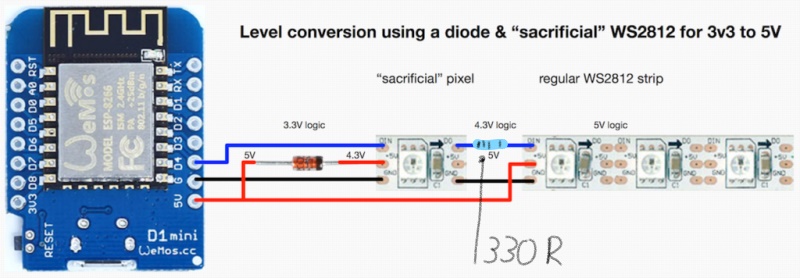
Model-Man
on 30 Aug 2020
Hi, I'll try to describe the flicker problem with me. I want to use LEDs for stair lighting and so it is a total of 15m type SK6812. The power supply is used 5V 60A, ie strong enough for operation. WLED is installed on ESP32 WROOM full version (large).
Flashes of different colors appeared to me randomly with certain effects, and even if white was on, the green LEDs flashed.
However, I see the biggest problem when using the WIPE effect, where the first two LEDs flash when they are to be off and, conversely, they go out when they are to be lit. I thought there was a problem in the 1m LED strip, so I swapped the first and second strips and the result is the same, so it has to go from ESP and WLED. I have no idea yet whether this is a problem of HW ESP32 or SW WLED. I also tried to buy a logic level controller, both an 8-line Texas Instrument and a 4-line KeeYees. TX did not work at all according to the delked connection, only with a strange and illogical connection, but the flickering was still. KeeYees arrived today, so I tried it. It worked right away, but again, there's no difference between getting involved with him and without him.
I use the latest version of WLED 0.10.0 and a total of 900 LEDs are used, which are mostly grouped into a 15 group with the WIPE effect.
I find that color flashes appear from the 4th meter. The first three are almost clean, except for the first two LEDs. It also didn't help to turn off the first LED in the settings.
If you are interested, I will make a video.
 Svrbinek
on 10 Sep 2020
Svrbinek
on 10 Sep 2020
Hi, so it is solved successfully today, thanks to the author, because today I found out that the update is WLED 0.10.2 and it fixed everything, so for now it finally works as it should. It is possible that for SK6812 the earlier code may have caused bad timing with certain effects. Who knows...
Svrbinek
on 12 Sep 2020
So I greet again and I have to write another knowledge from flashes again. I used the original bin file and the flashes are not. Then I used the compiled code modified by usermod and the flashes are, so I tried to compile the unmodified files without usermod and the flashes are again. I compile in Arduino IDE. Compilation seems to cause a problem that causes flashes. Therefore, I would like to ask, what are the original files copied from the WLED site?
Svrbinek
on 13 Sep 2020
I compile in Arduino IDE. Compilation seems to cause a problem that causes flashes.
Have you fully updated everything in Arduino IDE? If so, that there, I very strongly suspect, is your problem. Aircookie does not use the latest updates for everything as described in PlatformIO. Which is why it's better to use PlatformIO rather than Arduino IDE. For example, he uses NeoPixelBus version 2.5.7, FastLED version 3.3.2 and so on. And sometimes different versions for different boards. You also need the exact correct board settings in Arduino IDE. There's link somewhere explaining all this better, I'm sure someone will post that link for you soon, if it helps.
 Legsmaniac
on 13 Sep 2020
Legsmaniac
on 13 Sep 2020
I compile in Arduino IDE. Compilation seems to cause a problem that causes flashes.
Have you fully updated everything in Arduino IDE? If so, that there, I very strongly suspect, is your problem. Aircookie does not use the latest updates for everything as described in PlatformIO. Which is why it's better to use PlatformIO rather than Arduino IDE. For example, he uses NeoPixelBus version 2.5.7, FastLED version 3.3.2 and so on. And sometimes different versions for different boards. You also need the exact correct board settings in Arduino IDE. There's link somewhere explaining all this better, I'm sure someone will post that link for you soon, if it helps.
Thank you for answer. This might make sense why this is happening. I'm trying to use the PlatformIO platform, but for now it's impossible for me to compile a project in it. I haven't found a video anywhere that outlines how to compile such a large project. But maybe I'll try it and then it will work.
Svrbinek
on 13 Sep 2020
I join the discussion.
Flickering using 418 SK6812 Leds (RGBW) with 5V/40A power supply from BTF-Lightning.
If I set brightness to 20%, it works fine.
If I launch Hyperion Android Grabber, it works fine using 100% brightness with demo screen (RGB rotation, there is no white, maybe a clue?).
I use WLED, there is no flickering using solid color or effects @ 100% brightness.
I also suspect a software issue.
I also use Arduino IDE to compile WLED.
 0rsa
on 20 Sep 2020
0rsa
on 20 Sep 2020
Solved.
I disabled 'automatic brightness limiter' in WLED > Settings > LED Preferences and flickering is gone.
0rsa
on 20 Sep 2020
What diode is required for the sacrificial LED option?
I have found 'Skip 1st LED' and turning off the Automatic Brightness limiter in WLED settings helps but still get the occasional flash of white across all LEDs when using with Hyperion.
 jonwilliams84
on 8 Nov 2020
jonwilliams84
on 8 Nov 2020
You need to give the nodemcu more power that fixed the problem for me.
 DevPieter
on 19 Nov 2020
DevPieter
on 19 Nov 2020
You need to give the nodemcu more power that fixed the problem for me.
I have shortened the cable between the esp and the LEDs by 50cm...flashes have disappeared.
jonwilliams84
on 20 Nov 2020
I am running 0.10.2 on a NodeMCU and was experiencing the same random glitching/flashing.
I was able to resolve this by adding a 560Ω resistor inline between Data4 and my LED string.
Seems too simple, but effective, at least for me.
 J-gazm
on 24 Nov 2020
J-gazm
on 24 Nov 2020
I am running 0.10.2 on a Dig Quad and was experiencing the same random glitching/flashing.
I was able to resolve this by using 16awg wire for longest data line (approx 18m length) i have three other shorter runs using 20 awg. Also had to close Android App. Having Web UI open would cause glitching. Once I close UI the gitching would stop.
Only minimal testing done at this point.
 qai-retired
on 10 Dec 2020
qai-retired
on 10 Dec 2020
Related issues
 poofyteddy
·
43Comments
poofyteddy
·
43Comments
 Cosmicbase
·
27Comments
Cosmicbase
·
27Comments
 dpackham
·
34Comments
dpackham
·
34Comments
 raymiec
·
52Comments
raymiec
·
52Comments
 jonny190
·
70Comments
jonny190
·
70Comments
Most helpful comment
Solved.
I disabled 'automatic brightness limiter' in WLED > Settings > LED Preferences and flickering is gone.