I dont see options to use my apa102 leds?
 JanBosNL
All 28 comments
There isn't any option for that at the moment.
Since the underlying NeoPixelBus library supports them though, I can add support for APA102 tomorrow!
 Aircoookie
on 26 Mar 2019
Aircoookie
on 26 Mar 2019
@Aircoookie NeoPixelBus has APA102 support, its referred to as DotStarSpiMethod. Supports software and hardware SPI methods. Hardware is async though and software is slow!
One can use this line as a reference on the 2 methods.
 debsahu
on 26 Mar 2019
debsahu
on 26 Mar 2019
@debsahu thanks! I think WS28xx will remain the primary choice although APA102 definitely seem to have some advantage because of the CLK pin and additional global brightness possibility.
@JanBosNL just got an APA102 version to compile (completely untested though)
Just replace line 21 in NpbWrapper.h with #define PIXELMETHOD DotStarSpiMethod and delete the second parameter LEDPIN in lines 71 and 76.
Aircoookie
on 26 Mar 2019
Thank you @Aircoookie , I will try it out.
Been trying lots of stuff, still learning a lot. First few days the only way to get some leds burning was to throw them in a campfire... At the moment though, I am actually compiling some nice first tests that seem to work OK..
When I have tested your code, I will let you know.
JanBosNL
on 3 Apr 2019
Compiled and uploaded,
changed line 71 and 76 to:
  void Begin(NeoPixelType type, uint16_t countPixels)
  {
    cleanup();
    _type = type;

    switch (_type)
    {
      case NeoPixelType_Grb:
        _pGrb = new NeoPixelBrightnessBus<PIXELFEATURE3,PIXELMETHOD>(countPixels);
        _pGrb->Begin();
      break;

      case NeoPixelType_Grbw:
        _pGrbw = new NeoPixelBrightnessBus<PIXELFEATURE4,PIXELMETHOD>(countPixels);
        _pGrbw->Begin();
      break;
    }
  }
So far no luck, I first thought that the clock pin needed to be defined as well. Since the apa102 has 4 wires. GND and 5V and DATA + CLOCK
First though I tried to read up on the DotStarSpiMethod you tried
DotStarSpiMethod
This method should only be used with DotStar color features.
It will use the available hardware SPI support for the board you build with.
Generally the clock and data pins are not changeable for hardware support and thus the Pins argument is omitted on the constructor. If the pins are changeable like on the ESP32, then provide the pins to Begin.
The hardware pins on the board are often labeled as MOSI for data, and MSCLK or CLK for the clock.
So seems defining the pins freely is not possible with the DotStarSpiMethod on the esp8266 platform. Since I use a NodeMCU on the esp8266platform, I checked the datasheet to find the MOSI and CLK pins. The data pin is called SD1 on the NodeMCU and the clockpin CLK
Plugged the DATA and CLK wire from the ledstrip to those pins and we suddenly got leds lighting up.
So it works. Not tested the rest of the webserver and functions. will try that another day.
JanBosNL
on 3 Apr 2019
OK,,, checked the webserver controls.. They are not working. Leds seems to hang in a random multicolor confetti mode that might just be random noise from the clk and mosi spi pin.
Seems adjusting any of the settings nor the amount of leds on the strip has any effect on the strip.
JanBosNL
on 4 Apr 2019
I have implemented a working solution, based on DotStarMethod (software). It works great with 301 LEDs and an ESP-01. Note that you probably need a level shifter (I use a SN74AHCT126D).
I have created a pull request. Meanwhile, the code is available at my place. I hope that is the correct way to contribute, I am new to GitHub.
_Edit: AHCT, not AHC_
 T-Arens
on 1 May 2019
T-Arens
on 1 May 2019
Where do you get such a level shifter and do you have to connect this?
I still have here 1 meter apa102 Stripe, would like to try!
I have it connected without it, but it just blinks, and the Esp8622 does not reboot / start at all.
 salopette
on 1 May 2019
salopette
on 1 May 2019
If it doesn't boot and behave normally, the level shifter is not your problem.
Where you can get a SN74AHCT126N (N is easier to solder) depends on where you live, I guess (Digikey?).
The connection would look like this:

_Edit: AHCT, not AHC_
T-Arens
on 1 May 2019
You could also order a TXS0108E level shifter board from e.g. AliExpress.
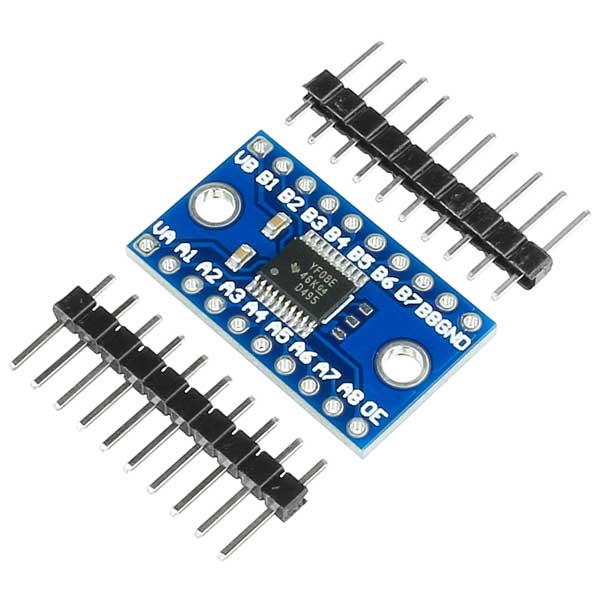
VA = 3.3V
VB = 5V
OE = 3.3V
A1, A2 = Data/Clock from ESP8266
B1, B2 = Data/Clock to LEDs over 100 Ohms Resistors
GND = GND
T-Arens
on 1 May 2019
Which is better? can I then control synonymous LPD6803 ic Led Band?
https://www.amazon.de/Converter-Pegelwandler-BiDirektional-Raspberry-Mikrocontroller/dp/B07DKT9JXT/ref=pd_sim_147_5/259-6435335-5384064?_encoding=UTF8&pd_rd_i=B07DKT9JXT&pd_rd_r=3579f4a2-6c27-11e9-ba4e-017bb8e0c721&pd_rd_w=spxae&pd_rd_wg=o7FWo&pf_rd_p=b0773d2f-6335-4e3d-8bed-091e22ee3de4&pf_rd_r=67Q18ZX27A92A7X88BR2&psc=1&refRID=67Q18ZX27A92A7X88BR2
https://www.amazon.de/AZDelivery-TXS0108E-Converter-Arduino-Raspberry/dp/B07N7FFY2Q/ref=pd_lpo_sbs_200_t_1?_encoding=UTF8&refRID=D0WB7WQ665QB31P1NY0N&th=1
salopette
on 1 May 2019
Definitely the second one, the TXS0108E. Will be better for high speeds.
I don't know the LPD6803 and don't find much information about those LED strips, so I don't know.
T-Arens
on 1 May 2019
https://github.com/area3001/esp8266-arduino-lpd6803
https://cdn-shop.adafruit.com/datasheets/LPD6803.pdf
Is it possible?
salopette
on 2 May 2019
The level shifter should work. The protocol looks different from the APA102s.
T-Arens
on 3 May 2019
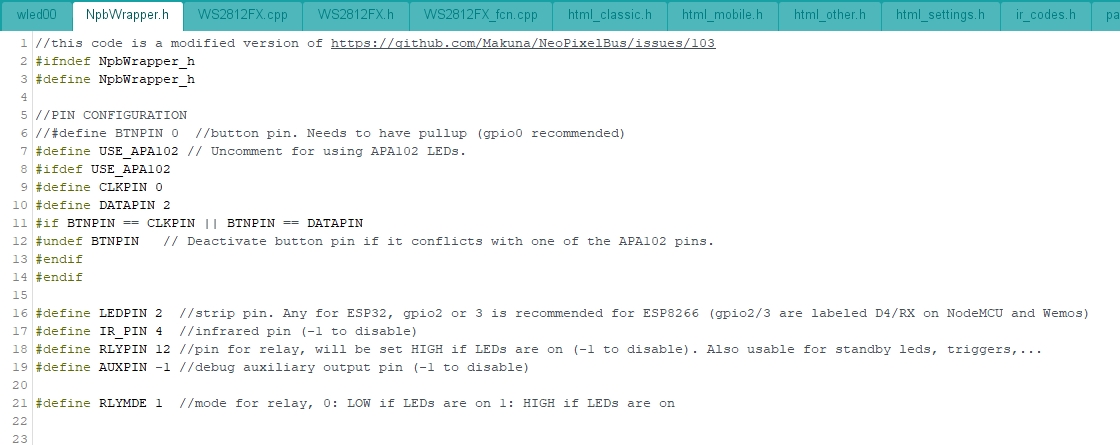
Hi, do I have to change something in your library for apa102? or is it already finished?
//PIN CONFIGURATION
define BTNPIN 0 //button pin. Needs to have pullup (gpio0 recommended)
//#define USE_APA102 // Uncomment for using APA102 LEDs.
salopette
on 3 May 2019
Look here.
T-Arens
on 4 May 2019
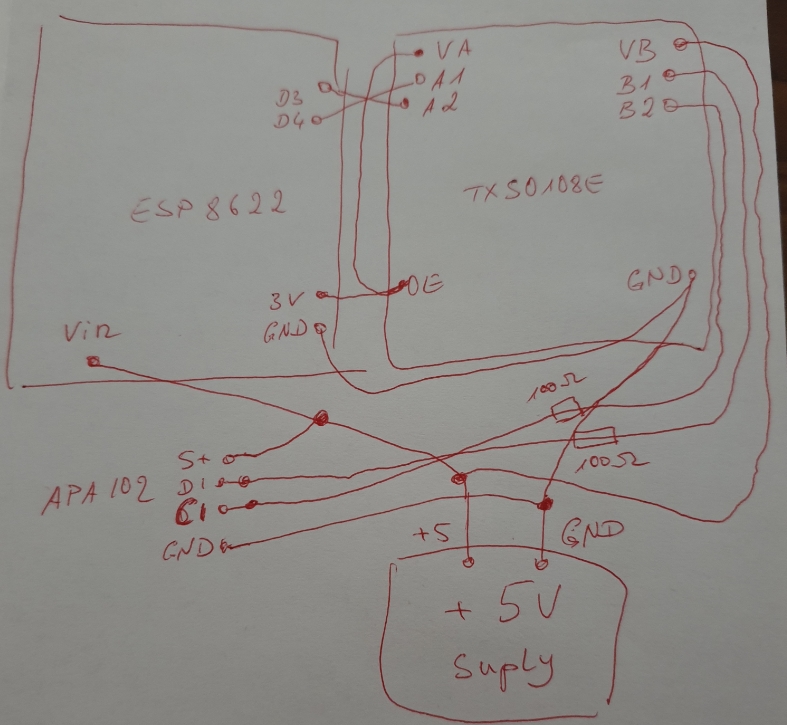
I have it so wired now, but it does not work.
Did I do something wrong?
salopette
on 5 May 2019
Hardware SPI for ESP8266 are on GPIO13(MOSI/DATA) and 14(SCK/CLOCK) pin.
EDIT: looks like software SPI is used here, nevermind my comment.
debsahu
on 5 May 2019
Try swapping clock and data, I got that mixed up, too. You uncommented #define USE_APA102, right?
T-Arens
on 5 May 2019
And what is D3 and D4? You have to use GPIO 0 and 2. Don't know what board you are using.
T-Arens
on 5 May 2019
@salopette hmm, the wiring looks fine. Nothing comes to mind but trying to swap, either.
@T-Arens D3 and D4 are GPIO0 and 2 on Wemos D1 and NodeMCU, so no issue there.
Aircoookie
on 5 May 2019
Hello, when I swap data and clock, nothing happens.
salopette
on 5 May 2019
And what does happen, when you don't swap them? Are they doing anything? Directly after power up of the ESP, they should flicker wildly. If that doesn't happen, something is electrically wrong. Are you sure you connected to the right end of the strip? It happened to me once, I connected to the wrong end, and then, nothing happens. 😉
T-Arens
on 5 May 2019
When I trade, the LEDs only stay light white.
I followed the arrows for direction
salopette
on 5 May 2019
You mentioned LPD6803 LEDs earlier. Are you using them, or APA102s?
T-Arens
on 5 May 2019
@T-Arens
i use apa102.
I did it!
It does not seem to be ok with my ESp8622?
Have now taken a Witty Cloud and it works!
But without level shifter! Do I need that umbedingt?
salopette
on 5 May 2019
If it works, no. ;-) Just if you get into problems (flicker, not working at all...), put it in.
T-Arens
on 5 May 2019
many thanks for the support!
You have been great!
salopette
on 6 May 2019
Related issues
 raymiec
·
52Comments
raymiec
·
52Comments
 tinseltunes
·
54Comments
tinseltunes
·
54Comments
 Stoppersocke00
·
27Comments
Stoppersocke00
·
27Comments
 timothybrown
·
76Comments
timothybrown
·
76Comments
 schroepfer
·
28Comments
schroepfer
·
28Comments