at the moment new effect creation require:
in wled00WS2812FX.cpp
write your new code at the end of the file
in wled00WS2812FX.h :
change number of effect ( #define MODE_COUNT )
define new mode ( #define FX_MODE_METEOR 76)
define new mode function ( _mode[FX_MODE_METEOR] = &WS2812FX::mode_meteor;)
call the function ( mode_meteor(void), )
in wled00htmls00.h
add the option to the list:
add the effect to the list:
unsure: increment line var b=Cf.TX.selectedIndex+a;if(b==-1||b==76) in a javascript
simplifying it would be great :(learned it the hard way :=)) otherwise with is THE project I was waiting, keep on going and thanks for sharing
 viknet365
All 11 comments
Hi, thanks for your pull request! Awesome job on porting the effect! I'm going to merge it with my local changes tomorrow.
I agree that it is not straightforward to add new effects. There is not a lot of optimization potential in the WS2812FX.h itself, 1. declaring a function prototype ( mode_meteor(void), ) , and 2. actually assigning it to the mode array ( _mode[FX_MODE_METEOR] = &WS2812FX::mode_meteor;) are both required. There should be a way to update MODE_COUNT automatically though.
The HTML is the really cumbersome part though, and with 0.8.2 it becomes even worse since the pages get gzip encoded to save size and speed, making direct changes to the htmls00.h file impossible.
Therefore I'm aiming to have a list of effects that is dynamically sent in the next major 0.9.0 version, so modifying the HTMLs is no longer neccessary for adding/removing/renaming effects. This will also allow us to do the same for color palettes and make it easier to define custom ones.
Thank you :)
 Aircoookie
on 21 Nov 2018
Aircoookie
on 21 Nov 2018
In the past I've used E1.31 to drive an LED matrix (a wordclock that I also wanted to use for effects). This is good if there is no pattern to the data and keeps changing (i.e. using a microphone and driving the effects based on the music). On another project I've wired some LED strips around the inside of a frame and cut out a shape at the front, the light comes out of the shape and effects like the rainbow effect work well but most of the other effects are not made for a LED strip to be used this way.
I'd like to create effects like the "fire" one but for my setup (where all the LEDs at the bottom need to be the same colour and the ones on either side have a matching gradient). I was thinking of doing this through E1.31 but seeing this suggestion got me thinking, would it be possible to define effects through "text" files that get uploaded and define each frame? does something like this already exist? Taking it to an extreme one could create a GIF file with as many pixels as the LED strip and define the colours for each frame then play it in a loop - I doubt this is the best way through!
In the past I've used https://processing.org/ to drive the LEDs and effects through E1.31, it'd be great to be able to "record" the frames of the LEDs and store them away in the controller without having to reflash.
I haven't looked at the code for effect creation at all so forgive me if my suggestion is completely missing the mark.
 kendersec
on 25 Nov 2018
kendersec
on 25 Nov 2018
hi, i've installed on my wemos d1 the development version 0.8.2, i find in the ws2812fx.h the meteor effect but i didn't find it on the web page... it's mt fault? thanks :)
 ghianciulu
on 29 Nov 2018
ghianciulu
on 29 Nov 2018
@kendersec Your suggestion of defining frames definitely seems cool and i'll keep it in mind. In 0.9.0, you should be able to achieve your goal using the segement support. This essentially allows you to treat the LEDs as three separate strips, where the strips to the side can be mirrored and the one at the bottom has a solid color depending on the effect
@ghianciulu Oh, I totally forgot adding the effect to the gzipped webpage. Sorry! I'll do it tomorrow. In 0.9.0, I will also change the system so the HTML doesn't need to be updated every time an effect is added.
Aircoookie
on 29 Nov 2018
@Aircoookie no problem... and thanks for your great work... i love it 👍
ghianciulu
on 29 Nov 2018
Hey @Aircoookie, first off: Thanks for this amazing software!
Do you have an estimate when 0.9.0 will be released? I use WLED to control a SK6812 WWA strip and would like to create a sunrise effect, to use it as a wake up light. And if you plan to change the effect handling, I would like to avoid to implement it twice.
 MatFl
on 21 Dec 2018
MatFl
on 21 Dec 2018
You're welcome! It always makes me very happy to hear how much you actually like it!
I estimate that I can't work much on WLED until the end of January. 0.9.0 will have some cool features though. Initially I will add Alexa color support (if possible, I'm not sure yet) and weekday support (you already asked for that one in another issue :) ). These should be available in the start of February. The full release will be late February to early March, I can't promise anything right now, but as you can see, it might take a while.
As for the sunrise effect, try setting the timed light target brightness to 255 in LED settings, the duration to whatever you'd imagine, and set "ND" as the time-activated macro. It might already support what you had in mind :)
The effect handling will not be majorly changed, only the way the effect names are updated and sent to the UIs. It isn't that creating effects themselves will become easier, just that manually adding the new effects to the UIs will no longer be needed. So, code you write now will be compatible with 0.9.0 with minimal changes!
Aircoookie
on 22 Dec 2018
Oh, I didn't think about using the timed light for making the light brighter. Just tested it and it actually works great :)
I created a macro with the start color, brightness and setup for the timed light (CL=hFF0064&A=5&NL=20&NT=255&NF=1) and just like this I am done. Thanks!
MatFl
on 22 Dec 2018
To the earlier comment about using .gif as frames. I did this for a project I was working on and would love to see it end up in WLED.
I would read a .gif or .png from a URL provided in a GET request, and then I'd map the pixel strip to the first row of the image file... and then then next frame was the second row etc.. Allowing me to create interesting animations. Here's one of the image files I used for my project.
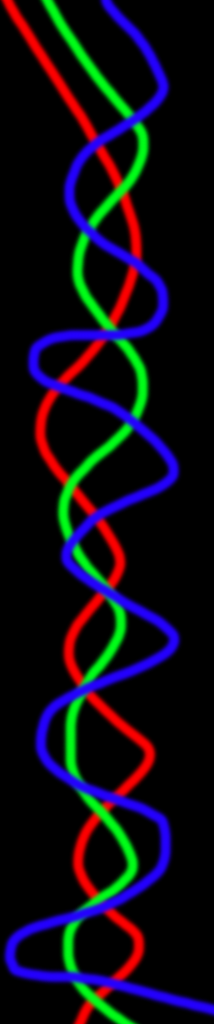
My LED's ran around a whiteboard in a rectangle. This png gave a really nice pattern.
https://youtu.be/LcgQztb-VBA
But my thought process was that it's really easy to create and give it new patterns but just feeding it pixels.
 zimmer62
on 25 Feb 2020
zimmer62
on 25 Feb 2020
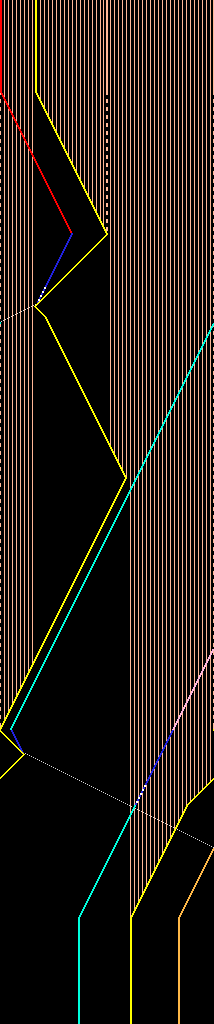
I wanted to leave one more image here... I don't have a video of this, but this .png file made a pacman like chase scene. Thought others might find it interesting. Load the first line and then load the second line etc...
zimmer62
on 25 Feb 2020
@zimmer62 I love this idea! This will be supported for sure once I add the required filesystem and loading infrastructure :)
Aircoookie
on 25 Feb 2020
Related issues
 tinseltunes
·
54Comments
Aircoookie
·
33Comments
tinseltunes
·
54Comments
Aircoookie
·
33Comments
 yetdog
·
30Comments
yetdog
·
30Comments
 coelner
·
67Comments
coelner
·
67Comments
 raymiec
·
52Comments
raymiec
·
52Comments
Most helpful comment
@zimmer62 I love this idea! This will be supported for sure once I add the required filesystem and loading infrastructure :)