Wixsharp: I can't seem to get it working
I downloaded the Wix and have been trying to follow this: https://github.com/oleg-shilo/wixsharp tutorial to start out. But when I run it it doesn't work.
I installed WixSharp, WixSharp.bin, WixSharp.wix.bin, Wix by Rob Mensching and Bob Arnson
I even installed using the command line, and it removes the errors on top of the code (using WixSharp)
and seems to be fine.
But when I try to run it, it doesn't work and makes this error.
\repos\WixSharp Setup1\bin\Debug\WixSharpSetup.exe" "/MSBUILD:WixSharp Setup1" "/WIXBIN:"" exited with code -532462766. WixSharp Setup1
And then after asking to reload the project because it was modified from outside the environment, it makes a folder called 'wix' and a WixSharp Setup1.g.wxs file with a yellow triangle that doesn't exist, so it can't be opened.
Did installing all those Wix packages overlap and make this error? Others don't seem to have trouble running it. Can you help me?
 EBO-Enkhbold
All 27 comments
I've been trying some things and maybe found something that could be useful for you to determine what it is.
After installing the references gets the Bootstrapper, WixSharp, WixSharp.Msi, WixSharpUI, etc. but they can't be viewed and says "Project cannot be viewed in the project browser because it is unavailable or not yet built, Please ensure that the project is available and built" (comes up on both: Wixsharp installed alone and WixSharp with WixSharp.wix.bin together)
EBO-Enkhbold
on 4 Jun 2020
I again made another new project but this time installing WixSharp.wix.bin before WixSharp and got this

the References section seems fine now but after reloading (because its says it has been modified from outside like before) the wix folder gets created and the non-existent .g.wxs file comes up again
Also is the
EBO-Enkhbold
on 4 Jun 2020
The behavior you are observing is a part of WixSharp VS project initialization. I'll explain.
After creating the project form the VS WixSharp project template (this is what I assume you did) you need to download the Wix# packages. It's a trivial "add package" action. Note, you only need to add WixSharp.wix.bin package if you don't have the compatible WiX version present on your system.
At this point WixSharp package importing step will modify your project to include the folder with yet
to be generated *.g.wxs file. This file will be generated when you try to compile your project first time. So the VS warning will go away.
That's it.
If for whatever reason you prefer to avoid using VS project template then you can just use a simple ConsoleApp project with only a single package WixSharp.bin. Read about it here:
https://github.com/oleg-shilo/wixsharp/wiki/VS2013-%E2%80%93-2015-Templates#msi-authoring-steps.
But I think using project templates gives you much more advantages: https://github.com/oleg-shilo/wixsharp/wiki/VS2013-–-2015-Templates
 oleg-shilo
on 4 Jun 2020
oleg-shilo
on 4 Jun 2020
By "add package" u mean the part where I installed WixSharp and WixSharp.wix.bin right?
after that when run the application it says there were build errors
and asks for this

and when I reload, it becomes like the picture in the last comment I made.
Could there be some configuration settings wrong with my Visual Studio or something? I repaired it using Visual Studio Installer this morning.
Also the wix folder with the generated wxs file doesn't exist on my actual repository folder
EBO-Enkhbold
on 4 Jun 2020
By "add package" u mean the part where I installed WixSharp and WixSharp.wix.bin right?
Yes
after that when run the application it says there were build errors
and asks for this
Yes this is how VS reacts on "_importing step will modify your project to include the folder ..._". You just need to reload. Exactly as you did.
and when I reload, it becomes like the picture in the last comment I made.
Yep, and that is a sign that your project now is ready to be built. Trigger "Build" and the warning will go away as the *.g.wxs file will be generated.
Also the wix folder with the generated wxs file doesn't exist on my actual repository folder
Correct. It is an autogenerated file (kind of like obj file in C++) that you do not need to commit in your repo. It is only needed fro troubleshooting.
I repaired it using Visual Studio Installer this morning.
I am not sure I follow this bit.
===========================
I recommend installing Wix# VS project templates extension as it is described here.
The advantage is this approach us that the template comes with the code that you have warranty to be compilable. Create the project, add the package(s), build and you are done.
And after that you can start adding your own business logic.
oleg-shilo
on 4 Jun 2020
I am doing those.
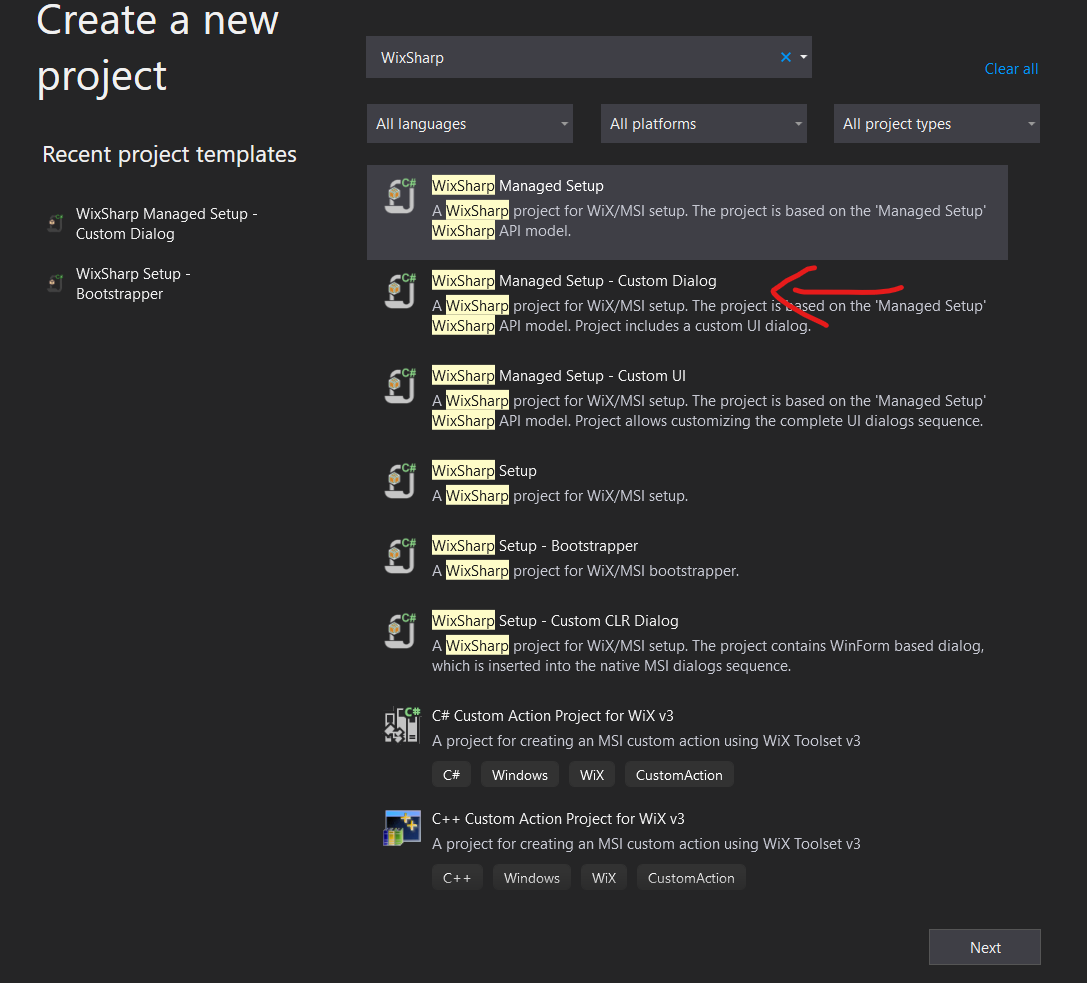
this is the Wix# VS project template I'm using(or trying to use) and when I build it

this error comes up.
and that is why I'm so confused. Even if I'm following the instructions to the T. I can't seem to make it work.
EBO-Enkhbold
on 4 Jun 2020
OK, now we have something! :)
your project structure is OK. Then and the error is triggered by the WixSharp compiler during the msi build. But... for some reason is not reported.
I would expect the project default content to be compilable. Not the case. :(
Just to help me to eliminate the most obvious causes can you please test the attached project.It is a default Wix# template but it is only using WixSharp.bin so no modification of the project structure is done. Build it and (important) execute it.
Let me know the outcome.
oleg-shilo
on 4 Jun 2020
there doesn't seem to be any solution in the zip
EBO-Enkhbold
on 4 Jun 2020
when I run the proram.cs
_Message=WiX binaries cannot be found. Wix# is capable of automatically finding WiX tools only if WiX Toolset installed. In all other cases you need to set the environment variable WIXSHARP_WIXDIR or WixSharp.Compiler.WixLocation to the valid path to the WiX binaries.
WiX binaries can be brought to the build environment by either installing WiX Toolset, downloading Wix# suite or by adding WixSharp.wix.bin NuGet package to your project._
shows up on BuildMsi() tho
EBO-Enkhbold
on 4 Jun 2020
Yep, the attachment contains the project file only.
===================
Great, the error message indicates the you have no WiX installed.
Now you need either to install WiX (v3.11.2) or add WixSharp.wix.bin NuGet package.
Then repeat the run.
oleg-shilo
on 4 Jun 2020
When I try to install it, it says it's already installed.
EBO-Enkhbold
on 4 Jun 2020
Very sorry, it seems like I've been trying to install WixSharp.wix.bin on the project I made and didn't realize.

this happened.
1st red part showed after trying to install
and 2nd red part showed after I saved the Solution in its own folder.
And now when I try to build it, it fails with the following Error:

When I try to restore NuGet packages, it says this on the output:
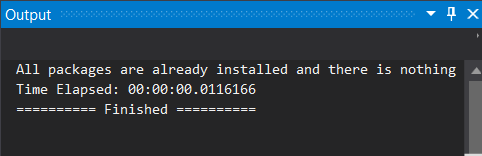
EBO-Enkhbold
on 5 Jun 2020
The error means that VS fails to restore the package. Sometimes this happens.
So I attached the zip with the package restored.
WixSharp Setup4.zip
oleg-shilo
on 5 Jun 2020
BTW, after working on your problem I have finally found the way to address the old usability issue with the need to reload solution on first build.
The latest templates v1.15.0 in conjunctions with WixSharp nuget package v1.14.4.1 works buy building the project just after adding the nuget package without the need to relood the solution.
oleg-shilo
on 5 Jun 2020
when trying to build the solution in that last zip file after installing NuGet v1.14.4.1 it still throws the error: (The command ""C:\Users\fkute\source\reposWixSharp.Setup4 (1)WixSharp Setup4\bin\DebugWixSharp Setup.exe"" exited with code -532462766. WixSharp Setup4)
and with the exception
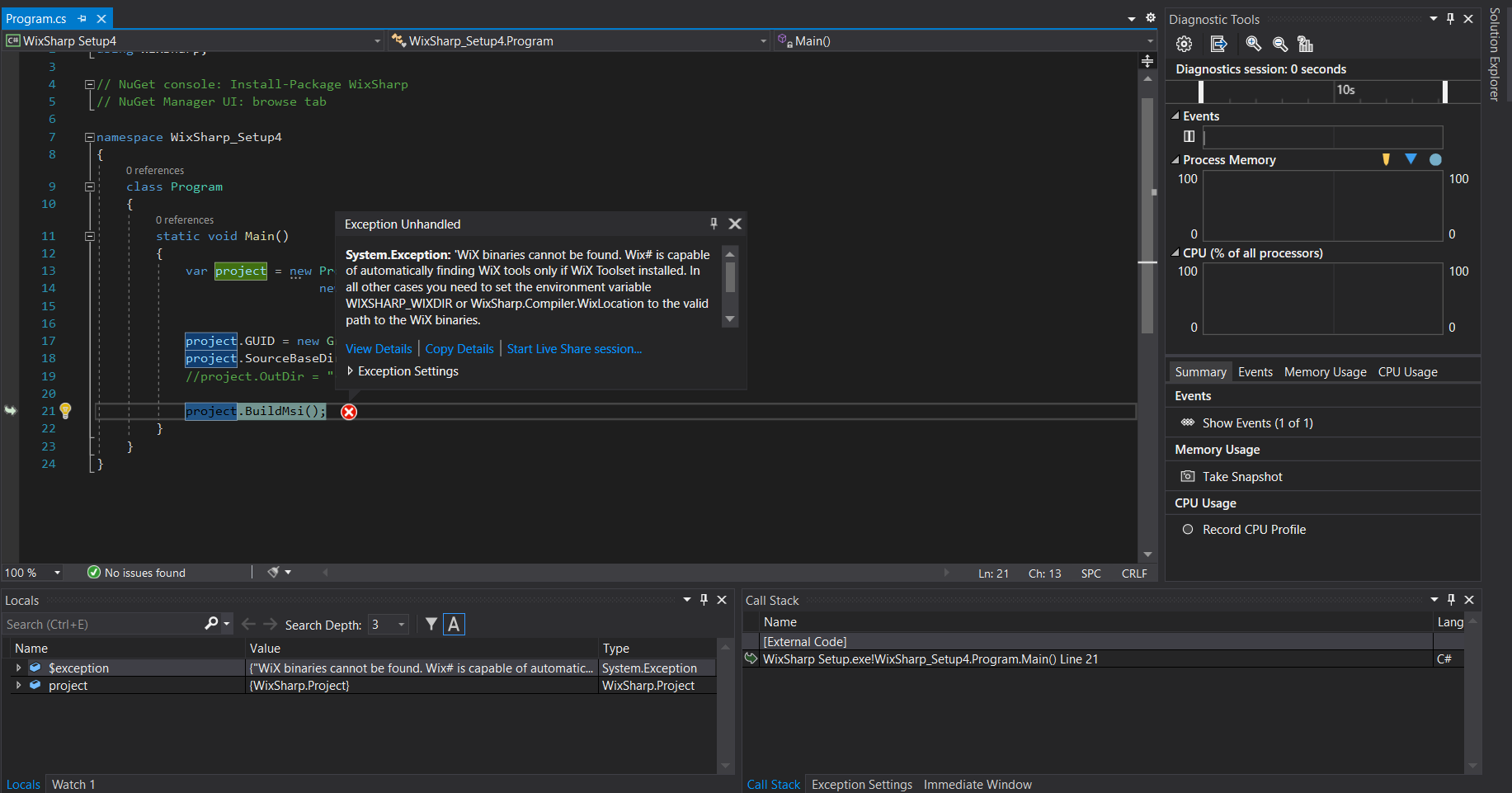
when trying to run.
EBO-Enkhbold
on 6 Jun 2020
Yep, that the one that you saw before. It asks you to install WiX compilers.
In you previous attempt you opted to install them as a NuGet package so you need to repeat this step again. Alternatively you can still install WIX tools on your system globally.
If you want a very quick check you can simply set your compiler location to any pat (e.g. from your previous experiment):
C#
Compiler.WixLocation = @"<solution_dir>\packages\WixSharp.wix.bin.<max_version>\tools\bin";
// or "Program Files\Windows Installer XML v<max_of 3*>\bin"
. . .
projectBuildMsi();
oleg-shilo
on 6 Jun 2020
Thank you very much!
It seems to be working now. It generates the empty .wxs every time now.
But can you tell me in more detail why it happened in the 1st place? And what exactly fixed it?
I'm curious and I might need to know later if my co-workers get the same problem.
And again thank you.
EBO-Enkhbold
on 7 Jun 2020
Basically we had three problems:
- You were not clear how to interpret VS request to reload project if the it was modified as the result of the first build.
This is no longer the case as I found the way to change project templates to avoid the reloading. The update has been publicly released.
You did not have WiX compiler present on your PC.
WiX is a precondition, as it is stated on the project Web site 😄, for compiling msi with WixSharp. Just in case if you do not have the latest sable WiX installed you can use WixSharp.wix.bin package instead.
WixSharp compiler is capable of analyzing runtime environment and finding the required WiX installation. Both from the NuGet package and form the system wide installation. But just in case if WiX is in a non-standard location then you can info WixShar about this withCompiler.WixLocation. Though in your case we did it simply because I decided to skip one step of troubleshooting and take the package location from your prev experiment.You could not restore package(s)
This is a known but not very frequent problem with VS, even though in majority of cases it caused by the user. But the easiest way to avoid it is is not to restore but to install packages. Exactly how WixSharp VS templates force you to do.
==========
As a general advice, just ensure you have installed WiX 3.* in the default location and use WixSharp VS project templates. That's it. If you do that you will not need any trouble shooting.
At least I do not expect that :o)
oleg-shilo
on 8 Jun 2020
The default location of WiX should be "C:\Users\
and from that point on as I'm understanding all WixSharp projects made with VS should have the Wix package in it.
And only need to add it with NuGet or "Install-Package" in the package manager command-line.
EBO-Enkhbold
on 8 Jun 2020
The default location of WiX should be "C:\Users
.nugetpackages" right?
Not exactly. Depending on the VS setting sNuGet packages can also be placed
- In a single system wide location where all projects can share the package binaries from
- In a solution/project specific location. Thus the projects do not share package binaries but use their own copies.
oleg-shilo
on 8 Jun 2020
After turning my computer off and on (the next day)
it started making the same
error: (The command ""C:\Users\fkute\source\reposWixSharp.Setup4 (1)WixSharp Setup4\bin\DebugWixSharp Setup.exe"" exited with code -532462766. WixSharp Setup4)
error again. Could it be caused by something in my registry or something? I have continued to do my work without any tools for the time being so I think you can close this issue if you want.
A similar problem arose when I was 1st installing my Visual Studio 2019 and adding DevExpress on it, they wouldn't register in my reference section at all.
EBO-Enkhbold
on 10 Jun 2020
Nuget reference:
https://docs.microsoft.com/en-us/nuget/consume-packages/managing-the-global-packages-and-cache-folders
I'm running into a similar situation here. Started with one of the wix# templates with VS setup to use the PackageReference format for nuget. This means that packages will by default be stored at %userprofile%\.nuget\packages and this is not one of the locations automatically look at in WixBinLocator.FindWixBinLocation().
So I switched VS to use the older packages.config format for nuget so that the packages folder would be created local to the solution. This is one of the locations automatically looked at according to the comment for Compiler.WixLocation:
If user does not set this property explicitly and WIXSHARP_WIXDIR is not defined
WixSharp.Compiler will try to locate WiX binaries in well known locations in this order:
packagesWixSharp.wix.bin. \tools\bin
Compiler.WixLocation calls WixBinLocator.FindWixBinLocation() internally and I do not see anywhere where the solution directory is being searched in FindWixBinLocation(). To me this seems to be the core issue and possibly the lack of automatic discovery for the location used by nuget when using the PackageReference format.
I realize that I can just set the environment variable WIXSHARP_WIXDIR, but I would rather not have to given the automatic discovery functionality already built into wix#. This would be one less item to have to configure for multiple devs and a build server.
Perhaps something like this built into FindWixBinLocation(). The following worked without setting any environment variables and still being able to use the newer PackageReference format for nuget:
```c#
string wixBinPackageDir = Environment.ExpandEnvironmentVariables(@"%userprofile%.nugetpackages\wixsharp.wix.bin");
string wixBinPath = string.Empty;
if (Directory.Exists(wixBinPackageDir))
{
Version greatestWixBinVersion = Directory.GetDirectories(wixBinPackageDir)
.Select(dirPath => Version.Parse(new DirectoryInfo(dirPath).Name))
.OrderDescending()
.FirstOrDefault();
if (greatestWixBinVersion != null)
{
    wixBinPath = Path.Combine(wixBinPackageDir, greatestWixBinVersion.ToString(), @"tools\bin");
}
}
Compiler.WixLocation = wixBinPath;
```
 tblong
on 9 Aug 2020
tblong
on 9 Aug 2020
Txs.
Agree.
Marking is as _Enhancement_
oleg-shilo
on 10 Aug 2020
@oleg-shilo , shouldn't there be a return statement here for the full path to wix bin directory?
tblong
on 26 Aug 2020
You are right, it is a mistake.
Will fix on weekend.
oleg-shilo
on 26 Aug 2020
Done
oleg-shilo
on 30 Aug 2020
Thanks @oleg-shilo, works great. Just tested this morning.
tblong
on 31 Aug 2020
Related issues
 Eagle3386
·
4Comments
Eagle3386
·
4Comments
 meytes
·
5Comments
meytes
·
5Comments
 ayman-eltemsahi
·
4Comments
ayman-eltemsahi
·
4Comments
 UweKeim
·
5Comments
UweKeim
·
5Comments
 JamesWHurst
·
5Comments
JamesWHurst
·
5Comments