Wixsharp: External UI Setting INSTALLDIR Error
I use External UI with WPF, and I want to change INSTALLDIR by code
public void StartInstall()
{
  base.StartInstall(@"INSTALLDIR=C:\");
}
but this dosen't work ... How can i change installdir?
question
 JasShao
All 2 comments
Cannot really comment about your code but passing the path in the slightly modified WinFormSetup sample works just fine. Try to follow it when implementing your setup:
```C#
void installBtn_Click(object sender, EventArgs e)
{
DisableButtons();
session.StartInstall("CUSTOM_UI=\"true\" INSTALLDIR=C:\MyProduct");
}
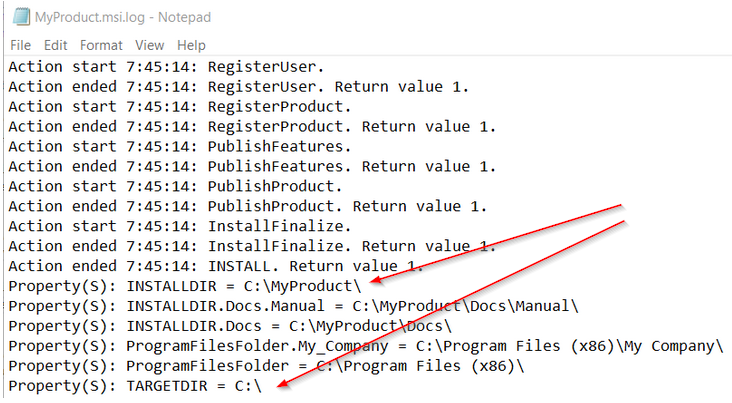
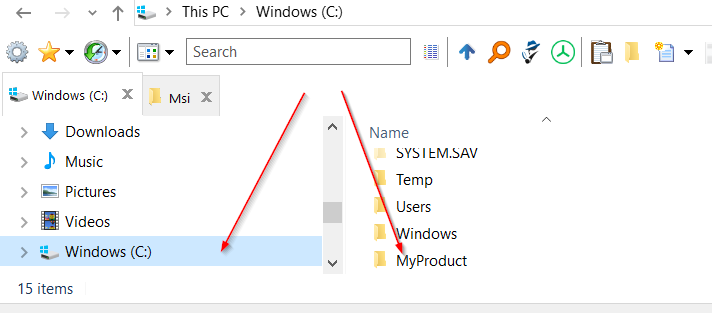
And of course it all will depend on your MSI definition, which is in that sample:
```c#
var docs = new Feature("Documentation");
var binaries = new Feature("Binaries");
var project =
new Project("MyProduct",
new LaunchCondition("CUSTOM_UI=\"true\" OR REMOVE=\"ALL\"", "Please run setup.exe instead."),
new Dir(@"%ProgramFiles%\My Company\My Product",
new File(binaries, @"Files\Bin\MyApp.exe"),
new Dir(@"Docs\Manual",
new File(docs, @"Files\Docs\Manual.txt"))));
project.UI = WUI.WixUI_Common;
project.GUID = new Guid("6f330b47-2577-43ad-9095-1861ba25889b");
Compiler.BuildMsi(project);
 oleg-shilo
on 28 May 2020
oleg-shilo
on 28 May 2020
👍1
It works well. This really help me. Thank you! :)
JasShao
on 29 May 2020
👍1
Was this page helpful?
0 / 5 - 0 ratings
Related issues
 UweKeim
·
5Comments
JasShao
·
4Comments
UweKeim
·
5Comments
JasShao
·
4Comments
 milhousemanastorm
·
4Comments
milhousemanastorm
·
4Comments
 mattias-symphony
·
3Comments
mattias-symphony
·
3Comments
 empz
·
3Comments
empz
·
3Comments